Mapbox
An MCP server for interacting with the Mapbox API, providing access to maps, navigation, and other location-based services.
Documentation
Mapbox MCP Server
MCP Server for the Mapbox API.
Features
Navigation Tools
-
mapbox_directions- Get directions between coordinates
- Inputs:
coordinates({latitude: number, longitude: number}[])profile(optional): "driving-traffic", "driving", "walking", "cycling"
- Returns: route details with steps, distance, duration
-
mapbox_directions_by_places- Get directions between places using their names
- Inputs:
places(string[]): Array of place namesprofile(optional): "driving-traffic", "driving", "walking", "cycling"language(optional): Two-letter language code (e.g., "zh", "en")
- Returns:
- Geocoding results for each place
- Route details with steps, distance, duration
- Any errors that occurred during processing
-
mapbox_matrix- Calculate travel time and distance matrices between coordinates
- Inputs:
coordinates({latitude: number, longitude: number}[])profile(optional): "driving", "walking", "cycling"annotations(optional): "duration", "distance", "duration,distance"sources(optional): Indices of source coordinatesdestinations(optional): Indices of destination coordinates
- Returns: Matrix of durations and/or distances between points
-
mapbox_matrix_by_places- Calculate travel time and distance matrices between places using their names
- Inputs:
places(string[]): Array of place names (2-25 places)profile(optional): "driving", "walking", "cycling"annotations(optional): "duration", "distance", "duration,distance"language(optional): Two-letter language codesources(optional): Indices of source placesdestinations(optional): Indices of destination places
- Returns:
- Geocoding results for each place
- Matrix of durations and/or distances
- Any errors that occurred during processing
Search Tools
mapbox_geocoding- Search for places and convert addresses into coordinates
- Inputs:
searchText(string): The place or address to search forlimit(optional): Maximum number of results (1-10)types(optional): Filter by place types (country, region, place, etc.)language(optional): Two-letter language codefuzzyMatch(optional): Enable/disable fuzzy matching
- Returns: Detailed location information including coordinates and properties
Claude Desktop Integration
Add this configuration to your Claude Desktop config file (typically located at ~/Library/Application Support/Claude/claude_desktop_config.json):
{
  "mcpServers": {
    "mapbox-mcp-server": {
      "command": "node",
      "args": ["/absolute/path/to/mapbox-mcp-server/build/index.js"],
      "env": {
        "MAPBOX_ACCESS_TOKEN": "your-api-key"
      }
    }
  }
}
Setup
Prerequisites
- Node.js 16 or higher
- TypeScript 4.5 or higher
- A valid Mapbox API key
API Key
Get a Mapbox API key by following the instructions here.
Set your API key as an environment variable:
export MAPBOX_ACCESS_TOKEN=your_api_key_here
Rate Limits
- Directions API: 300 requests per minute
- Matrix API:
- 60 requests per minute for driving/walking/cycling
- 30 requests per minute for driving-traffic
- Geocoding API: 600 requests per minute
Deployment
Structure
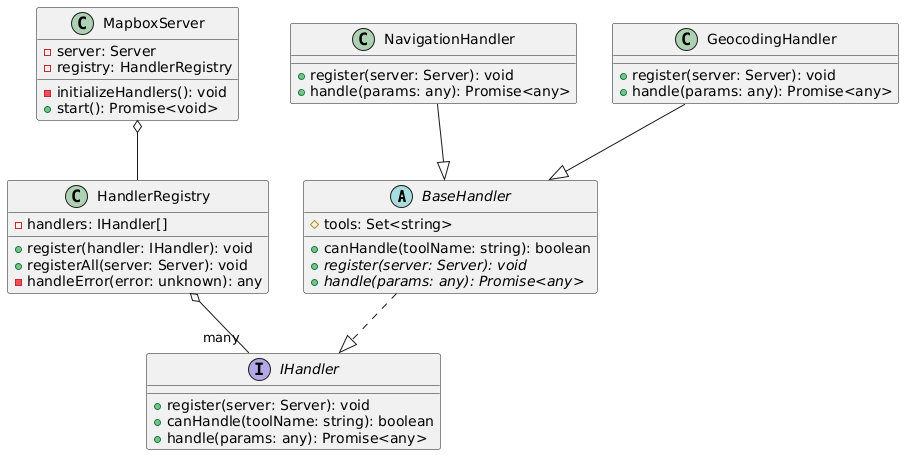
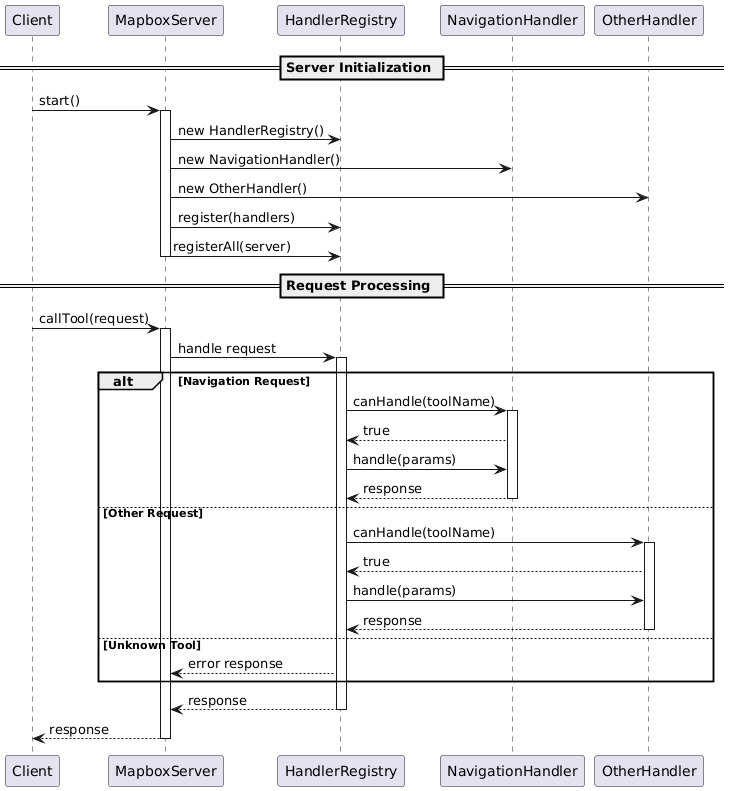
In mapbox-mcp-server, we use the following structure to manage the server's handlers:
src/server/handlers/base.ts: Base class for all handlerssrc/server/registry.ts: Registry for all handlerssrc/server/main.ts: Main entry point for the server
Each feature module follows this structure:
src/
├── types/          # Type definitions
├── schemas/        # Zod schemas for validation
├── tools/
│   ├── definitions/  # Tool definitions
│   └── handlers/     # Tool implementations
└── server/
    └── handlers/     # Handler classes
Class Diagram:
Process Diagram:
Error Handling
All tools implement comprehensive error handling:
- Input validation errors
- API request failures
- Rate limit errors
- Service-specific errors (e.g., no routes found, invalid coordinates)
License
This MCP server is licensed under the MIT License. This means you are free to use, modify, and distribute the software, subject to the terms and conditions of the MIT License. For more details, please see the LICENSE file in the project repository.