AssetDiet MCP
Asset intelligence for AI coding agents — audit, optimize, and roll back media safely.
Documentation

AssetDiet
Asset intelligence for AI coding agents — audit, optimize, and roll back media safely.





One-Command Setup · Try With Your Agent · Code Migration · Supported Formats · Safety & Rollback · Docs
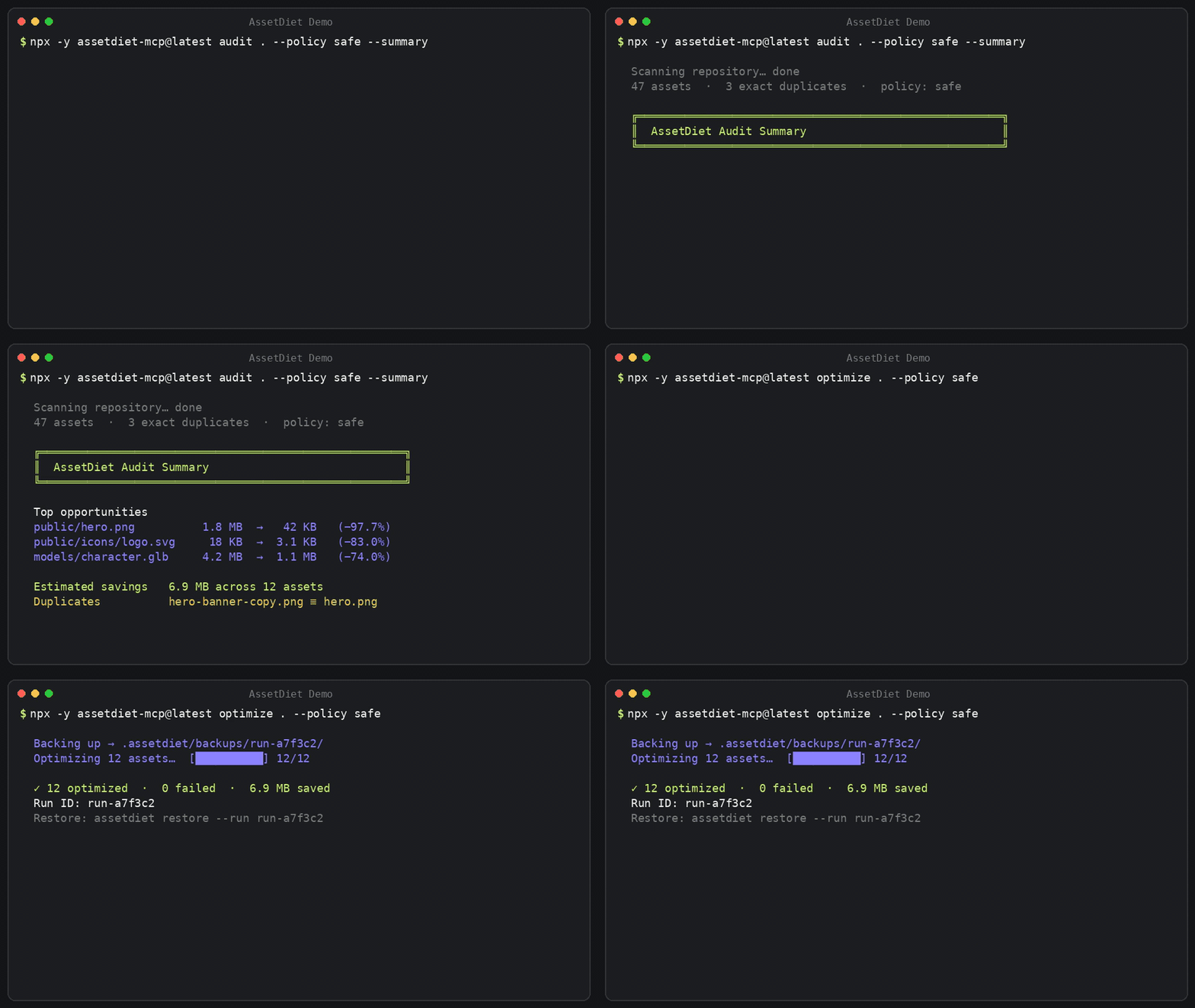
AI coding agents build frontend UIs in seconds, but treat media as opaque blobs — committing 4 MB raw camera photos, uncompressed SVGs, and duplicate icons straight into git. AssetDiet gives your agent eyes on media: auditing repos in milliseconds, executing lossless native optimizations, updating source code references, and keeping every byte reversible.
⚡ One-Command Setup
Connect AssetDiet to your AI coding assistant with zero manual configuration:
npx -y assetdiet-mcp@latest setup --yes
Automatically detects and registers AssetDiet with Cursor, Claude Desktop, Claude Code, Windsurf, and Codex with timestamped
.bakconfiguration backups.
Real-World Results
public/hero.png          4.8 MB  →  642 KB   (−86.6%)   balanced
public/icons/logo.svg    184 KB  →   42 KB   (−77.2%)   safe
models/character.glb     8.6 MB  →  3.2 MB   (−62.8%)   balanced
🤖 Try This With Your Agent
Once configured, copy and paste this prompt into your AI coding assistant (Cursor Composer, Claude Code, Windsurf, or Claude Desktop):
Run an AssetDiet audit on this repo under the safe policy. Show me the top assets by potential savings, any exact duplicates, and a short optimization plan. Don't change any files yet.
Your agent will call assetdiet_audit, index SHA-256 hashes, surface duplicate groups, and outline a risk-free proposal before asking for your go-ahead.
💻 Or Run from Your Terminal
# 1. Read-only audit with instant savings & duplicate discovery
npx -y assetdiet-mcp@latest audit . --policy safe

# 2. Or get a concise 3-line scorecard summary
npx -y assetdiet-mcp@latest audit . --policy safe --summary

# 3. Apply lossless optimizations with atomic journal safety
npx -y assetdiet-mcp@latest optimize . --policy safe
🛠️ Contributing / Building from Source
git clone https://github.com/092Abdullah/AssetDiet.git
cd AssetDiet
pnpm install
pnpm build
pnpm test
🔗 Beyond Files: Codebase Reference Migration
Most optimizers only touch files on disk. AssetDiet can also update your code when formats change.
When converting heavy legacy formats (like .png to modern .webp or .avif), your agent uses AssetDiet's AST and regex reference engine:
assetdiet_find_references: Traces every code, JSX, TS, CSS, and HTML reference to an asset across the repository.assetdiet_migrate_references: Atomically updates import statements and asset paths in your source files to match the new optimized filenames.
// Before
import hero from "./hero.png";
<img src="/assets/hero.png" />;

// After assetdiet_migrate_references
import hero from "./hero.webp";
<img src="/assets/hero.webp" />;
📦 Supported Asset Formats
AssetDiet uses battle-tested native engines and WebAssembly parsers. Zero cloud roundtrips.
| Format | Category | Engine | Capabilities |
|---|---|---|---|
.png, .jpg, .jpeg, .webp, .avif, .gif | Raster | Sharp (libvips) | Lossless compression, metadata stripping, palette quantization, alpha preservation |
.svg | Vector | SVGO | XML comment stripping, unused group cleanup, path precision rounding, viewBox preservation |
.glb, .gltf | 3D Models | glTF-Transform | Coincident vertex welding, mesh deduplication, unused material/sampler pruning |
.mp4, .webm | Video | FFmpeg / FFprobe | H.264/VP9 transcoding, atomic temporary swaps (auto-detected on host system) |
.woff2, .woff, .ttf, .otf | Fonts | Font Engine | Metadata extraction, glyph table analysis, family duplicate detection |
🔄 How AssetDiet Works
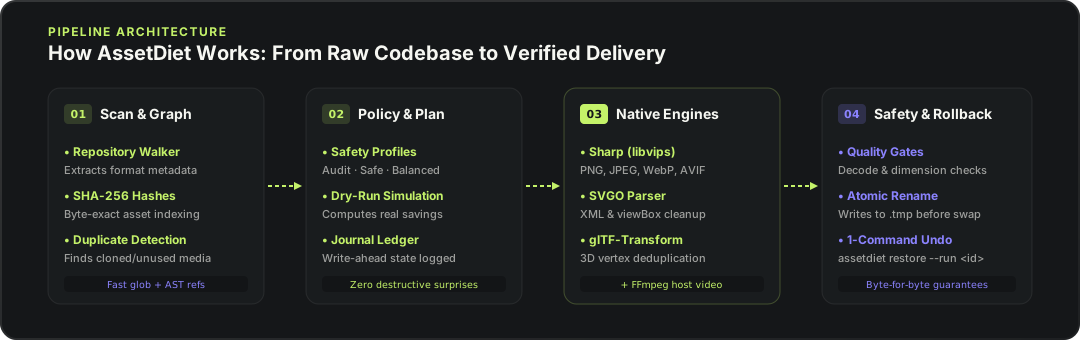
- Scan & Graph: Traverses repository files (respecting
.gitignore,.assetdietignore, and standard build excludes), hashes content with SHA-256, and links code references. - Policy & Plan: Evaluates opportunities against your chosen policy (
safe,balanced, oraggressive) and creates an in-memory execution plan. - Engine Optimization: Dispatches each asset to its native engine, writing to isolated temporary swap files (
.tmp.<random>). - Verification & Commit: Deep-validates decodability and dimensions. On success, atomically swaps the file. On failure, discards the temporary file leaving your original intact.
🛡️ Safety & Atomic Rollback
Every file operation is 100% reversible:
- Pre-Optimization Backups: Exact byte-for-byte originals are saved to
.assetdiet/backups/<runId>/before modification. - Write-Ahead Journal: State transitions are logged in
.assetdiet/runs/<runId>.json. - Atomic Replacements: Uses OS-level atomic renames (
fs.rename). Files are never partially overwritten. - Instant Restore:
npx -y assetdiet-mcp@latest restore --run <runId>
🎯 Optimization Policy Matrix
| Policy | Format Conversion | Quality Target | Max Dimensions | Code Ref Migration | Visual Fidelity (SSIM) | Typical Savings |
|---|---|---|---|---|---|---|
safe (default) | ❌ Same extension only | Lossless / 85 | Original (no resize) | ❌ Untouched | 100% Identical (SSIM ≥ 0.98) | 15–35% |
balanced | ✅ PNG/JPEG → WebP | High Quality (~85) | Original (no resize) | ✅ Atomic code updates | Near-imperceptible (SSIM ≥ 0.95) | 40–70% |
aggressive | ✅ WebP/AVIF + Quantize | Compact (~75) | Capped at 2560px | ✅ Atomic code updates | Perceptual (SSIM ≥ 0.88) | 60–85% |
audit | ❌ None (read-only) | N/A | Original | ❌ None | 100% Unchanged | Simulation only |
📊 Real-World Results
AssetDiet benchmarked on typical web and game repository assets:
| Asset Type | Original File | Policy | Optimized Result | Savings | SSIM Score | Code References Migrated |
|---|---|---|---|---|---|---|
| Landing Hero | hero.png (4.8 MB) | balanced | hero.webp (642 KB) | -86.6% | 0.987 | 3 files (index.tsx, Hero.jsx) |
| Product Photo | product.jpg (2.1 MB) | balanced | product.webp (310 KB) | -85.2% | 0.979 | 2 files (store.ts, Card.tsx) |
| App Icon | icon.png (320 KB) | safe | icon.png (214 KB) | -33.1% | 1.000 | In-place (same extension) |
| UI Vector | illustrations.svg (184 KB) | safe | illustrations.svg (42 KB) | -77.2% | Vector Clean | In-place (viewBox preserved) |
| Demo Clip | demo.mp4 (14.2 MB) | balanced | demo.mp4 (4.1 MB) | -71.1% | Stream Parity | In-place (H.264 CRF 23) |
| 3D Asset | character.glb (8.6 MB) | balanced | character.glb (3.2 MB) | -62.8% | Mesh Welded | In-place (glTF-Transform) |
🔒 100% Local & Private
- Zero Telemetry: No analytics, tracking beacons, or phone-home pings.
- 100% Local Execution: All processing happens on your CPU using embedded native engines. Media never leaves your machine.
- Safe Agent Integration: Only concise text metadata is passed over local stdio to your assistant.
📚 Documentation
- CLI Reference — Commands for
setup,doctor,audit,optimize,restore, andmcp. - MCP Tools Reference — Complete specifications for all 16 Model Context Protocol tools.
- Configuration & Ignore Rules — Customizing
.assetdietignore, policies, andassetdiet.config.json. - Installation Guide — Global installation, manual configuration, and platform guides.
- Architecture — Monorepo design, self-contained distribution, and stdio isolation.
- Security Policy — Security practices and reporting.
- Changelog — Release history.
📄 License
MIT © 2026 AssetDiet Contributors