amem
Локальная память агента без Docker: amem + MCP (факты хранятся в ~/.amem)
Документация
amem





Personal agent memory that stays on your machine. Works with Claude Code, Cursor, Claude Desktop, Copilot, Codex, Gemini CLI, Windsurf, Continue, Aider and Zed.
npx @iamem/amem setup
Website · Features · Why amem · How it works
Coding agents forget between sessions. They re-grep the same tree, re-learn the same constraints, and burn tokens rediscovering decisions you already paid for once.
amem gives Cursor, Claude Code, and other local hosts a private, searchable memory of durable facts about your repos — what owns what, which files matter, what broke last time — so the next session starts oriented instead of cold.
amem context "sync auth startup"
# Agent Memory Context

## Best Claims
### claim.sync_auth_mode_startup
Kind: `constraint`
Why: `keyword+8`, `fts+18.0`, `embed+6.3`, `kind:constraint`, `fresh`

The sync service checks auth mode during startup before enabling Drive sync.
Anchors: `src/background/sync-service.ts`
Nothing is uploaded. Nothing is written into your product git history. Memory lives under ~/.amem/ on your laptop only.
Why amem exists
| Without amem | With amem |
|---|---|
| Agent explores broadly every session | Agent queries memory first, then verifies the right files |
| Decisions live in chat scrollback | Decisions become structured claims with file anchors |
| Team sharing pressure on “AI context” docs | Explicitly personal — your prompts and learnings stay local |
Flat AGENTS.md that goes stale | Small graph: components → flows → claims, updated via proposals |
amem is not shared company wikiware and not a cloud RAG product. It is a local tool for individual developers who want agents that remember their work.
Privacy (non-negotiable)
| Piece | Location | Shared? |
|---|---|---|
| The amem tool (this repo) | GitHub / npm | Yes — installable |
| Your memory database | ~/.amem/graph.db (or .enc when locked) | No |
| Cursor project rule | .cursor/rules/amem.mdc in the product repo | Safe to commit — guidance only, no memory contents |
| Exports / backups you create | Wherever you write them | Keep private — do not commit |
Guarantees:
~/.amemis created with mode0700- Local UI binds to
127.0.0.1only - Memory never leaves the machine — no managed sync, no “share with org” mode
- Optional anonymous install ping only (see Telemetry); opt out anytime
- Agents are instructed to store repo facts, not proprietary prompting strategy
- Optional AES-256-GCM lock and encrypted local backups — still no cloud
Requirements
- Node.js 20+ (native
better-sqlite3) - git (repo identity uses remote URL / root path)
Install the tool
npx @iamem/amem setup   # Node 20+ — installs the `amem` CLI
# or
npm i -g @iamem/amem && amem setup
From a clone while developing:
git clone https://github.com/sslugic/amem.git
cd amem
npm install
npm link
amem setup
See docs/npm-release.md. CI runs npm test and npm run pack:check. better-sqlite3 uses its own prebuilds — no extra native step on common macOS/Linux + Node 20/22.
If npm install fails compiling native code, install Xcode CLT (macOS) or build-essential (Linux) and retry, or use a Node 20/22 official binary that matches the prebuild matrix.
Telemetry
On npm install / npx (outside CI and tests), amem may send a single anonymous POST to https://getamem.com/api/beacon/npm-install with:
- package name and version
- Node.js version
- OS platform and CPU architecture
No code, paths, usernames, emails, IPs, or memory contents are included. Opt out:
AMEM_TELEMETRY_DISABLED=1 npm i -g @iamem/amem
Memory under ~/.amem still never leaves your machine.
Quick paths
# Cursor or Claude Code in a git repo
amem init --platform cursor    # or: claude

# Other hosts (thin installers, same local DB)
amem init --platform windsurf|continue|aider|zed|claude-desktop

# Any other MCP client — binds the repo and prints the endpoint to paste
amem init --platform codex|copilot|gemini|cline|roo|jetbrains|opencode|goose|…
amem platforms                  # every id amem accepts (aliases included)

# Cross-repo “how I work” prefs (blended into project context)
amem init --personal
# or: amem setup --personal
Encrypt-at-rest + local backups
amem lock --passphrase '…'       # or AMEM_PASSPHRASE
amem unlock --passphrase '…'
amem backup --passphrase '…'     # ~/.amem/backups by default
amem backup schedule             # daily local timer (no cloud)
amem backup unschedule
While locked, set AMEM_PASSPHRASE (or unlock) before any command that opens the DB.
Embeddings and the rest of the toolkit
Everything is free. There are no tiers and nothing is held back — local embeddings, memory hygiene and its schedule, rules sync and the attestation packet are all included.
amem embed use ngram                     # local n-gram model, or `external` for your own command
amem embed reindex
amem restore --file ~/.amem/backups/amem-….db.enc
amem hygiene
amem rules sync
amem it-pack --out ~/.amem/it-pack
amem doctor --attest
The embedder ships as a hashing model by default (no download); ngram and external (stdin text → JSON vector) are local too. Still no cloud embed API, and nothing is uploaded.
Checkout + email delivery is a separate seller process (npm run shop) that is not published with the CLI. It can whitelist Mailtrap and Stripe names from another project’s .env — see shop/README.md.
Teaching every client how to use amem
Wiring a host to the MCP endpoint tells it amem exists; it does not tell it to
check the task board or query memory before exploring. amem init and
amem setup now write instructions into whatever file the host actually reads,
and one command covers everything else:
amem instructions                 # the client(s) bound to this repo
amem instructions --all           # every supported client
amem instructions --check         # CI-friendly: exits 1 if missing or stale
amem instructions --platform roo  # just one
One canonical text (src/instructions.ts) renders per host, so guidance cannot drift between clients:
| File | Clients |
|---|---|
.cursor/rules/amem.mdc | Cursor |
CLAUDE.md | Claude Code |
AGENTS.md | Codex, Grok, OpenCode, Crush, Amp, Qwen, Droid, OpenHands, Warp, Zed, Cody, Antigravity, Neovim, Claude Desktop, Devin, Jules |
GEMINI.md | Gemini CLI |
.github/copilot-instructions.md | GitHub Copilot |
.windsurf/rules/amem.md · .continue/rules/amem.md · .clinerules/amem.md · .roo/rules/amem.md · .kilocode/rules/amem.md · .augment/rules/amem.md · .kiro/steering/amem.md · .trae/rules/amem.md · .amazonq/rules/amem.md | Windsurf, Continue, Cline, Roo, Kilo, Augment, Kiro, Trae, Amazon Q |
.junie/guidelines.md · .goosehints · .aider.amem.md | Junie, Goose, Aider |
Hosts sharing a file are written once, so --all produces 17 files, not 30.
Shared files (CLAUDE.md, AGENTS.md, .github/copilot-instructions.md) get a
marked block that is replaced in place — anything you wrote around it survives:
# My Project
Use pnpm, not npm.

<!-- BEGIN amem (generated) -->
…
<!-- END amem -->
Aider has no MCP, so it receives CLI commands instead of tool names. Every file
is guidance only — no memory contents — and safe to commit. amem doctor says
so when a bound client's instructions are missing or out of date.
Memory that curates itself
Memory rots if nothing retires it. amem cleans up on a schedule rather than waiting to be asked:
amem hygiene schedule # daily; amem doctor warns when it is not installed
Each run takes a safety backup, then, per repo:
| Signal | What it means | Action |
|---|---|---|
| Non-fact | Chat filler stored as a claim | Deleted (held back if it exceeds 25% of the repo — a heuristic matching most of a corpus is a broken heuristic) |
| Anchor rot | Every file the claim points at is gone | Decayed. Tag-style anchors and source-less workspaces are exempt |
| Unhelpful | Attested 3+ times and never once answered the question | Decayed |
| Unused | Not returned and not touched inside the window | Decayed |
| Near-duplicate | Same content, overlapping anchors | Merged |
A claim is only ever retired on positive evidence. Missing attestation never counts against it — otherwise shipping this would decay everything at once. Pinned claims never decay.
Savings you can check
amem context records what it handed over; the agent (or the stop hook, from the host transcript) records what it still had to open. The saving is then computed from the real size of the files that were avoided:
saved = Σ(measured tokens of anchors returned but not opened) − packet_tokens
Nothing asks a model to estimate its own value, and a packet that avoided nothing reports a loss. The dashboard says modelled until 30 events have been attested, then switches to measured and corrects the total by the observed ratio.
amem usage attest --opened "src/db.ts"   # or let the stop hook do it
amem usage recompute --scope all --apply # re-measure historical events
First-time setup (recommended)
amem ui
That opens http://127.0.0.1:7843 on the Setup tab. It scans your home folder for git repos (skips Library, node_modules, Downloads, and similar noise). Check the ones you want, pick clients (Cursor, Claude Code, Windsurf, Continue, Aider, Zed, …), then Start tracking selected. Each pick is bound in ~/.amem and gets the matching installer when available.
Prefer a desktop window instead of a browser tab (same localhost server, same privacy):
# once per machine/checkout (downloads Electron — not included in npm i -g)
npm run app:setup

amem app
amem ui keeps opening the browser; amem app opens Electron. Both talk to 127.0.0.1 only. If the UI server is already running, amem app attaches to it. Global installs: run npm run app:setup from the package directory (or clone), then amem app.
The header has a Personal switcher (cross-repo prefs) and Lock / backup chrome — lock status, last backup, and a daily local schedule. Memory shows the same lock/backup chips. The Setup tab includes a copyable remember contract for any MCP host (amem recipe).
Optional: check Start amem ui when this computer logs in so the localhost server comes back after a reboot:
amem service install    # macOS LaunchAgent, Linux systemd --user, or Windows Startup
amem service status
amem service uninstall
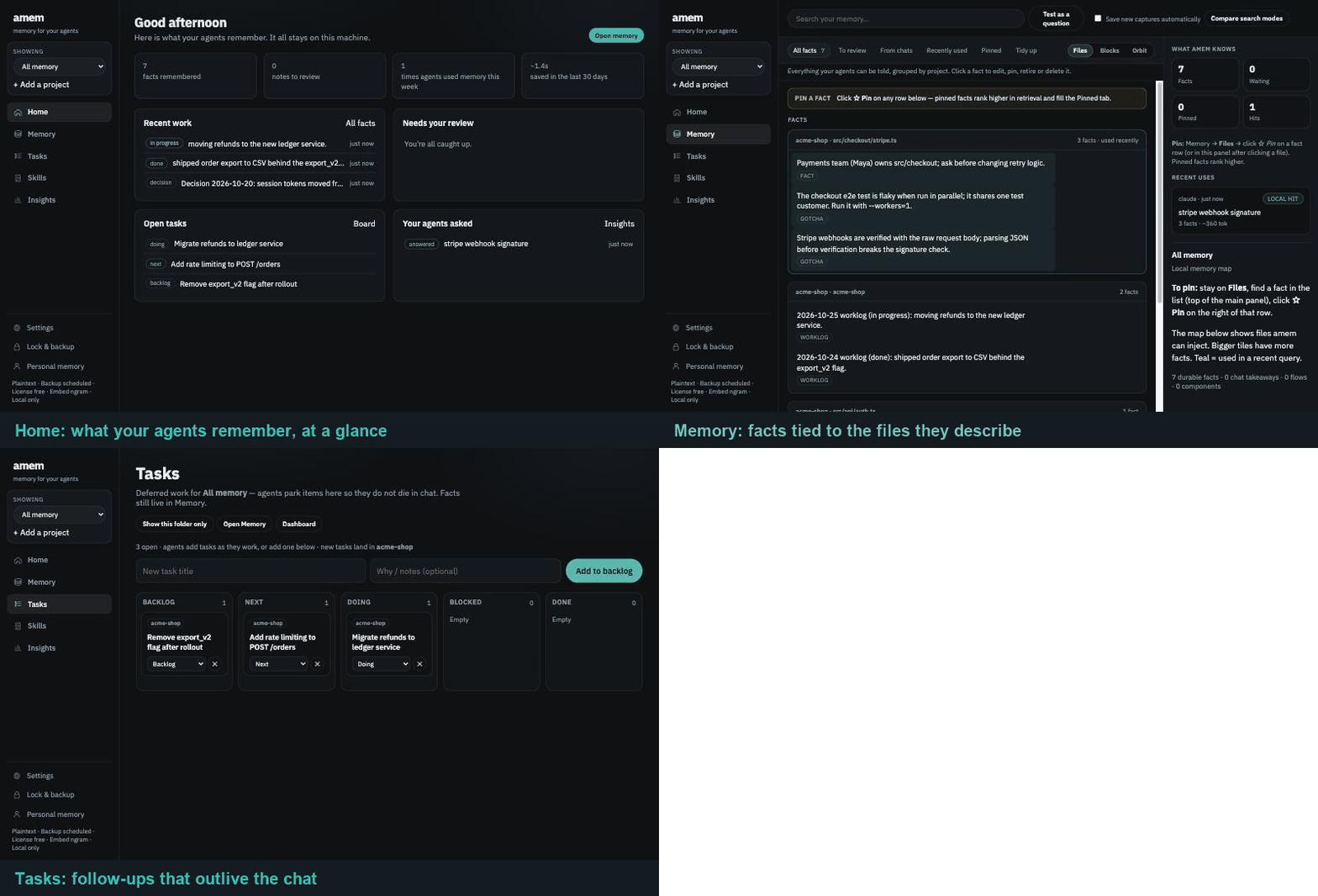
Tabs after setup:
- Setup — scan/select repos, platforms, login auto-start, bootstrap proposal
- Memory — facts by file, scored drafts (approve / replace older / dismiss / reject noisy), edit/pin/delete, search, recent hits/misses
- Tasks — per-project Kanban for deferred agent work (Backlog → Next → Doing → Blocked → Done). MCP:
amem_task_add/amem_task_update/amem_task_complete. Open tasks appear inamem_context. Use Memory for durable facts; Tasks for “do later.” - Stats — estimated tokens saved per LLM, plus JSON / markdown / PDF export (proxies, not a bill)
Server-only (no browser open):
amem ui --port 7843 --no-open
To scan extra folders (or only a subset), set AMEM_SCAN_ROOTS to a colon-separated list of directories.
CLI alternative (no UI)
cd ~/path/to/your-real-project
amem init --platform cursor    # or: --platform claude
amem doctor
amem status
To wire both agents to the same local memory, run init once per platform (or select both in the UI).
Day-to-day loop
1. Query before exploring
amem context "billing webhook retry"
Or let the agent do it — Cursor gets an always-on project rule; Claude gets hook guidance. Both install the skills:
amem-bootstrap— seed baseline memoryamem-update-working-memory— save durable learnings after a session
Hooks also inject context on session start / prompt submit, store conversation notes, queue session-end drafts, and can queue miss→learn drafts after empty context lookups when the agent later cites real files. Approve drafts in Memory (or allow low-risk kinds via policy auto_apply_kinds).
Session start also injects your recent personal memories (last 7 days), so a new chat picks up where the last one left off. Memories that mention the current repository come first. Personal memories saved with kind private (or anchor private) never appear in a work repository's context. Auto-generated skills whose description is just "Procedure for " are no longer suggested unless they have been used, and injected text is shortened at sentence boundaries. Claude Code receives hook context through hookSpecificOutput.additionalContext; Cursor through additional_context.
Stop checkpoint (opt-in). Set AMEM_STOP_CHECKPOINT=1 on the Claude Stop hook command (AMEM_STOP_CHECKPOINT=1 amem hook) to have Claude save durable context before it stops — only when the turn changed something (edits, commands, write-type MCP tools) and nothing was saved to amem after that work. Read-only turns and turns that already saved are left alone.
Secret filter. Remember, capture and skill writes block secret values (written-out keys, tokens, passwords, PEM keys, known token formats), not mentions of secret names such as SUMSUB_MOCK_WEBHOOK_SECRET or references like "$(gcloud secrets …)". IT policy deny_claim_patterns can add stricter rules.
2. Work as usual
Treat memory as a map, not source of truth. Read the anchored files before you change them. Prefer claims marked fresh; verify stale ones (anchored files changed after the claim).
3. Save what should survive
Ask the agent to run amem-update-working-memory, approve Memory drafts, or apply a proposal yourself:
amem propose validate /tmp/memory.json
amem propose diff /tmp/memory.json
amem propose apply /tmp/memory.json
4. Optional agent one-shot install
From inside the product repo, paste docs/agent-install-prompt.md into Cursor or Claude Code and let it run setup for you.
What gets stored
Memory is a small local graph in SQLite:
| Object | Meaning |
|---|---|
| Component | A subsystem / module (component.api) |
| Flow | How work moves (flow.checkout) |
| Claim | A durable fact with file anchors (may be active or superseded; optional pin) |
| Edge | Links (claim → flow → component); kind: "supersedes" archives the target claim |
| Draft | Pending session / miss→learn proposals waiting for Memory approve |
| Task | Deferred work on the project Kanban (Backlog / Next / Doing / Blocked / Done) — not a durable fact |
| Skill | A reusable multi-step procedure, stored as a SKILL.md file (see below) |
| Usage event | Each amem context hit + token estimate |
Claims are the retrieval unit. Ranking combines:
- SQLite FTS5 (Porter stemming) + keyword score
- On-device hashing embeddings (no model download)
- Pin boost, kind weights (
constraint/gotcha>session), freshness - Optional personal prefs claims blended into project context
Each injected claim includes a Why: line. Stale claims (anchors changed after updated_at) are down-ranked.
Example claim:
{
  "id": "claim.webhook_idempotency",
  "kind": "constraint",
  "text": "Stripe webhooks must be idempotent on event.id before mutating invoices.",
  "code_anchors": ["src/webhooks/stripe.ts"],
  "supersedes": ["claim.webhook_old_rule"]
}
supersedes (or an edge with kind: "supersedes") marks older claim ids as archived so they leave retrieval.
Skills (procedural memory)
Claims answer what is true. Skills answer how we do this here — a deploy sequence, a migration dance, a debugging path someone already walked. They are too long to sit in every prompt, so they load on demand.
Skills live as SKILL.md files under ~/.amem/skills/, indexed in SQLite for ranking:
~/.amem/skills/deploy-staging/SKILL.md
~/.amem/skills/deploy-staging/references/runbook.md
Progressive disclosure. A context packet carries only names and descriptions. The agent
calls amem_skill_view to pull a body once it decides the procedure applies, so an unused
library of skills costs almost no tokens.
The learning loop. amem ships no model, so it never writes a skill itself. At session end it looks for the shape of a hard-won procedure — enumerated steps or real commands, plus an error it recovered from or a correction you gave. When several signals line up it queues one suggestion, which reaches your agent as a nudge in the next context packet. The agent writes the skill; you approve it. If a skill was loaded during a session that still went sideways, amem queues a revision instead of a duplicate.
The bar is deliberately high, and a session can queue at most one suggestion.
amem skills list                # index of what is stored
amem skills show deploy-staging # full body
amem skills new deploy-staging --desc "Deploy staging and verify health"
amem skills import ./some-skill # bring in an agentskills.io skill
amem skills drafts              # pending suggestions and staged writes
amem skills approve <draft-id>
Skills are also a Skills tab in amem ui.
Safety. Skills are instructions an agent will follow, so content is scanned for credentials and prompt-injection patterns before any write. Three policy keys control them:
| Key | Default | Effect |
|---|---|---|
skills_enabled | true | Master switch for storage, ranking, and injection |
skill_write_approval | false | Stage agent writes for review instead of writing to disk |
skill_capture | true | Allow session-end skill suggestions |
An unreadable policy.toml forces skill_write_approval on. amem doctor --attest reports
every installed skill with a content hash, so you can diff what agents are being told to do.
Backups currently copy the database only —
~/.amem/skills/is not included yet. Keep skills you care about in version control until that lands.
Token savings (estimates)
Every amem context logs a usage event. The UI Stats tab breaks this down by platform (cursor, claude, …).
Automatic estimate:
estimated_avoided = max(0, anchors×4000 + claims×200 − packet_tokens)
This is a proxy for exploration avoided — not your Cursor/Anthropic bill. Money uses the same token proxy at $3 per 1M input tokens (Sonnet-class input). Cursor included usage and output tokens are not billed this way, so treat $ as an order-of-magnitude estimate.
Time saved is a separate proxy: each returned file anchor is treated as ~1.2s of tool round-trip the agent did not have to make. Local lookup duration is measured (SQLite on localhost). Hit rate is keyword matches on amem context — not Cursor/model API calls (those still happen). A miss means no stored fact matched the query; newest facts may still be injected as a weak fallback, and the agent still talks to the model.
Stats also shows a monthly projection: last 7 days of calls (or fewer if you just started), scaled to 30 days. Still a proxy, not a bill.
If you later know a better number:
amem usage report --platform cursor --saved 12000
# or attach to a specific event:
amem usage report --event-id usage_… --saved 12000
LLM clients (beyond git repos)
amem can bind a named workspace that is not a git checkout — for Luna Client or any tool that talks to Cursor/Claude/other models.
amem init --workspace my-app
# seeds starter facts and runs a context check automatically
Attach any LLM client yourself (HTTP or MCP). Keep amem ui running for HTTP. From the client, before each model call:
const res = await fetch("http://127.0.0.1:7843/api/context", {
  method: "POST",
  headers: { "Content-Type": "application/json" },
  body: JSON.stringify({
    workspace: "my-app",
    query: userMessage,
    platform: "app",
    sessionId,
  }),
});
const { markdown } = await res.json();
// prepend markdown to the prompt / tool result so the model skips a large retrieve
After a durable outcome:
await fetch("http://127.0.0.1:7843/api/remember", {
  method: "POST",
  headers: { "Content-Type": "application/json" },
  body: JSON.stringify({
    workspace: "my-app",
    text: takeaway,
    kind: "session",
    anchors: ["my-app"],
  }),
});
MCP config (any MCP host):
Keep amem ui running (or amem service install so it starts at login). GUI apps often cannot find amem on PATH, which shows up as “live tool discovery failed” / MCP error — not a sign-in prompt. Prefer HTTP:
{
  "mcpServers": {
    "amem": {
      "url": "http://127.0.0.1:7843/mcp?workspace=my-app"
    }
  }
}
Stdio also works if the host can spawn the binary. Print a config with absolute paths:
amem mcp --print-config --workspace my-app
Same localhost DB as git-repo memory. The UI switcher groups Git repos and Workspaces. Rename a workspace's display name anytime — the MCP slug (workspace=luna-ai) and stored claims stay on the same id.
amem rename "Luna Client" --workspace luna-ai
MCP tools (stdio or HTTP):
| Tool | When to use |
|---|---|
amem_context | Ranked memory packet for the current question |
amem_remember | Store a durable fact after an outcome |
amem_recipe | Generic read-then-write contract (any MCP host) |
amem_skill_list | Cheap index of stored procedures (names + descriptions only) |
amem_skill_view | Load one skill body, after the index says it applies |
amem_skill_save | Store a multi-step procedure you just worked out |
amem_repos | What is monitored (git repos + named workspaces) |
amem_stats | Lookup time, estimated tokens/ms saved, hit rate |
amem_graph | Claims / components / flows stored for a workspace or repo |
amem_status | Binding + counts; omit workspace for a machine-wide overview |
Command reference
amem setup [--personal] [--platform <host>]
amem init --platform <client>      # amem platforms lists every id
amem platforms [--json]
amem init --workspace <name> [--path <dir>] [--platform …]
amem init --personal
amem rename "<display name>" --workspace <slug>
amem status [--workspace <name>]
amem doctor [--attest] [--json]
amem context "<query>" [--workspace <name>] [--platform …]
amem remember "<text>" [--workspace <name>] [--kind …] [--anchor <path>]
amem recipe [--json]
amem skills list|show <name>|new <name> [--desc <text>]|rm <name>|sync|import <path>
amem skills drafts|approve <draft-id>|dismiss <draft-id>
amem mcp [--print-config] [--workspace <name>]
amem propose validate|diff|apply <file.json>
amem export [--out <file.json>]
amem wipe --yes
amem wipe --all --yes
amem lock|unlock --passphrase <secret>
amem backup [--out <dir>] [--passphrase <secret>] [--label <name>]
amem backup schedule [--out <dir>] [--hour <0-23>]
amem backup unschedule
amem session touch --platform cursor|claude [--session-id <id>]
amem hook
amem usage report --saved <n> [--platform …] [--event-id …]
amem usage export [--format json|md|pdf] [--days 30] [--scope current|all] [--out <file>]
amem license status|apply|activate|clear|issue|keys
amem embed status|use hash|use ngram|reindex
amem ui [--port 7843] [--no-open]
amem app [--port 7843]
amem service install|uninstall|status
| Command | Purpose |
|---|---|
setup | One-shot personal workspace + optional host install |
init | Bind a git repo, named workspace, personal prefs, or host |
rename | Change a workspace display name; MCP slug and memory stay bound |
context | Retrieve a Markdown packet; log usage |
remember | Store one local fact |
mcp | Stdio MCP tools; HTTP MCP at http://127.0.0.1:7843/mcp while UI runs |
skills | Manage procedural memory (list, show, new, import, drafts, approve) |
propose diff | Preview claim/component/flow changes before apply |
propose apply | Upsert structured memory locally |
lock / unlock | Optional AES-256-GCM encrypt-at-rest for graph.db |
backup | Local snapshot (optionally encrypted); schedule for daily timer |
ui | Setup wizard + Memory + Stats in the browser (localhost) |
app | Same UI in an Electron window (npm run app:setup once) |
service | Login item so amem ui starts after reboot |
doctor --attest | Privacy/policy attestation for IT tickets |
export / wipe | Personal backup or delete (still local) |
wipe --all --yes | Offboard: wipe every repo and remove ~/.amem |
What install puts where
Cursor
| Artifact | Path |
|---|---|
| Skills | ~/.cursor/skills/amem-* |
| Project rule | .cursor/rules/amem.mdc (in the product repo) |
| Hooks | ~/.cursor/hooks.json |
Reload Cursor if skills/rules do not appear immediately.
Claude Code
| Artifact | Path |
|---|---|
| Skills | ~/.claude/skills/amem-* |
| Hooks | ~/.claude/settings.json (SessionStart / UserPromptSubmit / Stop / related → full amem hook) |
Other hosts
| Host | What amem writes |
|---|---|
| Windsurf | ~/.codeium/windsurf/mcp_config.json MCP entry |
| Continue | ~/.continue/config.json MCP servers |
| Aider | .aider.amem.md CLI hints in the repo |
| Zed | settings.json context_servers / HTTP hint |
| Claude Desktop | claude_desktop_config.json stdio MCP entry |
Every other client in amem platforms — Codex, Copilot, Gemini CLI, Grok, Cline,
Roo, Kilo, Cody, Augment, JetBrains, Kiro, Trae, Antigravity, Neovim, OpenCode,
Goose, Crush, Amp, Qwen Code, Factory Droid, OpenHands, Amazon Q, Warp, Devin,
Jules — has no local installer: amem init --platform <id> binds the repo and
prints the MCP endpoint to paste (amem recipe for the full config).
Client ids are alias-folded, so claude-code, vscode, pycharm and
chatgpt resolve to claude, copilot, jetbrains and codex rather than
tripping policy.allowed_platforms.
Security & Architecture FAQ
How does amem prevent tool-poisoning and prompt injection?
Unconstrained memory tools that blindly record chat transcripts are vulnerable to storing conversational residue, adversarial instructions, or poisoned context. amem enforces multiple defensive gates:
- Fact vs. Noise Syntax Filtering (
isFactLike): Transcript sentences, questions, chat pleasantries, and user prompt fragments are automatically rejected before becoming claims, even if they mention real file paths. - Built-in & Custom Secret Deny Lists (
BUILTIN_DENY_CLAIM_PATTERNS): Built-in regexes drop passwords, API keys, tokens, and private keys. Administrators can enforce additional regex deny patterns via system policy. - Quality & Specificity Scoring (
scoreProposal): Proposals are scored based on anchor presence, durable vocabulary (constraint,gotcha,must), and specificity. Thin or low-scoring entries below the rejection threshold are dropped. - Staged Ingestion Queue by Default (
ProposalDraft): Background captures and session-end deductions are staged as proposals in SQLite for human review in the UI. Auto-apply is disabled by default (auto_apply_kinds = []). - Conflict & Supersede Tracking: When new claims share anchors with existing facts, amem computes similarity and raises conflict warnings, requiring explicit superseding rather than allowing silent overwrites.
How does amem prevent context bloat and cross-project memory leakage?
- Per-Repository Partitioning: Every memory claim, task, component, and note is keyed by
repo_id(derived from git remote URL / workspace path). Queries in one project cannot retrieve or leak memory from another repository. - Hybrid Retrieval & Strict Limits: Rather than dumping the graph,
amem_contextuses hybrid BM25 full-text search, on-device embeddings, keyword match, and freshness multipliers to rank and select only the top relevant facts (default limit: 12). - Hard Character Caps: Automatic hook injections are hard-capped at 2,400 characters to prevent prompt bloat and token exhaustion attacks.
- Progressive Disclosure for Skills: Context packets inject only a Level-0 index (skill names and one-line descriptions). Full procedural bodies are never injected unless the model explicitly requests them via
amem_skill_view.
How does amem handle code changes without serving stale memory?
Every claim is grounded with file anchors (code_anchors). During context generation, amem verifies file existence and compares file modification timestamps against claim creation times:
- If anchored files have changed, the claim is marked stale and penalized in ranking.
- Context packets explicitly inject a warning into the agent's prompt:
"_X claim(s) marked stale — anchored files changed after the claim was written. Verify before trusting._"
Does amem expose an unauthenticated network server or upload code?
- Strict Loopback Binding: The local HTTP UI / MCP daemon binds exclusively to
127.0.0.1. Non-loopback bindings are blocked by hardcoded policy rules. - Zero External Egress: Telemetry is hardcoded off (
telemetry: false). All SQLite databases (graph.db), vectors, and logs stay under~/.amemwith0700local filesystem permissions. - Optional At-Rest Encryption: The local database can be encrypted using AES-256-GCM (
amem lock --passphrase '...').
Develop amem itself
cd amem
npm install
npm run build
npm run test          # unit + integration + CLI e2e (node:test)
npm run smoke         # end-to-end CLI/API smoke
npm run test:all      # both
npm link
Layout:
src/           CLI, SQLite, policy, attest, installers, localhost API
ui-static/     Setup / Memory / Stats UI
skills/        Agent skill markdown
templates/     Cursor rule + example enterprise policy
docs/          Agent install prompt + IT endpoint runbook + backlog
test/          Comprehensive node:test suite
scripts/       Smoke tests + MDM offboard helper
Override the memory home for tests:
AMEM_HOME=/tmp/amem-test amem status
Enterprise endpoint (IT-managed)
amem is still personal memory on the laptop — not a shared wiki or cloud RAG.
IT / DevEx can govern the fleet: approved install, policy, attestation, offboarding.
| Control | Mechanism |
|---|---|
| Policy | /etc/amem/policy.toml (system) overrides ~/.amem/policy.toml; or AMEM_POLICY_PATH |
| Attestation | amem doctor --attest / --json (also GET /api/attest on local UI) |
| Secret hygiene | Builtin deny patterns + policy deny_claim_patterns on propose |
| Export lock | allow_export = false |
| Platform / repo allowlists | allowed_platforms, allowed_remote_hosts |
| Auto-apply drafts | auto_apply_kinds (empty = never; still local) |
| Offboarding | amem wipe --all --yes or scripts/mdm-offboard.sh |
Hard guarantees (not configurable away):
- No memory telemetry or claim upload —
~/.amemstays local - Optional anonymous npm install ping only (opt out:
AMEM_TELEMETRY_DISABLED=1) - UI binds to loopback only (
127.0.0.1) - Memory stays under
~/.amem(mode0700)
IT quick start
# 1) Pin / install amem on the endpoint (internal npm, pkg, or npm link)
# 2) Deploy policy (root-owned on managed machines)
sudo mkdir -p /etc/amem
sudo cp templates/policy.example.toml /etc/amem/policy.toml

# 3) Verify for security review
amem doctor --attest --json

# 4) On offboard / laptop return
amem wipe --all --yes
# or: scripts/mdm-offboard.sh
Example policy: templates/policy.example.toml
Full IT runbook: docs/enterprise-endpoint.md
Suggested rollout: small DevEx pilot → MDM package + policy → signed builds/SBOM if procurement asks. Shared org memory is intentionally out of scope.
Non-goals
- Company-shared or synced memory
- Cloud hosted “team brain”
- Exact provider billing integration
- Cloud/remote embedding APIs (local FTS5 + on-device hashing embeddings only)
- Writing memory contents into product git history
Upcoming ideas (not scheduled): see docs/backlog.md.
License
MIT — see LICENSE.