OrionBelt Semantic Layer
API-ориентированный движок и MCP-сервер, преобразующий декларативные YAML-модели в оптимизированный SQL для Postgres, Snowflake, ClickHouse, Dremio и Databricks
Документация

OrionBelt® Semantic and Context Layer, Rule Engine, and Semantic Sidecar
Define your metrics once in YAML. Let agents and BI tools query them without ever touching your schema.
A semantic sidecar: it rides alongside the systems you already run instead of replacing them.






Ask an LLM to write SQL against a raw star schema and sooner or later it joins two fact tables and hands you a revenue number inflated by a factor of eight. It looks right. Nobody catches it.
OrionBelt is a semantic and context layer with a rule engine, and it runs as a semantic sidecar. You declare dimensions, measures, metrics, and joins in version-controlled YAML. OrionBelt compiles them into dialect-specific SQL through a real AST, and routes multi-fact queries through a Composite Fact Layer planner that blocks the join paths that produce fan traps. Agents and BI tools ask for "Total Revenue" by "Country". They never see a table name.
No BI tool in the middle. No runtime lock-in. Point it at what you already have.
Four ways in
The same model serves every surface you already use. Four of them, and one model behind all four:
| Surface | Port | Speaks | Connect with |
|---|---|---|---|
| PostgreSQL wire | 5432 | Postgres protocol | DuckDB via ATTACH, Tableau, Dremio as a federated source, Power BI, Superset, DBeaver, Metabase, psql |
| Arrow Flight SQL | 8815 | gRPC + Arrow | DuckDB via adbc_scanner, Tableau and Power BI through the Flight SQL JDBC/ODBC drivers, ADBC clients (Python, Go, Java) |
| REST | 8000 | HTTP + JSON | your code, notebooks, curl, and the 8 PEP 249 drivers (which compile here, then execute on the warehouse directly) |
| MCP | stdio / HTTP | Model Context Protocol | AI agents: Claude, Cursor, Copilot, Windsurf |
Both SQL surfaces speak OBSQL, so SELECT "Region", "Total Sales" FROM sales_model is the same query whichever one you came in through. ADBC is how you use the Flight SQL surface rather than a fifth surface of its own, and DuckDB is a client that can take either SQL surface.
Eight ways out
Compiles to BigQuery, ClickHouse, Databricks, Dremio, DuckDB/MotherDuck, MySQL, PostgreSQL, and Snowflake. The warehouse behind the model is independent of the surface in front of it: any of the four surfaces, against any of the eight dialects.
Here is TPC-DS query 98. Two measures over the same column, identical but for one line: Class Revenue is pinned to a coarser grain than the query asks for.
measures:
  Store Sales Amount:
    columns: [{dataObject: Store Sales, column: Ext Sales Price}]
    aggregation: sum

  Class Revenue:
    columns: [{dataObject: Store Sales, column: Ext Sales Price}]
    aggregation: sum
    grain: {mode: FIXED, keepOnly: [Class]}   # <- pin to Class, ignore query grain

metrics:
  Revenue Ratio:
    expression: "{[Store Sales Amount]} * 100.0 / {[Class Revenue]}"
That one grain line is what becomes SUM(...) OVER (PARTITION BY "Class") below.
The query names business concepts. No tables, no joins, no SQL:
select:
  dimensions: [Item ID, Item Description, Category, Class, Current Price]
  measures: [Store Sales Amount, Revenue Ratio]
where:
  - {field: Category, op: inlist, value: [Sports, Books, Home]}
  - {field: Order Date, op: between, value: ["1999-02-22", "1999-03-24"]}
pip install orionbelt-semantic-layer
obsl compile tpcds.obml.yml -q Q98.yml -d duckdb
WITH "base" AS (
  SELECT
    "Item"."i_item_id" AS "Item ID",
    "Item"."i_item_desc" AS "Item Description",
    "Item"."i_category" AS "Category",
    "Item"."i_class" AS "Class",
    "Item"."i_current_price" AS "Current Price",
    CAST(SUM("Store Sales"."ss_ext_sales_price") AS DECIMAL(18, 2)) AS "Store Sales Amount",
    SUM("Store Sales"."ss_ext_sales_price") AS "Class Revenue"
  FROM "main"."store_sales" AS "Store Sales"
  LEFT JOIN "main"."item" AS "Item"
    ON "Store Sales"."ss_item_sk" = "Item"."i_item_sk"
  LEFT JOIN "main"."date_dim" AS "Date"
    ON "Store Sales"."ss_sold_date_sk" = "Date"."d_date_sk"
  WHERE
    "Item"."i_category" IN ('Sports', 'Books', 'Home')
    AND "Date"."d_date" BETWEEN '1999-02-22' AND '1999-03-24'
  GROUP BY ALL
)
SELECT
  "Item ID" AS "Item ID",
  "Item Description" AS "Item Description",
  "Category" AS "Category",
  "Class" AS "Class",
  "Current Price" AS "Current Price",
  "Store Sales Amount" AS "Store Sales Amount",
  "Store Sales Amount" * 100.0 / NULLIF(SUM("Class Revenue") OVER (PARTITION BY "Class"), 0) AS "Revenue Ratio"
FROM "base" AS "base"
ORDER BY
  "Category" ASC,
  "Class" ASC,
  "Item ID" ASC,
  "Item Description" ASC,
  "Revenue Ratio" ASC
You did not write the join path, the window function over an aggregate, the NULLIF guard, or one table name. Change -d duckdb to -d snowflake and the same two files compile for Snowflake, or for any of eight dialects.
This is checked, not asserted. 40 TPC-DS queries are built against a single OBML model and compared row by row against each engine's own reference SQL: 39 of 40 match on DuckDB at sf=1, 37 of 40 on ClickHouse at sf=10. Every one of the remaining differences traces to a reference variant rather than a compilation error, and each is documented. See the sweep, or the queries in examples/tpcds_queries/.
Where OrionBelt fits
OrionBelt is a sidecar, not a platform. It compiles a YAML model into correct SQL and exposes it over the protocols you already use. It does not run a cluster, own your cache, or ask you to adopt a cloud.
Reach for OrionBelt when:
- Agents query your data and a silently wrong number is unacceptable. Multi-fact queries route through a Composite Fact Layer planner that blocks fan-trap join paths instead of quietly summing across them.
- You want your metric definitions in reviewable YAML, with no JavaScript or Python in the model layer.
- Your BI tool should connect over the Postgres driver it already ships, with no new connector to install and no vendor runtime in the path.
- You self-host, across more than one engine, and want one model to compile for all of them.
Reach for something else when:
- You need pre-aggregation and caching tuned for high-concurrency dashboards at scale. Cube has years of production hardening there that OrionBelt does not.
- Your metrics already live in dbt and your team is happy there. MetricFlow keeps them where they are.
- You want an exploratory analysis language rather than a serving layer. Malloy is a better fit.
Try the live demo with a pre-loaded model, or open the Colab notebook and run it against TPC-H data.
What is a Context Layer?
A semantic layer tells a consumer how to compute a number: which table, which join, which aggregate. A context layer also tells it what the number means and what the business expects of it, in a form an agent can look up instead of guess. In OrionBelt that context lives in the same model as the metrics:
- Business rules state conditions over the model's dimensions, measures and metrics: who counts as a high-value client, which categories must not sell at a loss. The rule engine compiles each rule to the query that reports its members or violations, and evaluates one rule or all of them over REST, MCP, the CLI (
obsl rules evaluate) and the UI. - External concept mappings link data objects, dimensions, measures, metrics and rules to the concepts your organisation already governs (schema.org, FIBO, an internal vocabulary), with provenance.
- The OBSL graph exposes every loaded model as RDF, so its artefacts, joins, rules and concept links can be queried with SPARQL.
- Lineage shows what a dimension, measure, metric, rule or query is built from, down to the tables and the joins the planner chose, as JSON, Mermaid, or Turtle linked into the OBSL graph, in the API, the CLI (
obsl lineage) and the UI. - Descriptions, synonyms and owners on each artefact give agents the vocabulary users actually speak.
Agents reach all of it over MCP and REST, next to the query tools, so the same model that computes a number can also explain it. The next section shows rules and concept links in a model.
Meaning, not just metrics
A model that only knows that Total Sales is a sum still leaves the agent guessing what a high-value client is, or whether a category selling at a loss is a bug or a fact. Since 2.30 the model carries that too, and that is what makes OrionBelt a context layer as well as a semantic layer: business rules, links to the ontologies your organisation governs, and the model itself as an RDF graph give an agent the meaning behind the numbers, not only the numbers.
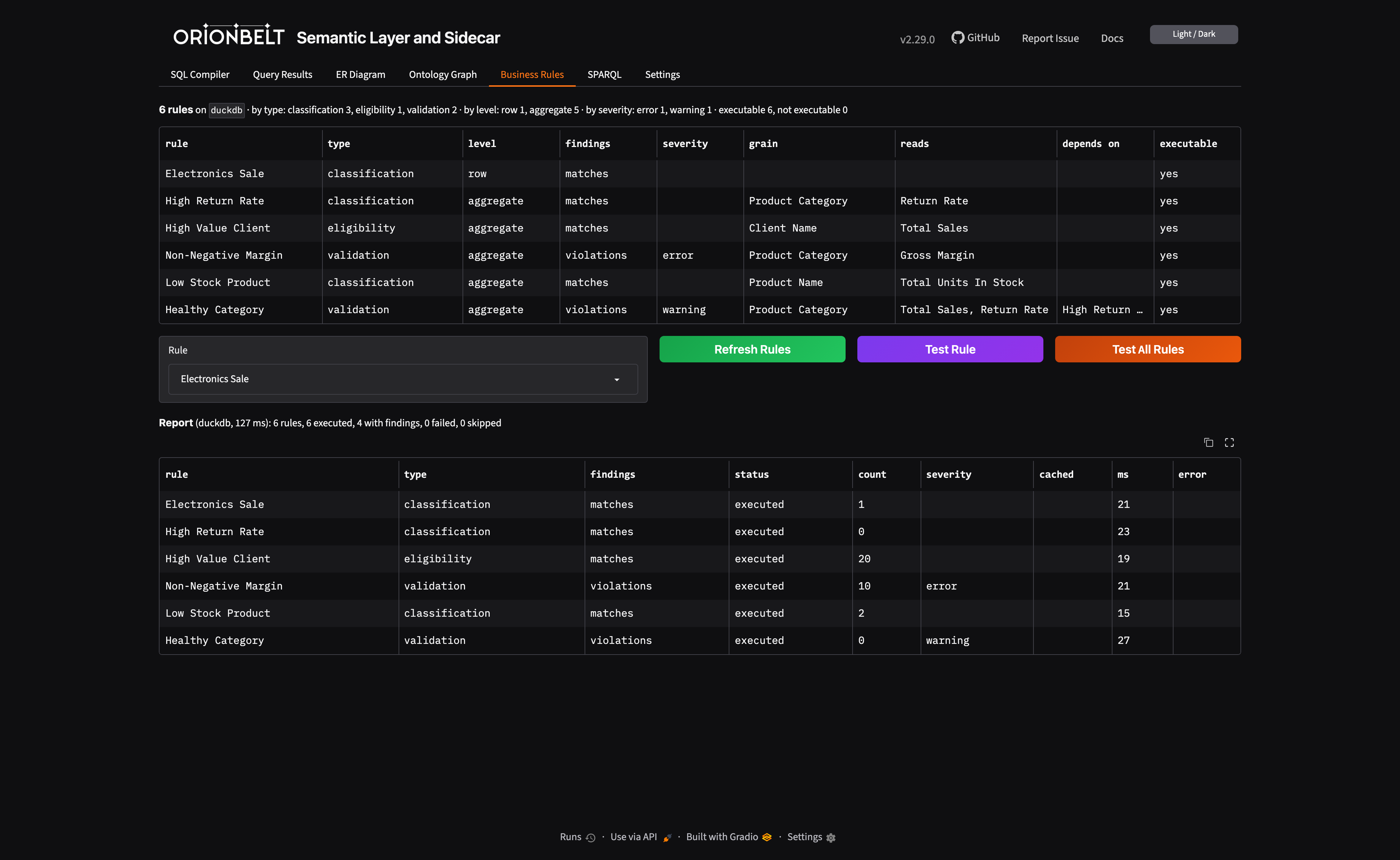
Business rules are conditions over the model's own dimensions, measures and metrics, with no SQL. The rule engine compiles each one to the query that reports its findings: the members of a classification or eligibility rule, the violations of a validation or constraint rule.
rules:
  Non-Negative Margin:
    type: validation
    severity: error
    description: Every product category must sell for at least what it cost
    grain: [Product Category]
    condition: {field: Gross Margin, op: ">=", value: 0}
This rule reads a metric, so it is aggregate: it becomes a HAVING at the category grain through the same planner as any query, multi-fact included. POST /v1/rules/{name}/evaluate returns the offending categories for this rule, and POST /v1/rules/evaluate runs every rule into one report.
Ontology links tie artefacts to the concepts your organisation already governs, as SKOS mapping relations with provenance:
ontology:
  prefixes:
    schema: "https://schema.org/"

dataObjects:
  Products:
    externalConceptMappings:
      - concept: schema:Product
        relation: exact
        justification: curated
Links never change the SQL. They change what can be asked: every loaded model is also an RDF graph, so "which artefacts mean a schema.org Product" is a SPARQL query, and the discovery API answers the same over REST (/concept-mappings, its /namespaces, and the /unmapped gap list).
For an agent this is the difference between guessing and looking it up. Over MCP, list_rules, evaluate_rule and find_concept_mappings sit next to execute_query as tools.
Guides: Business Rules, External Concept Mappings, OBSL Graph & SPARQL.
Contents
Four ways in · What is a Context Layer? · Meaning, not just metrics · Try it in 30 seconds · Claude Desktop / MCP · Why OrionBelt? · Features · Example · Documentation · Roadmap · Commercial · Development
Try it in 30 Seconds
Option A: Live Demo (no install)
Open the Live Demo — Gradio UI with a pre-loaded example model. Paste a query, pick a dialect, see SQL instantly.
API explorer: Swagger UI | ReDoc
Want to try the PostgreSQL wire surface? Cloud Run is HTTPS-only, so the public demo can't expose ports 5432 (pgwire) or 8815 (Flight SQL). Spin the same demo up locally in two commands — it includes the baked-in
orionbelt_1_commerceDuckDB dataset and the full OBSQL surface:docker run --rm -d --name orionbelt-demo \ -p 8080:8080 -p 5432:5432 -p 8815:8815 \ -e PGWIRE_ENABLED=true \ -e FLIGHT_ENABLED=true \ ralforion/orionbelt-semantic-layer-api:latest # REST + Gradio UI: http://localhost:8080/ui # pgwire (any psql / DBeaver / Tableau / Power BI): psql "host=localhost port=5432 user=obsl dbname=orionbelt_1_commerce sslmode=disable" \ -c 'SELECT "Client Name", "Total Sales" LIMIT 5' # Flight SQL smoke test: uv run python examples/obsql.py 'SELECT "Client Name", "Total Sales" LIMIT 5' docker stop orionbelt-demoThe container ships with
PGWIRE_AUTH_MODE=trust(default), so it's safe forlocalhostbut not safe to expose to the public internet. For exposed deployments, setAUTH_MODE=api_key(shipped in v2.12.0): pgwire then negotiates SCRAM-SHA-256 (or cleartext over TLS) against the shared key store.
Option B: Google Colab (no install)
 — Interactive notebook with TPC-H data: explore the model, compile queries across dialects, execute against DuckDB, and see results. Requires Python 3.12 runtime.
Option C: Install from PyPI
pip install orionbelt-semantic-layer
Then paste into a Python REPL:
from orionbelt.parser import ReferenceResolver, TrackedLoader
from orionbelt.compiler.pipeline import CompilationPipeline
from orionbelt.models.query import QueryObject, QuerySelect

model_yaml = """
version: 1.0
dataObjects:
  Orders:
    code: ORDERS
    columns:
      Price: { code: PRICE, abstractType: float }
      Country: { code: COUNTRY, abstractType: string }
dimensions:
  Country:
    dataObject: Orders
    column: Country
    resultType: string
measures:
  Total Revenue:
    resultType: float
    aggregation: sum
    expression: "{[Orders].[Price]}"
"""

loader = TrackedLoader()
raw, source_map = loader.load_string(model_yaml)
resolver = ReferenceResolver()
model, result = resolver.resolve(raw, source_map)

query = QueryObject(select=QuerySelect(dimensions=["Country"], measures=["Total Revenue"]))
pipeline = CompilationPipeline()
output = pipeline.compile(query, model, "postgres")
print(output.sql)
Output:
SELECT
  "Orders"."COUNTRY" AS "Country",
  CAST(SUM("Orders"."PRICE") AS NUMERIC(18, 2)) AS "Total Revenue"
FROM ORDERS AS "Orders"
GROUP BY "Orders"."COUNTRY"
No env file needed — the compilation pipeline is stateless.
Start the servers:
orionbelt-api                              # REST API on :8000 (Swagger UI at /docs, Gradio UI at /ui)
orionbelt-ui                               # standalone Gradio UI on :7860 (connects to API on :8000)
FLIGHT_ENABLED=true orionbelt-api          # API + Arrow Flight SQL on :8815 (DBeaver, Tableau, Power BI)
PGWIRE_ENABLED=true orionbelt-api          # API + PostgreSQL wire on :5432 (Tableau, DBeaver, Superset, psql, Dremio source)
Option C2: Install with uv
uv pip install orionbelt-semantic-layer
uv run orionbelt-api                       # REST API on :8000 (Swagger UI at /docs, Gradio UI at /ui)
uv run orionbelt-ui                        # standalone Gradio UI on :7860 (connects to API on :8000)
FLIGHT_ENABLED=true uv run orionbelt-api   # API + Arrow Flight SQL on :8815 (DBeaver, Tableau, Power BI)
PGWIRE_ENABLED=true uv run orionbelt-api   # API + PostgreSQL wire on :5432 (Tableau, DBeaver, Superset, psql, Dremio source)
Use the obsl CLI (no server needed - compiles in-process):
obsl validate model.yaml                                  # lint a model (exit 1 on error, CI-friendly)
obsl compile model.yaml -q query.json -d snowflake        # print the generated SQL
obsl compile model.yaml --sql 'SELECT "Region", "Sales" FROM model'  # ... or from an OBSQL string
obsl describe model.yaml                                   # overview of data objects + artefacts
obsl diagram model.yaml                                    # Mermaid ER diagram
obsl convert obml-to-osi model.yaml                        # OBML -> OSI (and osi-to-obml)
obsl execute -q query.json --server http://host           # run against a deployed model (omit MODEL)
See the CLI guide for all commands.
Smoke-test the Flight SQL surface without a BI tool:
uv run python examples/obsql.py 'SELECT version()'
uv run python examples/obsql.py 'SHOW TABLES'
uv run python examples/obsql.py 'SELECT "Region", "Total Sales" FROM sales LIMIT 5'

# Multi-model deployment? Pick the model with -m:
uv run python examples/obsql.py -m sales 'SHOW TABLES'
uv run python examples/obsql.py --list   # discover loaded models via REST
Try OBSQL in 30 seconds
OBSQL — OrionBelt Semantic QL — is the SQL surface BI tools and humans actually write. Bare labels, MEASURE() markers, or matching aggregate wrappers; aggregation-match validation; WITH ROLLUP / WITH CUBE; no escape hatch to raw warehouse SQL. Same language over Arrow Flight SQL (v2.4+) and PostgreSQL wire (v2.5+):
PGWIRE_ENABLED=true uv run orionbelt-api &

# Every BI tool already ships a Postgres ODBC/JDBC driver — point yours at :5432
psql "host=localhost port=5432 user=obsl dbname=sales sslmode=disable" \
  -c 'SELECT "Region", "Total Sales" LIMIT 5'

# All three measure forms compile to the same vendor SQL:
psql "..." -c 'SELECT "Region", "Total Sales"        FROM sales LIMIT 5'  -- bare
psql "..." -c 'SELECT "Region", MEASURE("Total Sales") FROM sales LIMIT 5'  -- explicit marker
psql "..." -c 'SELECT "Region", SUM("Total Sales")   FROM sales LIMIT 5'  -- matching aggregate
See the OBSQL reference for the full grammar.
Option D: Docker
Stage 1 — Zero-config start (models loaded later via API or UI):
docker run -p 8080:8080 ralforion/orionbelt-semantic-layer-api
Open http://localhost:8080/docs to explore the API.
Stage 2 — Realistic setup with docker compose:
# docker-compose.yml
services:
  api:
    image: ralforion/orionbelt-semantic-layer-api:2.32.0
    ports: ["8080:8080"]
    env_file: .env
    volumes:
      - ./models:/app/models:ro
    environment:
      MODEL_FILES: /app/models/my-model.obml.yml

  ui:
    image: ralforion/orionbelt-semantic-layer-ui:2.32.0
    ports: ["7860:7860"]
    environment:
      API_BASE_URL: http://api:8080
docker compose up -d
See .env.template for the full environment variable reference.
Docker notes:
API_SERVER_HOSTis already0.0.0.0inside the container — no override needed.- MCP via stdio does not work in Docker. Use the MCP HTTP client for containerized deployments.
- Mount models to
/app/models(or any path) and setMODEL_FILES(comma-separated paths) to pre-load on startup.- For production, pin a version tag (
:2.32.0) rather than:latest.
Claude Desktop / MCP
The MCP server is a separate thin client that delegates to the REST API:
Add to your Claude Desktop claude_desktop_config.json:
{
  "mcpServers": {
    "orionbelt": {
      "command": "uvx",
      "args": ["orionbelt-semantic-layer-mcp"]
    }
  }
}
Also works with Copilot, Cursor, and Windsurf. See the MCP repo for full setup options.
Why OrionBelt?
| OrionBelt | dbt Semantic Layer | Cube | Malloy | |
|---|---|---|---|---|
| Model format | YAML-only (OBML) | Python + YAML | JavaScript | Custom DSL |
| SQL generation | AST-based (injection-safe) | String templates | String templates | Compiler |
| Multi-dialect | 8 dialects, no runtime lock-in | dbt Cloud required | Cube Cloud or self-host | BigQuery-focused |
| Multi-fact queries | Star Schema + CFL planner (fan-trap prevention) | Limited | Pre-aggregations | Automatic joins |
| Integration surface | REST API + MCP + Gradio UI | dbt Cloud API | REST + GraphQL | VS Code extension |
| Deployment | Self-host anywhere, single binary | SaaS (Cloud) | SaaS or self-host | Library |
| License | BUSL-1.1 (converts to Apache 2.0) | Apache 2.0 | AGPL / proprietary | MIT |
| Business meaning in the model | Rules compiled to the query that reports their findings; SKOS links to an external ontology | Column-level data tests; free-form meta | Free-form meta (ai_context) | Annotations, uninterpreted |
Features
Semantic Modeling
- OBML Format — YAML-based semantic models with data objects, dimensions, measures, metrics, and joins
- Cross-Schema Queries — model data objects across multiple databases and schemas in a single model
- Static Model Filters — mandatory WHERE conditions baked into the model, auto-applied with join extension
- Business Rules — declarative
rulesover dimensions, measures and metrics (classification, eligibility, validation, constraint) without SQL; compiled to the query that reports their findings, tested one at a time or all at once into a report, listed and evaluated from the UI's Business Rules tab - OBSL Graph & SPARQL — RDF graph export and read-only SPARQL querying for every loaded model; external concept mappings link data objects, dimensions, measures and metrics to a business ontology (FIBO, schema.org, a corporate glossary) as SKOS matches
- OSI Interoperability — bidirectional conversion between OBML and the Open Semantic Interchange format, now developed as Apache Ossie (incubating)
SQL Compilation
- 8 SQL Dialects — BigQuery, ClickHouse, Databricks, Dremio, DuckDB/MotherDuck, MySQL, Postgres, Snowflake
- AST-Based Generation — custom SQL AST ensures correct, injection-safe SQL (not string templates)
- Star Schema & CFL — automatic join resolution with Composite Fact Layer for multi-fact queries
- Data Types & Precision — automatic CAST wrapping with dialect-specific type rendering and precision clamping
- Display Formatting — number format patterns (
#,##0.00,0.00%) on measures/metrics with locale-aware rendering - Timezone Settings — auto-detect database session timezone with
defaultTimezonefallback and ISO 8601 serialization - sqlglot Validation — post-generation syntax check across all supported dialects
Integration Surface
- REST API — FastAPI endpoints for model management, validation, compilation, and execution
- MCP Server — separate thin client for Claude, Copilot, Cursor, Windsurf
- AI Integrations — LangChain, OpenAI Agents SDK, CrewAI, Google ADK, Vercel AI SDK, n8n, ChatGPT
- Gradio UI — interactive web interface for model editing, query testing, and ER diagrams
- DB-API 2.0 + Flight SQL — PEP 249 drivers and Arrow Flight SQL server for DBeaver, Tableau, Power BI; ships with
examples/obsql.py, a tiny terminal CLI for testing the Flight surface without a BI tool - DuckDB as a client (v2.27.1+) - a plain DuckDB shell queries the layer, over either surface.
ATTACH ... (TYPE postgres)mounts the model as a table (SELECT ... FROM obsl.sales.model, oneSET pg_use_text_protocol = truefirst); theadbc_scannercommunity extension does it over Flight SQL with Arrow the whole way. Governed measures join to local tables and land inCREATE TABLE AS. Guide - PostgreSQL Wire Protocol (v2.5.0+) — native Postgres-protocol surface on
:5432. Every BI tool already ships a Postgres ODBC/JDBC driver, so the user side is "point your existing connection at OBSL and go" — Tableau, DBeaver, Superset, Power BI, plainpsql, and Dremio as a federated Postgres source (Dremio → OBSL → optionally back to Dremio's lakehouse, full circle)
Agent-Facing API
- Model Health on Load — every model load returns a
healthblock with orphan dataObjects, fan-trap risks, and unreachable dimensions — agents skip the defensive second round trip - Query Plan Endpoint —
POST /query/planreturns the planner's understanding (planner choice, physical tables, join path,would_compile) without compiling SQL or executing; opt-ininclude_database_explainadds the warehouse's raw EXPLAIN - Structured Warnings — every
warningslist across the API uses a stable{code, severity, message, path, hint, context}shape with a documented code taxonomy; agents branch on codes instead of parsing messages - Fuzzy
/findRecovery — when a search produces no exact or synonym hits, deterministic Levenshtein + trigram fallback returns near-miss candidates with scores and reasons - Model Examples — optional OBML
examples:block of canonical queries;GET /examples(with?intent=filtering) gives agents one-round-trip discovery of what a model is designed to answer
Freshness-Driven Result Cache
- Source-level freshness contracts — declare
refresh:blocks ondataObjectentries (interval / heartbeat / static); the cache derives query TTLs from the contracts of the physical tables a query touched, not from caller guesses - Heartbeat invalidation — one
POST /v1/heartbeatto a physical table invalidates every cached query that depends on it, across every dataObject and session - DuckDB metadata + Parquet results — file-backed cache with type-precise serialization, lazy expiration, LRU capacity sweep; opt-in via
CACHE_BACKEND=file - Inverts the Cube/dbt/Looker pattern — contracts live on the source, not the semantic abstraction; one source of truth across every cube/explore/saved query reading the table
Developer Experience
- Source-Position Errors — validation errors report exact YAML line and column
- ER Diagrams — interactive Mermaid diagrams with zoom and download (MD/PNG/Turtle)
- Session Management — TTL-scoped sessions with thread-safe model isolation
- JSON Schema — full OBML and query schema for IDE autocompletion (
yaml-language-server)
Example
Define a Semantic Model (OBML)
# yaml-language-server: $schema=https://raw.githubusercontent.com/ralforion/orionbelt-semantic-layer/main/schema/obml-schema.json
version: 1.0
dataObjects:
  Customers:
    code: CUSTOMERS
    database: WAREHOUSE
    schema: PUBLIC
    columns:
      Customer ID: { code: CUSTOMER_ID, abstractType: string }
      Country:     { code: COUNTRY, abstractType: string }

  Orders:
    code: ORDERS
    database: WAREHOUSE
    schema: PUBLIC
    columns:
      Order Customer ID: { code: CUSTOMER_ID, abstractType: string }
      Price:             { code: PRICE, abstractType: float }
      Quantity:          { code: QUANTITY, abstractType: int }
    joins:
      - joinType: many-to-one
        joinTo: Customers
        columnsFrom: [Order Customer ID]
        columnsTo: [Customer ID]

dimensions:
  Country:
    dataObject: Customers
    column: Country
    resultType: string

measures:
  Revenue:
    resultType: float
    aggregation: sum
    expression: "{[Orders].[Price]} * {[Orders].[Quantity]}"
    dataType: "decimal(18, 2)"
Compile via REST API
# Create a session
curl -s -X POST http://localhost:8080/v1/sessions | jq .session_id
# -> "a1b2c3d4"

# Load the model
curl -s -X POST http://localhost:8080/v1/sessions/a1b2c3d4/models \
  -H "Content-Type: application/json" \
  -d '{"model_yaml": "..."}' | jq .model_id
# -> "abcd1234"

# Compile a query
curl -s -X POST http://localhost:8080/v1/sessions/a1b2c3d4/query/sql \
  -H "Content-Type: application/json" \
  -d '{"model_id":"abcd1234","query":{"select":{"dimensions":["Country"],"measures":["Revenue"]}},"dialect":"postgres"}' \
  | jq -r .sql
Generated SQL (Postgres)
SELECT
  "Customers"."COUNTRY" AS "Country",
  CAST(SUM("Orders"."PRICE" * "Orders"."QUANTITY") AS NUMERIC(18, 2)) AS "Revenue"
FROM WAREHOUSE.PUBLIC.ORDERS AS "Orders"
LEFT JOIN WAREHOUSE.PUBLIC.CUSTOMERS AS "Customers"
  ON "Orders"."CUSTOMER_ID" = "Customers"."CUSTOMER_ID"
GROUP BY "Customers"."COUNTRY"
Change dialect to bigquery, clickhouse, databricks, dremio, duckdb, mysql, or snowflake for dialect-specific SQL.
Gradio UI
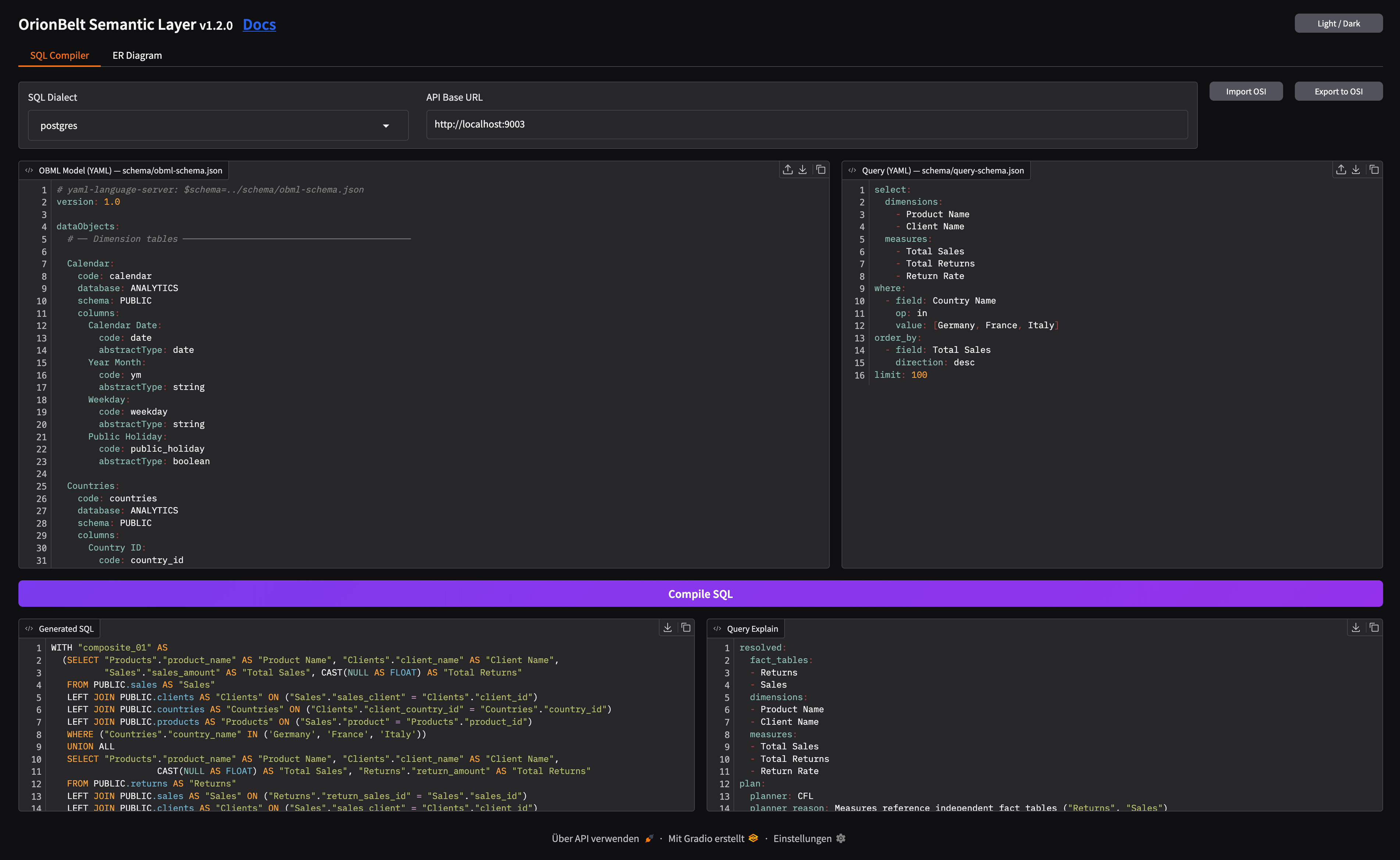
- SQL Compiler — side-by-side OBML model and query editors with syntax highlighting, 8 dialect selector, one-click compilation with formatted SQL output and query explain
- Query Execution — execute compiled queries against a connected database, view results with locale-aware number formatting, response metadata panel, TSV download and clipboard copy (requires
QUERY_EXECUTE=true) - ER Diagram — interactive Mermaid ER diagram with zoom, column toggle, and download (MD/PNG/Turtle)
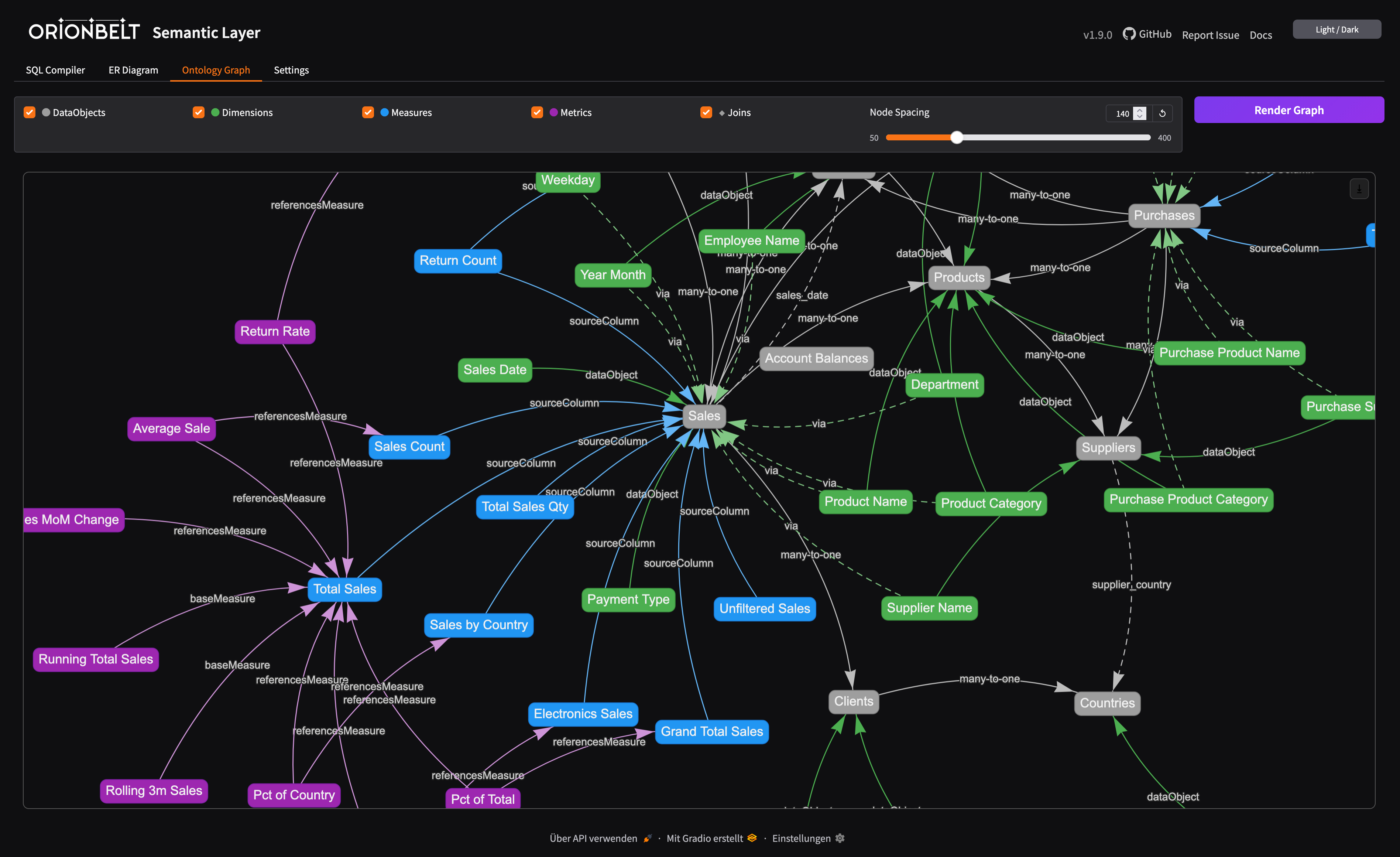
- Ontology Graph — interactive vis-network visualization of the OBML graph (data objects, dimensions, measures, metrics, joins) with toggleable layers and adjustable node spacing
- Business Rules: the model's rules with statistics; click a row to select one, show its OBML definition, test it or test all rules into a report
- SPARQL: read-only SELECT / ASK over the model's OBSL graph, in an editor with SPARQL syntax highlighting and a gallery of ready-to-run examples
- Editor Toolbar — clear, undo, redo, upload, download, and copy buttons on all code editors
- OSI Import/Export — convert between OBML and OSI formats
- Dark/Light Mode — toggle via header button, state persisted across sessions
Embedded mode — the UI is mounted at /ui on the API server:
pip install orionbelt-semantic-layer && orionbelt-api
# -> UI at http://localhost:8000/ui
Standalone mode — run API and UI as separate processes:
orionbelt-api                                              # API on :8000
orionbelt-ui                                               # UI on :7860 (connects to API on :8000)
API_BASE_URL=http://remote-api:8080 orionbelt-ui           # point UI to a remote API
Documentation
| Topic | Link |
|---|---|
| Full docs site | ralforion.com/orionbelt-semantic-layer |
| Installation | getting-started/installation |
| Quick Start | getting-started/quickstart |
| Docker & Deployment | getting-started/docker |
| Development | getting-started/development |
| OBML Model Format | guide/model-format |
| Query Language | guide/query-language |
| SQL Dialects | guide/dialects |
| Period-over-Period Metrics | guide/period-over-period |
| Trend Analysis (rank / lag / lead / ntile, partitioned MAs, statistical aggregates) | guide/trend-analysis |
| Compilation Pipeline | guide/compilation |
| OBSL Graph & SPARQL | guide/obsl |
| Business Rules | guide/business-rules |
| External Concept Mappings | guide/concept-mappings |
| Gradio UI | guide/ui |
| AI Integrations | guide/integrations |
| OSI Interoperability | guide/osi |
| REST API Endpoints | api/endpoints |
| DB-API Drivers & Flight SQL | drivers |
| Architecture | reference/architecture |
| Configuration | reference/configuration |
| Sales Model Walkthrough | examples/sales-model |
| Multi-Dialect Output | examples/multi-dialect |
| Multi-Fact: Sales & Returns | examples/multi-fact |
| TPC-DS Benchmark | examples/tpcds |
| Quickstart Notebook | examples/quickstart.ipynb |
| Comparison: Overview | comparison/ |
| Comparison: vs. dbt Semantic Layer | comparison/dbt |
| Comparison: vs. Malloy | comparison/malloy |
| Comparison: vs. LookML / Looker | comparison/lookml |
| Comparison: vs. Cube | comparison/cube |
| Comparison: vs. AtScale | comparison/atscale |
Status & Roadmap
| Status | Area |
|---|---|
| Shipped | 8 SQL dialects, REST API, MCP server, Gradio UI, DB-API drivers, Flight SQL, PostgreSQL wire protocol (v2.5.0+) — Tableau / DBeaver / Superset / Power BI / psql / Dremio as a federated Postgres source, OBSL/SPARQL, OSI v0.2 interop with bidirectional schema validation, AI integrations (LangChain, CrewAI, ADK, etc.), model inheritance & extends, data types & numerical precision, timezone settings, grain & filter context overrides, Trend Analysis — partitioned rolling windows, MetricType.WINDOW for rank/lag/lead/ntile, 9 statistical aggregates (CORR, COVAR_, REGR_, STDDEV_, VAR_), Unified authentication (v2.12.0) across REST / Flight / pgwire / UI — AUTH_MODE=api_key with shared key store, pgwire SCRAM-SHA-256 + cleartext, Artefacts Composability Resolution (ACR, v2.14.0): a composables endpoint that, given the query so far, returns which dimensions / measures / metrics can still be added (including CFL candidates), powering guided query building |
| Planned | OIDC / SSO authentication & per-token authorization scopes, CLI for automation & CI/CD, DDL view generation (CREATE VIEW from queries), additional dialects, additional BI tool integrations, pre-aggregation / materialization layer |
Commercial Offerings
OrionBelt Semantic Layer is source-available under BUSL-1.1 until its Apache-2.0 conversion — the free distribution has full parity on the shipped v2.6 surface and is production-grade for self-hosted use. For teams that want production support, a managed runtime, or embedded analytics terms, RALFORION offers:
- Embedded analytics license — relicensing terms for shipping OBSL inside a commercial product
- Commercial cloud offering — managed OrionBelt runtime with SLAs
- Enterprise features — capabilities tailored for enterprise deployments
- Consulting + support — implementation, modeling, and production support
Contact RALFORION d.o.o. for details.
Companion Project
OrionBelt Analytics
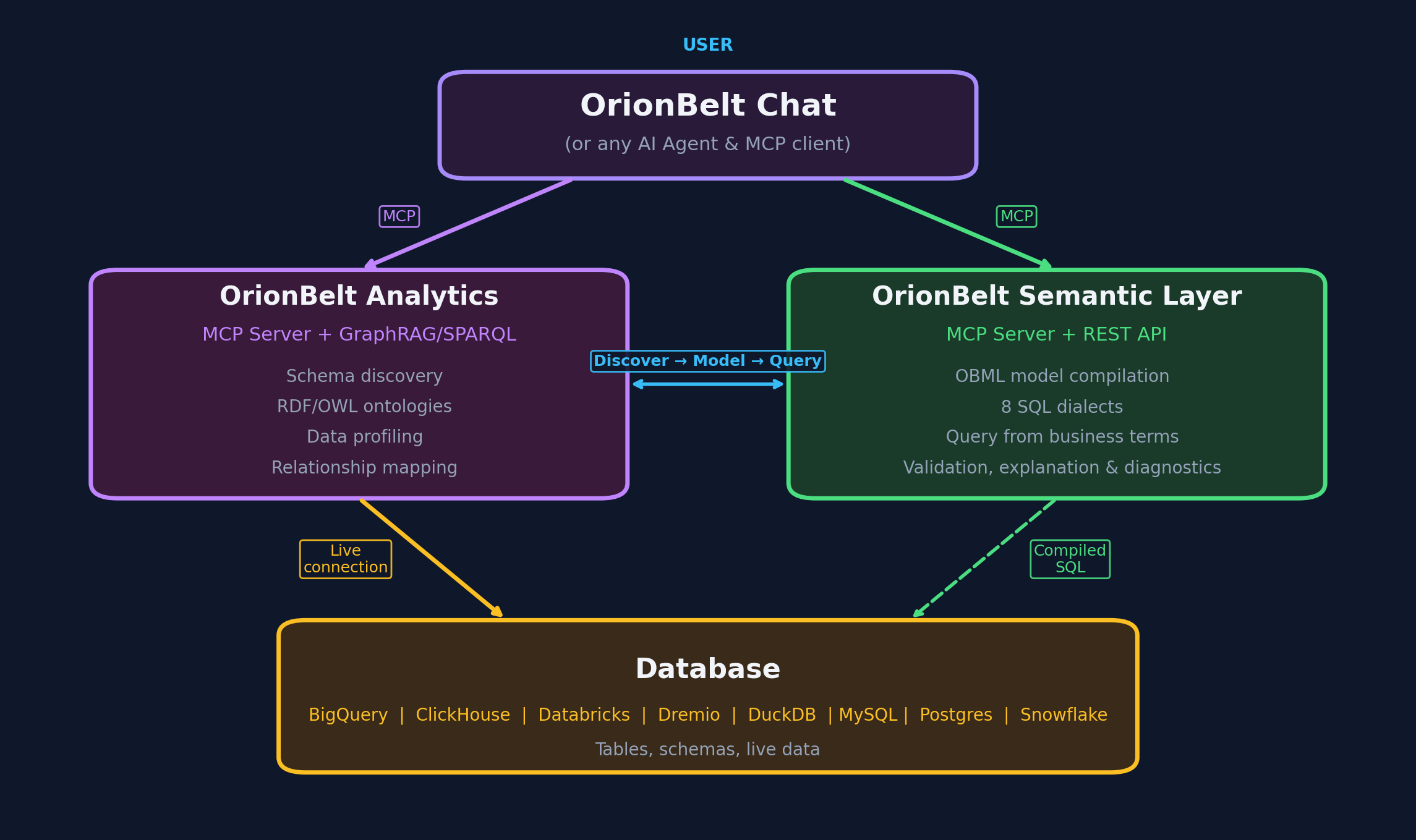
An ontology-based MCP server that analyzes relational database schemas and generates RDF/OWL ontologies. Together with OrionBelt Semantic Layer, it enables AI assistants to navigate your data landscape through ontologies and compile safe, dialect-aware analytical SQL.
Development
Contributing to OrionBelt or running from source:
git clone https://github.com/ralforion/orionbelt-semantic-layer.git
cd orionbelt-semantic-layer
uv sync                           # install all deps (dev, docs, ui, flight, drivers)
uv run orionbelt-api              # start API on :8000
# Quality
uv run pytest                     # run tests
uv run ruff check src/            # lint
uv run ruff format src/ tests/    # format
uv run mypy src/                  # type check

# Docs
uv sync --extra docs && uv run mkdocs serve  # docs on :8080

# CI workflows
./scripts/check-action-pins.sh              # verify every Action pin
./scripts/check-action-pins.sh --offline    # skip the upstream tag lookups
GitHub Actions pinning
Every uses: in .github/workflows is pinned to a 40-character commit SHA
rather than a tag, because a tag such as v7 is a movable label: it runs
whichever commit its owner has pointed it at when the job starts. The
# vX.Y.Z comment beside each SHA names the exact patch release that SHA was
cut from, and it has to be a patch release, since a major tag moves with every
upstream bump.
Pinning fixes which code runs but makes the reference unreadable, so
scripts/check-action-pins.sh keeps the SHA and its comment honest. It walks
every uses: line and requires a commit SHA, an owner from its ALLOWED_OWNERS
allowlist, and an exact-patch version comment, then resolves that tag upstream
with git ls-remote and fails when the commit it names is not the one pinned.
Container actions must be pinned by digest; local ./ actions are skipped.
--offline checks only the SHA and comment format, with no network calls.
The check runs as the pins job in CI, and as the first step after checkout in
the workflows that publish (Docker, PyPI, docs), so a tag can never ship
artifacts built by steps whose pins were never verified. Adding an owner to
ALLOWED_OWNERS is a deliberate decision: a SHA matching its own tag says
nothing about whether that action belongs in this repo at all.
License
Copyright © 2026 RALFORION d.o.o.
OrionBelt® is a registered trademark of RALFORION d.o.o.
Licensed under the Business Source License 1.1 (SPDX: BUSL-1.1). The Licensed Work will convert to Apache License 2.0 on 2030-03-16.
Third-party works redistributed by OrionBelt, and their terms, are listed in THIRD_PARTY_NOTICES.md.
By contributing to this project, you agree to the Contributor License Agreement.
For commercial licensing inquiries, contact: licensing@ralforion.com
