mindlm-mcp
Turn text, web pages and PDFs into interactive mind maps. MCP server and CLI, no API key needed.
Документация
mindlm-mcp
Turn text, web pages and PDFs into interactive mind maps — an MCP server and a command-line tool, with no API key required.
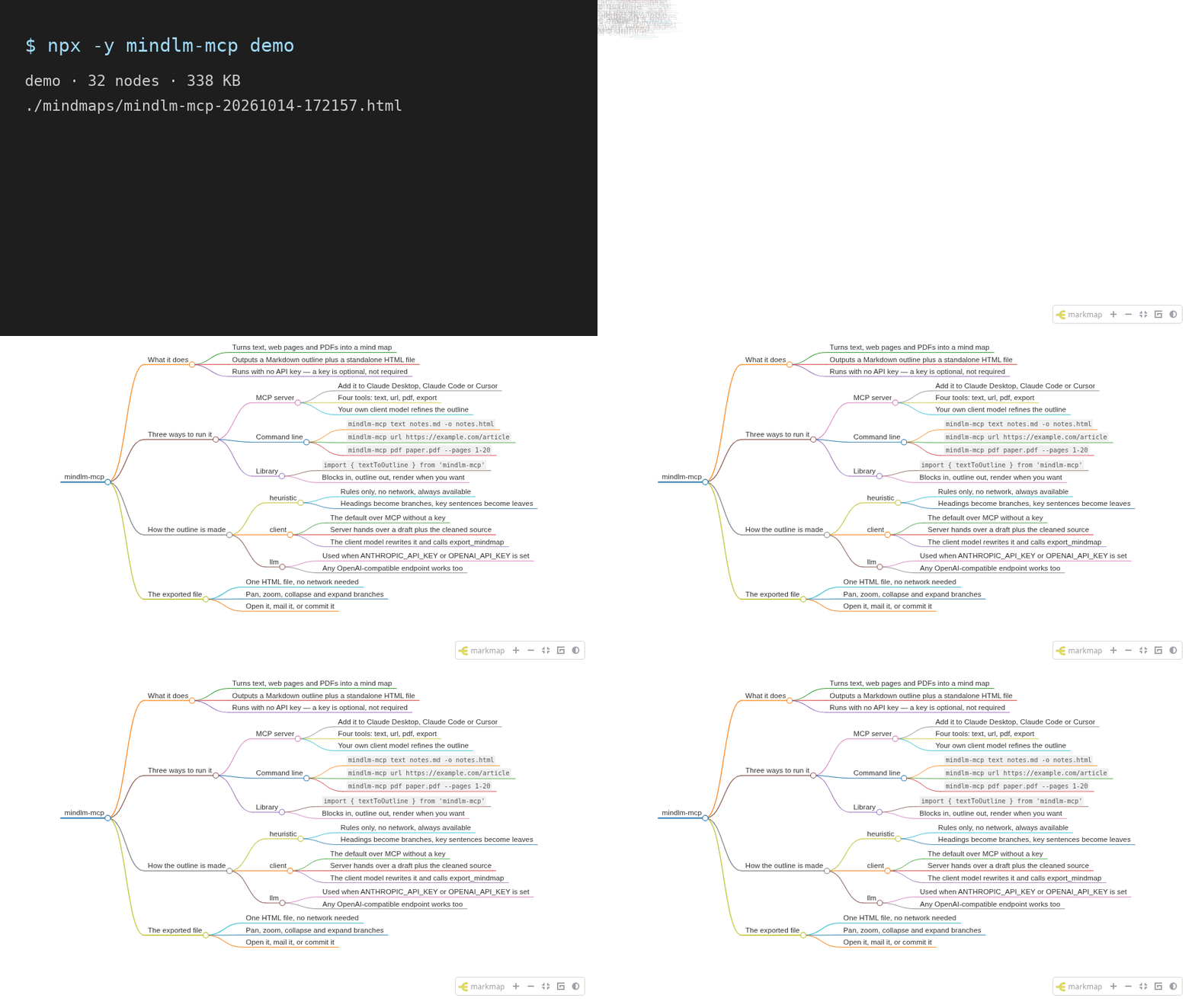
npx -y mindlm-mcp demo
That renders a built-in example and opens it. One HTML file, no build step, no account, no key.
- Three inputs. Plain text or Markdown, an http(s) page, or a local PDF.
- Two outputs. A Markdown outline you can edit, and a standalone HTML mind map (markmap) that works offline — every script is inlined.
- Zero keys. Over MCP the server hands your own model a draft plus the cleaned source text and lets it write the final outline. Set your own API key only if you want the server to call a model itself. See How the outline gets written.
Docs and a live demo: https://qingchejun.github.io/mindlm-io/ · Source: https://github.com/qingchejun/mindlm-io
Quick start
Every client runs the same command — npx -y mindlm-mcp serve — and needs no environment
variables. MINDMAP_OUTPUT_DIR below is optional; it just decides where exported files land.
Claude Code
claude mcp add mindlm -- npx -y mindlm-mcp serve
Scope it to one project with --scope project, and pass environment variables with -e:
claude mcp add mindlm -e MINDMAP_OUTPUT_DIR=~/Documents/mindmaps -- npx -y mindlm-mcp serve
Check it with claude mcp list, or /mcp inside a session.
Claude Desktop
Add this to claude_desktop_config.json, then restart the app:
{
  "mcpServers": {
    "mindlm": {
      "command": "npx",
      "args": ["-y", "mindlm-mcp", "serve"],
      "env": {
        "MINDMAP_OUTPUT_DIR": "~/Documents/mindmaps"
      }
    }
  }
}
- macOS:
~/Library/Application Support/Claude/claude_desktop_config.json - Windows:
%APPDATA%\Claude\claude_desktop_config.json
Cursor
The same block goes in ~/.cursor/mcp.json (all projects) or .cursor/mcp.json (one project):
{
  "mcpServers": {
    "mindlm": {
      "command": "npx",
      "args": ["-y", "mindlm-mcp", "serve"]
    }
  }
}
Ready-to-copy versions of all three live in examples/configs/.
Then ask for a mind map in plain language — "make a mind map of this PDF", "map out https://example.com/article" — and the client picks the right tool.
Tools
Four tools, always advertised in this order. The three *_to_mindmap tools return a Markdown
outline; export_mindmap turns an outline into an HTML file. Every result carries both a readable
text block and structuredContent.
text_to_mindmap
Outline text or Markdown you already have — a draft, notes, a transcript, a pasted chapter.
| Field | Type | Notes |
|---|---|---|
text | string, required | The content to map. Capped by MINDMAP_MAX_INPUT_CHARS. |
mode | auto | client | llm | heuristic | Default auto. |
title | string | Root node title. Derived from the source if omitted. |
maxDepth | int 2–6 | Levels including the root. Default 4. |
maxChildren | int 3–15 | Children kept per node. Default 8. |
language | string | e.g. "English", "中文". Defaults to the source language. |
export | boolean | Also render an HTML file and return its path. |
outputPath | string | Where that file goes. |
Input:
{
  "text": "# Tides\n\nSpring tides are the largest of the month.\n\n## Neap\n\nNeap tides are the smallest.\n"
}
structuredContent (default auto mode with no API key, i.e. client mode):
{
  "title": "Tides",
  "markdown": "# Tides\n\n## Spring tides are the largest of the month.\n\n### Neap\n- Neap tides are the smallest.\n",
  "mode": "client",
  "stats": { "inputChars": 79, "nodes": 4, "depth": 4, "truncated": false },
  "sourceText": "# Tides\n\nSpring tides are the largest of the month.\n\n## Neap\n\nNeap tides are the smallest.",
  "instructions": "This is a DRAFT outline produced by a rule-based algorithm. …"
}
With "mode": "heuristic" (or when an API key makes it "llm") the result is the same minus
sourceText and instructions — the outline is final and ready to export.
url_to_mindmap
Fetch a page and outline its main content. Article text is extracted with
Readability; navigation, footers and boilerplate are
dropped. Page furniture goes too: reference markers ([1]), "[edit]" links, notes above the
article, image captions, navigation boxes, and the trailing See also / References / Notes /
Further reading / External links / Bibliography sections, which are link lists rather than
content. A URL that serves a PDF is handed to the PDF pipeline automatically.
| Field | Type | Notes |
|---|---|---|
url | string, required | http(s) only. Private and loopback addresses are refused. |
| … | plus every option from text_to_mindmap |
Input:
{ "url": "https://example.com/tide-tables", "mode": "heuristic" }
structuredContent adds a source block describing where the text came from:
{
  "title": "Tide tables",
  "markdown": "# Tide tables\n\n## Spring tides …\n\n## Neap tides …\n",
  "mode": "heuristic",
  "stats": { "inputChars": 1042, "nodes": 9, "depth": 3, "truncated": false },
  "source": {
    "url": "https://example.com/tide-tables",
    "finalUrl": "https://example.com/tide-tables",
    "title": "Tide tables",
    "siteName": "Example",
    "fetchedAt": "2026-09-27T10:21:04.512Z",
    "contentType": "text/html"
  }
}
pdf_to_mindmap
Read a local PDF, using its bookmarks as the skeleton when it has them. A PDF stores positioned lines rather than paragraphs, so the soft-wrapped lines of one paragraph are rejoined before sentences are split — otherwise a browser's "print to PDF" would yield nodes like "releases oxygen." instead of whole sentences.
| Field | Type | Notes |
|---|---|---|
path | string, required | Path to a local PDF. ~ is expanded. |
pages | string | 1-based selection: "1-20", "3", "1-5,9". All pages by default. |
| … | plus every option from text_to_mindmap |
Input:
{ "path": "~/papers/attention.pdf", "pages": "1-12", "mode": "heuristic" }
structuredContent:
{
  "title": "mindlm-mcp PDF fixture",
  "markdown": "# mindlm-mcp PDF fixture\n\n## 1. Introduction\n\n### Mind maps turn a wall of prose into something you can scan…\n",
  "mode": "heuristic",
  "stats": { "inputChars": 769, "nodes": 12, "depth": 4, "truncated": false },
  "source": { "path": "/home/you/papers/attention.pdf", "totalPages": 3, "hasOutline": true }
}
export_mindmap
Render a Markdown outline into a standalone HTML mind map. Call this after you (or your model) have written the outline. It will not overwrite an existing file unless you ask.
| Field | Type | Notes |
|---|---|---|
markdown | string, required | One # root, then ##/### and - bullets. |
title | string | Page title. Defaults to the outline root. |
outputPath | string | File, or a directory to generate a name in. |
offline | boolean | Inline every script. Default true. |
toolbar | boolean | Zoom / fit / expand toolbar. Default true. |
initialExpandLevel | int −1–6 | Levels expanded on open; -1 expands everything. |
colorFreezeLevel | int 0–6 | Stop changing branch colour below this level. |
maxWidth | int 0–2000 | Maximum node width in pixels; 0 is unlimited. |
overwrite | boolean | Replace the file if it exists. Default false. |
returnHtml | boolean | Include the whole document in the result. Default false. |
branding | boolean | Add a small "Made with mindlm-mcp" footer link. Default false. |
Input:
{
  "markdown": "# Tides\n\n## Spring\n\n- Sun and moon in line\n\n## Neap\n\n- At right angles\n"
}
structuredContent:
{
  "path": "/home/you/mindmaps/tides-20260927-183322.html",
  "fileUrl": "file:///home/you/mindmaps/tides-20260927-183322.html",
  "bytes": 344349,
  "nodes": 5,
  "offline": true
}
Prompt
The server also exposes one prompt, mindmap_outline, which returns the outline rules
(optionally in a given language) followed by an instruction to call export_mindmap.
Command line
The same pipeline without a client. With no arguments and no terminal attached, mindlm-mcp
starts the MCP server — which is what an MCP client wants.
mindlm-mcp demo                                   # render a built-in example and open it
mindlm-mcp text notes.md -o notes.html            # a file, or "-" to read stdin
mindlm-mcp url https://example.com/article --open
mindlm-mcp pdf paper.pdf --pages 1-20
mindlm-mcp export outline.md -o map.html          # an outline you wrote yourself
mindlm-mcp serve                                  # MCP server on stdio
mindlm-mcp doctor                                 # runtime, LLM config, output directory
| Command | What it does |
|---|---|
serve | Start the MCP server on stdio. |
demo | Render the built-in example (--no-open to skip the browser). |
text <file> | Outline a .txt/.md file, or - for stdin. |
url <url> | Fetch a page and outline its main content. |
pdf <file> | Outline a local PDF. |
export <outline> | Render an existing Markdown outline. |
doctor | Report what is configured and where files will be written. |
Options on the conversion commands:
| Option | Meaning |
|---|---|
-o, --output <path> | Write here. A .md path writes the outline, .html the mind map. |
--title <title> | Root node title and page title. |
--md | Print the Markdown outline to stdout. |
--mode <auto|llm|heuristic> | How the outline is written. |
--depth <n> / --max-children <n> | Shape of the tree. |
--lang <language> | Language for the node labels. |
--provider <anthropic|openai> / --model <name> | Override the LLM configuration. |
--no-offline | Link CDN assets instead of inlining them. |
--no-toolbar | Hide the mind map toolbar. |
--open | Open the result in a browser. |
--overwrite | Replace the output file if it exists. |
--branding | Add the "Made with mindlm-mcp" footer link. |
-q, --quiet | Only print results, no progress. |
--env-file <path> | Load environment variables from a file first. |
Results a script might consume (a file path, an outline) go to stdout; progress and diagnostics go
to stderr. Exit codes: 0 ok, 1 usage error, 2 input error, 3 LLM error.
There is also a small programmatic API — textToOutline, urlToOutline, pdfToOutline,
renderMindmapHtml, exportMindmap — exported from the package root.
How the outline gets written
Deciding what belongs in the tree is the hard part, and there are three ways to do it. You never have to supply a key for any of this to work.
| Mode | When it is used | What happens |
|---|---|---|
client | MCP default with no key | The server returns a rule-based draft, the cleaned source text and instructions. Your client's model — the one you are already talking to — rewrites the outline and calls export_mindmap. Nothing leaves your machine except what the client already sees. |
heuristic | CLI default with no key | Rules only, no network: headings become branches, ranked sentences become leaves. Fast, deterministic, offline. |
llm | Whenever ANTHROPIC_API_KEY or OPENAI_API_KEY is set | The server calls that model itself, over plain fetch, using your key and your endpoint. Falls back to the heuristic draft if the call fails. |
mode: "auto" (the default everywhere) picks the row that applies. You can always force one with
mode over MCP or --mode on the CLI. Run mindlm-mcp doctor to see which one auto resolves to
right now.
There is no hosted service behind any of this: no telemetry, no update check, no call home.
Configuration
Every variable is optional. Copy .env.example to .env and pass it explicitly
with --env-file .env — nothing is loaded automatically — or set the variables in your MCP
client's env block.
| Variable | Default | Meaning |
|---|---|---|
MINDMAP_OUTPUT_DIR | ./mindmaps | Where exported HTML files go. ~ is expanded. |
MINDMAP_LLM_PROVIDER | auto-detected | anthropic or openai. Inferred from whichever key is set. |
ANTHROPIC_API_KEY | — | Switches auto to llm mode. |
OPENAI_API_KEY | — | Same, for any OpenAI-compatible endpoint. |
OPENAI_BASE_URL | https://api.openai.com/v1 | The endpoint used with OPENAI_API_KEY. |
MINDMAP_LLM_MODEL | claude-sonnet-5-5 for Anthropic | Model name. Required for OpenAI-compatible endpoints, where no name is portable. |
MINDMAP_ALLOW_PRIVATE_HOSTS | false | Let url_to_mindmap reach localhost and private networks. |
MINDMAP_MAX_INPUT_CHARS | 200000 | Hard cap on characters read from any one input. |
MINDMAP_CLIENT_MAX_CHARS | 60000 | Cap on the source text returned in client mode. |
The exported HTML
One file, openable with a double click. By default every script and stylesheet — d3, markmap-view,
the toolbar — is inlined, so the map keeps working with no network, on a locked-down machine, or
five years from now when a CDN has moved on. That costs about 340 KB per file; pass
offline: false (--no-offline) if you would rather link the CDN copies.
The KaTeX and highlight.js markmap plugins are deliberately disabled: both pull stylesheets from a
CDN, which would quietly break an "offline" export. Raw HTML in the outline is not rendered
(markdown-it runs with html: false), so text extracted from a hostile page cannot inject
script into the file you open.
Exports carry no attribution by default. --branding / branding: true adds one small footer
line if you want it.
Limitations
- JavaScript-only pages.
url_to_mindmapreads the HTML the server sends. A single-page app that renders its content client-side will come back empty or nearly so — copy the text and usetext_to_mindmapinstead. There is no headless browser. - Scanned PDFs. A PDF needs a real text layer. Scans and image-only exports are rejected with a clear error; there is no OCR.
- Long documents are truncated, not chunked, at
MINDMAP_MAX_INPUT_CHARS. Usepageson a long PDF, or map it a section at a time. - The heuristic is a draft. It ranks sentences by position and term frequency. It is stable and
fast, and it will sometimes pick the wrong sentence. That is exactly why
clientmode exists. - Paywalls, logins and robots. The fetcher sends no cookies and does not log in.
Security
- SSRF guard.
url_to_mindmapresolves the host first and refuses loopback, private, link-local (including the169.254.169.254cloud metadata address), CGNAT and multicast ranges unless you setMINDMAP_ALLOW_PRIVATE_HOSTS=true. Onlyhttp:andhttps:are accepted. - Limits. 5 MB per fetched response, a 15 s timeout, at most 5 redirects, 50 MB / 300 pages per PDF, and a character cap on every input.
- No telemetry, no update check, no hosted backend. The only network calls are the URL you ask for and — if you configured a key — your own LLM endpoint.
- No raw HTML in exports, and inlined JSON has
</script>escaped. - Reporting a vulnerability, and the known DNS-rebinding caveat: SECURITY.md.
Launch materials and directory listings
This section is a placeholder owned by the outreach lead. Announcement copy, awesome-list entries
and MCP directory submissions (mcp.so, Glama, Smithery, PulseMCP, the official MCP Registry) are
tracked in docs/launch.md and are intentionally empty here.
Contributing
Issues and pull requests are welcome — see CONTRIBUTING.md. Requires Node ≥ 22.12.
npm ci && npm run lint && npm run typecheck && npm test && npm run build
Want a full editor?
mindlm-mcp is deliberately small: outline in, one HTML file out. If you want to keep editing the map afterwards — drag nodes around, restyle branches, collaborate, keep a library of maps — that is what mindlm.io is for. This package works completely on its own and never talks to it.
License
MIT © 2026 青澈君