Staygreen: Uptime and Incident Monitoring
Мониторинг безотказной работы и инцидентов для приложений, созданных с помощью агентов программирования. Спросите своего агента, что сломано: он читает статус, время безотказной работы, время отклика, данные об инцидентах, а также сроки действия SSL и домена. Он может просканировать приложение, настроить его проверки, страницу статуса и cron-heartbeats одним вызовом, добавить монитор, приостановить мониторы и подготовить черновик обновления об инциденте для публикации. Войдите через OAuth или используйте API-токен рабочей области.
Размещённый MCP-сервер
npx add-mcp 'https://staygreen.io/mcp'Устанавливается в Claude Code, Codex, Cursor и другие
Документация
Staygreen
Uptime and incident monitoring for apps built with coding agents: checks from more than one location, incidents with the evidence attached, and a public status page for each app. Free plan at staygreen.io.
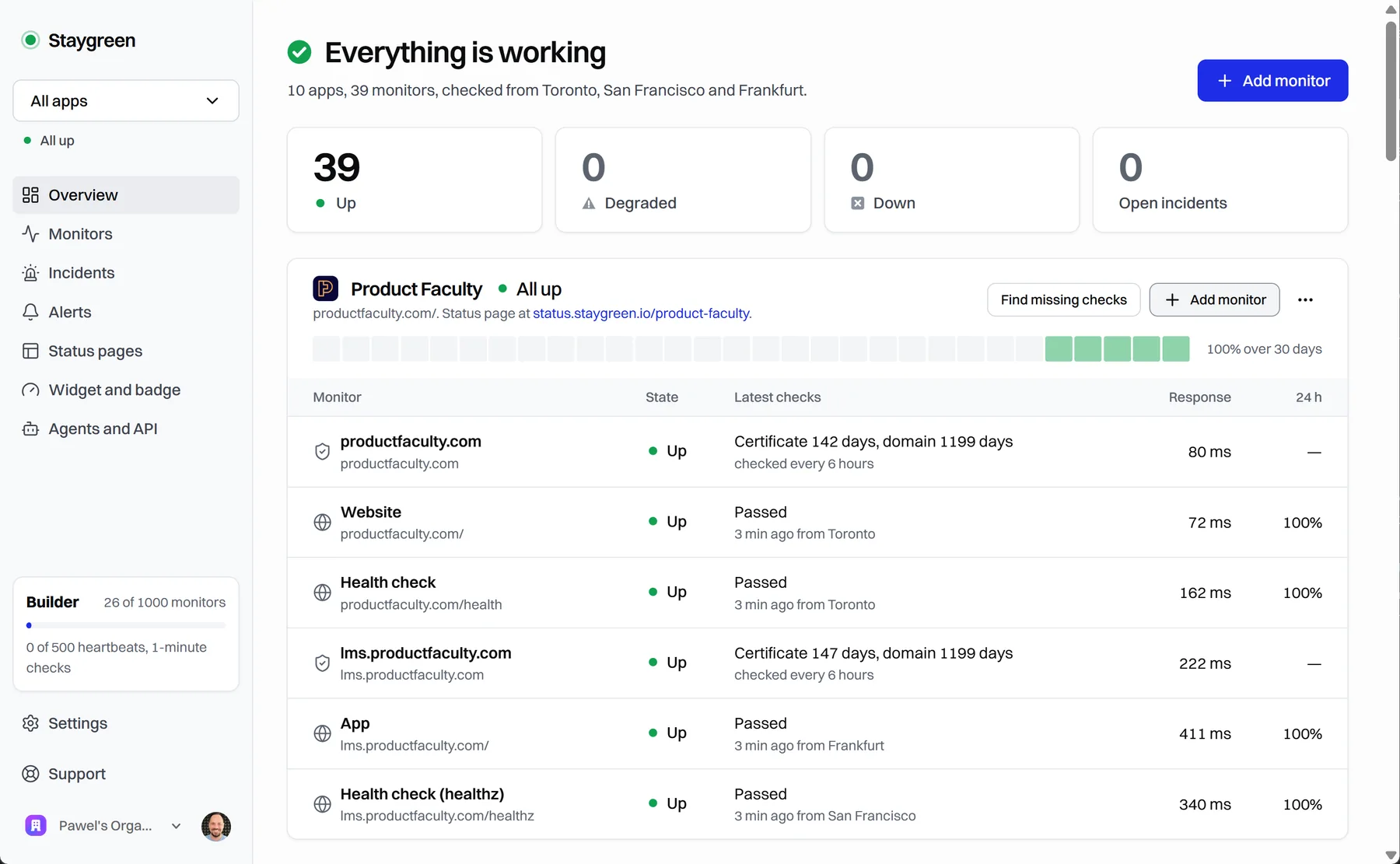
This repository holds Staygreen's source under the Functional Source License, Version 1.1, MIT Future License (FSL-1.1-MIT): the dashboard, the probes, the status edge, the Workers, the widget and the agent API, with the staygreen command-line package in packages/staygreen/. You may use, change and redistribute it for any purpose except offering a competing commercial product or service, and each version becomes MIT two years after it is published. It is also Staygreen's public issue tracker.
It is a reviewed, one-way copy of the private working repository, refreshed after each release. Staygreen is not accepting pull requests or outside contributions at the moment; issues are welcome through the templates, and security problems go to private vulnerability reporting.
Connect an agent (MCP)
Staygreen's MCP server is at https://staygreen.io/mcp (streamable HTTP). Every call requires sign-in; there is no anonymous tool.
Sign in: no token to handle
Add https://staygreen.io/mcp to an MCP client that supports signing in (OAuth), then sign in with your Staygreen account and choose the workspace. If you don't have an account yet, signing up there creates a Free workspace; you don't need to open the dashboard first. The connection can read and change that workspace's monitors, and you must be an administrator of it.


Claude Code:
claude mcp add --transport http staygreen https://staygreen.io/mcp
Then run /mcp, choose staygreen and Authenticate. In Claude, add it as a custom connector with the same URL.
With an API token (CI and scripts)
An administrator creates a token in the dashboard under Agents and API: read-only or read-and-write, shown once. Send it as Authorization: Bearer <token>. The same token works on the MCP server and on the REST API (https://staygreen.io/api/v1/<tool>).
claude mcp add --transport http staygreen https://staygreen.io/mcp \
  --header "Authorization: Bearer $STAYGREEN_API_TOKEN"
Local server (npm)
The staygreen package runs the same tools as a local stdio server and calls the REST API with a workspace API token. Node 22 or later.
claude mcp add staygreen -e STAYGREEN_API_TOKEN=… -- npx -y staygreen mcp
Without a token only scan_app works. Configuration for Claude Desktop, Cursor and VS Code, and the package's scan and provision commands, are in CLI.md.
Tools
| Tool | What it does |
|---|---|
get_status | Current status of one app or every app: monitors, page components and open incidents |
list_monitors | Monitors in your workspace, filtered by app, type or state, with each one's last check |
get_uptime | Measured uptime, downtime minutes, incident counts and daily history. Unmeasured time is no data, not 100% |
get_response_times | Response-time series for a monitor, by city and country |
get_incidents | Incident evidence and timelines: failing assertions, locations and masked snippets |
get_ssl_and_domain_expiry | Certificate and domain expiry dates for monitored hosts |
scan_app | A one-time scan of a public app URL. Optional keys are used once and never stored. Creates nothing |
provision_app | Sets up an app's website check, SSL and domain check, status page and cron heartbeats in one call |
create_monitor | Adds one monitor to an app, with the dashboard's own checks and plan limits |
pause | Pauses one monitor or one app's monitors for up to 24 hours, then resumes them |
draft_incident_update | Saves an incident note as a draft. It appears publicly only once you publish it in the dashboard |
Writes take a request_id UUID: repeat it with the same inputs to retry safely. Deleting, alert channels, teammates, billing and publishing are not available to agents. Calls share your workspace's budget: 30 a minute on Free, 120 on Builder.
Report a bug or suggest a feature
Open an issue. Say what you did, what you expected, and what happened instead; the monitor type and the screen help.
Issues are public. Never paste a secret, service-role or restricted key, a token, a webhook or heartbeat URL, a signing secret or a header value, whether Staygreen issued it or another service did. If you posted one, treat it as leaked: make sure the old value stops working wherever it is accepted, because issuing a new one doesn't always retire it; see staygreen.io/support if you're not sure how.
For a security problem, don't open an issue: use private vulnerability reporting instead. For anything else private, see staygreen.io/support.
Run it yourself
Staygreen is several services, not a one-click app, but a coding agent with your providers' API tokens can do most of an installation. You may run a copy for your own organizations; the license rules out offering it to others as a competing commercial product or service.
| Layout | What runs where | Good for |
|---|---|---|
| Recommended | The dashboard on Netlify, the database on Supabase, sign-in on Clerk, two probe VMs in different regions (one also runs the status edge), and three Cloudflare Workers for heartbeats, alerts and the watchdog | Monitoring you rely on: an HTTP, TCP or service check that fails is confirmed from a second location before an incident opens |
| Smallest | One VM running the dashboard, one probe and the status edge, with Supabase, Clerk and the three Workers as above | Trying it, or watching a few apps where an occasional false alarm is acceptable |
- Deploying: what you need, suggested resources and their monthly cost, the smallest installation, setting it up with an agent, and the setup order.
- Sample configurations: the probe's and the status edge's service units, variables and Caddyfile, and the alert sender's and watchdog's Wrangler configurations.
- The environment reference and the architecture.
The product is at the repository root; the standalone npm package is in packages/staygreen/. Root server.json and glama.json retain the hosted MCP and npm listing identities.
Development
Use Node 22 or later. From the root run npm ci, npm run typecheck, and npm run test:unit. The unit tests use fakes and require neither database access nor credentials. Run npm ci, npm run typecheck, npm run build, and npm test inside packages/staygreen/ for the standalone CLI.
The export check skips integration tests (Postgres and Supabase credentials), browser tests (a configured app, Playwright browsers, and Clerk development accounts), live network tests, and go-live acceptance. Private operator/export tests do not ship; their omitted paths are recorded in deploying. A passing offline check does not verify a deployment or sign-in.
For the app, create your own local .env from .env.example, fill the required app variables, then run npm run dev. npm run build also validates configuration; the offline export check runs TypeScript and unit tests, not an unconfigured Next production build. Review the legal pages, branding, service URLs and plan copy before serving your own deployment.
The opt-in tests/unit/rdap-live.test.ts network cases are skipped in offline unit runs. The package symlink test can also skip on Windows when symlink creation is unavailable.