openEuler MCP Servers
Коллекция MCP-серверов, предназначенная для улучшения взаимодействия с операционной системой openEuler.
Документация
openEuler MCP Servers仓库,欢迎大家贡献
简体中文 | English
openEuler MCP Servers 仓库




介绍
MCP是Model Context Protocol的缩写,旨在提供一个通用的大模型上下文协议,用来调用各种应用,拓展大模型能力,openEuler的mcp-servers仓库用来存放各种MCP Server,聚焦于操作系统领域,结合Devstation,EulerCopilot改善openEuler交互体验
软件架构
仓库目录带一个doc目录,用来存放整体的各类文档介绍,之后servers每个文件夹为一个独立的MCP Server
mcp-servers/
├── servers
│   ├── oeDeploys/
│   │   ├── mcp_config.json
│   │   ├── mcp-rpm.yaml
│   │   └── src/
│   │       ├── icon.png
│   │       ├── mcp-oedp.py
│   │       ├── readme.md
│   │       └── requirements.txt
│   ├── oeGitExt/
│   └── xxxxx/
├── scripts/
└── doc/
以oeDeploy为例,每个server顶层需要包含以下几个内容:
1、MCP配置文件 - 包含MCP Server的配置信息
2、部署配置文件 - 包含其他相关配置文件
3、源码目录 - 包含MCP Server的具体实现代码和相关资源文件
其中doc中的 MCP描述文档 给出了 MCP Servers 的描述建议,用于提升MCP Servers的易用性
使用说明
1、使用常用的MCP客户端完成配置如EulerCopilot,Roo Code,Cline等等
2、将MCP Server的配置文件写入到MCP客户端
使用yum自动安装(推荐):
openEuler社区会将每个MCP Server构建为一个个RPM包,用户直接yum install安装即可使用,即将上线
快速开始:如何使用MCP Python-SDK编写一个自己的MCP Server服务器
MCP环境搭建
1、安装 uv Python管理工具
yum install -y uv
2、安装MCP
yum install -y python3-mcp
实战编码
1、挑选一个小工具oegitext
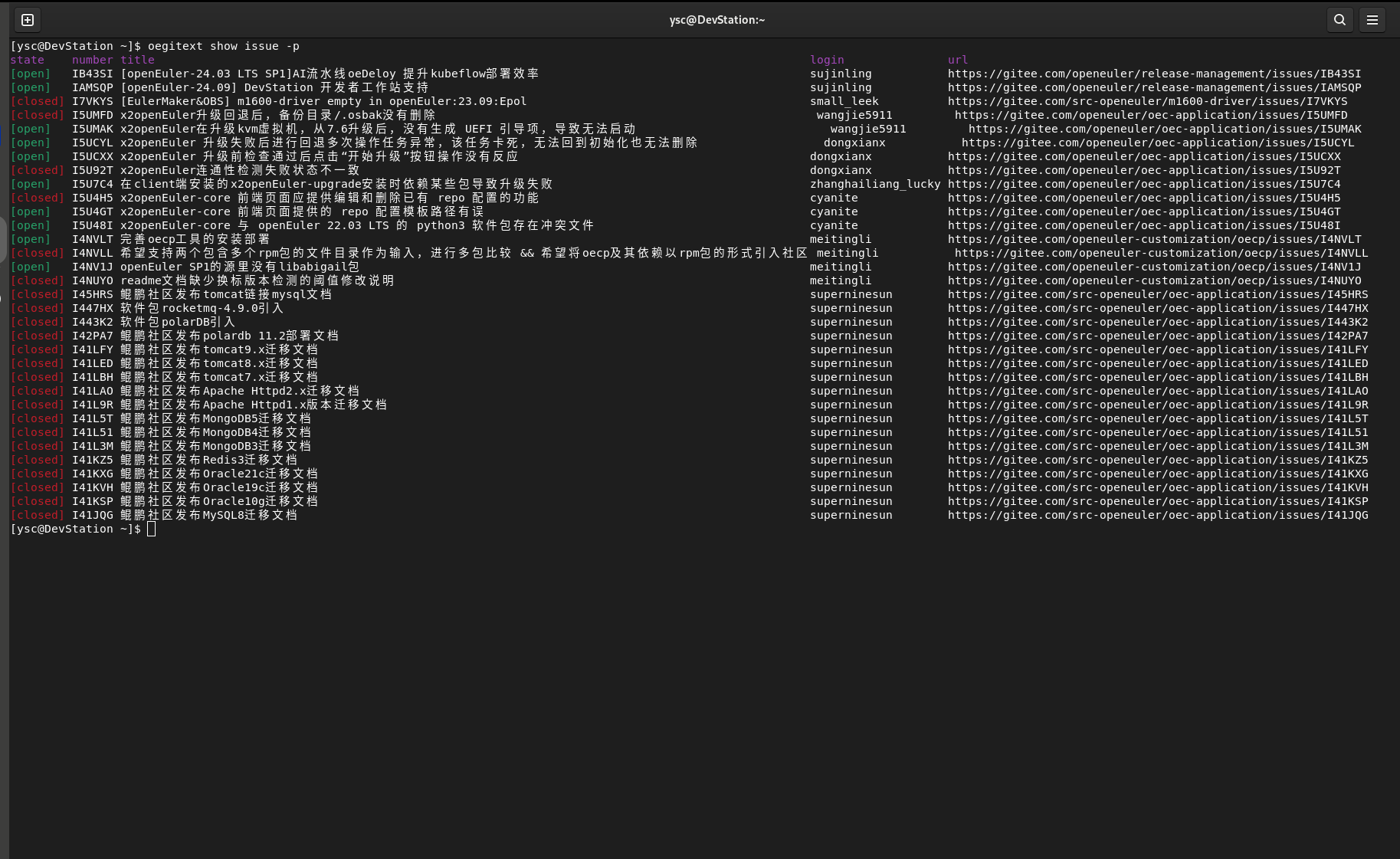
oegitext是一个用来和gitee交互的小工具,可以用来查询在gitee上面的一些仓库和issue,查询一些PR信息:
该工具在DevStation上预安装,如果没有安装,可以在配置openEuler-25.03 EPOL仓库后使用 yum install oegitext安装
安装完成之后,使用如下命令配置gitee令牌:
oegitext config -token ${access_token}
之后使用oegitext show issue -p查询当前issue:
2、使用python-sdk进行一个改造
在上面使用uv创建的虚拟环境中,新建一个oegitext_mcp.py文件 下面是代码的一个简单示例:
import subprocess
from mcp.server.fastmcp import FastMCP

mcp = FastMCP("查找openEuler社区的issue")

@mcp.tool()
def get_my_openeuler_issue() -> str:
    """统计我在openEuler社区所负责的issue"""
    try:
        # 执行oegitext命令并解析结果
        result = subprocess.check_output(['oegitext', 'show', 'issue', '-p'],
                                        text=True,
                                        stderr=subprocess.STDOUT)

        return result
    except subprocess.CalledProcessError as e:
        return e
    except Exception as e:
        return e

if __name__ == "__main__":
    # Initialize
    mcp.run()
3、openEuler MCP环境搭建
打开DevStation预安装的vscodium软件,在插件市场里安装Roo Code(后续也可以使用EulerCopilot实现) 在设置当中配置大模型,我们使用的是DeepSeeK V3的API:
API提供商:OpenAI Compatible
OpenAI基础URL:https://api.siliconflow.cn
密钥:对应的密钥
模型:Pro/deepseek-ai/DeepSeek-V3   #可以自己选择合适的模型
在Roo Code插件上方的选项卡里选择MCP服务器 点击编辑全局MCP
{
  "mcpServers": {
    "oegitext_mcp": {
      "command": "/usr/bin/uv",
      "args": [
        "--directory",
        "/home/xxx/oegitext_mcp",
        "run",
        "--python",
        "/usr/bin/python3",
        "oegitext_mcp.py"
      ],
      "disabled": false,
      "autoApprove": [],
      "alwaysAllow": []
    },
  }
}
上面的路径修改成正确的实际路径,之后保存,点击完成
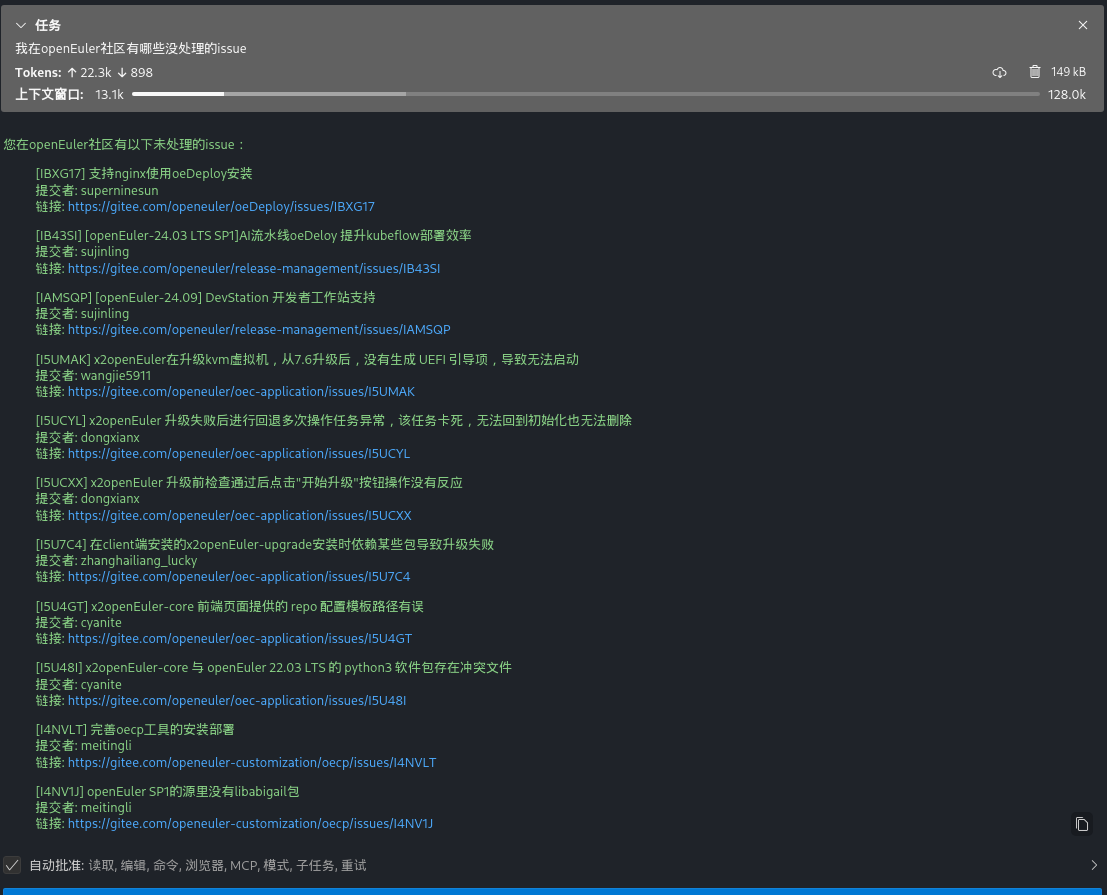
4、MCP Client调用效果