Garmin Nutrition
Питание от Pack4Back позволяет рассказать ChatGPT или Claude, что вы съели, и записать это в Garmin Connect — для вас или для членов семьи, предоставивших доступ.
Размещённый MCP-сервер
npx add-mcp 'https://nutrition.pack4back.com/mcp'Устанавливается в Claude Code, Codex, Cursor и другие
Документация
Log meals from chat. Keep Garmin in charge.
Nutrition by Pack4Back lets you tell ChatGPT or Claude what you ate and write it to Garmin Connect — for you, or for family members who have granted access.
1,026 people tracking meals
Create a Nutrition account Connect Claude or ChatGPT See how it works
Chat first
Connect Claude or ChatGPT with the steps below. Account and Garmin happen in the Connect window. No terminal, no API key.
Consent, not aliases
Family sharing is granted on this site. A model cannot invite Vasya. You can revoke access or delete your account at any time.
Garmin stays Garmin
We use a session to write meals. Garmin email and password login is a temporary workaround while we wait for official Garmin API approval. Passwords are not stored. This is not an official Garmin product.
Connect in under a minute
Add the MCP connector in Claude or ChatGPT. On first Connect you create a Nutrition account, then connect Garmin — meals are written to Garmin Connect+, not stored as a separate food log here.
- Open Claude (web or desktop) and click Customize in the top-left corner.
- Click Connectors.
- Click +, then Add custom connector.
- Give it a name, for example Garmin Nutrition.
- Paste this URL into the Remote MCP server URL field:
https://nutrition.pack4back.com/mcpCopy - Click Add.
- Click Connect — Nutrition login opens. Continue with Google, Facebook, or email. If Garmin is not connected yet, enter your Garmin Connect email and password (temporary until official API approval), then Allow.
- Done. It works right away and shows up in Claude on iOS and Android. Meals are written to Garmin Connect+.
Works on every Claude plan. The free plan allows one connected MCP server at a time.
- Open ChatGPT on the web → Settings → Apps. If you do not see Create, turn on Developer mode in Advanced settings.
- Click Create app (or add a connector).
- Name: Garmin Nutrition.
- For Connection, paste this server URL:
https://nutrition.pack4back.com/mcpCopy - Authentication: OAuth. Leave Advanced OAuth closed.
- Check I understand and want to continue.
- Click Create, then sign in — Nutrition login, Garmin Connect if needed, then Allow.
- Done. The connector also appears in the ChatGPT iOS and Android apps. Meals land in Garmin Connect+.
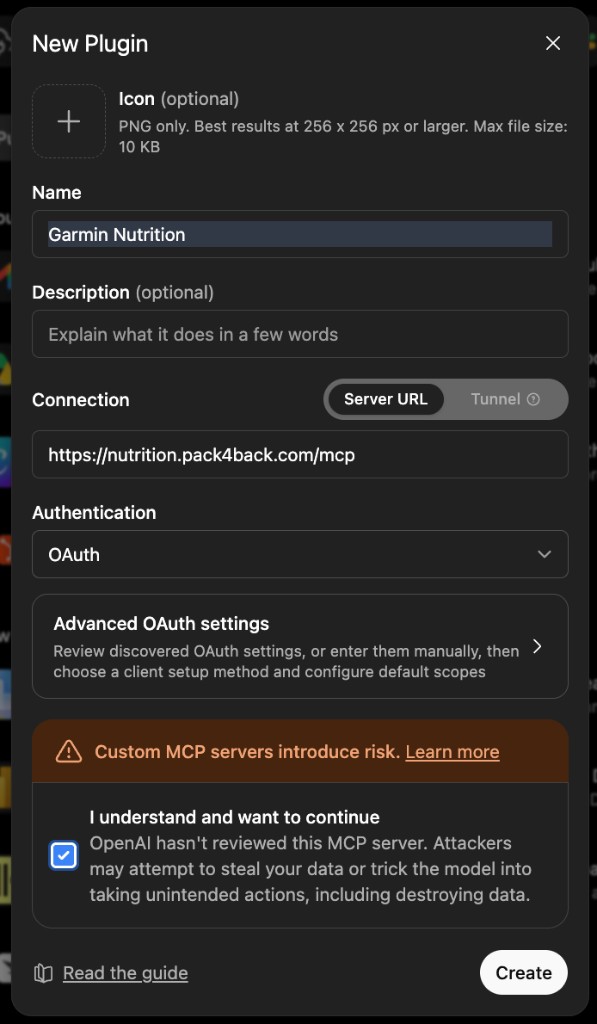 Open the ChatGPT New Plugin screenshot
Basic settings are enough. Do not fill Advanced OAuth.
Add this config to Cursor, VS Code, Claude Code, and similar MCP clients. Windsurf uses serverUrl instead of url.
{
  "mcpServers": {
    "nutrition": {
      "url": "https://nutrition.pack4back.com/mcp"
    }
  }
}
In Claude Code: claude mcp add --transport http nutrition https://nutrition.pack4back.com/mcp
The client opens Nutrition login. Connect Garmin there if you have not already, then Allow. Gemini’s consumer chat cannot add a remote MCP connector today.
Claude connector deep link · Full walkthrough
A Pack4Back product
Gear, trips, and packing live on pack4back.com. Nutrition is a dedicated host with its own login so Garmin credentials and meal grants stay isolated.
We always keep a short MCP log (which tool ran, destination, success or error type) and per-user call/error counts to operate the service. Optional: you may also let us store the meal prompt text and photos ChatGPT or Claude send us, to improve Nutrition. That extra consent is off by default and can be changed in Settings.
For supporters
Nutrition is free. If it helps you log meals, you can buy a coffee for the maintainer.
Not medical advice. Estimates can be wrong. See the disclaimer and privacy policy.