Ambient Context MCP
Локальное приложение в системном трее Windows, которое предоставляет конфиденциально классифицированный фоновый контекст — присутствие, активное приложение, заряд батареи, питание, нагрузку на систему — в виде MCP-инструментов.
Документация
Ambient Context MCP





en | ja
Windows のローカル ambient context (在席状態、フォアグラウンドアプリ種別、バッテリ、電源イベント、システム負荷、長時間作業の検知など) を、プライバシー分類された MCP ツールとして任意の AI クライアント (Claude Code、Claude Desktop 等) に公開するトレイ常駐プロセスです。
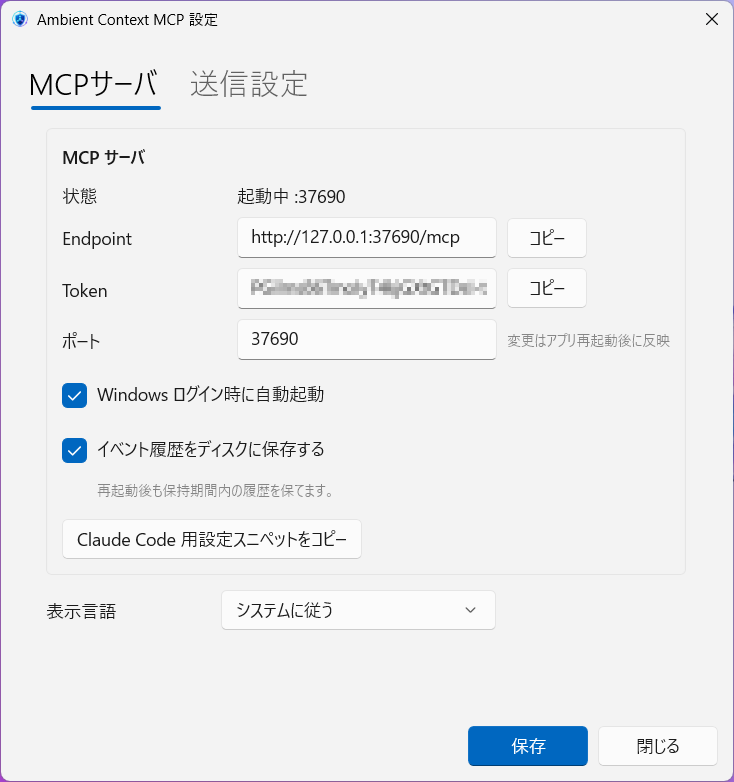
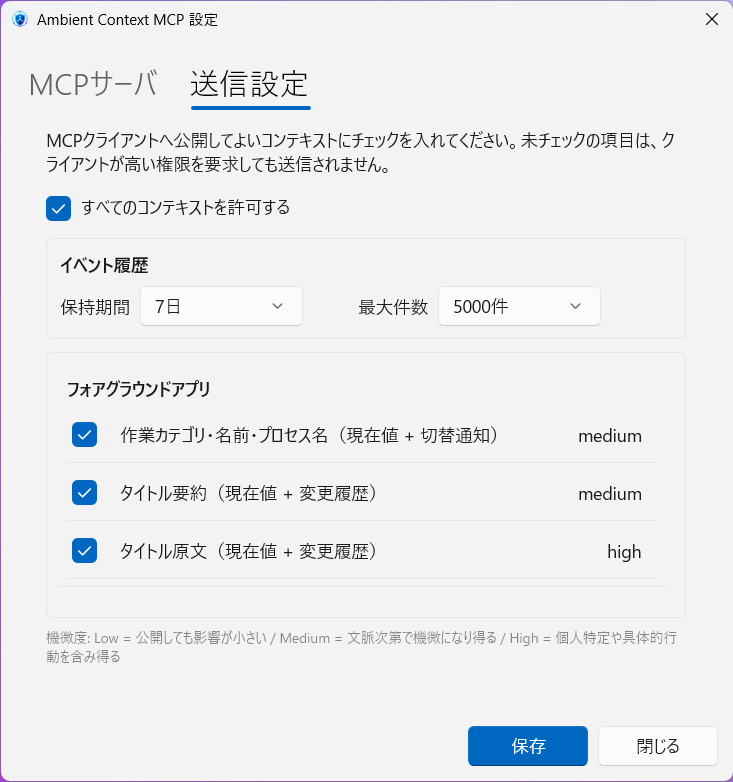
特徴
- ローカル完結: 127.0.0.1 のみで待ち受け、外部送信は一切なし
- 既定 OFF: 機微度 medium / high の情報は明示的に opt-in しない限り送信されない
- 小さいフットプリント: タスクトレイ常駐の単一プロセス
- MCP Streamable HTTP:
http://127.0.0.1:37690/mcpで公開、Bearer トークン必須 - プライバシー診断ツール:
ambient_context_get_policyで「なぜこの値が出力されないか」をクライアントから自己診断可能
公開する 4 ツール
| ツール | 説明 |
|---|---|
ambient_context_get_states | 現在のコンテキスト状態 (presence, battery, フォアグラウンドアプリ種別 等) |
ambient_context_poll_events | クライアント別カーソル以降の未読イベント (user_returned, ac_power_connected 等) |
ambient_context_describe_events | 全イベントの payload スキーマカタログ (sensitivity / 説明 / 例値、実データは含まない) |
ambient_context_get_policy | 機微度分類と有効送信可否の診断情報 (実データは含まない) |
クイックスタート
A. Claude Desktop (MCPB バンドル)
Releases から ambient-context-mcp-vX.Y.Z.mcpb をダウンロードし、Claude Desktop の設定 → 拡張機能 からインストールしてください。インストール後、Claude Desktop が tray を自動 spawn してツールが使えるようになります。
tray は単一 LocalContextHub を保つために 1 プロセスのみ常駐します。MCPB はトレイ未起動時のみ spawn し、起動済みなら既存の tray にぶら下がります。
B. Claude Code / その他クライアント (Streamable HTTP)
アーカイブ版 (ambient-context-mcp-vX.Y.Z-win-x64.zip) を展開し、ambient-mcp.exe を実行してください。
- アプリ起動 → タスクトレイに
[●] Ambient Context MCP — :37690が表示 - トレイクリック → 設定ダイアログが開く
- 「送信設定」タブで公開して構わない context にチェック → 保存
- トレイメニュー → 「Claude Code 用設定をコピー」
- 任意のターミナルでペースト
claude mcp add ambient-context \
  --transport http http://127.0.0.1:37690/mcp \
  --header "Authorization: Bearer <TOKEN>"
- Claude Code から
ambient_context_get_statesなどが呼べます
ドキュメント
- docs/tool-spec.md - MCP ツール契約 (Input/Output、scope、認証)
- docs/privacy-classifications.md - 既定送信ポリシー一覧
- docs/client-config.md - Claude Code/Desktop 設定例
- docs/windows-implementation.md - Windows 固有の実装メモ
必要環境
- Windows 10 version 2004 (10.0.19041, May 2020 Update) 以降
- .NET 8 ランタイム + ASP.NET Core 8 ランタイム x64 (framework-dependent 配布版の場合)
- Windows App Runtime 1.8 x64 — 初回起動時に未導入なら案内され、ダウンロードページ へ誘導されます
ビルド
# 開発ビルド
dotnet build src\windows\AmbientContextMcp.sln

# リリース成果物 (zip + .mcpb の両方を出力)
pwsh tools\build-release.ps1                  # version は mcpb/manifest.json から
pwsh tools\build-release.ps1 -Version 0.4.0   # 明示指定
pwsh tools\build-release.ps1 -SkipZip         # mcpb のみ
pwsh tools\build-release.ps1 -SkipMcpb        # zip のみ
mcpb validate を有効にするには npm i -g @anthropic-ai/mcpb を先に入れてください。未インストール時は Compress-Archive フォールバックで .mcpb を作ります (manifest 検証はスキップ)。
ファイル配置
%LOCALAPPDATA%\AmbientContextMcp\
├── settings.json          # ユーザー設定 (送信オプトイン、ポート、トークン)
├── ambient-context.json   # 直近 snapshot のローカルキャッシュ (デバッグ用)
├── events.jsonl           # イベント履歴 (永続化を有効にした場合のみ)
└── mcp-api.json           # 起動中 MCP の discovery 情報 (終了時に削除)