Layro MCP
Предоставьте AI-агентам кодинга доступ к production-ready React UI-компонентам, блокам дашбордов и шаблонам от Layro, чтобы быстрее создавать консистентные интерфейсы с меньшим количеством ручных исправлений.
Размещённый MCP-сервер
npx add-mcp 'https://layropro.com/api/mcp'Устанавливается в Claude Code, Codex, Cursor и другие
Документация
Stop prompting AI to rebuild your UI.
Give Claude Code, Cursor and other AI coding tools access to reusable React UI components through Layro MCP. Spend less time recreating common UI patterns and fixing repetitive interface details, and more time building your product.
Free components with full source. A free account, no card.
Waiting for your AI tool
Waiting for your AI tool
Waiting for your AI tool
Layro MCP connected
layro·search_components("billing")
→ 9 components found
layro·get_component_code("plan-picker")
→ installed Plan Picker
layro·get_component_code("invoice-history")
→ installed Invoice History
Done. Both components are in components/ui, wired into the page, light and dark.
1 prompt · 0 fix-up roundsReady to ship
Waiting for your AI tool
Waiting for your AI tool
Waiting for your AI tool
Why Layro
Stop paying credits to fix UI.
Building a product with Claude Code, Cursor or Codex? Each screen usually costs 1 to 2 hours of prompting, tweaking and rebuilding, and up to 6× the credits it should. With Layro MCP your agent calls a ready-made, well-designed component and puts it straight into your product.
Credit calculator
Calculate what you save.
Every “fix the spacing”, “wrong colour”, “smaller heading” is another agent round, and another round of credits. With Layro MCP your agent starts from a finished component.
30
5150
6 rounds
Spacing, colour, type, states, dark mode…
2 rounds15 rounds
Model tier
Most everyday coding models · $3 / $15 per million tokens
What you spend in 30 days
Without Layro180 rounds$25.65 · 12 h
With Layro MCP30 rounds$4.28 · 2.0 h
You save in 30 days
$21.37
Time saved
10 h
Tokens saved in 30 days
5.6M
Layro Lifetime
$149 once
Estimate only. Assumes about 35K tokens in and 2.5K out per agent round at typical API rates for the tier, and 4 minutes a round. On Cursor, Copilot or a Claude plan, the same tokens come out of your usage limits.
Prompting UI from scratch
- 1Prompt the screen
- 2Fix the spacing
- 3Fix the colours and type
- 4Add hover, focus, loading states
- 5Make dark mode work
- 6Fix what that broke
About 6 rounds and 1 to 2 hours per screen
With Layro MCP
- 1Ask for the screen
- 2Your agent calls Layro MCP
- 3A finished component lands in your code
1 round, the component arrives finished
Layro MCP
How Layro works with your AI tool New
Connect once. Claude Code, Cursor, VS Code, Codex and other MCP tools can then search every Layro component, read its props and install the right one into your project, instead of writing it from scratch.
1 · Connect once
claude mcp add --transport http layro https://layropro.com/api/mcp
2 · Ask for what you need
Build a billing page with Layro components.
Claude CodeCursorVS CodeCodexWindsurfGemini CLIAntigravity
In your AI tool
New
- YouAdd a date range picker to the settings page.
- MCPsearch_components("date range picker") → date-picker
- MCPget_installation(date-picker) → npx shadcn@latest add …/r/date-picker
- AIInstalled Layro's Date Picker in components/ui and wired it to your form, range mode on.
All 112 components, with props, packages and usage. Free ones need a free account's token; Pro ones need lifetime access.
Components
Every product screen, already built.
Production-ready React and Tailwind UI components for AI chat, agents, dashboards, tables, billing, permissions, and more. Accessible, light and dark, and ready to paste.
[
AI Chat12 components
A chat window, streaming answers, prompt box and conversation history.
](https://layropro.com/components/category/ai-chat)[
AI Agent15 components
Run status, plans, tool calls, approvals, history and a full agent workspace.
](https://layropro.com/components/category/ai-agent)[
Data Tables4 components
Editable cells, filter builder, saved views and CSV import.
](https://layropro.com/components/category/data-tables)[
Documents10 components
Viewers, signing flows, audit trails and version history.
](https://layropro.com/components/category/documents)[
Workspace10 components
Members, roles, permissions and access requests.
](https://layropro.com/components/category/workspace)[
Billing9 components
Plans, invoices, payment methods and usage.
](https://layropro.com/components/category/billing)[
Productivity2 components
A kanban board and a notification panel.
](https://layropro.com/components/category/productivity)[
Data & feedback8 components
Tables, charts, badges and the states between them.
](https://layropro.com/components/category/data-and-feedback)[
Forms13 components
Fields, inputs, selects and pickers on one control scale.
](https://layropro.com/components/category/forms)[
Overlays7 components
Dialogs, drawers, popovers, menus and a command palette.
](https://layropro.com/components/category/overlays)[
Auth3 components
Sign in, sign up, one-time codes and password strength.
](https://layropro.com/components/category/auth)
Templates
Complete applications, ready to make yours.
Production-ready React and Next.js templates for dashboards, SaaS products, and modern web applications. Open the live demo before you buy.
 Open the demo
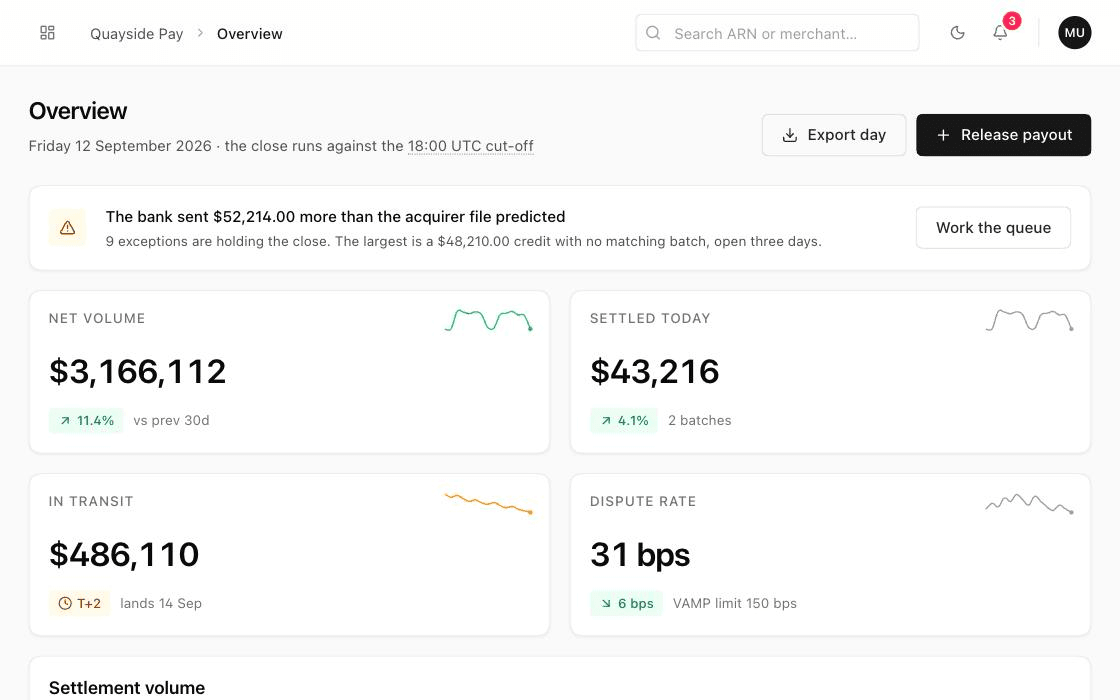
Settle — Payment Operations
Template · 8 screens
Included
Eight screens for the team that closes the day: settlement, reconciliation, payouts and disputes.
How it works
From prompt to production in three steps.
Through your AI tool or by hand. No wrappers and no runtime: just the source in your repository, ready to edit.
-
Ask or install
Tell your AI tool which component you want, or run one command yourself. The shadcn CLI writes the file into your project and installs what it needs.npx shadcn@latest add @layro/data-table -
Compose
One file, typed props, your theme's colours. Your agent reads the props and wires your data; you restyle it with Tailwind like any code you wrote.<DataTable columns={columns} data={rows} /> -
Ship
Keyboard support, screen-reader labels, light and dark are already done. Nothing phones home.npm run build
Pricing
Start free. Pay once for all of it.
62 components are free with an account, so you can judge Layro in your own project first. Pro is one payment for all 112 components at once, every template and each future release.
Free
$0
62 components, free with an account.
Start here:
- 62 components with their full source
- Copy or install as many as you like
- Try every preview, any time
- A free account, no card
- Install with the shadcn CLI, or copy the file
- The same code quality, states and accessibility as Pro
What you get:
- All 112 components: the 62 free ones and 50 Pro
- The Settle template, and every one after it
- Everything open at once, with no daily limit
- Lifetime access to all components and upcoming updates
- One command to install with the shadcn CLI
- Built for AI coding tools: Claude Code, Cursor, Codex and more
- Support by email from the person who wrote the code
- Built with React, TypeScript and Tailwind CSS v4
No subscription. Payment and tax are handled by Lemon Squeezy.
FAQ
Frequently asked questions
Everything worth knowing before you buy.
(01)What do I get when I buy?
Every component on this site with its source, every template, and everything released after you buy. You sign in, pay once, and your account is unlocked: copy the code from any component page, install it with the shadcn CLI, or download the files.
(02)What is free, and what is Pro?
62 components are free, with their full source. Anyone can try the previews; to see the code, copy, download or install one, sign in with a free account. Pro is one payment for all 112: the other 50 components (the AI agent, data table, documents, billing and workspace sets), every template, and everything released later.
(03)Who is it for?
Developers who build with AI coding tools such as Claude Code, Cursor, Codex, Windsurf or GitHub Copilot, and want every screen the tool produces to look and behave like one product. Indie hackers and small teams shipping a SaaS, an AI product or an internal tool use it the same way.
(04)Do I need an AI tool to use Layro?
No. Every component is plain React and TypeScript source in your own repository. Install it with one command or copy the file, and edit it like code you wrote. It is designed so that an AI tool uses it well, not so that it needs one.
(05)What kind of apps can I build?
Anything in React with Tailwind CSS v4: Next.js, Vite, Remix. Use the components in unlimited personal and commercial projects, including client work. The one thing you may not do is resell or republish the source itself.
(06)Is this a subscription?
No. It is one payment. There is nothing to renew and nothing to cancel, and the code you have taken stays yours.
(07)Do the components work with Claude Code, Cursor and other AI agents?
Yes, that is what they are built for. Every component is one self-contained file with typed props and documented states, so an agent can read it and place it without guessing. Each page has a Copy prompt button with the install command, the props and the mistakes assistants usually make, and the registry installs any component by name.
(08)Do you offer refunds?
No. Source code cannot be returned once it is downloaded, so all sales are final. 62 components are free with their full source, and every paid one has a live preview, so you can try before you pay. If you are charged twice or cannot get access, we put it right.
(09)How do I get help?
Write to layropro26@gmail.com. One person builds Layro and answers the mail, so a reply can take a day, but it comes from the person who wrote the code.