Unreal-MCP
Открытый MCP-сервер для подключения AI-агентов к Unreal Engine 5.7, редактору и рантайму (плагин на C++ + .NET sidecar).
Документация










Unreal MCP (AI Game Developer for Unreal) connects any MCP-aware AI agent to the Unreal Editor. Ask in plain words and the agent spawns actors, edits levels, authors and compiles Blueprints, edits and compiles C++, manages assets and checks its work with screenshots. It is the Unreal sibling of Unity-MCP and Godot-MCP, and uses the same cloud backend (ai-game.dev) or your own GameDev-MCP-Server.
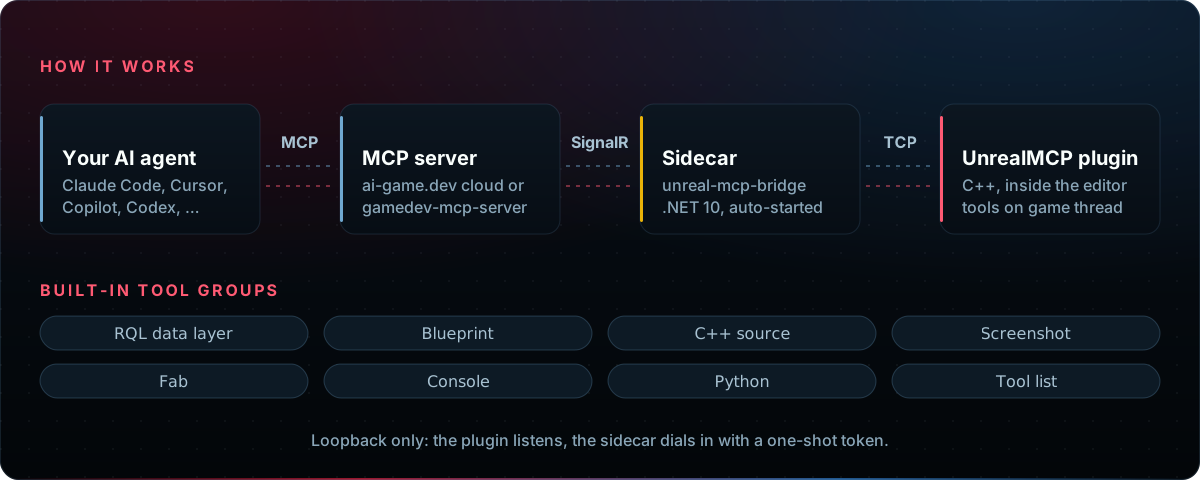
Unreal's editor is C++, so the .NET MCP host runs next to it as a small sidecar (unreal-mcp-bridge) that the plugin starts, watches and restarts for you. Design details: docs/ARCHITECTURE.md.
Status: latest release (plugin, sidecar and CLI share one version) · Unreal Engine 5.5–5.8 · sidecar builds for Windows x64, macOS (Intel and Apple silicon) and Linux x64 · each release is tested on Windows (UE 5.5–5.8) and macOS (UE 5.7, 5.8) · available on Fab and GitHub Releases.
Features
✅ C++ authoring — scaffold classes, edit source, compile; errors come back as file, line, severity
✅ Blueprints — create, edit and compile, with structured errors the agent can fix
✅ RQL data layer — query and change actors, assets and levels in one language (RQL)
✅ Visual feedback — viewport, game-view, camera and isolated-actor screenshots
✅ Python — run editor Python with the full unreal API
✅ Fab — search Fab, list your library, add owned content
✅ Extensions — GAS, Niagara, PCG, Landscape, Control Rig, Enhanced Input, Mesh Terrain (experimental)
✅ Your own tools — add tools, prompts and resources from any plugin (guide)
✅ Runtime mode — opt in to drive a running game (docs/RUNTIME.md)
✅ Cloud or local — ai-game.dev out of the box, or a self-hosted gamedev-mcp-server
Coverage: the agent can do virtually anything you can do in the Unreal Editor. Tool groups: the RQL data layer, Blueprints, C++ source, screenshots, Fab, the console, editor Python and the tool list, plus the extensions. Every tool: docs/TOOLS.md.
Efficiency: the tools are compact by design, so the agent needs fewer calls and fewer tokens per task and works faster and cheaper. For the RQL data layer this is measured in RQL's own evaluation (a sandbox game world, same tasks, model and grader): RQL needed about 9–18× fewer tool calls and 17–19× fewer tokens per task than conventional find / dump-as-JSON / set reflection tools (results).
What you can ask
| Ask your agent | Tools it uses |
|---|---|
"Add an AHealthPickup actor class in C++, compile it and fix any errors" | source-create-class, source-update, source-compile |
| "Make a door Blueprint that opens on overlap, compile it, place it in the level" | blueprint-* |
| "Count the trees in this level and move every point light 1 m up" | rql-query, rql-mutate |
| "Take a screenshot from the player camera and check the lighting" | screenshot-* |
| "Find a free rock pack on Fab and add it to the project" | fab-search, fab-add |
| "Batch-rename the selected assets with a Python script" | python-execute |
C++ is a first-class loop. source-compile builds with Live Coding when it is active, else UnrealBuildTool, and returns every diagnostic with its file, line and severity, so the agent fixes errors without reading the build log. It says when a change needs a full build and an editor restart (new classes, changed UCLASS / UPROPERTY / UFUNCTION declarations). File operations stay inside <Project>/Source/. From a terminal, unreal-mcp-cli compile prints file:line:col diagnostics without an editor.
RQL is learned from the editor itself: rql-schema lists every source, type and member, and the unreal-rql skill teaches the syntax with recipes (unreal-mcp-cli setup-skills writes it for your agent).
Requirements
- Unreal Engine 5.5 – 5.8 (the release pipeline validates each of them).
- A C++ project, because the plugin ships as source and Unreal compiles its modules for your project with your platform's C++ toolchain. A Blueprint-only project becomes a C++ project in one step: in the editor, Tools → New C++ Class… and create any class. A new project:
unreal-mcp-cli create-project ./MyGamescaffolds a minimal C++ one. The Fab build needs no C++ project: the Epic Games Launcher installs it precompiled. - No .NET install. The MCP host is a self-contained .NET program (
unreal-mcp-bridge) bundled inside the plugin for your platform; the plugin starts and restarts it. (The Fab build has no executables: its Get bridge button opens the release page, and you extract the bridge into the plugin's bridge folder once.) Only building the bridge from source needs the .NET 9 SDK. - Node.js 22.14+, only for
unreal-mcp-cli(an npm package; 22.14 is its minimum Node version). - Windows or macOS (every release is tested on both). Linux x64: the sidecar is built and shipped, but no release test runs on Linux.
Quick start
1. Install the plugin, one of:
-
Fab (no terminal): add AI Game Developer to your engine, enable it under Edit → Plugins, open your project.
-
Two commands (Node.js 22.14+):
npx unreal-mcp-cli install-plugin ./MyGame   # plugin + bundled bridge into MyGame/Plugins
npx unreal-mcp-cli open ./MyGame             # build if needed and open the editor
2. Connect, in the editor: open Tools → AI Game Developer.
- Fab install only: install the
unreal-mcp-bridgesidecar once (the Fab build carries no executables): click Get bridge to open the release page, extract the zip for your platform into the folder Open bridge folder shows, then click Connect. - Cloud (default): click Authorize and approve the sign-in in your browser. Local: switch to Custom and click Start next to MCP server; the editor downloads the checksum-verified
gamedev-mcp-server(with a Fab install, install that server by hand: the log names the download). - Under AI agent, pick yours (Claude Code, Cursor, Codex, …) and click Configure.
3. Ask your agent: "Spawn three cubes in a row and a point light above them, then take a screenshot."
Local or Cloud? Both are fully supported; you can switch later. Cloud is the default because it needs no open ports and avoids port conflicts with other programs; the connection is free. Local runs without an account or internet access, for offline and air-gapped machines.
| Local | Cloud | |
|---|---|---|
| Account | none | ai-game.dev sign-in |
| MCP server | gamedev-mcp-server on your machine, started by the editor or by your agent | ai-game.dev relay |
| Traffic | stays on localhost | passes through ai-game.dev (what it logs) |
| Auth | none on loopback, or a shared token (one flag) | OAuth or a per-project key |
| Good for | offline and air-gapped work, CI, private projects | no open ports or port conflicts; one account across several projects and machines |
Everything from the terminal (CLI: Cloud, Local, token auth)
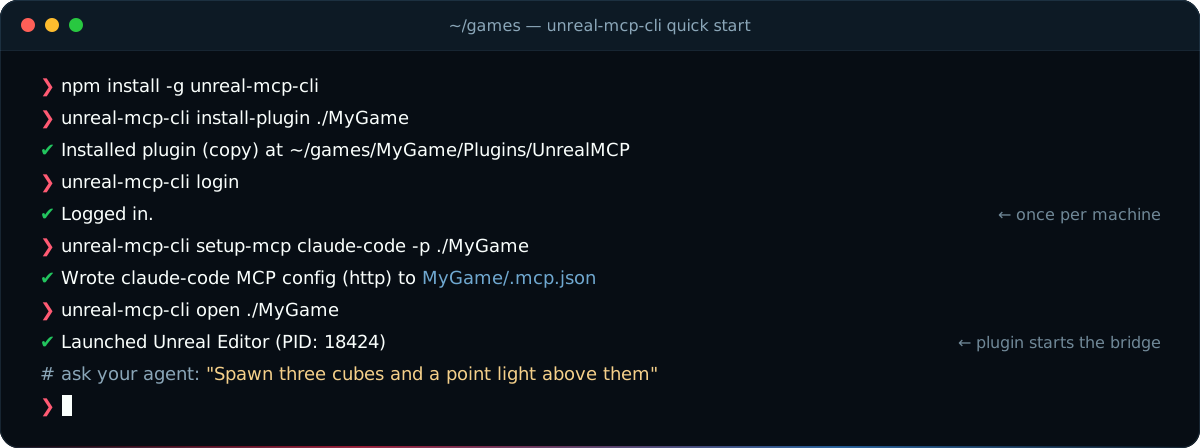
Cloud (the plugin's default mode):
npm install -g unreal-mcp-cli                       # or: npx unreal-mcp-cli@latest <command>

unreal-mcp-cli install-plugin ./MyGame              # copy the plugin (with its bridge) into MyGame/Plugins
unreal-mcp-cli login                                # sign in to ai-game.dev once per machine
unreal-mcp-cli setup-mcp claude-code -p ./MyGame    # write the agent's MCP config
unreal-mcp-cli open ./MyGame                        # build if needed and open the editor
Local (no account):
npm install -g unreal-mcp-cli
unreal-mcp-cli install-plugin ./MyGame
unreal-mcp-cli configure -p ./MyGame --mode Custom                 # plugin: local server
unreal-mcp-cli setup-mcp claude-code -p ./MyGame --transport stdio # agent starts it
unreal-mcp-cli open ./MyGame
setup-mcp --transport stdio downloads the checksum-verified gamedev-mcp-server release into the project and points the agent at it. Both sides use the same per-project port on localhost.
Turn on token auth (local): add the flags to the configure line, then run setup-mcp again; the plugin and the server then both require the secret.
unreal-mcp-cli configure -p ./MyGame --mode Custom --auth required --token <secret>
Why no auth is the local default: the server binds to loopback only and rejects requests from non-local browser origins, so only programs on your own machine can reach it. Use a token when you do not trust every program or user on that machine. The secret lands in the project's .env (gitignored by configure) and in the agent's config file, so keep that file out of version control.
What the cloud relay sees. In Cloud mode, tool calls pass through the ai-game.dev MCP relay. The relay is stateless: it routes tool calls between your AI client and the editor without inspecting or persisting their contents, and it does not collect your conversations, source code, project files, assets or scene data. It logs request metadata (client IP address, timestamp and duration, status code and request path, tool name, request and response size) and MCP event metadata (event type, timing, status, session identifiers, the tool, prompt or resource name, and error details). Request logs and MCP events are used primarily within a rolling 90-day window; the policy does not guarantee automatic deletion at a fixed age. Details: Privacy Policy.
install-plugin downloads the signed plugin source release that matches the CLI version.
Other ways to install:
- Fab-format zip: besides the Fab listing, each GitHub release also carries a Fab-format build (
unreal-mcp-plugin-fab-<version>.zip) without executables; with either, the window's Get bridge button walks you through installing the sidecar once. - Manual: copy
UnrealMCP/into<YourProject>/Plugins/UnrealMCP/. A source checkout has no bundled sidecar: rununreal-mcp-cli bootstrap-localor setUNREAL_MCP_BRIDGE_PATH.
Updating (unreal-mcp-cli update), connection modes, environment variables and troubleshooting: docs/CONFIGURATION.md.
Agent setup
unreal-mcp-cli setup-mcp <agent> -p ./MyGame writes the config for you (setup-mcp --list shows all supported agents). What it writes:
Claude Code: .mcp.json
unreal-mcp-cli setup-mcp claude-code -p ./MyGame
{
  "mcpServers": {
    "unreal-mcp": {
      "type": "http",
      "url": "https://ai-game.dev/mcp/p/<pin>",
      "headers": { "Authorization": "Bearer agd_pk_…" }
    }
  }
}
The <pin> routes to this project's editor. The header is this project's key when the machine is signed in; --oauth writes a URL-only config and the agent signs in itself. With --transport stdio the entry runs the local server instead: "command" is gamedev-mcp-server under <project>/Intermediate/UnrealMCP/server/, "args" set port=<port>, client-transport=stdio and authorization=none.
Cursor: .cursor/mcp.json
unreal-mcp-cli setup-mcp cursor -p ./MyGame
The same mcpServers → unreal-mcp entry as Claude Code: "type": "http" with the URL, or "type": "stdio" with command and args for the local server.
Codex: .codex/config.toml
unreal-mcp-cli setup-mcp codex -p ./MyGame
[mcp_servers.unreal-mcp]
enabled = true
url = "https://ai-game.dev/mcp/p/<pin>"
tool_timeout_sec = 300
startup_timeout_sec = 30
With a project key the section also carries http_headers with the Authorization header.
Usage
Most of the time you just talk to your agent. The CLI also calls the same tools directly, starting a headless editor when none is running:
# Query the level with RQL
unreal-mcp-cli rql -p ./MyGame 'actors | where Label starts-with "Tree" | count'

# Change it: set / call goes to rql-mutate (add --dry-run to preview)
unreal-mcp-cli rql -p ./MyGame 'editor | call SpawnActor("PointLight")'

# Run editor Python
unreal-mcp-cli exec -p ./MyGame "unreal.SystemLibrary.get_engine_version()"

# List every tool with its inputs, build C++ without the editor, run Automation tests
unreal-mcp-cli tools -p ./MyGame
unreal-mcp-cli compile ./MyGame
unreal-mcp-cli test ./MyGame
All commands and options: cli/docs/commands.md or unreal-mcp-cli commands.
Security
- Plugin ↔ sidecar: the plugin listens on a loopback TCP port; the sidecar dials it with a one-shot token sent over stdin (never on the command line, never logged).
- Local server:
gamedev-mcp-serverbinds to loopback by default and answers403to a request whoseOriginis not allowed (DNS-rebinding defense). On loopback the plugin starts it without authentication unless you choose a token (UNREAL_MCP_AUTH_OPTION,UNREAL_MCP_TOKEN). Server options: hosting and authentication. - Cloud: the agent signs in with OAuth or uses a per-project key you can replace with
setup-mcp --regenerate-key. The relay is stateless and does not persist tool-call contents; it records request and MCP event metadata (details). - What the tools can do: edit files under
<Project>/Source/, run console commands and editor Python, change any reflected property. - Controls over them:
- Whitelist (hard limit):
UNREAL_MCP_TOOLSserves only the listed tools; any other tool is neither listed nor callable. - Hide (soft): the Visible checkbox in the MCP Tools window removes a tool from
tools/list, but a client that calls it by name still runs it. - Bounded changes: C++ file tools stay inside
<Project>/Source/; anrql-mutatecall is all-or-nothing, one undo step, previewable withdry_run, and refused above 200 targets unless the call raisesmax_targets(up to 1000);python-executestops aftertimeout(30 s by default); every tool call has a time limit (UNREAL_MCP_TOOL_TIMEOUT, 5 min by default). - Not for the AI: the system tools (
ping, skill generation,editor-quit) are absent fromtools/list, andeditor-quitrefuses unless the CLI session's nonce matches. - Details: docs/TOOLS.md.
- Whitelist (hard limit):
- Runtime mode is off by default: a game never connects on its own. It needs the
bRuntimeMcpEnabledsetting (default off) and an explicitConnect()call, accepts only a loopback host unless you allow a remote one, and is refused in Shipping builds unless compiled in. Keep the plugin out of packaged games with aTargetDenyList(docs/RUNTIME.md).
Extensions
Extensions are optional plugins that extend RQL; they add no tools of their own.
unreal-mcp-cli install-extension com.ivanmurzak.unreal-ai-gas ./MyGame
| Extension | Adds | Requires |
|---|---|---|
| AI ControlRig | Procedural animation rigs and their Anim Blueprint wiring | ControlRig, RigVM, UE 5.7+ |
| AI EnhancedInput | Input actions, mapping contexts, triggers and modifiers | EnhancedInput, UE 5.7+ |
| AI GAS | Gameplay Effects, ability Blueprints and attribute sets | GameplayAbilities, EnhancedInput, GameplayTagsEditor, UE 5.7+ |
| AI Landscape | Landscapes, oceans, lakes and rivers | Water, UE 5.7+ |
| AI MeshTerrain | Mesh terrains (experimental): create, modifiers, sculpt and paint, surface height, rebuild | MeshTerrainMode, MeshPartition, UE 5.8+ |
| AI Niagara | Niagara systems, emitters, modules and collision | Niagara, ChaosNiagara, UE 5.7+ |
| AI PCG | PCG graphs, volumes and generated scatters | PCG, UE 5.7+ |
Extensions compile from source in your project (on the next editor open, or now with --build); the installer enables the engine plugins they need.
Documentation
| Page | What is in it |
|---|---|
| docs/TOOLS.md | Every built-in and system tool, extensions, per-tool visibility |
| docs/rql.md | The RQL query language: sources, members, mutations, play testing |
| docs/CONFIGURATION.md | First run, updating, environment variables, troubleshooting |
| docs/EXTENSIONS.md | Write your own RQL modules, tools, prompts and resources |
| docs/RUNTIME.md | Runtime (in-game) mode, its security gates, keeping the plugin out of shipped games |
| cli/docs/commands.md | unreal-mcp-cli command reference and exit codes |
| docs/ARCHITECTURE.md | The authoritative design (IPC, registration, sidecar, UI, config) |
| docs/RELEASING.md | Maintainers: releases, CI runners, secrets |
| docs/EXTENSION-MONOREPO.md | Maintainers: testing and releasing the extensions |
Repository layout
| Path | What it is |
|---|---|
UnrealMCP/ | The Unreal plugin (C++): UnrealMcpRuntime, UnrealMcpRql, UnrealMcpEditor |
bridge/ | unreal-mcp-bridge, the .NET 9 sidecar |
cli/ | unreal-mcp-cli, the npm package |
extensions/ | Seven optional engine extensions with their own releases |
samples/ | An editor extension template and a runtime (in-game) tool sample |
Links
- ai-game.dev · Discord · Issues
- Siblings: Unity-MCP · Godot-MCP
- Shared pieces: GameDev-MCP-Server · MCP-Plugin-dotnet · ReflectorNet
- Model Context Protocol
License
Free for game developers, commercial games included. Unreal MCP is Apache-2.0 © Ivan Murzak. Two bundled components, RQL and Code-Exec, use the PolyForm Shield 1.0.0 license, which restricts only companies that build competing AI tools for game development; you can use all of it to build, ship and sell your games. Notices: UnrealMCP/ThirdPartyNotices.txt.