3D Cartoon Generator & File System Tools
Генерирует 3D-мультяшные изображения с помощью Google Gemini AI и обеспечивает безопасные операции с файловой системой.
Документация
MCP Combined Server: 3D Cartoon Generator & File System Tools
A professional-grade server that provides two major capabilities:
- High-quality 3D-style cartoon image generation using Google's Gemini AI
- Secure file system operations for reading, writing, and managing files
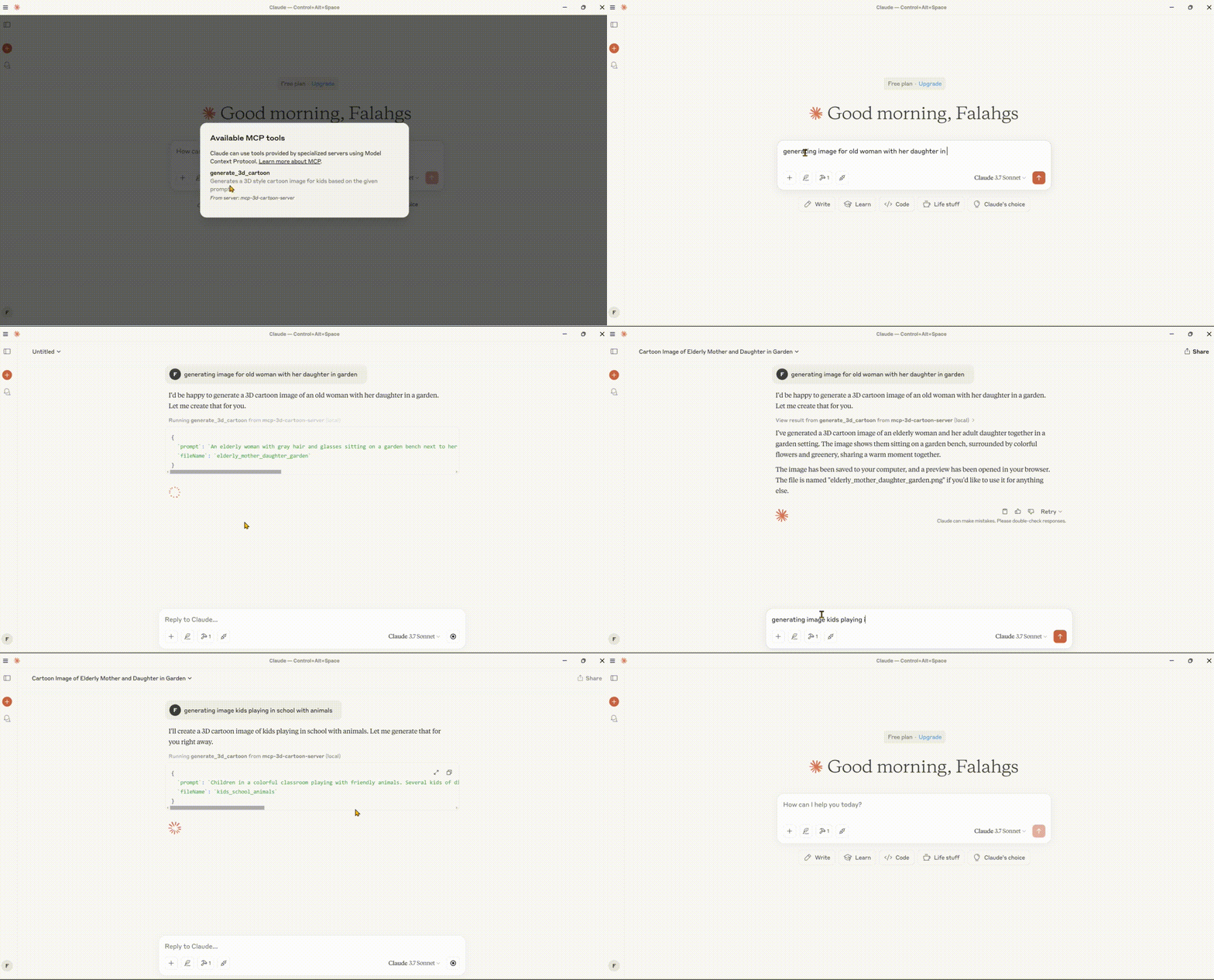
🌟 Features
Image Generation
- 3D Cartoon Generation: Creates high-quality 3D-style cartoon images
- Child-Friendly Design: Focuses on colorful, playful, and engaging visuals
- Instant Preview: Automatically opens generated images in your default browser
- Local Storage: Saves images and previews in an organized output directory
File System Operations
- Secure File Access: Path validation and security checks
- Read/Write Files: Read and write text file contents
- Directory Operations: List, create, and navigate directories
- File Search: Find files matching patterns
System Features
- Professional Configuration: Robust error handling and controlled logging
- Cross-Platform Support: Intelligent file path handling for Windows, macOS, and Linux
- Smart OS Detection: Automatically finds the best save location for each operating system
- Security Controls: Restricted directory access through configuration
🛠️ Technical Stack
- Core Framework: Model Context Protocol (MCP) SDK
- AI Integration: Google Generative AI (Gemini)
- Runtime: Node.js v14+
- Language: TypeScript
- Package Manager: npm
📋 Prerequisites
- Node.js (v14 or higher)
- Google Gemini API key
- TypeScript
⚙️ Installation
- Clone the repository:
git clone https://github.com/falahgs/mcp-3d-style-cartoon-gen-server.git
cd mcp-3d-style-cartoon-gen-server
- Install dependencies:
npm install
- Configure environment:
Create a
.envfile in the root directory:
GEMINI_API_KEY=your_api_key_here
ALLOWED_DIRECTORIES=/path/to/allowed/dir1,/path/to/allowed/dir2
- Build the project:
npm run build
🔧 Configuring Claude Desktop with MCP Server
To integrate this combined server with Claude Desktop:
-
Locate the Configuration File:
- Windows:
%APPDATA%\Claude\claude_desktop_config.json - macOS:
~/Library/Application Support/Claude/claude_desktop_config.json - Linux:
~/.config/Claude/claude_desktop_config.json
- Windows:
-
Add the following configuration:
{
  "mcpServers": {
    "mcp-3d-cartoon-generator": {
      "command": "node",
      "args": [
        "path/to/your/build/index.js"
      ],
      "env": {
        "GEMINI_API_KEY": "your_gemini_api_key_here",
        "IS_REMOTE": "true",
        "SAVE_TO_DESKTOP": "true",
        "DETECT_OS_PATHS": "true",
        "ALLOWED_DIRECTORIES": "C:\\Users\\YourUsername\\Desktop,C:\\Users\\YourUsername\\Documents",
        "DEBUG": "false"
      }
    }
  }
}
Windows PowerShell Helper Script
For Windows users, you can use the included fix_claude_config.ps1 script to automatically configure Claude Desktop:
- Edit the script to update the path to your server build and your Gemini API key
- Run the script in PowerShell:
powershell -ExecutionPolicy Bypass -File .\fix_claude_config.ps1
This will create or update the configuration file with proper encoding and settings.
🚀 Available Tools
1. Image Generation Tool
{
  "name": "generate_3d_cartoon",
  "description": "Generates a 3D style cartoon image for kids based on the given prompt",
  "inputSchema": {
    "type": "object",
    "properties": {
      "prompt": {
        "type": "string",
        "description": "The prompt describing the 3D cartoon image to generate"
      },
      "fileName": {
        "type": "string",
        "description": "The name of the output file (without extension)"
      }
    },
    "required": ["prompt", "fileName"]
  }
}
2. File System Tools
Read File
{
  "name": "read_file",
  "description": "Read the contents of a file",
  "inputSchema": {
    "type": "object",
    "properties": {
      "path": {
        "type": "string",
        "description": "Path to the file to read"
      }
    },
    "required": ["path"]
  }
}
Write File
{
  "name": "write_file",
  "description": "Write content to a file",
  "inputSchema": {
    "type": "object",
    "properties": {
      "path": {
        "type": "string",
        "description": "Path to the file to write"
      },
      "content": {
        "type": "string",
        "description": "Content to write to the file"
      }
    },
    "required": ["path", "content"]
  }
}
List Directory
{
  "name": "list_directory",
  "description": "List the contents of a directory",
  "inputSchema": {
    "type": "object",
    "properties": {
      "path": {
        "type": "string",
        "description": "Path to the directory to list"
      }
    },
    "required": ["path"]
  }
}
Create Directory
{
  "name": "create_directory",
  "description": "Create a new directory",
  "inputSchema": {
    "type": "object",
    "properties": {
      "path": {
        "type": "string",
        "description": "Path to the directory to create"
      }
    },
    "required": ["path"]
  }
}
Search Files
{
  "name": "search_files",
  "description": "Search for files matching a pattern",
  "inputSchema": {
    "type": "object",
    "properties": {
      "path": {
        "type": "string",
        "description": "Base directory to search from"
      },
      "pattern": {
        "type": "string",
        "description": "Search pattern (glob format)"
      },
      "excludePatterns": {
        "type": "array",
        "items": {
          "type": "string"
        },
        "description": "Patterns to exclude from search (glob format)"
      }
    },
    "required": ["path", "pattern"]
  }
}
📄 Example Usage
Image Generation Examples
// Generate a 3D cartoon
{
  "name": "generate_3d_cartoon",
  "arguments": {
    "prompt": "A friendly robot playing with a cat",
    "fileName": "robot_cat_play"
  }
}
File System Examples
// Read a file
{
  "name": "read_file",
  "arguments": {
    "path": "C:/Users/YourUsername/Documents/example.txt"
  }
}

// Write a file
{
  "name": "write_file",
  "arguments": {
    "path": "C:/Users/YourUsername/Documents/new-file.txt",
    "content": "This is the content of the file."
  }
}

// List directory contents
{
  "name": "list_directory",
  "arguments": {
    "path": "C:/Users/YourUsername/Documents"
  }
}

// Create a directory
{
  "name": "create_directory",
  "arguments": {
    "path": "C:/Users/YourUsername/Documents/new-folder"
  }
}

// Search for files
{
  "name": "search_files",
  "arguments": {
    "path": "C:/Users/YourUsername/Documents",
    "pattern": "*.txt",
    "excludePatterns": ["temp*", "*.tmp"]
  }
}
🔒 Security Features
The server implements several security measures:
- Path Validation: All file paths are validated to ensure they are within allowed directories.
- Allowed Directories: Only directories explicitly set in the
ALLOWED_DIRECTORIESenvironment variable can be accessed. - Symlink Protection: Prevents access to directories outside the allowed scope via symlinks.
- Controlled Logging: Debug logs are disabled by default to prevent information leakage.
⚙️ Configuration Options
Environment Variables
| Variable | Description | Default |
|---|---|---|
GEMINI_API_KEY | Google Gemini API key for image generation | (Required) |
ALLOWED_DIRECTORIES | Comma-separated list of allowed file system paths | User's home dir, current dir |
IS_REMOTE | Run in remote mode without browser opening | false |
SAVE_TO_DESKTOP | Force saving to desktop directory | false |
DETECT_OS_PATHS | Enable OS-specific path detection | true |
DEBUG | Enable verbose debug logging | false |
🛠️ Troubleshooting
Common Issues:
-
JSON Parsing Errors in Claude:
- Ensure
DEBUGis set to "false" to prevent logs from interfering with JSON communication - Check for proper JSON formatting in the Claude configuration
- Ensure
-
File Access Denied:
- Verify that the paths you're trying to access are included in
ALLOWED_DIRECTORIES - Check file permissions on the target files/directories
- Verify that the paths you're trying to access are included in
-
Images Not Saving:
- Set
SAVE_TO_DESKTOPto "true" to ensure images save to the desktop - Check desktop path detection in the server logs (enable DEBUG temporarily)
- Set
📄 License
🤝 Contributing
Contributions are welcome! Please feel free to submit a Pull Request.