Raymon
Государственный HTTP-приемник + MCP-сервер + терминальный интерфейс для логов в стиле Ray.
Документация
raymon





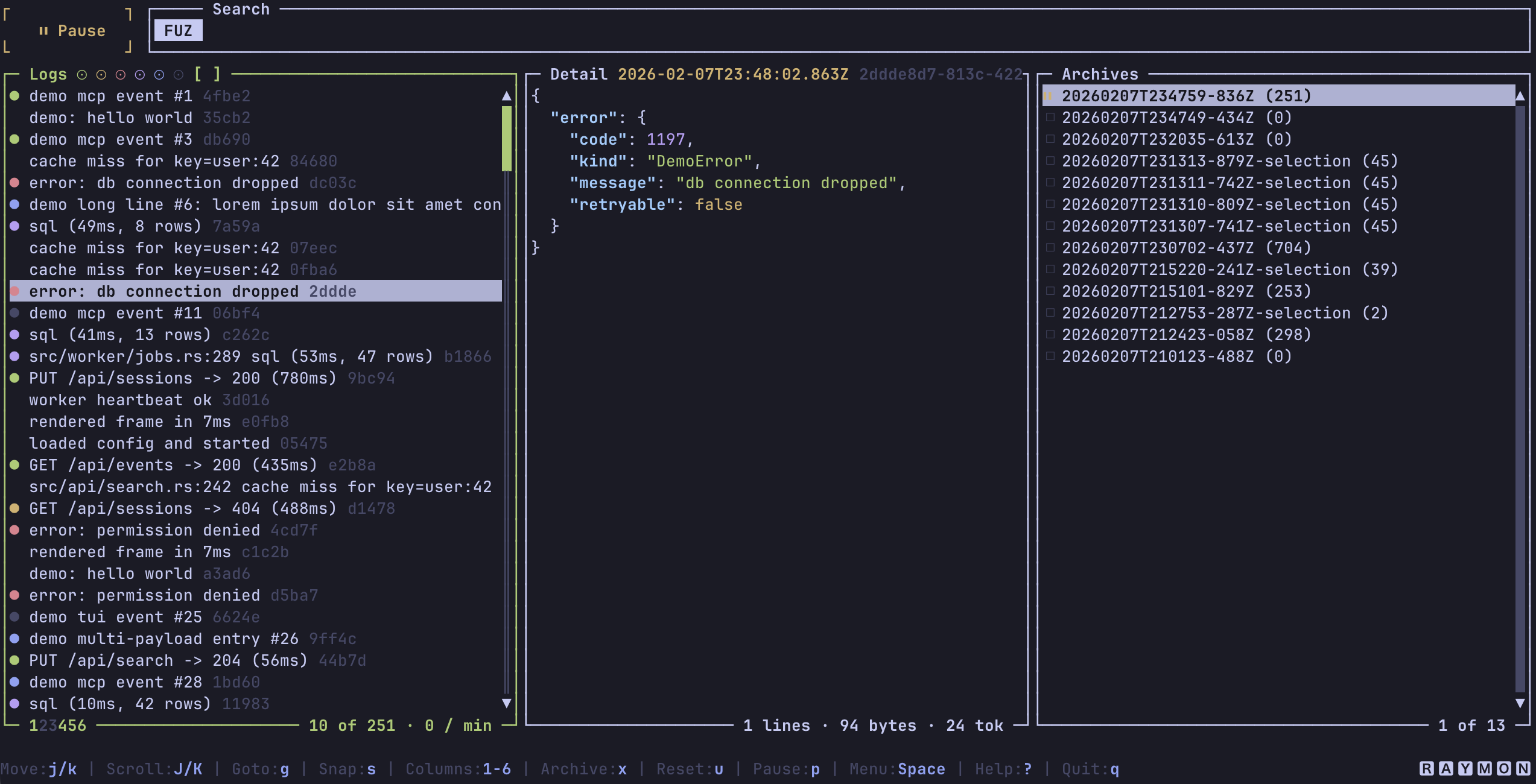
Raymon is a local-first Ray-style log receiver with an HTTP ingest endpoint, a Streamable HTTP MCP server, durable JSONL storage, and a Ratatui terminal UI.
Use Raymon when you want Ray-compatible dumps from your app to be visible in a terminal and searchable by AI agents through MCP.
What Raymon provides
| Surface | What it does |
|---|---|
| HTTP ingest | Accepts Ray-style JSON envelopes on POST /. |
| MCP server | Exposes raymon.search and raymon.get_entries on POST /mcp. |
| Terminal UI | Browses live logs, filters by screen/type/color, opens payloads, yanks details, and manages JSONL archives. |
| Storage | Persists entries to data/entries.jsonl under the active storage root. |
| Rust crate API | Exposes raymon::run() plus public raymon_core, raymon_ingest, raymon_storage, raymon_mcp, and raymon_tui modules for embedding and tests. |
Raymon listens on the Ray default port, 23517, so many Ray client libraries can target it with little or no configuration.
Quickstart
Prerequisites
- A Raymon binary from Cargo, Homebrew, GitHub Releases, or a local source build.
- A terminal. The default run mode opens the TUI.
Run with generated events
Start Raymon in demo mode:
raymon --demo
Expected result: the TUI opens and demo events begin appearing. Press ? for help or q to stop Raymon.
Run without the TUI and send one event
Start Raymon in one terminal:
RAYMON_NO_TUI=1 raymon
Send a Ray-style event from another terminal:
curl -sS http://127.0.0.1:23517/ \
  -H 'content-type: application/json' \
  -d '{
    "uuid": "readme-demo-1",
    "payloads": [
      {
        "type": "log",
        "content": {
          "message": "hello from Raymon",
          "color": "green"
        },
        "origin": {
          "hostname": "local",
          "fileName": "README.md",
          "lineNumber": 1
        }
      }
    ],
    "meta": {
      "project": "raymon-readme",
      "host": "local",
      "screen": "readme"
    }
  }'
Expected output contains:
{"ok":true,"error":null}
Stop the server with Ctrl+C.
Installation
Cargo
Raymon requires Rust 1.89 or newer.
cargo install raymon
Homebrew
brew install bnomei/raymon/raymon
GitHub Releases
Download a prebuilt archive from GitHub Releases, extract it, and place raymon on your PATH.
From source
git clone https://github.com/bnomei/raymon.git
cd raymon
cargo build --release
The binary is written to target/release/raymon.
Sending logs
Raymon stores Ray-style log entries. Generate them with a Ray-compatible library in your application, then point that library at Raymon's host and port.
Known Ray integrations include PHP, JavaScript, Bash, Ruby, Python, Go, Dart, and Rust. For Rust-native payloads, see ray-dbg.
The default local endpoint is:
http://127.0.0.1:23517/
If your sender uses the Ray desktop defaults, Raymon usually works by starting raymon before you emit logs.
Inbound envelopes must include a non-empty uuid, at least one payload, a non-empty payloads[*].type, and a non-empty payloads[*].origin.hostname. When the same UUID is ingested more than once, Raymon merges the payloads into one entry and stores the merged entry before it publishes live state or events.
Run modes
Local TUI
raymon
This starts the HTTP ingest endpoint, the MCP endpoint, and the TUI on 127.0.0.1:23517.
Headless local server
RAYMON_NO_TUI=1 raymon
Use this for background logging, MCP-only workflows, or tests.
Remote server with auth
export RAYMON_AUTH_TOKEN="change-me"
RAYMON_ALLOW_REMOTE=1 \
RAYMON_HOST=0.0.0.0 \
RAYMON_NO_TUI=1 \
raymon
Raymon refuses non-loopback binds unless RAYMON_ALLOW_REMOTE=1 is set. If the bind address is non-loopback, Raymon also requires RAYMON_AUTH_TOKEN unless you explicitly set RAYMON_ALLOW_INSECURE_REMOTE=1.
CLI reference
raymon [OPTIONS]
| Option | Meaning |
|---|---|
--host <HOST> | Override the HTTP bind host. |
--port <PORT> | Override the HTTP bind port. |
--config <PATH> | Load a specific JSON config file instead of searching for ray.json. |
--ide <COMMAND> | Command used by the TUI to open origin files. |
--editor <COMMAND> | Command used by the TUI to open selected detail payloads in a temp file. |
--jq <COMMAND> | jq command used for detail-pane searches. |
--tui | Enable the TUI. |
--no-tui | Disable the TUI. |
--demo | Generate local demo events. |
-v, --verbose | Enable info logging. Use -vv for debug logging. |
-h, --help | Print CLI help. |
-V, --version | Print the Raymon version. |
Configuration precedence is:
- Defaults.
ray.json.- Environment variables.
- CLI flags.
Configuration
Raymon searches for ray.json from the current directory upward. If it finds one, the directory containing that file becomes the storage root. Without ray.json, the current working directory is the storage root.
Example ray.json:
{
  "host": "127.0.0.1",
  "port": 23517,
  "tui": true,
  "max_entries": 10000,
  "storage_max_entries": 100000,
  "mcp_redact_payloads": false
}
Environment variables use the same concepts with RAYMON_ names:
| Variable | Default | Meaning |
|---|---|---|
RAYMON_ENABLED | true | Enable or disable Raymon. |
RAYMON_HOST | 127.0.0.1 | HTTP bind address. |
RAYMON_PORT | 23517 | HTTP bind port. |
RAYMON_TUI | true | Enable the TUI. |
RAYMON_NO_TUI | false | Disable the TUI. Takes precedence over RAYMON_TUI. |
RAYMON_IDE | code | IDE command used for origin-file jumps. For VS Code line jumps, use code --goto. |
RAYMON_EDITOR | VISUAL/EDITOR/vim | Editor command used for selected detail payloads. |
RAYMON_JQ | jq | jq command used for detail search. |
RAYMON_MAX_BODY_BYTES | 1048576 | Maximum HTTP request body size and merged stored-entry size. |
RAYMON_MAX_QUERY_LEN | 265 | Maximum search, command, picker, and MCP query length in bytes. |
RAYMON_MAX_ENTRIES | 10000 | Maximum entries kept in memory for MCP and live resync. 0 disables in-memory eviction. |
RAYMON_STORAGE_MAX_ENTRIES | 100000 | Maximum distinct entries kept in data/entries.jsonl. 0 disables storage retention. |
RAYMON_JQ_TIMEOUT_MS | 10000 | Detail-search jq timeout in milliseconds. |
RAYMON_ALLOW_REMOTE | false | Allow binding to non-loopback addresses. |
RAYMON_ALLOW_INSECURE_REMOTE | false | Allow non-loopback binding without auth. Avoid this unless you accept the exposure risk. |
RAYMON_INSECURE_REMOTE | unset | Alias for RAYMON_ALLOW_INSECURE_REMOTE. |
RAYMON_ALLOW_MCP_SHUTDOWN | false | Allow MCP ray/quit, ray/exit, raymon/quit, and raymon/exit custom methods to stop Raymon. |
RAYMON_MCP_REDACT_PAYLOADS | false | Redact sensitive-looking payload fields in MCP results and event notifications. |
RAYMON_AUTH_TOKEN | unset | Require Authorization: Bearer <token> or x-raymon-token: <token> for all HTTP requests. |
RAYMON_TOKEN | unset | Alias for RAYMON_AUTH_TOKEN. |
RAYMON_TUI_PALETTE | unset | Override the TUI palette with 18 comma-separated colors. |
RAYMON_PALETTE | unset | Alias for RAYMON_TUI_PALETTE. |
RAYMON_LOG | unset | Tracing filter. Falls back to RUST_LOG when unset. |
RAYMON_TUI_PALETTE expects:
fg,bg,black,red,green,yellow,blue,magenta,cyan,white,bright_black,bright_red,bright_green,bright_yellow,bright_blue,bright_magenta,bright_cyan,bright_white
Each color can be #RRGGBB, rgb:RR/GG/BB, or rgb:RRRR/GGGG/BBBB.
Storage
Raymon stores entries as newline-delimited JSON in:
data/entries.jsonl
The data/ directory is created under the active storage root. The TUI also writes session archives under:
data/archives/
On startup, Raymon restores stored entries into the core state so MCP search can see persisted logs. The TUI starts with a fresh live view and lets you browse archive files from the archives pane.
Retention keeps the newest distinct UUIDs. During restore, Raymon skips corrupt JSONL lines and legacy blob entries instead of aborting startup.
HTTP API
| Method and path | Purpose |
|---|---|
POST / | Ray ingest endpoint for Ray payload envelopes. |
POST /mcp | MCP Streamable HTTP endpoint. Prefer this path for MCP clients. |
POST / also accepts MCP JSON-RPC requests as a compatibility fallback when ingest parsing rejects the body and the JSON looks like MCP JSON-RPC. Prefer /mcp for new MCP clients.
When RAYMON_AUTH_TOKEN is set, every request must include one of these headers:
Authorization: Bearer <token>
x-raymon-token: <token>
Ingest responses use HTTP status codes:
| Status | Meaning |
|---|---|
200 | The envelope was stored and published. |
400 | The request body was invalid JSON. |
413 | The merged entry exceeded RAYMON_MAX_BODY_BYTES. |
422 | The envelope was missing required fields or had invalid data. |
500 | Storage, state, or event-bus handling failed. |
MCP setup
Add a local Raymon MCP server to Codex:
codex mcp add raymon --url http://127.0.0.1:23517/mcp
Remote setup with bearer-token auth:
codex mcp add raymon \
  --url http://<host>:23517/mcp \
  --bearer-token-env-var RAYMON_AUTH_TOKEN
Equivalent MCP JSON:
{
  "mcpServers": {
    "raymon": {
      "url": "http://127.0.0.1:23517/mcp"
    }
  }
}
Remote MCP JSON with auth:
{
  "mcpServers": {
    "raymon": {
      "url": "http://<host>:23517/mcp",
      "headers": {
        "Authorization": "Bearer ${RAYMON_AUTH_TOKEN}"
      }
    }
  }
}
MCP tools
Raymon exposes two read-only tools.
raymon.search
Search stored entries and return compact summaries.
Input:
{
  "query": "string (optional; plain text or /regex/)",
  "types": ["string"],
  "colors": ["string"],
  "screen": "string (optional)",
  "project": "string (optional)",
  "host": "string (optional)",
  "limit": "number (optional)",
  "offset": "number (optional)"
}
types and colors also accept comma-separated strings:
{ "types": "error,exception", "colors": "red" }
Result:
{
  "entries": [
    {
      "uuid": "string",
      "received_at": 0,
      "project": "string",
      "host": "string",
      "screen": "string",
      "payload_count": 1,
      "payload_types": ["log"]
    }
  ],
  "count": 1,
  "limit": 100,
  "offset": 0,
  "scan_limit": 5000
}
Defaults and limits:
| Field | Default | Limit |
|---|---|---|
limit | 100 | 500 |
offset | 0 | 5000 |
scan_limit | 5000 | Fixed newest-entry scan window |
query | unset | RAYMON_MAX_QUERY_LEN bytes |
raymon.get_entries
Fetch full entries by UUID.
Input:
{
  "uuids": ["<uuid>"],
  "redact": false
}
Supported input aliases:
{ "uuid": "<uuid>" }
{ "uuids": "<uuid-1>,<uuid-2>" }
redacted and redact_payloads are aliases for redact. When redaction is enabled, Raymon replaces sensitive-looking payload fields such as passwords, tokens, API keys, cookies, and secrets.
Result:
{
  "entries": [
    {
      "uuid": "string",
      "received_at": 0,
      "project": "string",
      "host": "string",
      "screen": "string",
      "session_id": null,
      "payloads": [
        {
          "type": "log",
          "content": {},
          "origin": {
            "project": "string",
            "host": "string",
            "screen": "string",
            "session_id": null,
            "function_name": null,
            "file": null,
            "line_number": null
          }
        }
      ]
    }
  ]
}
Limits:
| Limit | Value |
|---|---|
| UUIDs per request | 100 |
| Bytes per UUID | 265 |
| Serialized tool result | 1048576 bytes |
Connected MCP peers receive ray/event notifications for inserted, updated, cleared, and lagged events. If a client receives a lag notification, it should refresh with raymon.search.
TUI
The TUI is keyboard-first and has built-in help. Press ? for the full keymap.
| Key | Action |
|---|---|
? | Open keybindings. |
q | Quit Raymon and stop the HTTP/MCP server. |
Space | Open the picker menu. |
/ or f | Search messages and file paths with fuzzy search. |
r | Start a regex search. |
: | Search inside the selected detail payload. Uses jq for JSON queries when available. |
j/k, arrows | Move in the focused pane. |
h/l, left/right arrows | Move focus left or right. |
J/K, PageUp/PageDown | Scroll the detail pane. |
Tab, Shift+Tab | Move focus between logs, detail, and archives. |
g | Go to a log position. |
G | Jump to the last log. |
s | Snap color and type filters to the selected log entry. |
u | Reset search and filters. |
p | Pause or resume live updates. |
a | Toggle the archives pane. |
x | Archive the current view to a JSONL file. |
Enter | Load the selected archive when the archives pane has focus. |
n | Rename the selected archive. Live archives cannot be renamed. |
d | Delete the selected archive after confirmation. Live archives cannot be deleted. |
y | Yank the selected list entry. |
Y | Yank the selected detail payload. |
z | Toggle expanded JSON rendering. |
Z | Toggle raw JSON rendering. |
m | Toggle style and metadata payloads in the detail pane. |
1 through 6 | Toggle list columns: color dot, timestamp, type label, file, message, UUID. |
o | Open the origin file in the configured IDE. |
e | Open the selected detail payload in the configured editor. |
Ctrl+l | Clear the live log list without deleting stored entries. |
Ctrl+c | Quit from anywhere. |
Mouse support is enabled: click to focus or select, and use the wheel to move through the pane under the pointer.
Raymon uses the terminal ANSI palette by default, so it inherits light, dark, and base16-style terminal themes. Use RAYMON_TUI_PALETTE when you need a fixed palette.
Agent skill
This repository includes an AI-facing runbook at skills/raymon/SKILL.md. It teaches agents how to:
- Generate Ray-style events with common Ray integrations.
- Add Raymon as a local or remote MCP server.
- Use
raymon.searchbeforeraymon.get_entriesto inspect logs efficiently.
The skill is documentation for agents. It is not runtime code.
Source layout
| Path | Purpose |
|---|---|
src/cli.rs | Runtime lifecycle, configuration, storage restore, demo mode, and TUI/server orchestration. |
src/cli/http.rs | Axum router, auth, body limits, concurrency limits, ingest, and MCP mounting. |
src/raymon_core.rs | IO-free domain types, filters, events, and Ray envelope normalization. |
src/raymon_ingest.rs | HTTP ingest parsing, validation, duplicate-UUID merging, storage, and event emission. |
src/raymon_mcp.rs | MCP tools, notifications, query limits, result limits, and shutdown hooks. |
src/raymon_mcp/schema.rs | MCP request and response schemas. |
src/raymon_storage/ | JSONL persistence, indexing, listing, and retention. |
src/raymon_tui.rs | TUI state, rendering, search, filtering, key handling, editor integration, and archive workflows. |
tests/ray_php_local.rs | Ignored local PHP/Ray integration test. |
Development
Run the Rust test suite:
cargo test --all-targets
Run formatting and clippy checks:
cargo fmt --all -- --check
cargo clippy --all-targets --all-features -- -D warnings
Run pre-commit hooks when prek is installed:
prek validate-config prek.toml
prek run --all-files
prek install
Run the local-only PHP Ray integration test after installing the global PHP ray() helper:
cargo test --test ray_php_local -- --ignored ray_php_local_integration
Build and package release artifacts:
TARGET=x86_64-apple-darwin scripts/build-release.sh
VERSION=0.7.0 TARGET=x86_64-apple-darwin scripts/package-release.sh
The release workflow builds Linux musl (x86_64, aarch64), macOS (x86_64, aarch64), and Windows MSVC (x86_64) targets. Unix artifacts are .tar.gz archives, Windows artifacts are .zip archives, and each package gets a .sha256 file.
License
MIT. See LICENSE.