Armor Crypto MCP
официальныйMCP для взаимодействия с несколькими блокчейнами, стейкингом, DeFi, обменом, мостами, управлением кошельками, DCA, лимитными ордерами, поиском монет, отслеживанием и многим другим.
Что можно делать с Armor Crypto MCP?
- Создание и управление кошельками Solana — Создавайте новые кошельки, группируйте их и архивируйте неиспользуемые с помощью инструментов управления кошельками.
- Выполнение обмена токенов — Совершайте обычные обмены на Solana с помощью инструмента обмена.
- Настройка автоматизированных торговых стратегий — Размещайте, просматривайте и отменяйте DCA-ордера, лимитные ордера и запланированные сделки.
- Стейкинг и анстейкинг токенов — Используйте инструменты стейкинга для размещения активов или вывода средств из стейкинга.
- Поиск популярных токенов — Ищите токены и получайте данные о популярных токенах на Solana.
- Проведение статистического анализа — Используйте инструмент статистического калькулятора для точного анализа данных в сети.
Документация
Armor Crypto MCP
Альфа-тестовая версия 0.1.24
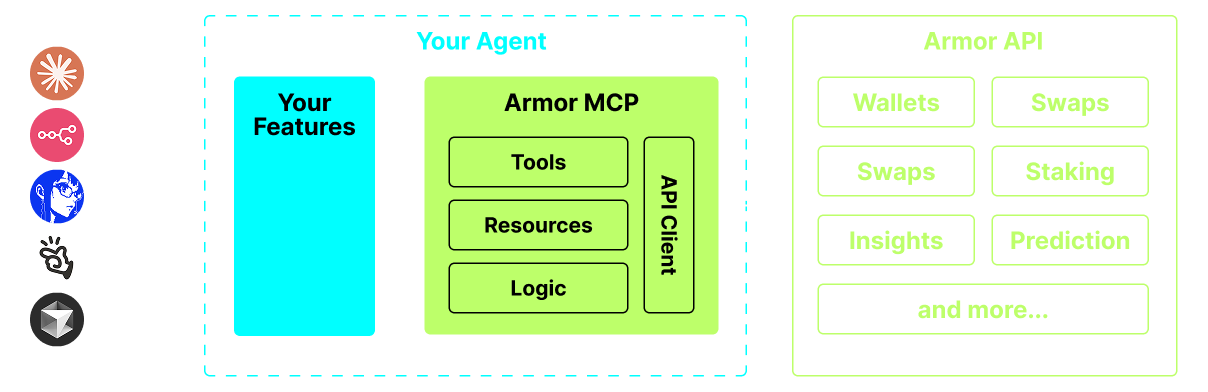
Единый источник для интеграции AI-агентов с криптоэкосистемой. Включает создание и управление кошельками, обмены, переводы, событийные сделки, такие как DCA, стоп-лосс и тейк-профит, и многое другое. Armor MCP поддерживает Solana в альфа-версии, а в бета-версии будет поддерживать более десятка блокчейнов, включая Ethereum, Base, Avalanche, Bitcoin, Sui, Berachain, megaETH, Optimism, Ton, BNB и Arbitrum, среди прочих. Используя Armor MCP, вы можете привнести весь мир криптовалют в своего AI-агента с унифицированной логикой и полным набором инструментов.
Возможности
🧠 Нативный AI
📙 Управление кошельками
🔃 Обмены
🌈 Специализированные сделки (DCA, стоп-лосс и т.д.)
⛓️ Мультичейн
↔️ Кроссчейн-транзакции
🥩 Стейкинг
🤖 Быстрая интеграция с агентскими фреймворками
👫 Социальные настроения
🔮 Прогнозирование
Требования
1. Убедитесь, что у вас установлен Python
2. Установите uv
Linux / Windows
pip install uv
Mac
brew install uv
3. Claude Desktop или ваш AI-агент будет запускать MCP
Подробности см. в разделе Использование и настройка.
Альфа-тестирование
В настоящее время мы находимся на стадии пре-альфа и тестируем возможности различных агентов и агентских фреймворков, таких как Claude Desktop, Cline, Cursor, n8n и др.
Текущие возможности и инструменты
- Управление кошельками
- Группировка и организация
- Архивирование
- Обмен и сделки
- Обычный обмен
- DCA (размещение / список / отмена)
- Запланированные ордера
- Лимитные ордера (размещение / список / отмена)
- Стейкинг и анстейкинг
- Поиск токенов и трендовые токены
- Статистический калькулятор для точного анализа
- Поддержка блокчейна Solana
Скоро
- Поддержка большего числа блокчейнов
- Минтинг
- Armor Agents как инструмент (или A2A)
Настройка MCP
В настоящее время для получения API-ключа необходимо иметь Armor NFT. Получите его здесь
Использование и настройка
Чтобы использовать Armor MCP с вашим агентом, вам потребуется следующая конфигурация, замените <PUT-YOUR-KEY-HERE> на ваш API-ключ:
{
  "mcpServers": {
    "armor-crypto-mcp": {
      "command": "uvx",
      "args": ["armor-crypto-mcp@latest", "--version"],
      "env": {
        "ARMOR_API_KEY": "<PUT-YOUR-KEY-HERE>"
      }
    }
  }
}
Использование в Claude Desktop
- Должен быть включен режим разработчика
- Откройте меню «Файл» в левом верхнем углу окна Claude Desktop.
- Перейдите в «Файл» > «Настройки»
- В разделе «Разработчик» нажмите «Изменить конфигурацию»
- В файл конфигурации вставьте раздел
armor-wallet-mcpиз примера выше - Обязательно замените заполнитель на ваш API-ключ
- Сохраните файл и начните новый чат в Claude Desktop
Использование в Cline
- Нажмите кнопку
MCP Serversна вкладке Cline в VSCode на левой панели - Прокрутите левую панель вниз и нажмите
Configure MCP Servers - В файл конфигурации вставьте раздел
armor-wallet-mcpиз примера выше - Обязательно замените заполнитель на ваш API-ключ
- Сохраните файл, нажмите
Doneна вкладкеMCP Serversи начните общение с Cline
Использование в n8n
- Откройте приложение n8n
- В левом нижнем углу экрана нажмите
...рядом с вашим именем пользователя и выберитеSettings - На левой панели нажмите
Community nodes, а затем кнопкуInstall a Community Node - В поле поиска для
npm Package Nameвведите mcp - Установите
MCP Nodes - Добавьте любой узел MCP, например:
List Tools - На вкладке MCP Client
ParametersнажмитеSelect Credentialи выберитеCreate new credential - В поле
Commandвведитеuvx - В поле
Argumentsвведитеarmor-crypto-mcp - В поле
EnvironmentsвведитеARMOR_API_KEY=eyJhbGciOiJIUzI1NiIsIn...и вставьте полное значение API-ключа после= - Вернувшись на вкладку
Parameters, вы можете выбрать MCPOperationдля этого узла
Использование Armor MCP
После настройки Armor MCP вот несколько промптов, с которых можно начать