QueryAPIGate
Самостоятельно размещаемый MCP-сервер, который превращает сохранённые SQL-запросы в инструменты для ИИ-агентов с типизированными входными данными. Доступ контролирует сервер, а не промпт: разрешения для каждого ключа, маскирование столбцов, доступ к произвольному SQL только для чтения, подтверждение человеком операций записи, квоты и защищённый от незаметного изменения журнал аудита. Поддерживает PostgreSQL, MySQL, SQLite, DuckDB, ClickHouse, MongoDB и файлы в S3/GCS/R2. Apache-2.0.
Документация
QueryAPIGate






Turn SQL into secure, governed REST APIs - and MCP tools for AI agents.
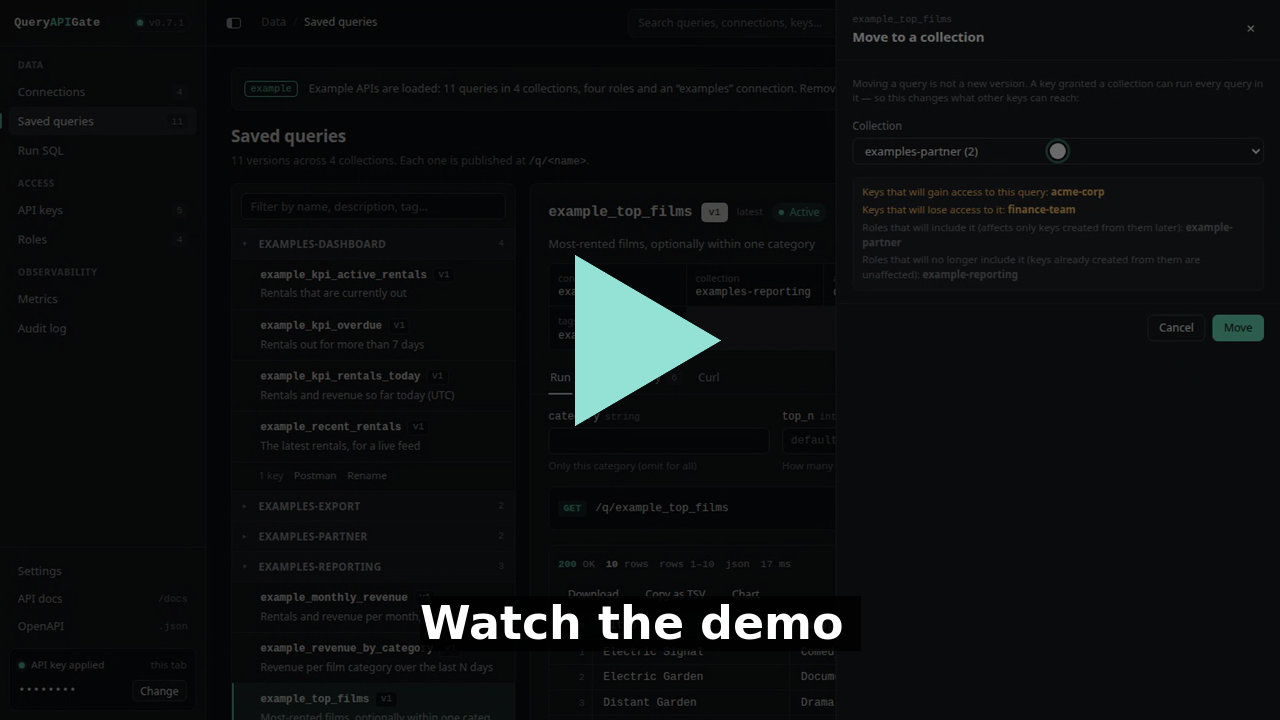
Every feature, one by one: the full walkthrough (6 minutes, in chapters)
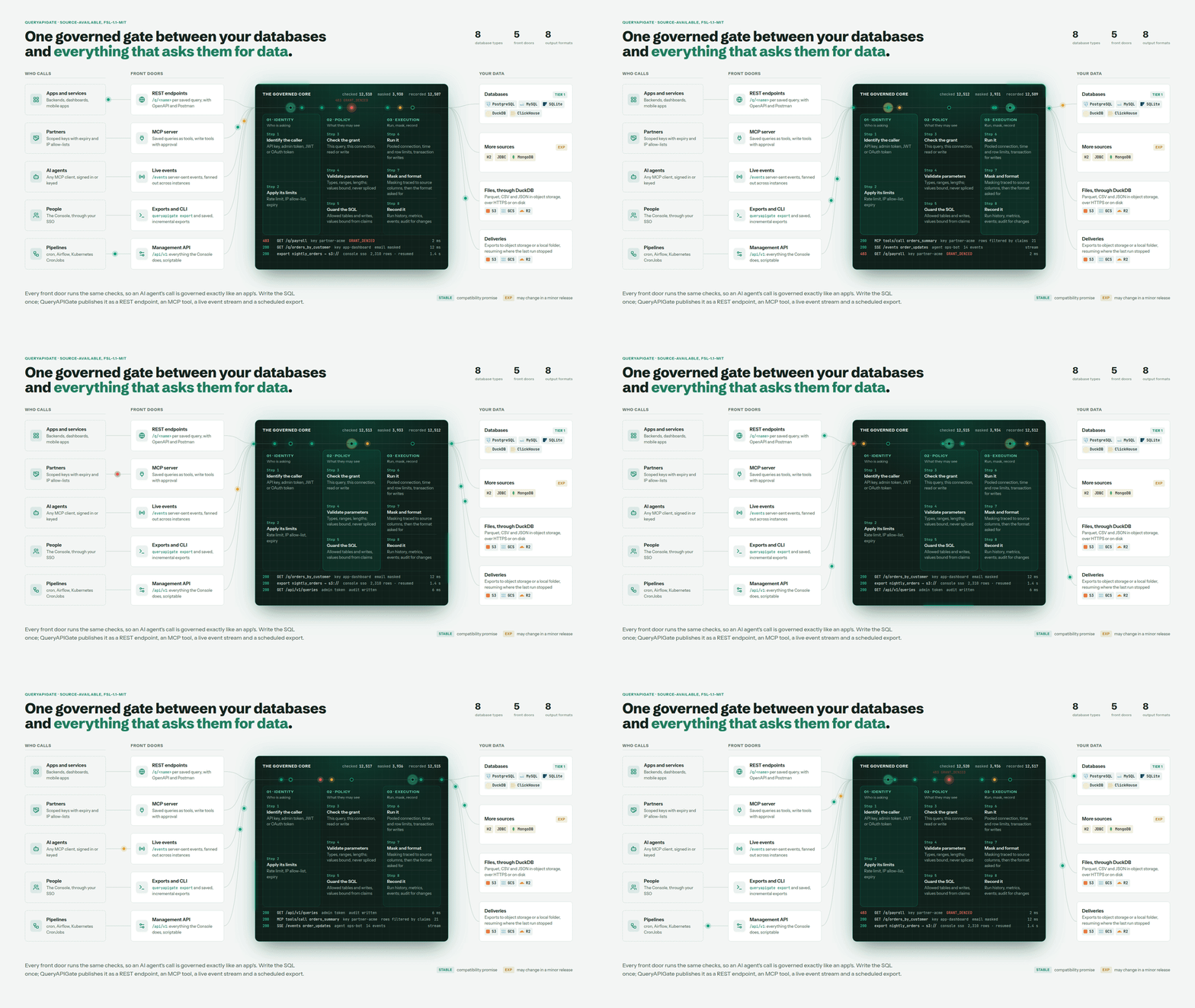
Every front door runs the same checks, so an AI agent's call is governed exactly like an app's. Write the SQL once; it's a REST endpoint, an MCP tool, a live event stream and a scheduled export.
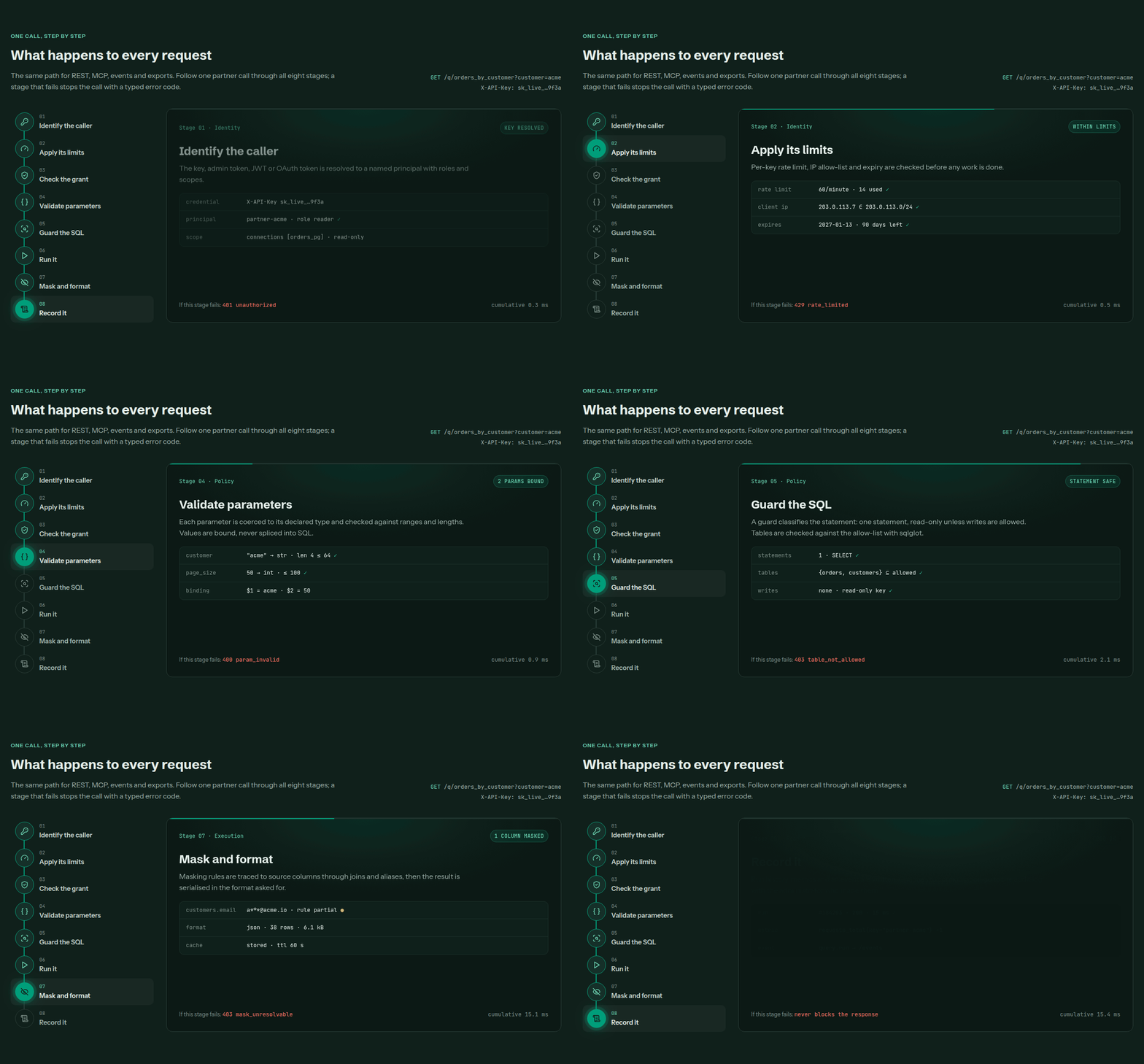
One path for REST, MCP, events and exports. A stage that fails stops the call with a typed error code - except recording, which never blocks the response.
QueryAPIGate is a self-hosted service that runs SQL against your databases - and against Parquet, CSV and JSON files on disk, S3, GCS or the web, through DuckDB - and returns the results as JSON, NDJSON, XML, YAML, CSV, TSV, Excel or Parquet. Save a query once and it becomes a versioned endpoint with typed, injection-safe parameters and run history - without writing a controller, a repository layer, pagination, auth or serialization boilerplate for it.
Write SQL. Configure the query. Apply access controls. Get an API.
$ curl 'http://127.0.0.1:5000/q/example_film_search?text=Harbor&page_size=2' -H 'X-API-Key: demo-key'
[{"film_id":48,"title":"Broken Harbor","category":"Action","rating":"PG-13"},{"film_id":44,"title":"Electric Harbor","category":"Documentary","rating":"G"}]

$ curl 'http://127.0.0.1:5000/q/example_top_films?top_n=2&category=Comedy&format=csv' -H 'X-API-Key: demo-key'
title,category,rating,rentals,rank
Electric Signal,Comedy,PG,977,1
Crimson Garden,Comedy,PG-13,631,2
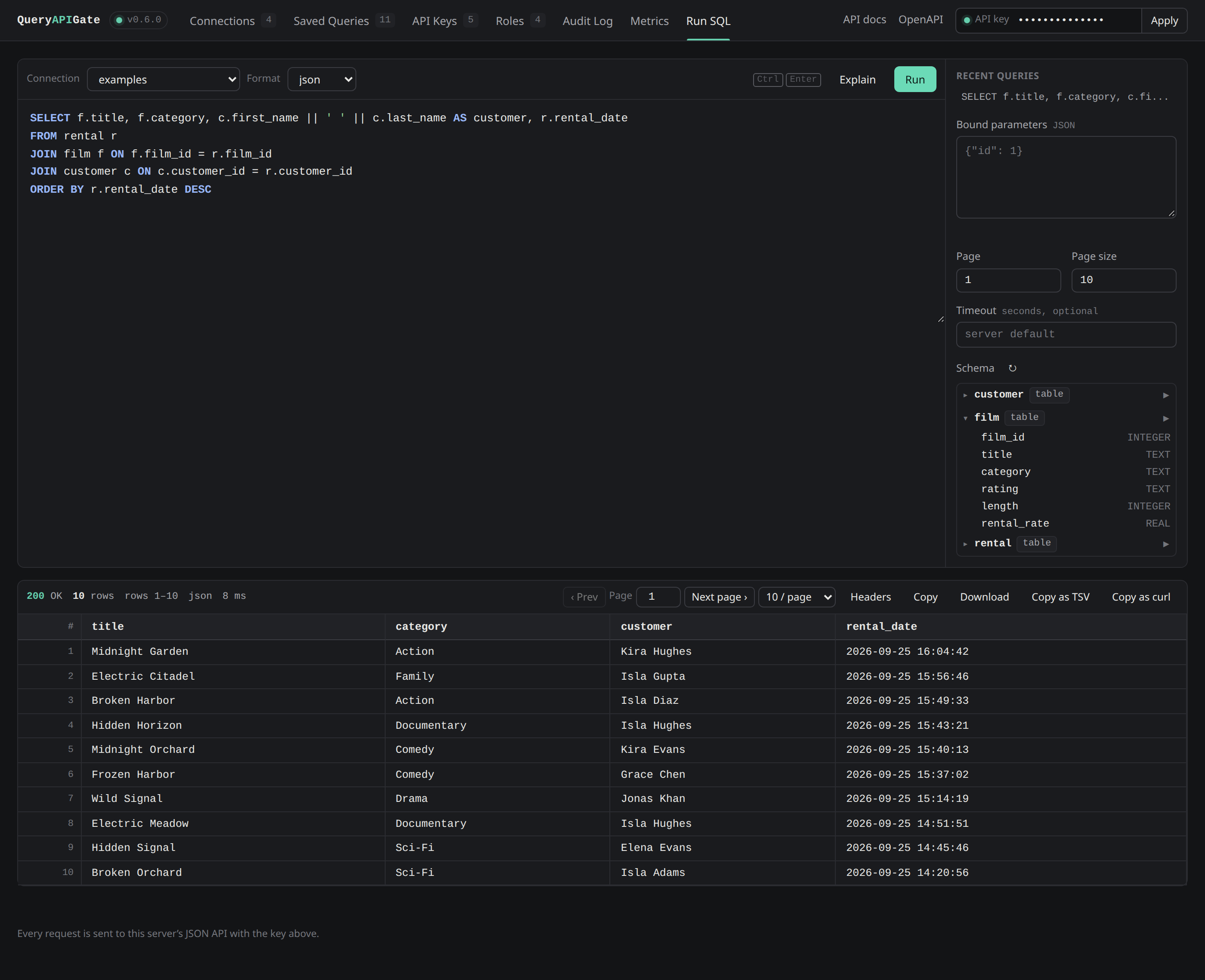
The built-in Console at /console: write SQL with completion and a schema browser, run it, then save it as an API - no separate tool to install.
More of the Console - Home, connections, keys and roles, history, the audit log, metrics, alerts, the access map - screen by screen: a tour of the Console.
Contents
- Why QueryAPIGate
- Features
- Install · Quick start · Saving a query as an endpoint
- Try it with Docker
- Documentation
- Contributing · Security · License · Contact
Why QueryAPIGate
Valuable SQL sits in reports, dashboards, ETL jobs and application code, with no way to a REST endpoint except a backend service written around each query. QueryAPIGate makes the query itself the API: write the SQL once, and it is a versioned endpoint with typed parameters, governed by who may call it, how often and what they may see - and the same query is an MCP tool for AI agents, a live event stream and a scheduled export.
That MCP surface is a reason in itself: it's how you let an AI agent query production data without handing it a database connection. The agent sees only governed tools, ad-hoc SQL over MCP is always read-only, writes wait for a person's approval, and the same masking, limits and audit apply - the limits live in the gateway, where no prompt can talk its way around them. One governed core, two front doors that matter most: REST for your apps, MCP for your agents.
It doesn't replace an application backend; it removes the boilerplate when the requirement is "expose this query safely". Use cases, how it compares to PostgREST, Hasura and others, and the thinking behind it: why QueryAPIGate.
Features
- Saved, versioned queries as endpoints -
GET /q/<name>, typed and injection-safe parameters, drafts and publishing, run history. - Scoped API keys, roles and collections - per connection, per query or per collection; expiry, IP allow-lists, rate limits, quotas, table allow-lists.
- A governed MCP server for AI agents - saved queries as self-describing tools, read-only ad-hoc SQL, masking-aware schema discovery, OAuth sign-in, and write tools that wait for a person's approval - the same grants, masking and audit as every other caller.
- Named administrators and SSO - admin roles and tokens, Console sign-in through your identity provider, signed-in users' JWTs.
- Workspaces (experimental) - several teams on one server, each running its own connections, queries and keys, and administering nothing of another's.
- Column masking - hash, mask or drop what a caller mustn't see, traced through the SQL to the source column.
- Eight database types, and files - PostgreSQL, MySQL, SQLite, DuckDB, ClickHouse and MongoDB; H2 and JDBC; Parquet, CSV and JSON on S3, GCS, R2 or disk.
- Eight output formats, and streaming - JSON, NDJSON, XML, YAML, CSV, TSV, Excel and Parquet; whole results streamed from the database cursor.
- Exports to object storage - scheduled, incremental, to S3, GCS, R2 or a folder.
- Live events - every run as it happens, per key, with resume.
- A tamper-evident audit log - a signed hash chain, streamed to your SIEM.
- Observability - Prometheus metrics, OpenTelemetry tracing, alerts that clear themselves, a Grafana dashboard.
- Configuration as code and secrets from files and Vault.
- OpenAPI and Postman - every saved query a typed endpoint in
/openapi.jsonand/docs. - Docker, Helm and several instances - one PostgreSQL store, Redis for shared limits; signed releases with SLSA provenance.
Every feature in detail: features. Every setting: configuration.
Install
pip install "queryapigate[postgres]"         # pick the drivers you need: mysql, postgres, clickhouse, h2, duckdb
# or everything:                        pip install "queryapigate[all]"
SQLite needs no extra driver. H2 and generic JDBC connections (queryapigate[h2]) also need a Java runtime; H2's own
driver jar is bundled, a JDBC connection to another vendor brings its own. DuckDB (queryapigate[duckdb]) needs no
external runtime either - it's a native Python extension, same as SQLite. queryapigate[encryption] adds
encryption at rest for connection passwords -
only needed if you set QUERYAPIGATE_SECRET_KEY.
From a clone: pip install -e ".[dev]". Or use Docker - see below.
Quick start
Fastest: queryapigate examples load && queryapigate serve installs four worked example APIs
(reporting, dashboard, export, partner) you can try, and queryapigate examples unload removes them again. Loading
them creates a real API key per scenario, which also means the server now requires a key for every request - set
QUERYAPIGATE_API_KEY yourself first so you have an admin key on hand for ad-hoc SQL too:
QUERYAPIGATE_API_KEY=demo-key queryapigate examples load    # also prints one scoped key per scenario - store them now
QUERYAPIGATE_API_KEY=demo-key queryapigate serve             # http://127.0.0.1:5000
The examples come with a small generated examples database (films, customers and rentals), so you can also run ad-hoc SQL
straight away:
curl -X POST 'http://127.0.0.1:5000/execute_sql?page_size=3' -H 'X-API-Key: demo-key' -H 'Content-Type: application/json' \
     -d '{"sql": "SELECT film_id, title, rating FROM film WHERE film_id > :min", "params": {"min": 10}, "connection_name": "examples"}'
Open http://127.0.0.1:5000/docs for the interactive API reference, or http://127.0.0.1:5000/console for the admin UI to manage connections and saved queries and run ad-hoc SQL without leaving the browser.
For your own databases, run queryapigate init in an empty folder: it creates queryapigate.db with an
inactive template connection for every supported database type. Edit them (admin UI, or PATCH /api/v1/connections/<name>), set "active": true, and start the server there.
Saving a query as an endpoint
This uses the examples connection that queryapigate examples load sets up:
curl -X POST http://127.0.0.1:5000/api/v1/queries -H 'X-API-Key: demo-key' -H 'Content-Type: application/json' -d '{
  "name": "film_by_id",
  "sql": "SELECT * FROM film WHERE film_id = :id",
  "parameters": {"id": {"type": "int", "min": 1, "max": 60, "description": "Film id"}},
  "connection_name": "examples",
  "author": "me", "description": "Look up a film",
  "publish": true
}'

curl 'http://127.0.0.1:5000/q/film_by_id?id=7&format=yaml' -H 'X-API-Key: demo-key'
curl 'http://127.0.0.1:5000/q/film_by_id?id=0' -H 'X-API-Key: demo-key'
# {"error": "Invalid parameters: id must be at least 1", "errors": {"id": "must be at least 1"}}
Rules: type (int, float, str, bool), default, required, enum, min/max, min_length/max_length,
pattern and description - see the API reference.
POST /api/v1/queries/film_by_id/versions adds version 2 - a draft until published ("publish": true, or
POST .../publish); DELETE /api/v1/queries/film_by_id/versions/1 removes one version.
Add "cache_ttl": 60 to cache a response for that many seconds (X-Cache: HIT/MISS, ETag, Cache-Control) -
opt-in, and never used for a query that writes. See
Response caching.
Try it with Docker
Every release is published for linux/amd64 and linux/arm64, signed:
docker run -p 5000:5000 -v queryapigate-data:/data -e QUERYAPIGATE_API_KEY=change-me ghcr.io/anantharajuc/queryapigate:latest
Or start it in front of a PostgreSQL database seeded with sample films, with
docker-compose.yml:
docker compose up --build
curl -H 'X-API-Key: demo-key' 'http://127.0.0.1:5000/q/films_by_rating?rating=PG&max_length=90'
Open http://127.0.0.1:5000/docs, paste demo-key into the box at the top, and both saved queries are there as
endpoints; docker compose down -v cleans up.
The image tags, volumes and a real deployment - TLS, secrets, backups, Prometheus and Grafana, several instances, Kubernetes: deployment.
Documentation
The documentation site has all of it; on GitHub:
| Start | Installation and setup · Configuration · Example APIs · How-to guides |
| Reference | API · MCP server · Database connections · Query metadata · Features |
| Run it | Deployment · Performance · Technology stack · A tour of the Console |
| Security | Security policy · Threat model · Where data goes |
| Project | Why QueryAPIGate · Changelog · Roadmap · Architecture decisions |
Contributing
Contributions are welcome - database drivers, security, performance, the Console, documentation, tests. Please read CONTRIBUTING.md first: the development setup, the tests, and how a change gets in.
Security
Report a vulnerability privately - see SECURITY.md, which also has the hardening checklist for a deployment and how to verify a release.
Third-party components
The wheel bundles the H2 Database JDBC driver (MPL 2.0 / EPL 1.0). The example data is generated
locally by queryapigate examples load; no third-party datasets are included.
License
QueryAPIGate is open source, under the
Apache License, Version 2.0 (Apache-2.0)
© Anantha Raju C - see NOTICE. Use it, modify it and
redistribute it, commercially or not, under that license's terms.
Earlier versions: 0.39.0 onward is Apache-2.0; 0.7.0 to 0.38.0 were released under the Functional Source License,
Version 1.1, MIT Future License (FSL-1.1-MIT), and versions up to 0.6.1 under MIT. A copy you already obtained keeps
the license it came with.
Contact
Anantha Raju C - @anantharajuc - arcswdev@gmail.com
Project link: https://github.com/AnanthaRajuC/QueryAPIGate