Teradata
официальныйНабор инструментов для управления платформой, обеспечения качества данных, а также чтения и записи в базу данных Teradata.
Что можно делать с Teradata MCP?
- Query and analyze data — Задавайте вопросы на естественном языке для изучения таблиц, профилирования данных и визуализации закономерностей без написания SQL.
- Generate semantic layers — Создавайте пользовательские доменные инструменты, подсказки и кубы из YAML-определений с помощью руководства по настройке.
- Run AI and RAG pipelines — Выполняйте семантический поиск, генерацию с дополнением извлечения и векторное хранение с помощью инструментов
rag,tdvsиfs. - Manage database administration — Обрабатывайте безопасность, контролируйте емкость и автоматизируйте резервное копирование через наборы инструментов
dba,secиbar. - Execute long-running analytics — Запускайте аналитические функции
tdml_*как фоновые задачи и опрашивайте результаты вместо блокировки. - Protect against destructive actions — Используйте Guard Mode для многошаговых потоков подтверждения операций
bar_*иsec_*.
Документация
Teradata MCP Server



Подключайте AI-агентов напрямую к Teradata с корпоративной безопасностью и расширяемостью.
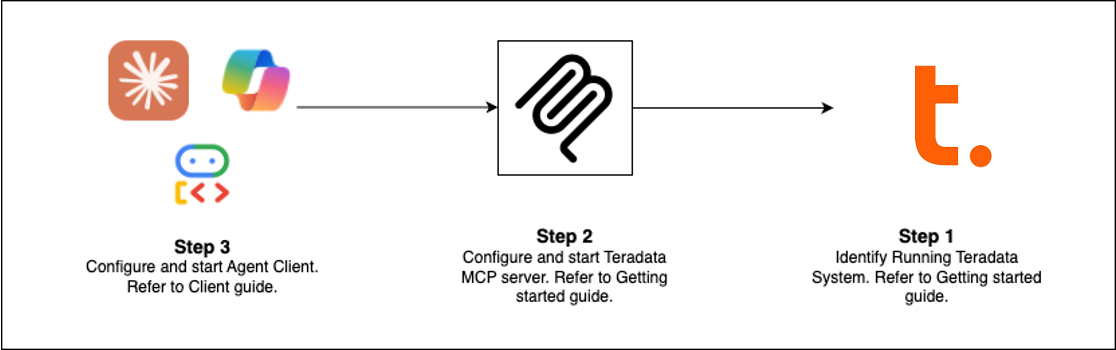
Быстрый старт (Выберите свой путь)
| Клиент | Лучше всего подходит для | Время настройки |
|---|---|---|
| Claude Desktop | Исследовательский анализ, администрирование платформы | 5 мин |
| VS Code + Copilot | Инженерия данных, разработка агентов | 5 мин |
| Open WebUI | Тестирование новых LLM локально | 5 мин |
| Code Examples | Создание собственного клиента | зависит от случая |
| Flowise | Визуальный конструктор агентов | 10 мин |
Предварительные требования: База данных Teradata (или бесплатная песочница) + uv
Настройка Claude Desktop (без установки)
Добавьте это в claude_desktop_config.json (Настройки > Разработчик > Изменить конфигурацию):
{
  "mcpServers": {
    "teradata": {
      "command": "uvx",
      "args": ["teradata-mcp-server"],
      "env": {
        "DATABASE_URI": "teradata://<USERNAME>:<PASSWORD>@<HOST_URL>:1025/<USERNAME>"
      }
    }
  }
}
Что вы можете делать
| Вариант использования | Возможности | Инструменты |
|---|---|---|
| Запросы и анализ | Исследуйте таблицы, профилируйте данные, объясняйте результаты, визуализируйте паттерны — без SQL | base, dba, qlty, plot |
| Семантический слой | Создавайте пользовательские семантические слои и инструменты из YAML или с помощью нашего Agent Skill | Узнать больше → |
| Конвейеры AI и RAG | Семантический поиск, генерация с дополнением извлечения, векторное хранение | rag, tdvs, fs |
| Администрирование базы данных | Управление безопасностью, мониторинг ёмкости, автоматизация резервного копирования | dba, sec, bar |
Что нового (последний релиз)
- FastMCP v4 — Протокол без сессий, фоновые задачи для длительных аналитических операций, завершение аргументов
- Кэширование ответов — Сигналы TTL на 5 минут сокращают избыточные запросы к базе данных в многоходовых диалогах
- Режим защиты — Многошаговые потоки подтверждения для разрушительных операций (bar_, sec_)
- Фоновые задачи —
tdml_*аналитические функции возвращают идентификаторы задач для опроса вместо блокировки - Завершение аргументов — Автоматическое предложение имён таблиц и столбцов из схемы по мере ввода
- Возможность хуков — Перехват вызовов инструментов для пользовательского мониторинга, аудита или ограничения частоты
- Защита лимита строк — Настраиваемые ограничения (
DEFAULT_ROW_LIMIT,MAX_ROW_LIMIT) предотвращают переполнение токенов LLM - Улучшенная безопасность — Представления VX для детального контроля доступа на уровне строк
Расширение и развёртывание
Добавление пользовательской логики
Используйте хуки для перехвата вызовов инструментов для мониторинга, аудиторских следов или проверки → Руководство по хукам
Определение семантических слоёв
Создавайте доменные инструменты, подсказки и кубы в YAML → Руководство по настройке
Развёртывание везде
Запускайте как CLI (uv), HTTP-сервер, Docker-контейнер или облачный сервис → Руководство по установке
Посмотрите в действии
- Голосовой агент — Двустороннее аудио в реальном времени с Amazon Nova Sonic
- Веб-агент — Интерактивный чат-интерфейс с фреймворком Google ADK
- Flowise Builder — Визуальные рабочие процессы перетаскиванием
- Пользовательское промежуточное ПО — Паттерны мониторинга производительности
Узнать больше
- Полная документация — Установка, конфигурация, архитектура, безопасность
- Видеоуроки — Пошаговые руководства
- Руководство разработчика — Расширение и вклад
- Архитектура — Как компоненты работают вместе
Вклад
Мы приветствуем вклад! См. наше Руководство по вкладу и Руководство разработчика, чтобы начать.