GitViz
Визуализация истории Git и журналов коммитов с анимацией, делающая операции Git интуитивно понятными и лёгкими для понимания.
Документация
GitViz MCP: Animated Log & History



A powerful VS Code extension that visualizes Git history and commit logs with animations, making Git operations intuitive and easy to understand.
💬 Give Us Feedback
Help us improve! Share your thoughts, suggestions, or issues via our feedback forms:
Your feedback makes a difference. We read every submission. 🙏
🚀 Boost Copilot with Git Commands
Want Copilot to better understand Git? 🤖✨ Just use #get_git_prompt!
This helps Copilot generate smarter suggestions for Git-related tasks.
Try something like this:
#get_git_prompt What is the commit message of the latest commit?
Features
- Before/After Animations: Visualize how Git operations like merge, rebase, and cherry-pick transform your commit tree.
- Interactive Controls: Play, pause animations.
- Branch Structure: Clear visualization of branch relationships and merge points.
- Commit Highlighting: Click to highlight specific commits in the tree.
- Real-time Updates: Automatically reflects changes in your working directory.
- Language Model Integration: Built-in tools for Git analysis and assistance.
- Smart Repository Detection: Automatically detects and switches between repositories.
- Enhanced Git Commands: Integrated AI tools for a better Git workflow.
Usage
Install the GitViz MCP Extension
You can install the extension in one of the following ways:
From VS Code Marketplace
Search for "GitViz MCP" in the VS Code Extensions view (Ctrl+Shift+X / Cmd+Shift+X) and click Install.
Manual Installation
- Download the
.vsixfile from releases. - Open VS Code.
- Run
Extensions: Install from VSIX...from the Command Palette. - Select the downloaded
.vsixfile.
Configure Based on Your Environment
-
For Copilot Users:
It is recommended to use the extension directly, as MCP Server setup is usually not required.
If you still need to manually configure the MCP Server, refer to the
Copilot Configbelow or run thegitVizMcp: Register MCP Servercommand from the VS Code Command Palette."servers": { "gitViz": { "type": "http", "url": "http://localhost:35555/gitviz/sse" } } -
For Cline Users:
Please configure using the
Cline Configbelow:"mcpServers": { "gitViz": { "url": "http://localhost:35555/gitviz/sse", "transportType": "sse" } } -
For Cursor Users:
This extension does not currently support Cursor.
Basic Operational Flow
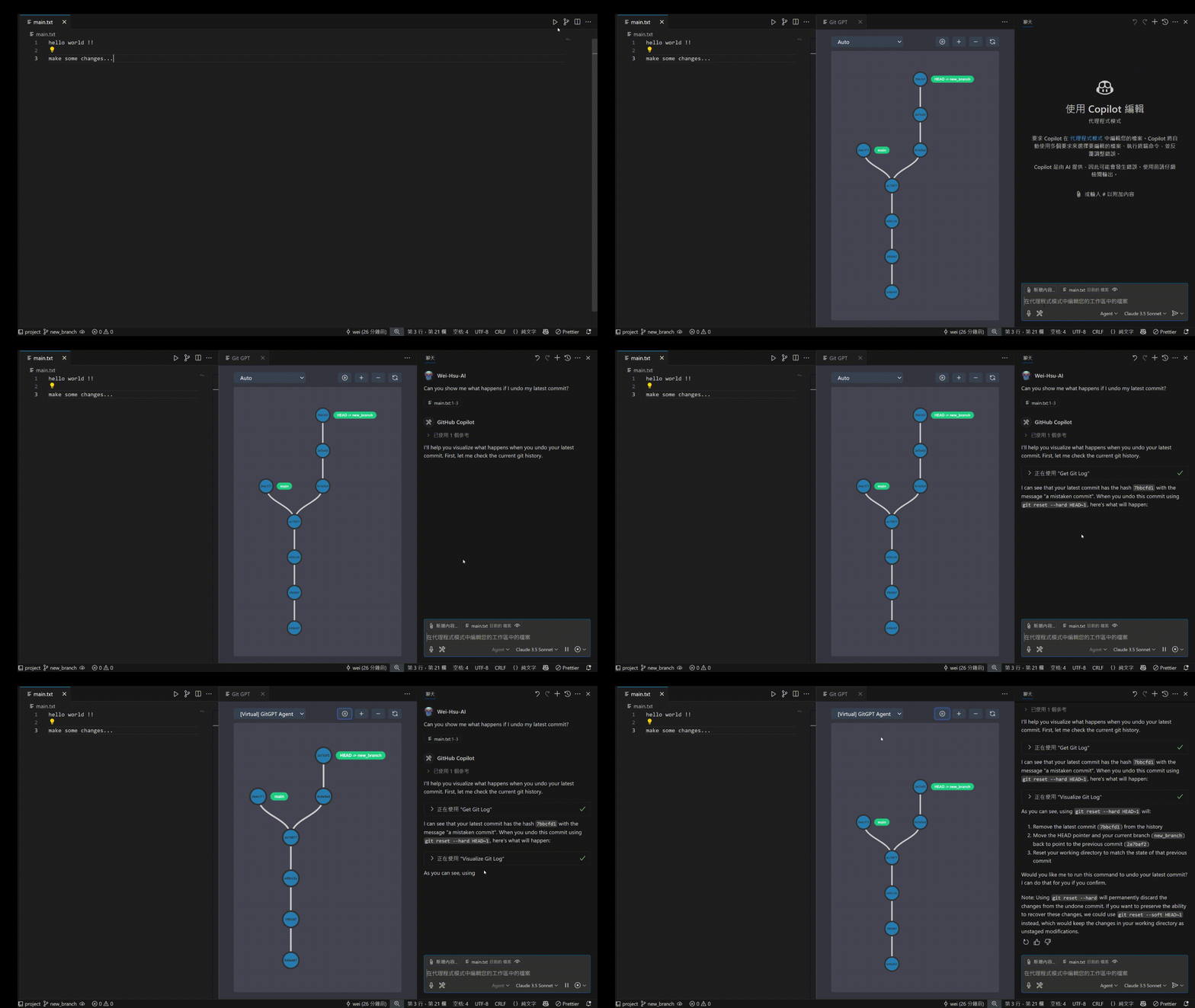
Opening Git Visualizer
- From Editor: Click the Git branch icon in the editor title bar.
- From Command Palette:
Ctrl+Shift+P→ type "gitVizMcp: Open Git Log Viewer".
Basic Operations
- Select Repository: Use the "gitVizMcp: Set Repository" command to choose which repository to visualize.
- View Animation: The interface will show the before/after states of Git operations.
- Control Playback: Use the play/pause button to control animation timing.
- Zoom & Navigate: Use zoom controls to explore complex commit trees.
Repository Management
- Auto Mode: Automatically switch repository based on the currently open file.
- Manual Selection: Choose a specific repository from available options.
- Multiple Workspaces: Supports multi-root workspaces.
Other Settings & Tools
Available Settings
| Setting | Default | Description |
|---|---|---|
gitVizMcp.port | 35555 | Port for MCP server |
gitVizMcp.basePath | "/gitviz" | Base path for API endpoints |
gitVizMcp.maxGitLogEntries | 30 | Maximum number of git log entries to fetch. |
Note: If you change the gitVizMcp.port or gitVizMcp.basePath settings, you must also update the URL in your MCP Server configuration (e.g., Copilot Config or Cline Config) to match these new values.
Commands
| Command | Description |
|---|---|
gitVizMcp: Open Git Log Viewer | Open the main visualization interface |
gitVizMcp: Set Repository | Select which repository to visualize |
gitVizMcp: Register MCP Server | Register MCP server in VS Code settings |
gitVizMcp: Restart Server | Restart the MCP server |
Language Model Tools
This extension provides AI tools for enhanced Git experience:
highlight_commit: Highlight specific commits in the visualizationget_git_log: Retrieve Git history for analysisvisualize_git_log: Create before/after visualizations of Git operationsget_git_prompt: Access Git-GPT assistance templates
Requirements
- VS Code: Version 1.99.0 or higher
- Git: Must be installed and accessible via command line
License
This project is licensed under the MIT License - see the LICENSE file for details.