Notion MCP Server
MCP-сервер для Notion API, обеспечивающий взаимодействие в реальном времени через Server-Sent Events (SSE).
Документация
Deploy and get started in minutes on ContexaAI
Important Note
This repository is a fork of the official Notion MCP server available on NPM.
The primary modification is the replacement of the transport mechanism from Stdio to Server-Sent Events (SSE).
Notion MCP Server
This project implements an MCP server for the Notion API.
Installation
1. Setting up Integration in Notion:
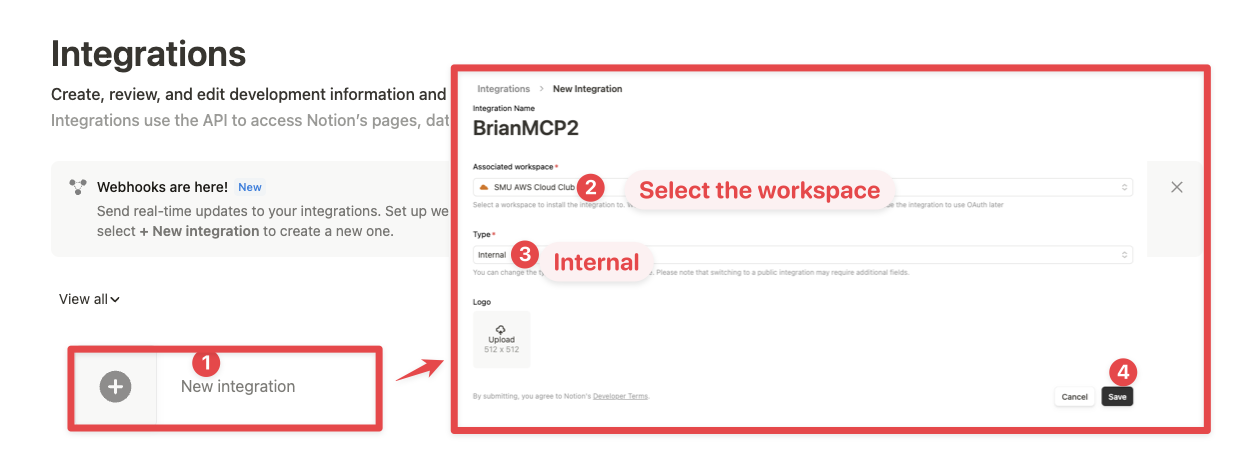
Go to https://www.notion.so/profile/integrations and create a new internal integration or select an existing one.
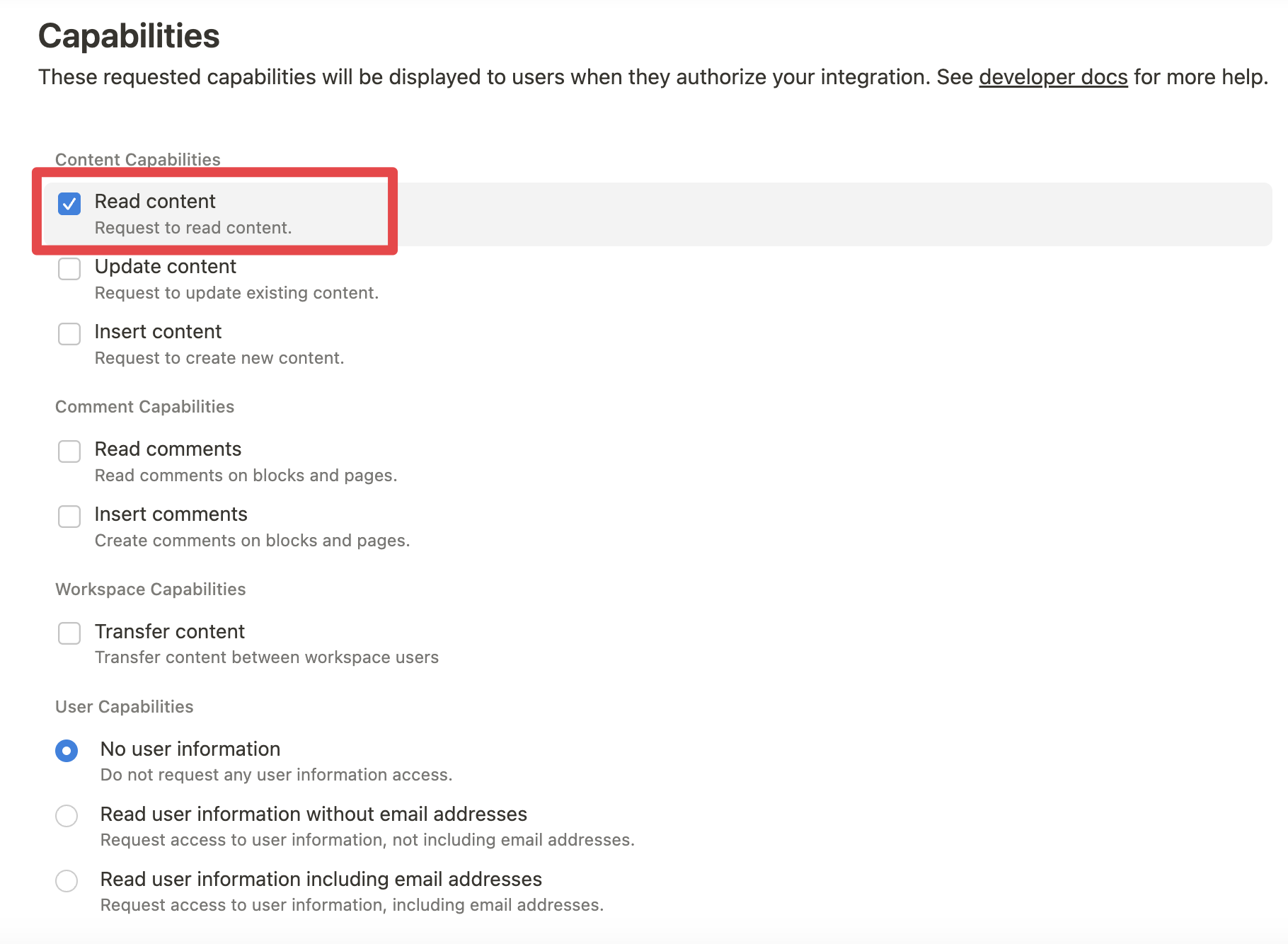
While we limit the scope of Notion API's exposed (for example, you will not be able to delete databases via MCP), there is a non-zero risk to workspace data by exposing it to LLMs. Security-conscious users may want to further configure the Integration's Capabilities.
For example, you can create a read-only integration token by giving only "Read content" access from the "Configuration" tab:
2. Connecting content to integration:
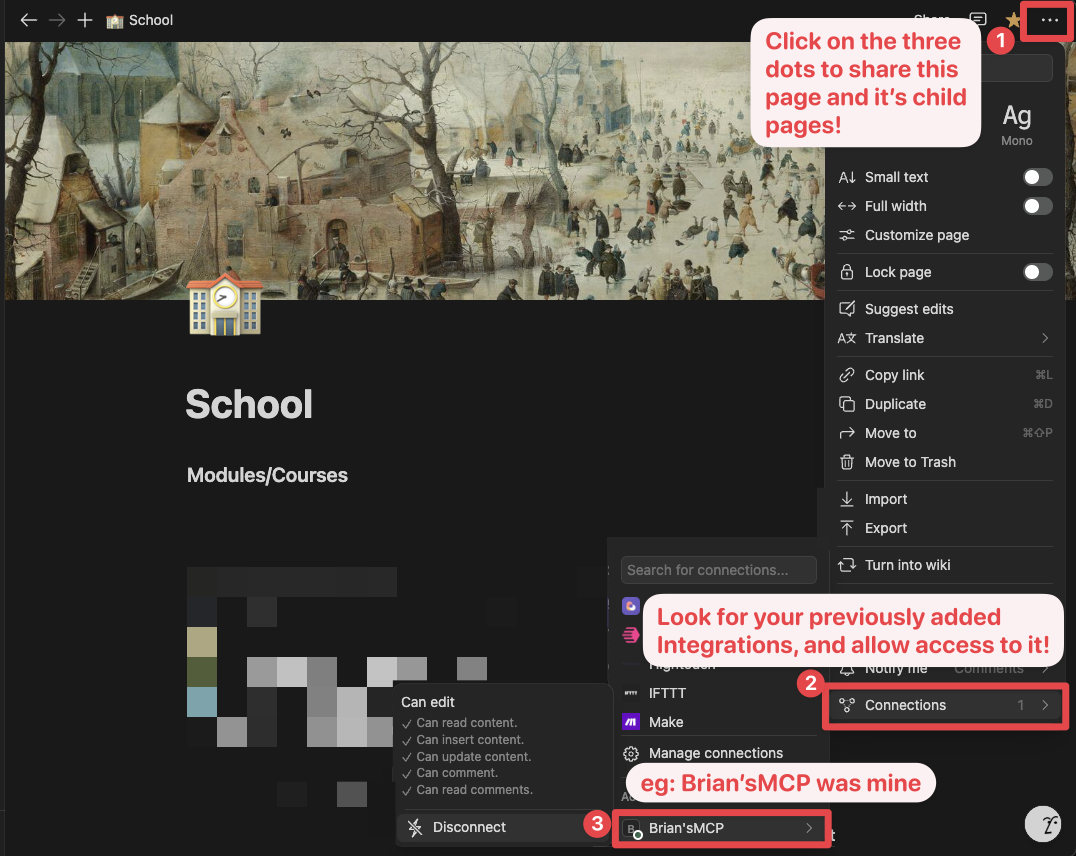
Ensure relevant pages and databases are connected to your integration.
To do this, you'll need to visit that page, and click on the 3 dots, and select "Connect to integration".
3. Adding MCP config to your client:
Using npm:
Add the following to your .cursor/mcp.json or claude_desktop_config.json (MacOS: ~/Library/Application\ Support/Claude/claude_desktop_config.json)
{
  "mcpServers": {
    "notionApi": {
      "command": "npx",
      "args": ["-y", "@notionhq/notion-mcp-server"],
      "env": {
        "OPENAPI_MCP_HEADERS": "{\"Authorization\": \"Bearer ntn_****\", \"Notion-Version\": \"2022-06-28\" }"
      }
    }
  }
}
Using Docker:
There are two options for running the MCP server with Docker:
Option 1: Using the official Docker Hub image:
Add the following to your .cursor/mcp.json or claude_desktop_config.json:
{
  "mcpServers": {
    "notionApi": {
      "command": "docker",
      "args": [
        "run",
        "--rm",
        "-i",
        "-e", "OPENAPI_MCP_HEADERS",
        "mcp/notion"
      ],
      "env": {
        "OPENAPI_MCP_HEADERS": "{\"Authorization\":\"Bearer ntn_****\",\"Notion-Version\":\"2022-06-28\"}"
      }
    }
  }
}
This approach:
- Uses the official Docker Hub image
- Properly handles JSON escaping via environment variables
- Provides a more reliable configuration method
Option 2: Building the Docker image locally:
You can also build and run the Docker image locally. First, build the Docker image:
docker-compose build
Then, add the following to your .cursor/mcp.json or claude_desktop_config.json:
{
  "mcpServers": {
    "notionApi": {
      "command": "docker",
      "args": [
        "run",
        "--rm",
        "-i",
        "-e",
        "OPENAPI_MCP_HEADERS={\"Authorization\": \"Bearer ntn_****\", \"Notion-Version\": \"2022-06-28\"}",
        "notion-mcp-server"
      ]
    }
  }
}
Don't forget to replace ntn_**** with your integration secret. Find it from your integration configuration tab:
Examples
- Using the following instruction
Comment "Hello MCP" on page "Getting started"
AI will correctly plan two API calls, v1/search and v1/comments, to achieve the task
- Similarly, the following instruction will result in a new page named "Notion MCP" added to parent page "Development"
Add a page titled "Notion MCP" to page "Development"
- You may also reference content ID directly
Get the content of page 1a6b35e6e67f802fa7e1d27686f017f2
Development
Build
npm run build
Execute
npx -y --prefix /path/to/local/notion-mcp-server @notionhq/notion-mcp-server
Publish
npm publish --access public