AST2LLM for Go
Uma ferramenta local de aprimoramento de contexto baseada em AST para LLMs que analisa a estrutura de projetos Go para uma resolução de contexto mais rápida
Documentação
AST2LLM for Go




Ferramenta local de aprimoramento de contexto baseada em AST para LLM
Injeta automaticamente estrutura de código relevante em seus prompts usando análise precisa de AST do Go.
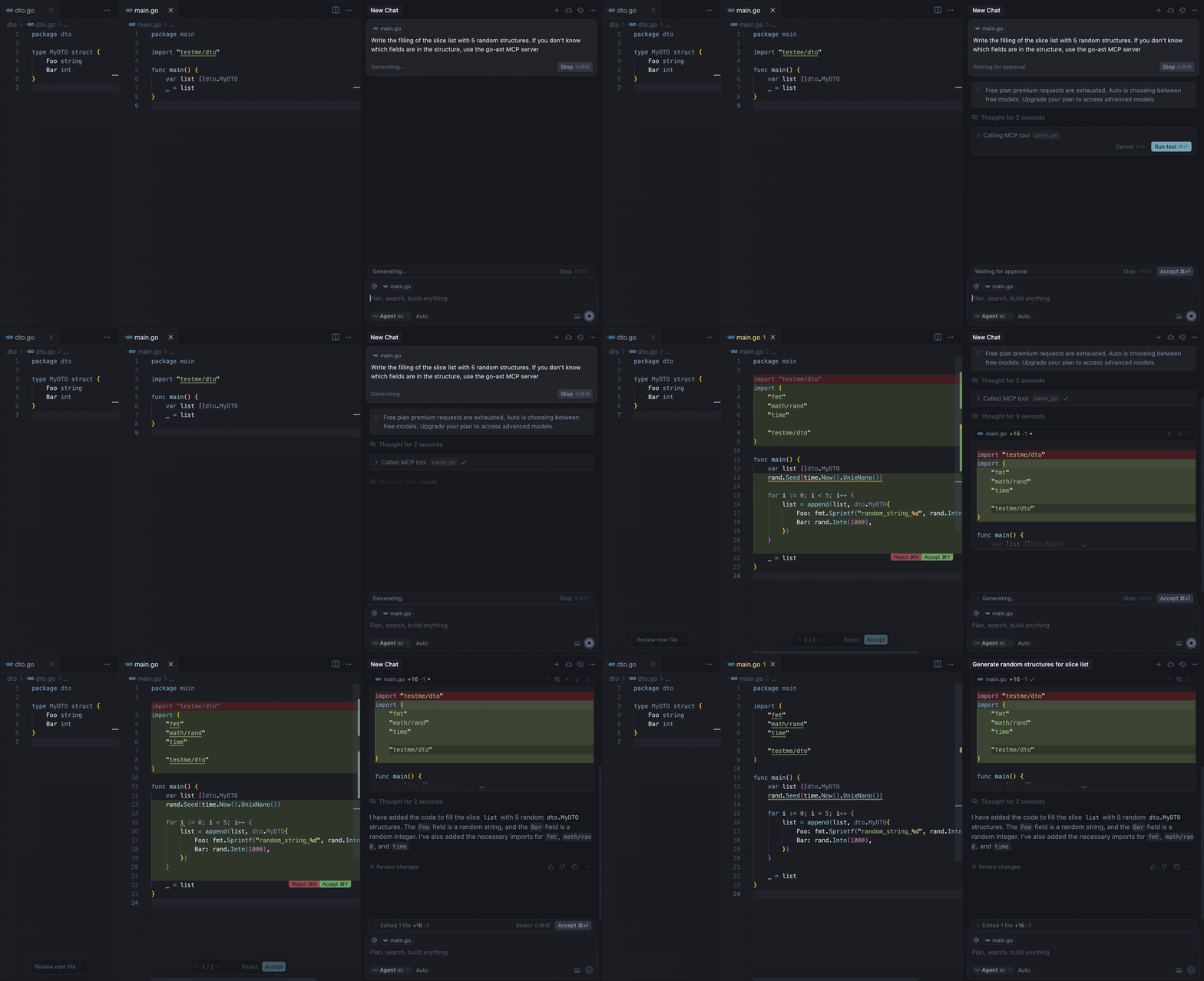
Nosso servidor MCP fornece a ferramenta parse-go que:
- Analisa a estrutura do seu projeto Go
- Identifica declarações de tipos externos
- Empacota contexto para prompts de LLM
- Entrega resolução de contexto 3-5x mais rápida que abordagens baseadas em grafos
Por exemplo, a demonstração acima mostra o modelo chamando a ferramenta para obter as informações ausentes sobre os campos da estrutura MyDTO. Em resposta, o modelo recebeu todas as informações necessárias da resposta:
Used Imported Structs (from this project, if available):
  Struct: testme/dto.MyDTO
    Fields:
      - Foo string
      - Bar int
Requisitos
- Go 1.22 ou superior (se compilar a partir do código-fonte)
- Cliente MCP compatível (Cursor, Claude, VS Code, etc.)
Instalação
Binários
Para instalar o ast2llm-go no seu sistema, execute o seguinte comando no seu terminal:
curl -LsSf https://raw.githubusercontent.com/ast2llm/ast2llm-go/main/install.sh | sh
Este script detectará automaticamente seu sistema operacional e arquitetura, baixará o binário apropriado e tentará adicioná-lo ao seu PATH. Você também pode especificar um diretório de instalação:
curl -LsSf https://raw.githubusercontent.com/ast2llm/ast2llm-go/main/install.sh | sh -s -- --install-dir /usr/local/bin
Auto-atualização
Para atualizar o ast2llm-go para a versão mais recente, basta executar novamente o comando de instalação:
curl -LsSf https://raw.githubusercontent.com/ast2llm/ast2llm-go/main/install.sh | sh
Desinstalação
Para remover o ast2llm-go do seu sistema, execute o script de desinstalação:
curl -LsSf https://raw.githubusercontent.com/ast2llm/ast2llm-go/main/uninstall.sh | sh
Este script removerá o binário, limpará as modificações do PATH e excluirá os arquivos de configuração relacionados. Talvez seja necessário reiniciar o shell após a desinstalação.
Configuração em Clientes
Após a instalação do ast2llm-go, você precisa reiniciar a IDE.
Cursor
Adicione ao seu ~/.cursor/mcp.json:
{
  "mcpServers": {
    "go-ast": {
      "command": "ast2llm-go",
      "args": []
    }
  }
}
Claude Desktop
Adicione ao claude_desktop_config.json:
{
  "mcpServers": {
    "go-ast": {
      "command": "ast2llm-go"
    }
  }
}
Visual Studio Code
Adicione à sua configuração MCP do VS Code:
{
  "servers": {
    "go-ast": {
      "type": "stdio",
      "command": "ast2llm-go"
    }
  }
}
Nota sobre o Estado Atual
Este servidor MCP está em desenvolvimento ativo e pode apresentar problemas de estabilidade ou funcionalidade incompleta. Estamos trabalhando duro para melhorá-lo, mas você pode encontrar:
- Erros ocasionais de análise
- Suporte limitado a tipos na versão atual
- Gargalos de desempenho com bases de código grandes
Encontrou um problema?
Abra uma Issue no GitHub para nos ajudar a melhorar! Agradecemos todos os relatórios de bugs e solicitações de recursos.
Roteiro
Suporte a Linguagens
- Suporte para tipos struct
- Suporte para tipos interface
- Suporte para tipos de função
- Suporte para variáveis globais
Contexto Multi-arquivo
- Analisar vários arquivos abertos simultaneamente
- Resolução de dependências entre arquivos
- Otimização de importação sensível ao contexto
Representação de AST
- Visualização aprimorada da hierarquia de tipos
- Pesquisar representação ideal de AST para LLMs. Fornecer diferentes formatos de saída adaptados a vários cenários, como no repomix:
- XML: Para compatibilidade com soluções tradicionais semelhantes ao Repomix.
- JSON: Um formato moderno adequado para integração com ferramentas e ambientes contemporâneos.
- Markdown: Um formato facilmente legível, ideal para visualização rápida e documentação de alterações.
Desempenho
- Análise incremental
- Cache de AST
- Análise paralela
Contribuindo
Aceitamos contribuições! Veja como você pode ajudar:
-
Relatar Bugs
- Abra uma issue com uma descrição clara
- Inclua etapas para reproduzir
- Adicione logs/capturas de tela relevantes
-
Sugerir Recursos
- Abra uma issue com a solicitação de recurso
- Explique o caso de uso e os benefícios
- Inclua exemplos relevantes
-
Enviar Pull Requests
- Faça um fork do repositório
- Crie um branch de recurso
- Adicione testes para a nova funcionalidade
- Garanta que todos os testes passem
- Envie um PR com uma descrição clara