AGS Extend SDK MCP Server
oficialUm servidor MCP para ajudar assistentes de IA a responder perguntas e gerar código do AccelByte Extend SDK de forma mais eficaz.
O que você pode fazer com AGS Extend SDK MCP?
- Pesquisar símbolos do Extend SDK — encontre funções e modelos em C#, Go, Java ou Python usando correspondência aproximada por nome, tags ou descrição com
search-symbols. - Descrever símbolos específicos — obtenha detalhes completos de um símbolo por ID, incluindo parâmetros, campos, importações, tipos de retorno, exemplos de uso e permissões necessárias com
describe-symbols. - Estruturar um novo aplicativo Extend — invoque o prompt
create-extend-apppara clonar um repositório de modelo e começar a partir de um exemplo funcional no idioma escolhido.
Documentação
AGS Extend SDK MCP Server
Um servidor Model Context Protocol (MCP) que fornece aos assistentes de IA (VS Code Copilot, Cursor, Claude, Gemini, Antigravity) o AccelByte Extend SDK como contexto adicional — para que eles possam responder perguntas sobre o SDK e gerar código Extend SDK correto.
O Que Ele Faz
- Pesquisa símbolos do Extend SDK (funções e modelos) por nome, tags ou descrição (correspondência difusa)
- Descreve símbolos específicos — parâmetros, campos, imports, exemplos, tipos de retorno, permissões necessárias
- Gera a estrutura de um novo aplicativo Extend a partir de um repositório modelo via o prompt
create-extend-app
Ele serve a referência do SDK para quatro linguagens — C#, Go, Java e Python. Você escolhe a linguagem por conexão através do caminho da URL (veja Escolha sua linguagem).
A AccelByte hospeda o Extend SDK MCP Server para você — você não precisa instalar ou executar nada localmente. Basta apontar seu assistente de IA para a URL MCP hospedada para sua linguagem. Não há login: o servidor expõe apenas dados de referência do SDK somente leitura. Prefere executá-lo você mesmo? Veja Executando Localmente & Auto-Hospedagem.
Instalação Rápida
Cole isto no seu assistente de codificação de IA — ele buscará o guia de instalação, fará algumas perguntas e configurará tudo para você:
Install the AGS Extend SDK MCP server for me. Fetch and follow the instructions at
https://raw.githubusercontent.com/AccelByte/ags-extend-sdk-mcp-server/refs/heads/master/INSTALL.md
Funciona no VS Code Copilot, Cursor, Claude Code, Antigravity e Gemini CLI.
Usuários do Claude Desktop: O caminho mais simples é Configurações → Conectores → Adicionar conector personalizado (Nome:
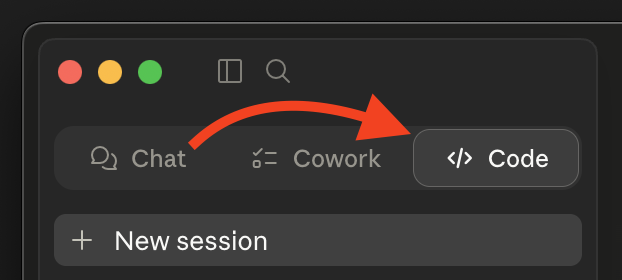
extend-sdk, URL: sua URL MCP) — sem necessidade de instalador de IA. Veja Claude Desktop abaixo.Se você quiser usar o prompt de Instalação Rápida acima, mude para a aba Código primeiro (Chat e Cowork não podem editar seu arquivo de configuração).
Prefere fazer você mesmo? Veja Instalação Manual abaixo.
Instalação Manual
Passo 1: Escolha sua linguagem e obtenha sua URL
A URL MCP é a URL base do servidor hospedado seguida por /extend-mcp/{language}:
https://<mcp-server-host>/extend-mcp/{language}
| Linguagem | Caminho da URL |
|---|---|
| C# | /extend-mcp/csharp |
| Go | /extend-mcp/go |
| Java | /extend-mcp/java |
| Python | /extend-mcp/python |
<mcp-server-host>é o host da implantação da sua organização — pergunte ao seu administrador AccelByte se não tiver certeza.- Uma instância hospedada serve todas as linguagens. Para mudar de linguagem depois, basta alterar o segmento final do caminho (ex.:
/extend-mcp/python→/extend-mcp/go). Solicitar uma linguagem desconhecida retorna HTTP400. - O caminho base (
/extend-mcp) sem linguagem serve a linguagem padrão configurada no servidor.
Sem instância hospedada? Você pode executar o servidor você mesmo com Docker — veja Executando Localmente & Auto-Hospedagem.
Passo 2: Configure seu cliente
O servidor usa transporte HTTP Transmissível. Clientes que suportam transporte HTTP conectam-se diretamente à URL. Clientes que suportam apenas transporte stdio usam mcp-remote como ponte.
Precisa do
mcp-remote? Ele é executado vianpx, então você precisa do Node.js 18+ comnpxdisponível — verifique comnpx --version. Nenhuma instalação global é necessária.
Substitua sua URL do Passo 1 onde quer que veja <URL> abaixo.
Visual Studio Code (Copilot)
.vscode/mcp.json no seu espaço de trabalho (ou settings.json do usuário):
{
  "servers": {
    "extend-sdk": {
      "type": "http",
      "url": "<URL>"
    }
  }
}
Se seu cliente não conseguir acessar um servidor HTTP, troque para: { "command": "npx", "args": ["-y", "mcp-remote", "<URL>"] }.
Veja a documentação do VS Code MCP.
Cursor
.cursor/mcp.json no seu espaço de trabalho (ou configurações do usuário):
{
  "mcpServers": {
    "extend-sdk": {
      "type": "http",
      "url": "<URL>"
    }
  }
}
Se seu cliente não conseguir acessar um servidor HTTP, troque para: { "command": "npx", "args": ["-y", "mcp-remote", "<URL>"] }.
Veja a documentação do Cursor MCP.
Claude Code
claude mcp add --transport http extend-sdk <URL>
Alternativa (ambientes somente stdio): claude mcp add extend-sdk -- npx -y mcp-remote <URL>.
Veja a documentação do Claude Code MCP.
Antigravity
mcp_config.json na raiz do seu projeto:
{
  "mcpServers": {
    "extend-sdk": {
      "type": "http",
      "url": "<URL>"
    }
  }
}
Se seu cliente não conseguir acessar um servidor HTTP, troque para: { "command": "npx", "args": ["-y", "mcp-remote", "<URL>"] }.
Veja a documentação do Antigravity MCP.
Gemini CLI
gemini mcp add --transport http extend-sdk <URL>
Alternativa (ambientes somente stdio): gemini mcp add extend-sdk -- npx -y mcp-remote <URL>.
Veja a documentação do Gemini CLI MCP.
Claude Desktop
Opção A — Conector Personalizado (recomendado)
- Abra Configurações → Conectores → Adicionar conector personalizado (na área "Personalizar").
- Preencha Nome:
extend-sdke URL do servidor MCP remoto: sua<URL>do Passo 1. - Salve.
Não vê "Adicionar conector personalizado"? Alguns planos Team e Enterprise desabilitam conectores personalizados via política do espaço de trabalho. Se a opção estiver faltando ou desativada, use a Opção B.
Opção B — Arquivo de configuração mcp-remote (alternativa)
Edite claude_desktop_config.json:
- macOS:
~/Library/Application Support/Claude/claude_desktop_config.json - Windows:
%APPDATA%\Claude\claude_desktop_config.json
{
  "mcpServers": {
    "extend-sdk": {
      "command": "npx",
      "args": ["-y", "mcp-remote", "<URL>"]
    }
  }
}
Reinicie o Claude Desktop após salvar.
Usando as Ferramentas
Uma vez conectado, seu assistente tem acesso a estas ferramentas. No chat do seu assistente, experimente os prompts de exemplo abaixo — dê permissão para executar as ferramentas quando solicitado.
search-symbols
Pesquise símbolos do Extend SDK por nome, tags ou descrição, com correspondência difusa. Retorna uma lista paginada de resumos.
"Pesquise por símbolos relacionados a usuário" · "Encontre símbolos para inventário"
describe-symbols
Obtenha detalhes completos de símbolos específicos por ID — campos, parâmetros, imports, exemplo de uso, tipo de retorno e permissões necessárias.
"Descreva os símbolos
AdminCreateUser@iameUser@iam"
create-extend-app
Um modelo de prompt que clona um repositório modelo de aplicativo Extend e o abre (em um Dev Container quando disponível) para que você possa começar a partir de uma amostra funcional.
Invoque o prompt
create-extend-appe siga as conclusões de cenário / modelo / linguagem.
[!TIP] Ao codificar com este servidor MCP, comece a partir de uma amostra de introdução ao Extend SDK ou de um modelo de aplicativo Extend em vez de um projeto em branco, e adicione arquivos de origem relevantes como contexto para melhores resultados.
Executando você mesmo
Prefere executar o servidor localmente (stdio) ou hospedar o servidor HTTP você mesmo? Veja Executando Localmente & Auto-Hospedagem para uso com Docker, variáveis de ambiente, endpoints HTTP, testes de fumaça, desenvolvimento a partir do código fonte e lançamento da imagem.
Solução de Problemas
Chamadas de ferramentas falham / o servidor retorna 400
Verifique a linguagem no caminho da sua URL. Deve ser uma de csharp, go, java ou python (ex.: /extend-mcp/go). Uma linguagem desconhecida retorna HTTP 400.
Cliente não consegue conectar à URL HTTP
Alguns clientes suportam apenas transporte stdio. Mude esse cliente para a configuração de ponte mcp-remote mostrada no Passo 2. Ele precisa do Node.js 18+ com npx disponível (npx --version).
"Conexão recusada" ou o host está inacessível
Confirme se o <mcp-server-host> e a URL completa estão corretos (pergunte ao seu administrador AccelByte) e se sua rede consegue acessá-lo.
Documentação
- Guia de Instalação — seguido pelo prompt de Instalação Rápida; legível por si só
- Executando Localmente & Auto-Hospedagem — Docker, variáveis de ambiente, endpoints HTTP, desenvolvimento e lançamento da imagem
- Coleção do Postman — instruções de importação e teste de fumaça com Newman para
search-symbolsedescribe-symbols
Contribuições
Este repositório é publicado como está. Para relatórios de bugs e perguntas, por favor, abra uma issue.