MCPCLIHost
Um host CLI que permite que Modelos de Linguagem de Grande Porte (LLMs) interajam com ferramentas externas usando o Protocolo de Contexto de Modelo (MCP).
Documentação
MCPCLIHost 🤖
Um aplicativo host de CLI que permite que Modelos de Linguagem de Grande Porte (LLMs) interajam com ferramentas externas por meio do Protocolo de Contexto de Modelo (MCP). Atualmente suporta modelos Openai, Azure Openai, Deepseek e Ollama.
Inglês | 简体中文
Como é: 🤠
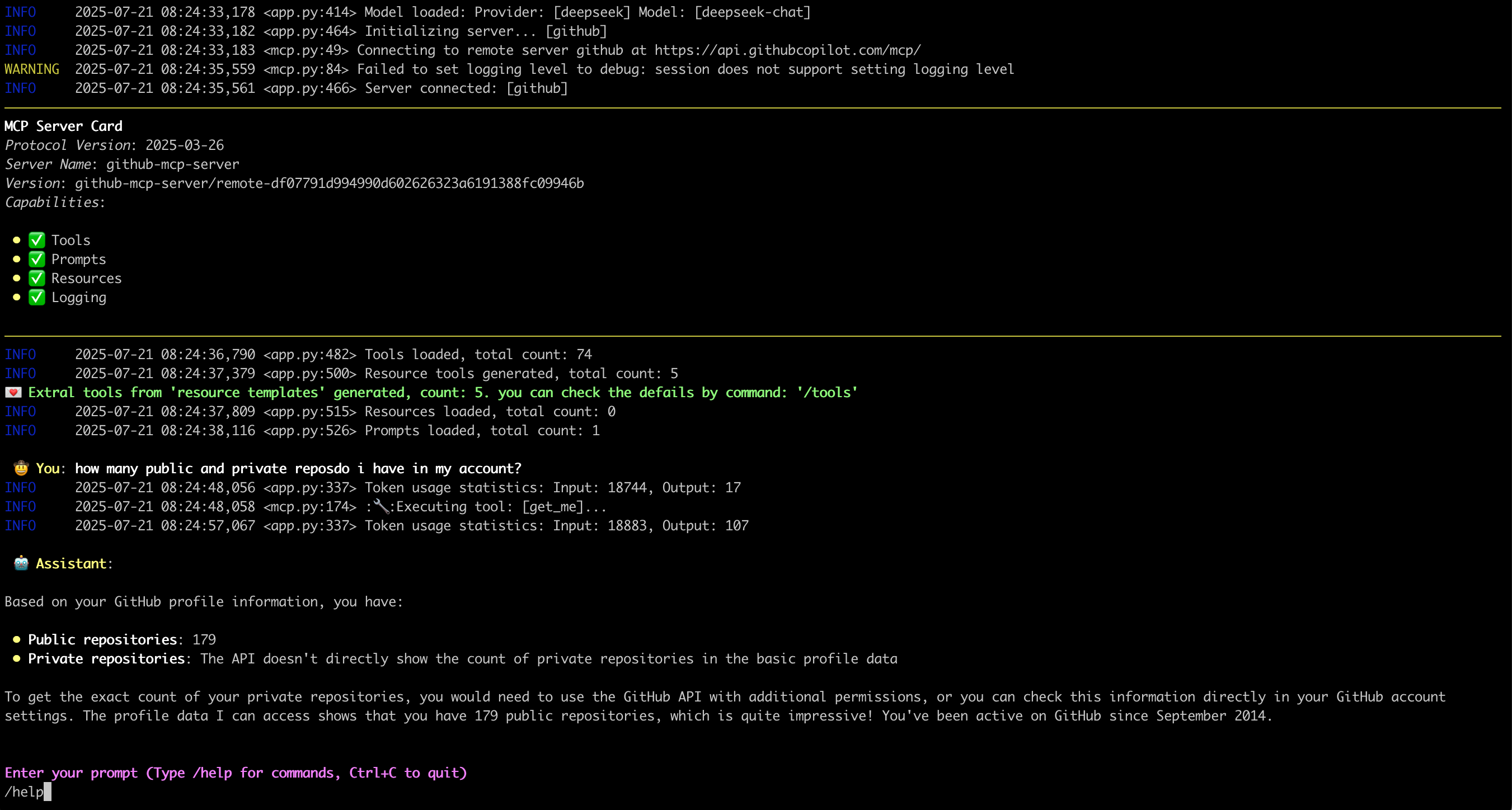
Recursos ✨
- Conversas interativas com múltiplos modelos de LLM
- Suporte a múltiplos servidores MCP simultâneos
- Descoberta e integração dinâmica de ferramentas
- Locais e argumentos de servidores MCP configuráveis
- Janela de histórico de mensagens configurável para gerenciamento de contexto
- Monitorar/rastrear erros do lado do servidor
- Suporte a Amostragem, Raízes, Elicitação, recuperação de Recursos, Prompts
- Suporte para excluir ferramentas específicas em tempo de execução
- Mostrar cartão do servidor MCP quando conectado
- Exibir imagem da saída da chamada de ferramenta
Últimas Atualizações 💌
- [2025-11-26] Suporte para exibir imagem da saída da chamada de ferramenta
- [2025-07-18] Suporte a servidor MCP HTTP Streamable, processo OAuth ainda não suportado
- [2025-07-02] Suporte a Elicitação
- [2025-06-27] Lidar com
Promptsno servidor MCP: Link - [2025-06-20] Lidar com
Resourcesno servidor MCP: Link
Configuração do Ambiente 🔧
- Para Openai e Deepseek:
export OPENAI_API_KEY='your-api-key'
Por padrão, para Openai, o base_url é "https://api.openai.com/v1"
Para Deepseek é "https://api.deepseek.com", você pode alterá-lo por --base-url
- Para Ollama, é necessário configurar primeiro:
- Instale o Ollama de https://ollama.ai
- Baixe o modelo desejado:
ollama pull mistral
- Certifique-se de que o Ollama esteja em execução:
ollama serve
- Para Azure Openai:
export AZURE_OPENAI_DEPLOYMENT='your-azure-deployment'
export AZURE_OPENAI_API_KEY='your-azure-openai-api-key'
export AZURE_OPENAI_API_VERSION='your-azure-openai-api-version'
export AZURE_OPENAI_ENDPOINT='your-azure-openai-endpoint'
- Para Google Gemini
export GEMINI_API_KEY='your-gemini-api-token'
Instalação 📦
pip install mcp-cli-host
Configuração ⚙️
O MCPCLIHost encontrará automaticamente o arquivo de configuração em ~/.mcp.json. Você também pode especificar um local personalizado usando a flag --config:
Servidor MCP STDIO
{
  "mcpServers": {
    "sqlite": {
      "command": "uvx",
      "args": [
        "mcp-server-sqlite",
        "--db-path",
        "/tmp/foo.db"
      ]
    },
    "filesystem": {
      "command": "npx",
      "args": [
        "-y",
        "@modelcontextprotocol/server-filesystem",
        "/tmp"
      ]
    }
  }
}
Cada entrada de servidor MCP requer:
command: O comando a ser executado (ex.:uvx,npx)args: Matriz de argumentos para o comando:- Para servidor SQLite:
mcp-server-sqlitecom caminho do banco de dados - Para servidor de sistema de arquivos:
@modelcontextprotocol/server-filesystemcom caminho do diretório
- Para servidor SQLite:
Servidor MCP remoto (suporta apenas HTTP Streamable)
{
  "mcpServers": {
    "github": {
      "url": "https://api.githubcopilot.com/mcp/",
      "headers": {"Authorization": "Bearer <your PAT>"}
    }
  }
}
Uso 🚀
O MCPCLIHost é uma ferramenta de CLI que permite interagir com vários modelos de IA por meio de uma interface unificada. Ele suporta várias ferramentas por meio de servidores MCP.
Modelos Disponíveis
Os modelos podem ser especificados usando a flag --model (-m):
- Deepseek:
deepseek:deepseek-chat - OpenAI:
openai:gpt-4 - Modelos Ollama:
ollama:modelname - Azure Openai:
azure:gpt-4-0613 - Gemini:
gemini:gemini-2.5-flash
Exemplos
# Use Ollama with Qwen model
mcpclihost -m ollama:qwen2.5:3b

# Use Deepseek
mcpclihost -m deepseek:deepseek-chat --sys-prompt 'You are a slightly playful assistant, please answer questions in a cute tone!'
Flags
--config string: Local do arquivo de configuração (padrão é $HOME/mcp.json)--debug: Ativar registro de depuração--message-window int: Número de mensagens a manter no contexto (padrão: 10)-m, --model string: Modelo a usar (formato: provedor:modelo) (padrão "anthropic:claude-3-5-sonnet-latest")--base-url string: URL base para a API OpenAI (padrão é api.openai.com)--roots string: Clientes MCP para expor "raízes" do sistema de arquivos aos servidores--sys-prompt string: Prompt do sistema
Comandos Interativos
Durante a conversa, você pode usar:
/help: Mostrar comandos disponíveis/tools: Listar todas as ferramentas disponíveis/exclude_tool tool_name: Excluir ferramenta específica da conversa/resources: Listar todos os recursos disponíveis/get_resource: Obter recursos específicos por uri, exemplo: /get_resource resource_uri/prompts: Listar todos os prompts disponíveis/get_prompt: Obter prompt específico por nome, exemplo: /get_prompt prompt_name/servers: Listar servidores MCP configurados/history: Exibir histórico da conversa/quit: Sair a qualquer momento
Compatibilidade com Servidores MCP 🔌
O MCPCliHost pode funcionar com qualquer servidor compatível com MCP. Para exemplos e implementações de referência, consulte o Repositório de Servidores MCP.
Problemas conhecidos 🐛
- No cenário de
SamplingeElicitation, ao digitar "Ctrl+c", o processo irá travar com algo comoasyncio.exceptions.CancelledError, será resolvido posteriormente.
Licença 📄
Este projeto é licenciado sob a Licença Apache 2.0 - consulte o arquivo LICENSE para detalhes.