observability-mcp
Um servidor MCP que se conecta a qualquer backend de observabilidade através de conectores plugáveis, normaliza os dados, adiciona análise inteligente e fornece uma interface web para configuração.
Documentação
observability-mcp
O gateway unificado de observabilidade para agentes de IA.
Um único servidor MCP que se conecta a qualquer backend de observabilidade por meio de conectores plugáveis, normaliza os dados, adiciona análise robusta de anomalias e fornece uma interface web para configuração.
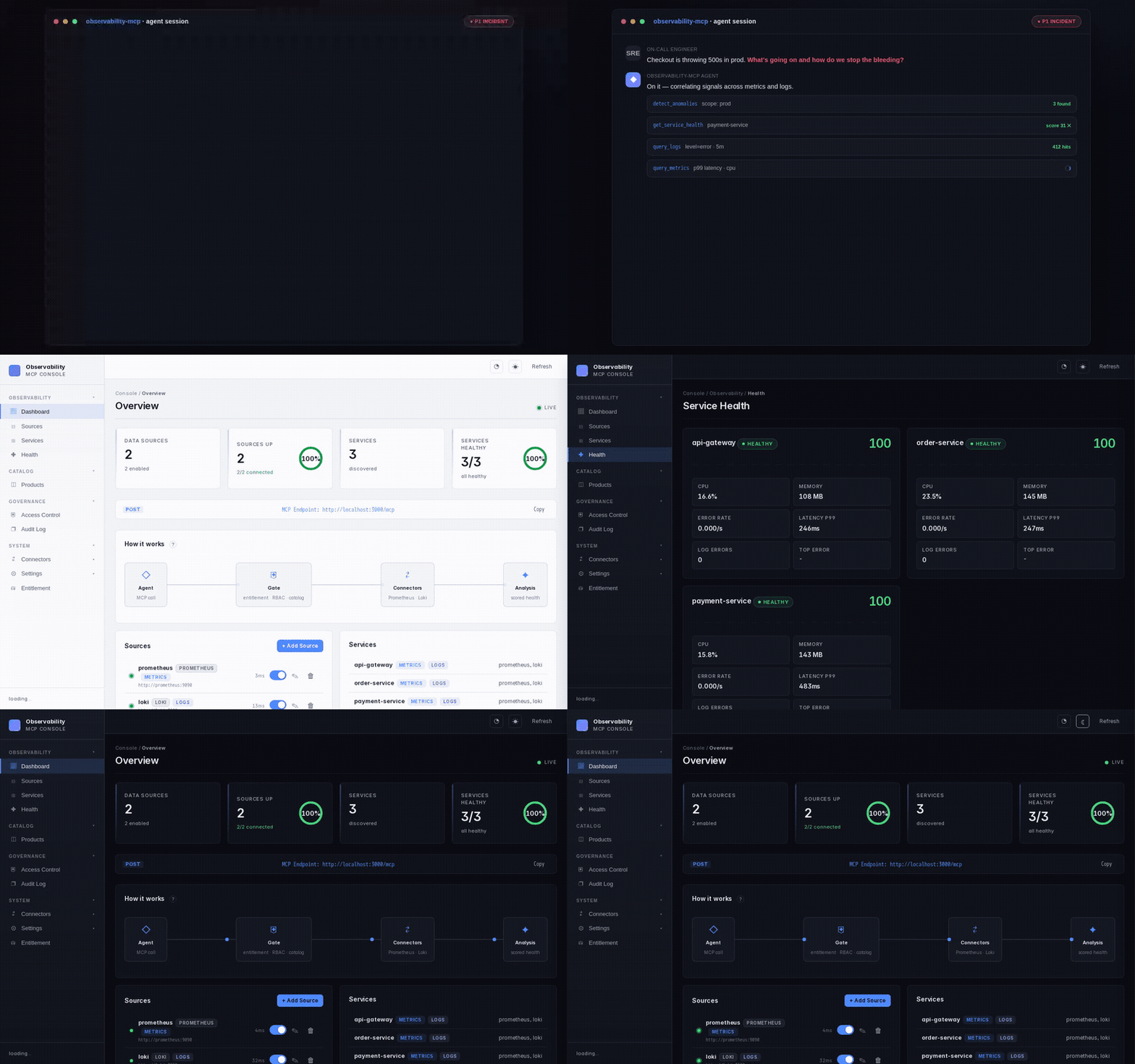
Um endpoint MCP, todos os backends — para que um agente que esteja tratando um incidente faça uma pergunta normalizada em vez de lidar com N servidores de fornecedores e suas linguagens de consulta.
0/10 → 10/10: o mesmo modelo local de 8B passa de respostas alucinadas sobre raio de explosão para respostas exatamente corretas quando recebe as ferramentas de topologia deste gateway — medido, não afirmado.
npx @thotischner/observability-mcp                                    # start (UI on :3000)
claude mcp add observability --transport http http://localhost:3000/mcp   # wire into Claude
Doze ferramentas somente leitura (readOnlyHint: true em todas) · filtro/agregação no lado do servidor para que os agentes recebam números, não agulhas no palheiro · guia For-Agents







Todos os selos — CI, Helm, cadeia de suprimentos (cosign / SBOM / SLSA / provenance)









📖 Site de documentação completa: https://thotischner.github.io/observability-mcp/
🔌 Abrir no MCP Inspector — explorador interativo de uma linha:
npx --yes @modelcontextprotocol/inspector \
  --config <(npx --yes @thotischner/observability-mcp inspector-config)
Por que isso importa — medido, não afirmado
Em uma pergunta real de equipe de plataforma Kubernetes ("quais outros pods compartilham um nó com payment-service para sabermos o que mais cai se esse nó ficar indisponível?"), o mesmo modelo local produz respostas extremamente diferentes dependendo das ferramentas que você fornece:
| Ferramentas disponíveis para o agente (llama3.1:8b, n=10) | Precisão do raio de explosão entre namespaces |
|---|---|
| Ferramentas genéricas de métrica + log + serviço | 0 / 10 — alucina o tipo de entidade errado (prometheus, loki, kubernetes) |
Mesmo modelo + get_topology + get_blast_radius | 10 / 10 — lista exata e correta de co-locatários, em todas as iterações |
O JSON bruto de ambos os braços, além de mais três cenários (RCA de serviço único, raio de explosão dentro do namespace, cenários em que a topologia não ajuda), está em docs/benchmark-astronomy-shop.md. O harness está em scripts/benchmark-rca.mjs; execute novamente com make benchmark-up && make benchmark-run.
Não afirmamos aceleração universal — o documento detalha exatamente onde as ferramentas de topologia ajudam (perguntas em formato de grafo) e onde não ajudam (drill-downs puros de métrica única).
Experimente em 10 segundos
npx @thotischner/observability-mcp
# then open http://localhost:3000
Conecte-o ao Claude Code com uma única chamada de CLI:
claude mcp add observability --transport http http://localhost:3000/mcp
…ou faça commit no seu repositório como .mcp.json (funciona da mesma forma no Claude Desktop / Cursor):
{
  "mcpServers": {
    "observability": {
      "transport": { "type": "http", "url": "http://localhost:3000/mcp" }
    }
  }
}
O servidor inicia com zero fontes. Adicione Prometheus/Loki pela interface web ou pelas variáveis de ambiente PROMETHEUS_URL / LOKI_URL.
Se preferir que os trechos acima sejam impressos por um alvo do Make — incluindo substituição de host/porta personalizados — use
make connect-claude-codeoumake connect-cursor.make doctorfaz um handshake MCP real de ida e volta contra um servidor em execução, reporta a postura de governança ao vivo (modo de autenticação, redação, persistência do log de auditoria, limite de taxa por identidade) e informa o que corrigir se não conseguir.
Multiusuário / produção? Consulte docs/access-control.md para a configuração opcional de login em modo básico + RBAC + log de auditoria + limite de taxa por identidade. Tudo desativado por padrão; a demonstração acima permanece inalterada.
SSO via OIDC?
make demo-oidcinicia um Keycloak + um mcp-server com sabor OIDC na porta 3001 com três usuários pré-provisionados (admin/operator/viewer, senha = nome de usuário, SOMENTE DEMONSTRAÇÃO). Consulte docs/auth-oidc.md para configurações de produção com Keycloak / Authentik / Auth0 / Azure AD.RBAC externo via OPA?
make demo-opainicia um Open Policy Agent com uma política Rego de exemplo + um mcp-server com suporte a OPA na porta 3002. Consulte docs/policy-engines.md para as compensações e caminhos de migração dos backends integrado / arquivo / OPA.Produtos MCP selecionados? Defina
OMCP_PRODUCTS_FILEcomo um catálogo YAML (config/products.yaml.example) e distribua pacotes de ferramentas por tenant/agente em vez de "tudo, o tempo todo". Controlado por RBAC, auditado, editável a quente. Detalhes em docs/products.md.
Quer a demonstração completa de engenharia do caos (Prometheus + Loki + 3 serviços de exemplo + o agente autônomo)? Clone e execute:
make demo # equivalent to: docker compose --profile demo up --build --wait
Ou execute o quickstart soberano — um comando, totalmente on-premise, zero chamadas externas: ele inicia a stack, injeta um incidente real e mostra lado a lado o que um agente obtém sem vs com a camada de análise (uma parede de números brutos vs um veredito pontuado que identifica o culpado). O agente opcional raciocina sobre isso com um modelo local (Ollama):
make demo-sovereign
Consulte make help para todos os fluxos de trabalho canônicos.
Por quê?
Cada fornecedor de observabilidade entrega seu próprio servidor MCP — Prometheus, Grafana, Datadog, Elastic, cada um isolado. Um agente de IA que trata um incidente entre sistemas precisa lidar com N servidores separados e aprender cada linguagem de consulta (PromQL, LogQL, …). Não existe uma camada de abstração unificada.
observability-mcp é essa camada: um endpoint MCP que normaliza todos os backends e responde em termos simples de serviço/métrica/log, além de um mecanismo de análise que sinaliza anomalias que o agente teria que reconstruir a partir de consultas brutas por conta própria.
Para quem é: equipes de SRE / plataforma que executam Prometheus + Loki e usam um agente de IA (Claude, LLMs locais, …) para triagem de incidentes. A alavancagem do gateway é maior quando o agente não é um modelo de fronteira — um modelo menor ou local que não consegue escrever PromQL/LogQL manualmente de forma confiável se beneficia mais de ferramentas normalizadas e análise pré-computada. Um modelo de fronteira forte consegue consultar backends brutos com competência por conta própria; nesse caso, o valor está na consistência e no mecanismo de análise, não na conveniência de consulta. Afirmamos isso com honestidade, em vez de alegar aceleração universal.
Recursos
- 🔍 Inspect — veja, aprenda e aplique o comportamento do agente — um grafo ao vivo no estilo service mesh de cada chamada de ferramenta MCP, um fluxo de aprendizado no estilo AppArmor que deriva um perfil de comportamento do tráfego real e um modo de aplicação que bloqueia chamadas fora da linha de base aceita. Ir para Inspect ↓
- Gateway unificado — Um único endpoint MCP para todos os seus backends de observabilidade.
- Análise entre sinais — Correlaciona métricas e logs automaticamente. Detecção robusta de anomalias (linha de base mediana/MAD, detecção de tendência para rampas lentas, aquecimento + permanência para suprimir oscilações) e pontuação de saúde ponderada.
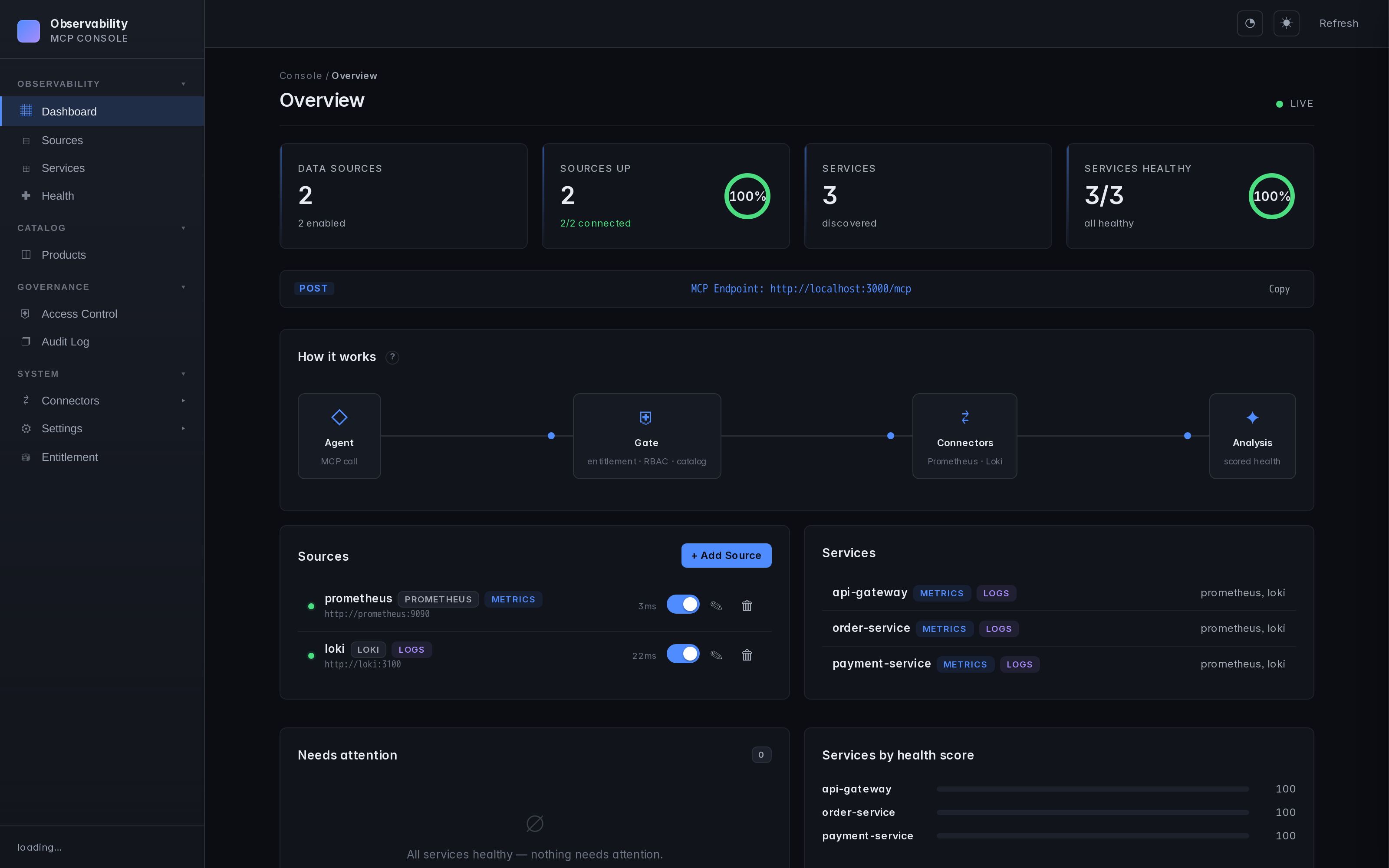
- Interface web — Fontes, serviços, monitoramento de saúde, configuração. Em tempo real, tema escuro.
- Padrões prom-client — Funciona imediatamente com a instrumentação padrão do Node.js para Prometheus. A resolução dinâmica de labels verifica
job/service/app/service_namepara que a filtragem de serviços simplesmente funcione. - Fallback de labels do Loki — Descobre serviços por meio de
service_name/service/job/app/container, incluindo streams enviados via Docker com barras iniciais. - Conectores plugáveis — Uma interface, qualquer linguagem de consulta (PromQL, LogQL, Flux, KQL...). Consulte docs/connectors.md.
- Autenticação e TLS — Basic, Bearer, CA personalizado, mTLS. Consulte docs/auth-and-tls.md.
- Multi-backend — Várias instâncias do mesmo tipo, sem problema.
Inspect — veja, aprenda e aplique o comportamento do agente
Você entregou a um agente (ou a um bot de CI, ou a uma credencial vazada) uma chave para seus backends de observabilidade. Inspect responde à pergunta que o RBAC não consegue: esta chamada é normal para esta identidade, comparada ao que ela realmente tem feito?
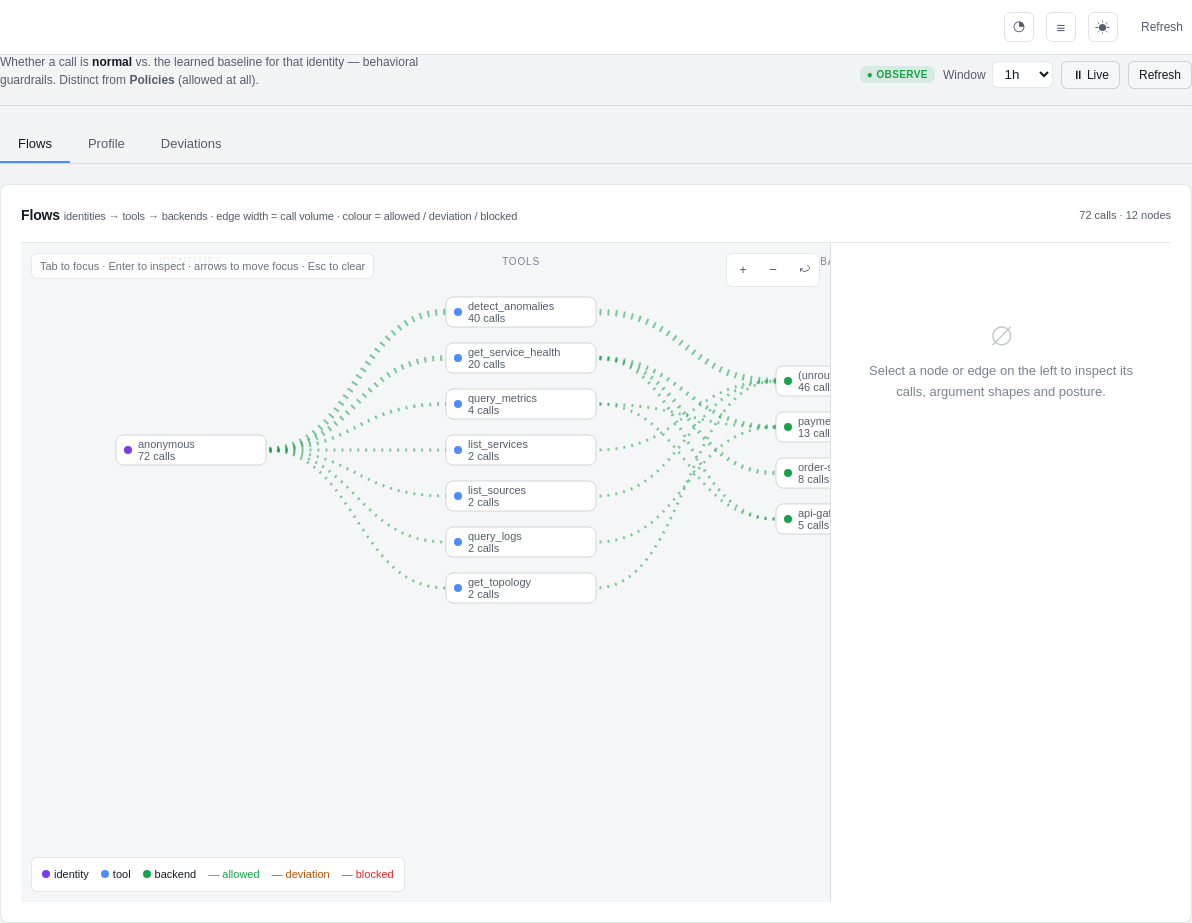
Ele empresta o fluxo de aprendizado do AppArmor e uma visão de tráfego no estilo service mesh (pense em Kiali, para chamadas de ferramentas de agentes):
   OFF  ──▶  OBSERVE  ──▶  DRY-RUN (complain)  ──▶  ENFORCE
              │              │                        │
        record calls    compute what WOULD be     block calls that
        only (zero      blocked, but still allow   fall outside the
        risk, default)  — review before enforcing   accepted profile
- Flows — um grafo ao vivo de Identidades → Ferramentas → Backends. A espessura das arestas é o volume de chamadas; a cor é permitido / desvio / bloqueado. Clique em qualquer nó para detalhar as chamadas reais, a distribuição de formatos de argumentos e transformar uma aresta observada diretamente em uma regra.
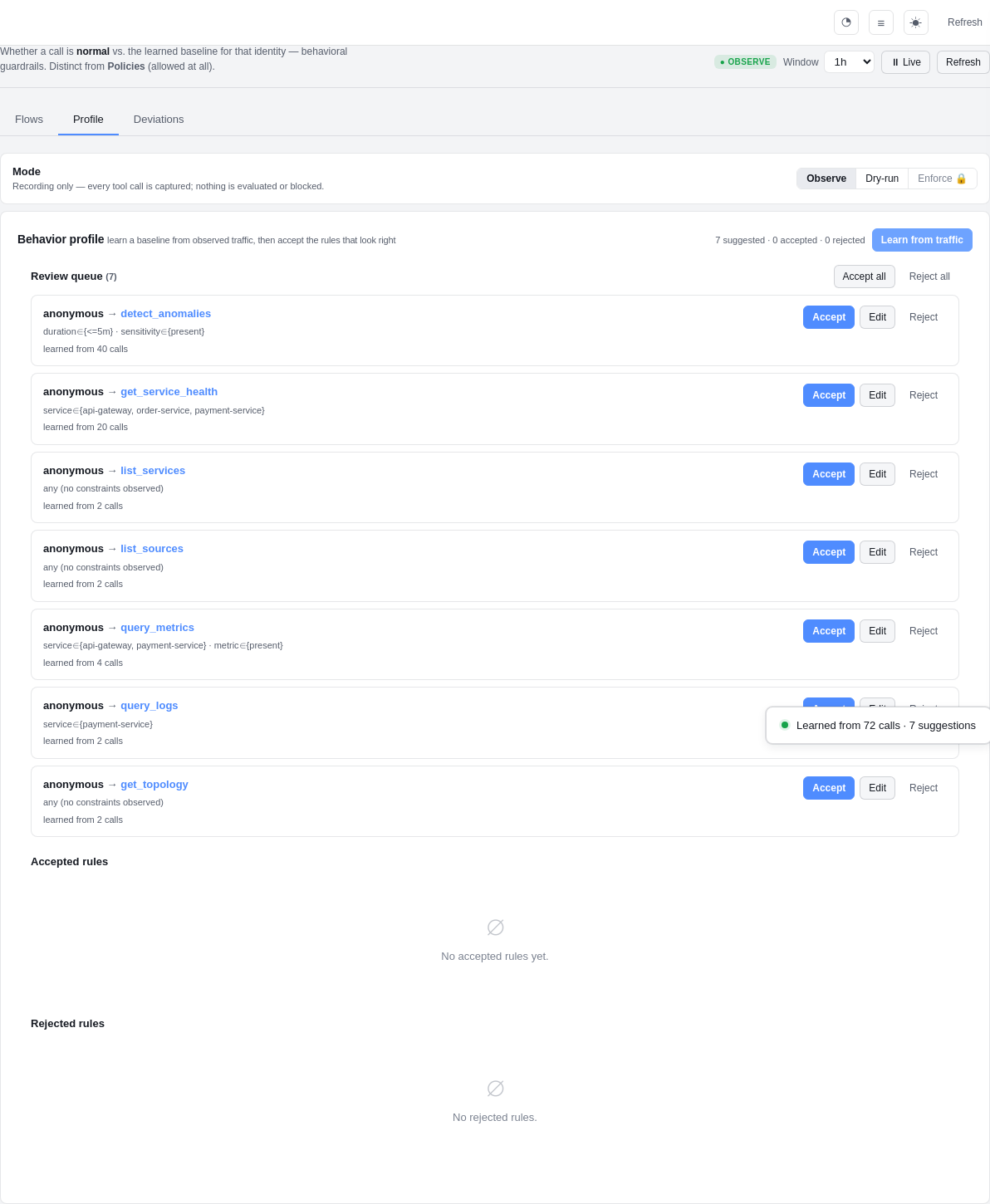
- Profile — o ciclo de aprendizado: clique em "Learn from traffic", revise as regras sugeridas (
anonymous → query_logs · service ∈ {payment-service}— aprendidas de N chamadas) e aceite / edite / rejeite cada uma. Somente regras aceitas controlam o tráfego. - Deviations — toda chamada que ficou fora do perfil: quem, qual ferramenta, o que foi incomum — um clique para aceitar no perfil ou confirmar uma anomalia.
Privacidade por design: o Inspect armazena formatos de argumentos, nunca payloads brutos, e executa tudo pela camada de redação do gateway primeiro. Ele não faz nenhuma chamada de saída — a garantia de isolamento (air-gapped) permanece inalterada.
OSS vs. licenciado: observe e dry-run — o grafo ao vivo, aprender um perfil, ver desvios que seriam bloqueados — são gratuitos. O bloqueio ativo enforce é um controle licenciado (mostrado com 🔒 na interface). Visibilidade é gratuita; a aplicação é o recurso licenciado. Design completo: docs/inspect.md.
Qualidade de detecção
O mecanismo de anomalias é testado retrospectivamente contra uma suíte sintética rotulada que cobre rampas lentas (vazamento de memória rumo a OOM), picos, mudanças de degrau, ruído estável, piscadas transitórias, recuperações unilaterais, padrões sazonais diários e um nível "difícil" deliberadamente ambíguo de baixo SNR. Pontuado como um gate de CI (backtest.test.ts) — esses números são regenerados a partir dessa suíte, não escritos à mão:
| Casos | Precisão | Recall | F1 |
|---|---|---|---|
| 64 | 100.0% | 87.5% | 93.3% |
A precisão é 100% (sem alertas espúrios); as falhas de recall são por design no piso de ruído do nível difícil. A suíte é determinística e uma regressão do detector falha no CI. Reproduza localmente:
docker run --rm -w /app -v "$(pwd)/mcp-server:/app" node:20-alpine \
  sh -c "npm i --silent && npx tsx --test src/analysis/backtest.test.ts"
Capturas de tela
| Inspect — grafo de fluxo | Inspect — aprender um perfil |
|---|---|
|  |
| Dashboard | Saúde do serviço | Hub de conectores |
|---|---|---|
 | 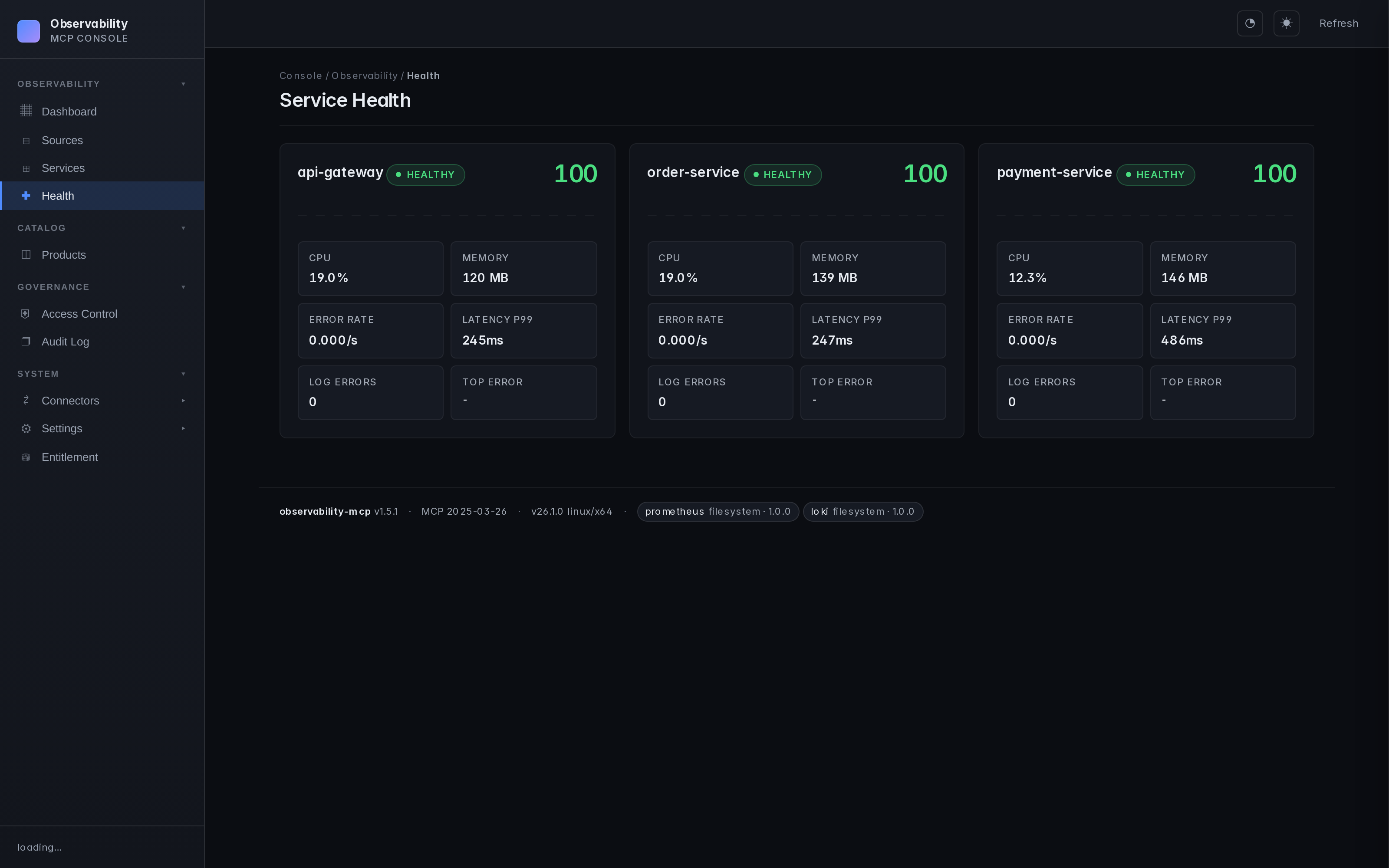 | 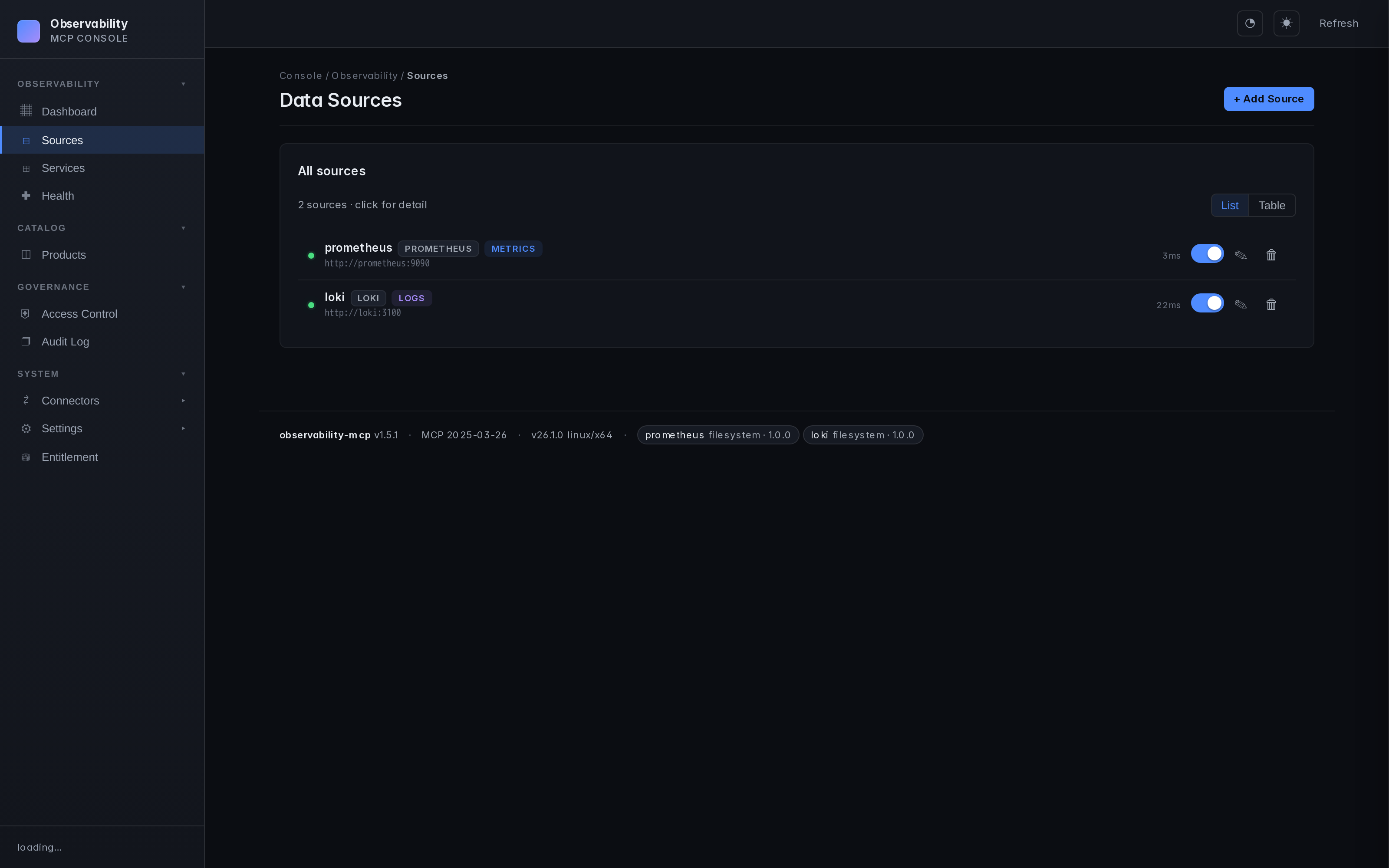 |
Arquitetura
graph TB
    Agent["AI Agent<br/><small>Claude, Ollama, etc.</small>"]

    subgraph MCP ["observability-mcp :3000"]
        Tools["12 MCP Tools"]
        Analysis["Analysis Engine<br/><small>Robust stats, Health Scoring, Correlation</small>"]
        UI["Web UI"]
    end

    subgraph Connectors ["Pluggable Connectors"]
        Prom["Prometheus<br/><small>PromQL — metrics</small>"]
        Loki["Loki<br/><small>LogQL — logs</small>"]
        K8s["Kubernetes<br/><small>watch — topology</small>"]
        Next["Your Backend<br/><small>Any query language</small>"]
    end

    Agent <-->|"MCP<br/>Streamable HTTP"| Tools
    Tools --- Analysis
    Tools --- UI
    MCP --> Prom & Loki & K8s & Next

    style MCP fill:#1a1a2e,stroke:#58a6ff,color:#fff
    style Connectors fill:#0d1117,stroke:#3fb950,color:#fff
    style Agent fill:#58a6ff,stroke:#58a6ff,color:#000
    style Next fill:#0d1117,stroke:#3fb950,color:#8b949e,stroke-dasharray: 5 5
Estrutura do repositório
mcp-server/   # the product — server, Web UI, analysis engine, built-in plugins
helm/         # ArtifactHub-grade Helm chart
docs/         # configuration, auth, plugin architecture, airgapped deployment, ...
examples/     # demo material — agent, example services, Prometheus+Loki configs
mcp-server/ é o que você instala. Tudo em examples/ é opcional via docker compose --profile demo — é assim que o repositório demonstra a detecção de caos de ponta a ponta, mas implantações de produção não precisam de nada disso.
Instalação
| Método | Comando | Melhor para |
|---|---|---|
| npm | npx @thotischner/observability-mcp | Desenvolvimento local, toolchains Node, zero instalação |
| Docker (GHCR) | docker run -p 3000:3000 ghcr.io/thotischner/observability-mcp:latest | Hosts de produção, isolamento |
| Helm | helm repo add observability-mcp https://thotischner.github.io/observability-mcp/helm install observability-mcp observability-mcp/observability-mcp | Kubernetes |
| A partir do código-fonte | git clone … && make demo | POC completo com serviços de exemplo e caos |
CLI (omcp) | npm i -g @thotischner/observability-mcp | Gerenciar conectores, a stack de demonstração e o Helm pelo terminal — consulte CLI |
O GHCR é multi-arquitetura (amd64 + arm64). Tags disponíveis: latest, main, X.Y.Z, X.Y, X, sha-<commit>. Observação: o v inicial é removido das tags semver.
Helm chart
O chart acompanha Deployment, Service, Ingress/PVC/HPA opcionais, NetworkPolicy, ServiceMonitor (ativado automaticamente com base no CRD do Prometheus Operator), helm test sonda de conexão e values.schema.json validação. Anotações de nível ArtifactHub. Consulte helm/observability-mcp/ para a referência completa de valores, ou o guia de implantação airgapped para um exemplo de produção endurecido.
helm repo add observability-mcp https://thotischner.github.io/observability-mcp/
helm repo update
helm install observability-mcp observability-mcp/observability-mcp \
  --set sources.prometheusUrl=http://prometheus.monitoring.svc.cluster.local:9090 \
  --set sources.lokiUrl=http://loki.logging.svc.cluster.local:3100
# docker-compose snippet
services:
  observability-mcp:
    image: ghcr.io/thotischner/observability-mcp:latest
    ports: ["3000:3000"]
    environment:
      PROMETHEUS_URL: http://prometheus:9090
      LOKI_URL: http://loki:3100
    volumes:
      - ./mcp-config:/home/node/.observability-mcp
    restart: unless-stopped
Para configuração completa — caminhos, variáveis de ambiente, ${VAR} substituição, referência completa de sources.yaml — consulte docs/configuration.md.
Início Rápido
Opção A: Autônomo (seus próprios backends)
npx @thotischner/observability-mcp
Em seguida, abra a interface web em http://localhost:3000, clique em Fontes → + Adicionar Fonte, aponte para suas URLs do Prometheus/Loki. Ou pule a interface:
PROMETHEUS_URL=http://localhost:9090 LOKI_URL=http://localhost:3100 \
  npx @thotischner/observability-mcp
Opção B: Grafana Cloud
O Grafana Cloud usa autenticação básica com seu ID de instância numérico como nome de usuário e um token de API como senha. O ID da instância para Prometheus e Loki é diferente — encontre ambos em Conexões → Fontes de dados.
# ~/.observability-mcp/sources.yaml
sources:
  - name: grafana-cloud-prom
    type: prometheus
    url: https://prometheus-prod-XX-prod-eu-west-X.grafana.net/api/prom
    enabled: true
    auth:
      type: basic
      username: "${GRAFANA_PROM_USER}"   # numeric instance ID
      password: "${GRAFANA_TOKEN}"
  - name: grafana-cloud-loki
    type: loki
    url: https://logs-prod-XXX.grafana.net
    enabled: true
    auth:
      type: basic
      username: "${GRAFANA_LOKI_USER}"   # different from Prom!
      password: "${GRAFANA_TOKEN}"
GRAFANA_PROM_USER=… GRAFANA_LOKI_USER=… GRAFANA_TOKEN=glc_… \
  npx @thotischner/observability-mcp
Opção C: Demonstração completa (Docker Compose com serviços de exemplo)
git clone https://github.com/ThoTischner/observability-mcp.git
cd observability-mcp
docker compose --profile demo up --build
Inicia um cluster k3s de nó único, compila os três serviços de exemplo e os executa como Deployments Kubernetes dentro do k3s, além de Prometheus, Loki, Promtail, o servidor MCP e o agente no lado do docker-compose. Abra http://localhost:3000.
Os mesmos Deployments que o Prometheus coleta e dos quais o Loki recebe logs também são o que o gráfico de topologia mostra — então o agente pode correlacionar uma anomalia de métrica/log com seu host subjacente usando get_blast_radius. Os endpoints de caos permanecem em localhost:8080/8081/8082 (mapeados para os NodePorts do k3s) para que scripts existentes e vídeos de demonstração continuem funcionando sem alterações.
Sem --profile demo, apenas mcp-server inicia — útil quando você já executa Prometheus/Loki em outro lugar e só quer expô-los via MCP.
Opção D: Modo benchmark (OpenTelemetry Demo / Astronomy Shop)
Para produzir números de RCA credíveis contra uma carga de trabalho real de microsserviços (~23 serviços, instrumentação OTel nativa):
make benchmark-up         # clones upstream Astronomy Shop, brings up both stacks
make benchmark-run        # runs the harness baseline vs topology, writes JSON
make benchmark-down       # tears down
make benchmark-up adiciona Tempo + uma ponte de coletor OTel sob nosso --profile benchmark e orquestra a stack upstream em um projeto compose separado, unindo a rede deles à nossa para que os serviços do Astronomy Shop enviem traces para nosso Tempo. Consulte docs/benchmark-astronomy-shop.md e examples/benchmark/README.md. O primeiro pull é de ~4 GB.
Ferramentas MCP
| Ferramenta | Sinal | Propósito |
|---|---|---|
list_sources | meta | Descobrir backends configurados e status da conexão |
list_services | meta | Descobrir serviços monitorados em todos os backends |
query_metrics | métricas | Consultar métricas com estatísticas resumidas pré-computadas |
query_logs | logs | Consultar logs com contagens de erros/avisos e padrões principais |
get_service_health | unificado | Pontuação de saúde combinando métricas + logs (0–100) |
detect_anomalies | unificado | Detecção de anomalias entre sinais com análise robusta (mediana/MAD + tendência) |
get_topology | topologia | Retornar o grafo de infraestrutura mesclado (recursos + arestas) de cada conector com suporte a topologia, filtrável por fonte/tipo/escopo |
get_blast_radius | topologia | Pivotar na relação universal RUNS_ON — "se o host deste recurso falhar, quem mais falha?". Funciona para pod→nó, vm→hipervisor, contêiner→host |
As duas ferramentas de topologia exigem um conector com suporte a topologia. O conector Kubernetes incluído é o primeiro; futuros conectores (vCenter, NetBox, …) se integram pela mesma interface isTopologyProvider e emitem valores kind/relation do vocabulário de topologia canônico.
Usando com Claude Code
Conecte o Claude Code diretamente — sem necessidade de agente.
CLI:
claude mcp add observability --transport http http://localhost:3000/mcp
Ou .mcp.json na raiz do seu projeto (amigável para commit):
{
  "mcpServers": {
    "observability": {
      "transport": { "type": "http", "url": "http://localhost:3000/mcp" }
    }
  }
}
Depois pergunte ao Claude em linguagem natural. Por exemplo, após disparar caos na demonstração (curl -X POST http://localhost:8081/chaos/error-spike):
"Há alguma anomalia agora?"
Claude chama detect_anomalies e encontra:
{
  "anomalies": [
    { "metric": "cpu", "severity": "high", "service": "payment-service",
      "description": "cpu is 3.4σ above baseline (18.36 → 37.31)" },
    { "metric": "request_rate", "severity": "low", "service": "payment-service",
      "description": "request_rate is -1.8σ below baseline (0.08 → 0.04)" }
  ]
}
"Mostre os logs de erro do payment-service."
Claude chama query_logs:
{
  "summary": {
    "total": 11, "errorCount": 11,
    "topPatterns": [
      "Request failed: internal error during POST /payments (6x)",
      "Request failed: internal error during POST /refunds (4x)"
    ]
  }
}
Claude correlaciona os sinais — pico de CPU, logs de erro inundando, taxa de requisições reduzida pela metade — e explica o incidente em linguagem simples. Sem PromQL, sem LogQL.
Demonstração: Chaos Engineering
Três microsserviços de exemplo geram tráfego e suportam injeção de caos:
curl -X POST http://localhost:8081/chaos/high-cpu        # CPU spike
curl -X POST http://localhost:8081/chaos/error-spike     # CPU + latency + errors
curl -X POST http://localhost:8081/chaos/slow-responses  # Latency
curl -X POST http://localhost:8081/chaos/memory-leak     # OOM logs
curl -X POST http://localhost:8081/chaos/reset
O agente (docs/agent.md) detecta anomalias em até 30 segundos e produz uma análise de incidente via LLM se o Ollama estiver em execução.
CLI (omcp)
Uma CLI de controle acompanha o mesmo pacote npm (bin omcp) — gerencie conectores, a stack de demonstração e instalações Helm.
Instale-a (ou execute ad-hoc sem instalar):
npm i -g @thotischner/observability-mcp   # puts `omcp` on your PATH
omcp --help

# or, no install:
npx -p @thotischner/observability-mcp omcp doctor
Depois:
omcp doctor                       # check docker / compose / helm / node
omcp demo up                      # full demo stack (auto-picks free host ports)
omcp plugin list                  # browse the connector hub catalog
omcp plugin install tempo@1.2.0 --trust-root key.pem    # download + verify + extract
omcp plugin verify ./plugins/tempo --trust-root key.pem # offline audit
omcp helm upgrade obs -- -n monitoring --set sources.prometheusUrl=http://prom:9090
A instalação/verificação de plugins reutiliza as verificações de assinatura e integridade do servidor com falha fechada
(compatível offline; --offline-dir para airgapped). Flags extras de helm
são repassadas após um literal --.
Documentação
- Configuração — caminhos, variáveis de ambiente, substituição de
${VAR}, referência completa desources.yaml - Autenticação e TLS — Basic, Bearer, CA personalizado, mTLS
- Auth do plano de gerenciamento (modo básico) — tela de login opcional + cookies de sessão assinados para a interface web / plano
/api/* - Redação de logs — padrões de PII/segredos mascarados automaticamente na saída de
query_logsantes de chegar ao agente; desative viaOMCP_REDACTION=off - Visão geral de controle de acesso + runbook — papéis RBAC, cadeia de auditoria, limites de taxa por identidade, enriquecimento do catálogo de serviços e um runbook de investigação para as perguntas mais comuns de "quem / por quê"
- Prometheus — padrões, resolução de rótulos,
resolvedSeries, compatibilidade com prom-client - Loki — fallback de rótulos, barra do contêiner Docker, Loki gerenciado
- Conectores — escreva seu próprio backend
- Agente — configuração do Ollama, comportamento do loop
- Solução de problemas — armadilhas e correções comuns
- Segurança — pipeline de automação, relato de vulnerabilidades, proteções integradas
- Implantação airgapped — espelhamento de imagens, plugins privados, configuração amigável para GitOps
- Vocabulário de topologia — o contrato canônico
kind/relationque todo conector com suporte a topologia emite, além do validador somente com avisos - Benchmark RCA — harness A/B reproduzível; em uma pergunta de raio de explosão entre namespaces (llama3.1:8b, n=10) o conjunto de ferramentas base pontua 0/10 e alucina o tipo de entidade errado, o mesmo modelo com ferramentas de topologia pontua 10/10 deterministicamente — veja a tabela de três cenários para o quadro completo e honesto
- Como isso se compara a ferramentas adjacentes — tabela com fontes citadas vs. Datadog Bits AI, HolmesGPT, Robusta — no que cada uma é melhor e onde isso se encaixa
- Portão de controle de acesso de governança — RBAC / catálogo / auditoria opcionais atrás de um token de direito assinado (desativado por padrão)
- Connector Hub — navegue por conectores versionados e assinados (catálogo:
hub/) - Casos de uso — cinco cenários com os prompts que os conduzem
Endpoints
| Serviço | URL |
|---|---|
| Servidor MCP (HTTP Streamable) | http://localhost:3000/mcp |
| Interface web | http://localhost:3000 |
| API de saúde | http://localhost:3000/api/health |
Na demonstração docker-compose: Prometheus em :9090, Loki em :3100. Os três serviços de exemplo são executados como Deployments Kubernetes dentro do k3s no compose e são acessíveis no host via mapeamento NodePort :8080–:8082 — mesmas URLs de antes da migração para k8s, então comandos de caos existentes continuam funcionando.
Transportes: HTTP Streamable por padrão (/mcp). Para clientes/catálogos baseados em stdio (Claude Desktop, mcp-proxy do Glama, etc.) execute com --stdio (ou MCP_TRANSPORT=stdio) — um servidor MCP via stdin/stdout, todos os logs em stderr para que o fluxo do protocolo permaneça limpo.
Stack Tecnológica
TypeScript + Node 20, @modelcontextprotocol/sdk (HTTP Streamable), Express, Zod, js-yaml, prom-client (serviços de exemplo), Prometheus, Loki, Promtail, Docker Compose, Ollama opcional.
Requisitos
- Autônomo: Node 20+ (ou apenas
npx) - Demonstração Docker: Docker + Compose, 4 GB+ de RAM (8 GB+ com Ollama)
- Opcional: Ollama no host para a análise LLM do agente
Contribuindo
- Faça um fork do repositório e
docker-compose up --build. - Escolha uma issue ou abra uma para discutir sua ideia.
- Envie um PR — todo o código roda em Docker, sem dependências locais.
Ideias: novos conectores (InfluxDB, Elasticsearch, Datadog), algoritmos de análise adicionais, melhorias na interface.
Licença
Apache License 2.0 — veja também NOTICE.
Versões até e incluindo a última versão licenciada sob MIT permanecem disponíveis sob MIT; versões subsequentes são Apache-2.0. Contribuições exigem um Contrato de Licença de Contribuidor.
Se você achar útil, considere dar uma estrela — isso ajuda outras pessoas a descobrirem o projeto.