FinMCP
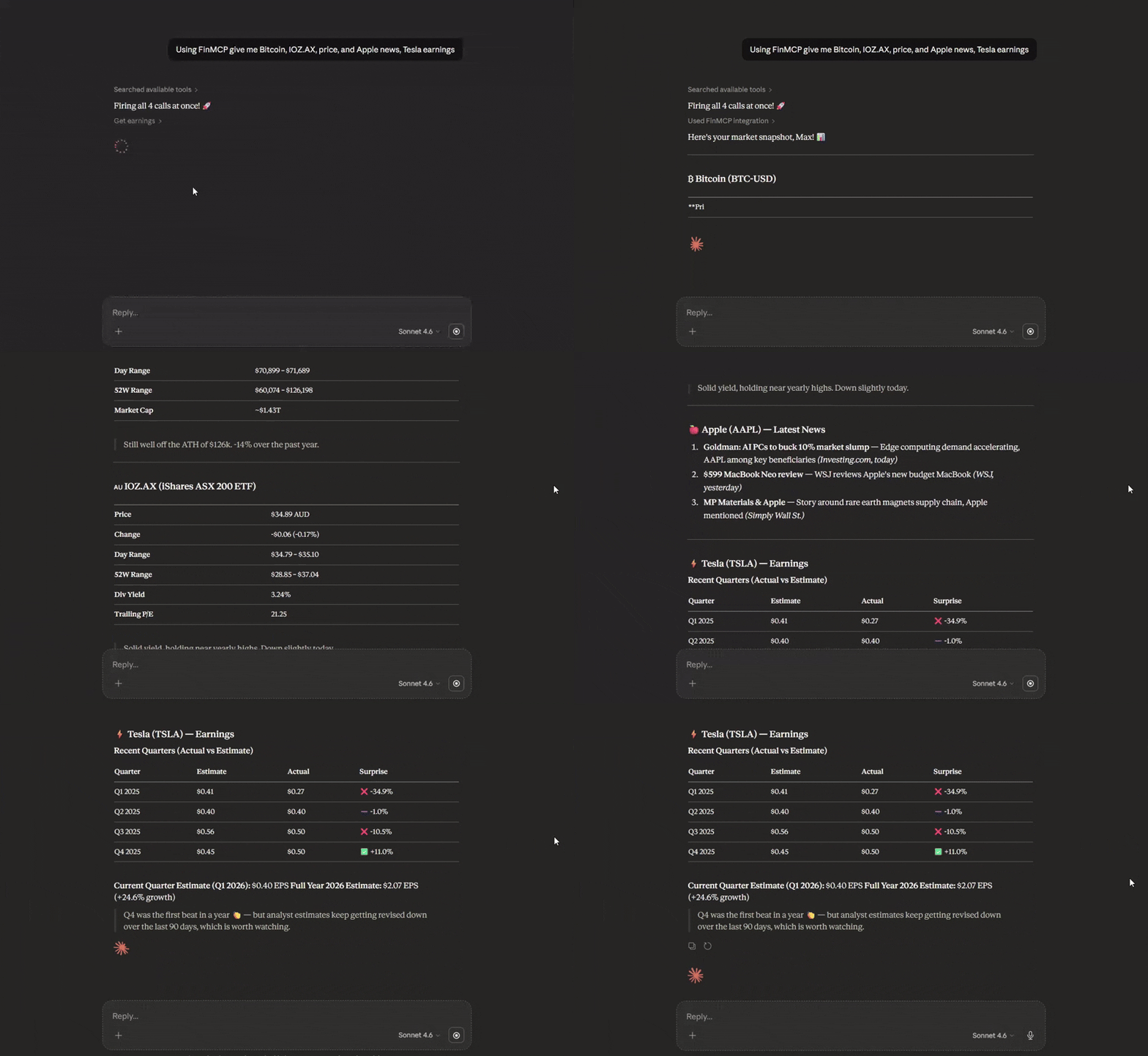
Servidor MCP de Finanças em TypeScript leve que encapsula as APIs do Yahoo Finance. Conecte dados financeiros em tempo real — ações, opções, criptomoedas, lucros — a qualquer assistente de IA. Sem chave de API. Funciona via stdio, Docker ou HTTP.
Documentação
Servidor MCP do Yahoo Finance (Cloud)
Infraestrutura de dados financeiros de nível de produção (Cloud) para assistentes de IA com resiliência de nível empresarial, validação abrangente de qualidade de dados e monitoramento pronto para produção.
Implantar na Nuvem (baseado em Docker)
O FinMCP vem com um Dockerfile e é totalmente baseado em Docker, portanto roda em qualquer plataforma que suporte contêineres — Railway, Render, Fly.io, DigitalOcean App Platform, um VPS ou qualquer outra.
Opção mais fácil — Railway (recomendado para iniciantes):
- Cadastre-se em railway.com (link de indicação — dá créditos gratuitos)
- Novo Projeto → Implantar do repositório GitHub → cole
https://github.com/Steve-sy/finmcp - O Railway detecta automaticamente o
Dockerfilee compila + implanta automaticamente - (Opcional) Adicione
YF_MCP_API_KEYna aba Variáveis do Railway para proteger seu endpoint - Vá para Configurações → Rede → Gerar domínio para obter sua URL pública
- Seu endpoint MCP estará ativo em:
https://<your-app>.up.railway.app/mcp
Outras plataformas (Render, Fly.io, VPS, etc.):
Qualquer plataforma que possa executar um contêiner Docker funciona. Aponte-a para este repositório e defina o comando de início como node dist/http.js. O servidor escuta na variável de ambiente PORT (injetada automaticamente pela maioria das plataformas) e usa como padrão 3333.
Opcional: proteja implantações públicas com YF_MCP_API_KEY e conecte-se usando ...?key=YOUR_SECRET.
Integração com Claude Desktop (Cloud)
Personalizar -> Conectores -> Adicionar conector personalizado: Nome: FinMCP URL do servidor MCP remoto: sua url https na nuvem: https:///mcp
Instalação Local
npm install -g @mustafa.ramx/finmcp
Início Rápido
Iniciar Servidor
finmcp
Integração com Claude Desktop (Local — npm)
Adicione ao seu claude_desktop_config.json:
{
  "mcpServers": {
    "finmcp": {
      "command": "finmcp"
    }
  }
}
Integração com Claude Desktop (Local — Docker)
Se preferir Docker em vez de instalar Node.js, primeiro compile a imagem:
docker build -t finmcp .
Depois adicione ao seu claude_desktop_config.json:
{
  "mcpServers": {
    "finmcp": {
      "command": "docker",
      "args": ["run", "-i", "--rm", "finmcp", "node", "dist/index.js"]
    }
  }
}
Nota: O suporte a MCP do ChatGPT Desktop pode variar — consulte a documentação dele para configuração de conector personalizado.
Outras Ferramentas de IA
Cursor AI / Cline AI:
{
  "mcpServers": {
    "finmcp": {
      "command": "finmcp"
    }
  }
}
Recursos
- 15 Ferramentas de Dados Financeiros: Ações, opções, criptomoedas, câmbio, inteligência empresarial, sentimento de mercado
- Padrão de Disjuntor: Recuperação automática de falhas de API
- Limitação de Taxa Multiestratégia: Token bucket + adaptativo + limitação por endpoint
- Pontuação de Qualidade de Dados: Validação de completude e integridade
- Cache Abrangente: Fallback gracioso com alta taxa de acerto de cache (70-90%)
- Transporte HTTP por Streaming: Execute localmente ou implante na nuvem (Docker/Railway) para acesso HTTPS
- Autenticação Opcional por Chave de API: Proteja implantações públicas com
YF_MCP_API_KEY - Testes Empresariais: Testes de unidade, integração, e2e e caos
Ferramentas Disponíveis
Dados de Mercado
get_quote- Cotações em tempo real com relatório de qualidadeget_historical_prices- Dados OHLCV com intervalos de datasget_historical_prices_multi- Dados históricos em lote
Inteligência Empresarial
get_quote_summary- Visão geral abrangente da empresaget_balance_sheet- Ativos, passivos, patrimônio líquidoget_income_statement- Receitas, despesas, lucro líquidoget_cash_flow_statement- Fluxos de caixa operacional, de investimento e de financiamentoget_earnings- Lucros trimestrais com estimativasget_analysis- Recomendações de analistas e preços-alvoget_major_holders- Propriedade institucional e de insiders
Sentimento de Mercado
get_news- Artigos mais recentes com pontuação de relevânciaget_options- Cadeias de opções com Gregosget_trending_symbols- Maiores movimentações com métricas de volumescreener- Filtre ações por mais de 12 critérios
Multi-Ativos
get_crypto_quote- Preços de criptomoedasget_forex_quote- Taxas de câmbio de pares de moedas
Documentação
Para documentação completa, incluindo configuração, exemplos de uso, detalhes de arquitetura e melhores práticas:
Ver Documentação Completa no GitHub
A documentação inclui:
- Referência Completa de Ferramentas
- Guia de Uso com Exemplos
- Guia de Configuração
- Detalhes de Arquitetura
- Status de Verificação de Dados
Configuração
Crie um arquivo config.json:
{
  "rateLimit": {
    "requestsPerMinute": 60,
    "requestsPerHour": 1500
  },
  "cache": {
    "ttlQuotes": 60000,
    "maxCacheSize": 1000
  },
  "circuitBreaker": {
    "failureThreshold": 5,
    "monitoringWindow": 60000,
    "successThreshold": 3
  }
}
Para opções detalhadas de configuração, consulte o Guia de Configuração.
Desempenho
| Métrica | Valor |
|---|---|
| Consultas de cotações | 60 requisições/minuto (configurável) |
| Operações em lote | Até 100 símbolos por requisição |
| Taxa de acerto de cache | 70-90% para símbolos acessados com frequência |
| Tempo de inicialização a frio | <500ms |
| Cobertura de testes | 95%+ para middleware principal |
Licença
MIT