Google Images Search MCP Server
Pesquise imagens do Google, visualize os resultados e faça o download diretamente no seu IDE.
Documentação
🖼️ Google Images Search MCP

Search. See. Save. – The only MCP that shows Google Images results directly in your chat as actual images, not just links!
Unlike other tools that return text descriptions or links, this MCP displays search results as actual images in your conversation. Works with Cline and Windsurf.
Perfect for getting visual inspiration, finding assets for projects, or quickly browsing images without leaving your IDE.
Demo
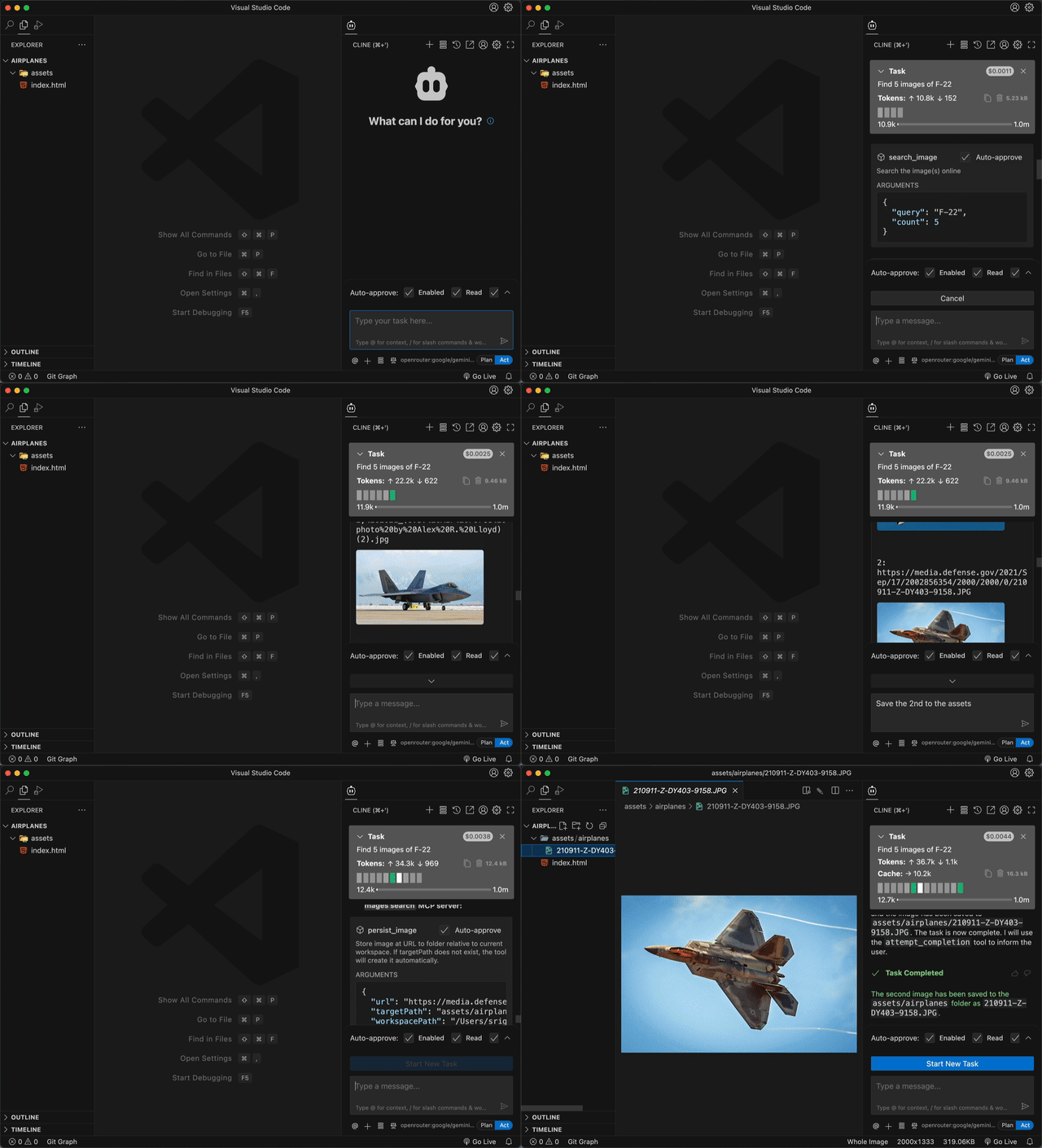
Usage & Requirements
Requirements
- Node.js v20+
- Google Cloud Platform account (free tier sufficient)
- Compatible IDE: Cline or Windsurf
Setup Guide
Follow these steps to set up this MCP:
Step 1: create Google Custom search engine
- Go to Google Programmable Search Engine
- Click "Add" to create a new search engine
- In "Sites to search", enter
*(asterisk) to search the entire web - Give your search engine a name (e.g., "My Image Search")
- In the search engine settings, enable "Image search" option
- Click "Create"
- Copy the Search engine ID - you'll need this for configuration
Step 2: Get Google API Key
- Go to Google Cloud Console API Credentials
- If you don't have a project, create one
- Click "+ CREATE CREDENTIALS" → "API key"
- Copy the generated API key
- (Optional) Restrict the API key to "Custom Search API" for security
Step 3: Configure MCP in Your IDE
Add the following configuration to your MCP settings:
{
  "mcpServers": {
    "googleImagesSearch": {
      "command": "npx",
      "args": ["-y", "@srigi/mcp-google-images-search"],
      "env": {
        "API_KEY": "your-google-api-key-here",
        "SEARCH_ENGINE_ID": "your-search-engine-id-here"
      },
      "autoApprove": ["search_image", "persist_image"]
    }
  }
}
Replace your-google-api-key-here and your-search-engine-id-here with the values from steps 1 and 2.
Usage Example
Here's how to use the MCP once configured:
-
Search for images: Ask your AI assistant to search for images
Find 5 images of F-22 -
Get more results: Request additional search results
Find 5 more images -
Save an image: Ask to save a specific result to your project
Save the 3rd image to the "assets" folder
The MCP will display the search results as actual images in your chat history, and you can easily save any of them to your local project directory.
🚀 Development
Want to contribute? Great! Quality contributions are welcomed.
Requirements: Node.js v20+, direnv, PNPM v10
Quick start:
- Copy
.envrc (example)to.envrcand add your Google API credentials - Run
pnpm install && pnpm dev - Update your MCP configuration for development:
{
  "mcpServers": {
    "googleImagesSearch": {
      "command": "node",
      "args": ["/absolute/path/to/project/src/index.js", "--debug", "--pretty-print"],
      "env": {
        "API_KEY": "your-google-api-key-here",
        "SEARCH_ENGINE_ID": "your-search-engine-id-here"
      },
      "autoApprove": ["search_image", "persist_image"]
    }
  }
}
Debug and logging options:
- No
--debugflag provided - logging is disabled --debugwithout argument - enable logging intodebug.login current working directory the running MCP--debug /absolute/path/to/debug.log- enable logging and write logs to the specified absolute path--pretty-print- Format logs for better readability (formatted JSON output)
note: only absolute path is allowed when providing a path to --debug. Relative paths will cause the server to exit with an error!
Writing TypeScript code:
The pnpm dev auto-recompile all changes to .ts files. But you must reload your MCP server manually for changes to be reflected in your IDE.
Use pnpm dev:inspector for interactive testing in the browser.
🛠️ Available Tools
🔍 search_image - Find images using Google's vast database
query(required) - What you're looking forcount(1-10, default: 2) - How many resultssafe('off'/'medium'/'high') - Filter levelstartIndex- For pagination
💾 persist_image - Download and save images to your project
url(required) - Image URL to downloadtargetPath(required) - Where to save it (folder or full path)
Security features: Path validation, MIME type checking, 10MB size limit, supports all major image formats (JPEG, PNG, GIF, WebP, SVG, etc.)