Brainstorm
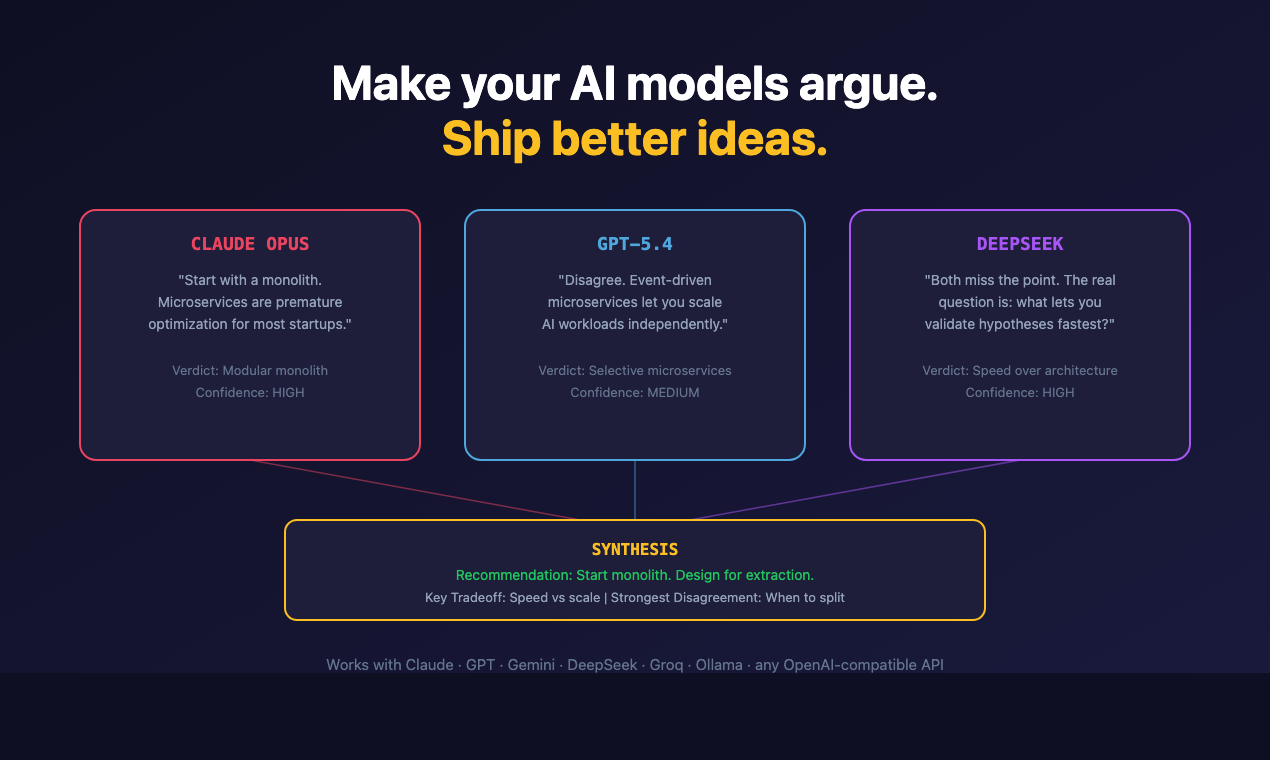
Debates de IA em múltiplas rodadas entre GPT, DeepSeek, Groq e Claude — todos os modelos argumentam, criticam e sintetizam dentro do seu assistente de codificação.
Documentação
brainstorm-mcp




Faça uma pergunta de design a um modelo e você obtém uma resposta confiante, sem nenhum sinal sobre quais partes ele não tem certeza. Pergunte a três e a discordância é o sinal.
O brainstorm-mcp executa debates multi-round entre GPT, Gemini, DeepSeek, Claude e modelos locais Ollama de dentro do seu editor: eles veem e criticam as respostas uns dos outros ao longo das rodadas, e então você recebe uma síntese de 3 tópicos — recomendação, principais trade-offs e discordância mais forte. Também oferece modo rápido instantâneo, revisão de código multi-modelo com veredictos e estilos red-team/Socrático. O modo hospedado não precisa de chaves de API.
Não confie em uma única IA. Faça-as argumentarem.
Início rápido (60 segundos)
claude mcp add brainstorm -- npx -y brainstorm-mcp
Então peça ao Claude: "Brainstorm usando opus, sonnet e haiku sobre se devemos usar GraphQL ou REST."
Isso roda em modo hospedado: sem chaves de API, sem contas de provedores. O debate usa os modelos já disponíveis no seu ambiente, e você recebe a síntese de 3 tópicos no final.
Demonstração
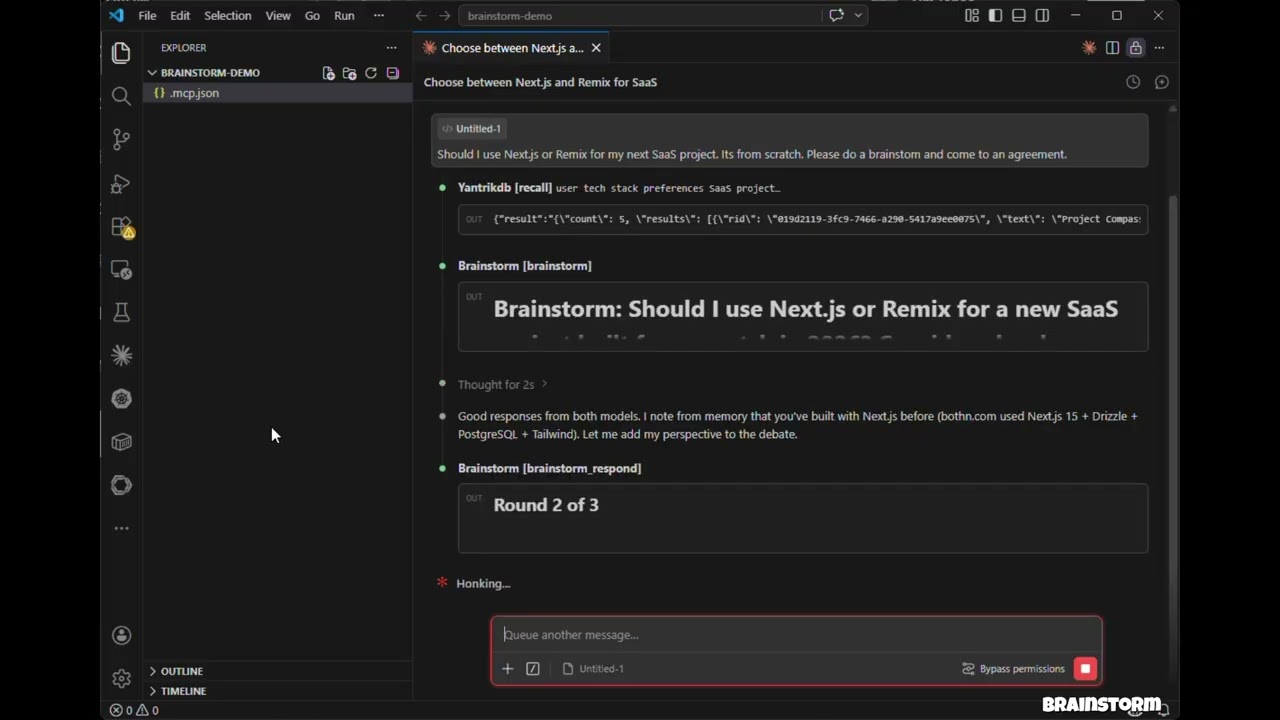
Clique para assistir: 3 modelos debatem, fazem cross-examination e produzem um veredicto estruturado — tudo dentro do Claude Code.
Recursos
- Modo hospedado — Sem necessidade de chaves de API. Usa modelos do seu ambiente (Claude Opus/Sonnet/Haiku) via sub-agentes
- Modo API — Chamadas diretas à API de modelos com execução paralela em OpenAI, Gemini, DeepSeek, Groq, Ollama
- Modo CLI — Debata por meio de CLIs de agentes que você já possui (
claude,codexe outros), para que os debates rodem na sua assinatura em vez de créditos de API - brainstorm_quick — Perspectivas instantâneas de múltiplos modelos em menos de 10 segundos
- brainstorm_review — Revisão de código multi-modelo com achados estruturados, classificações de severidade e veredictos
- Estilos de debate — Livre, red-team (adversarial) e Socrático (perguntas investigativas)
- Injeção de contexto — Fundamente debates em código real, diffs ou documentos de arquitetura
- Veredictos de síntese em 3 tópicos — Recomendação, Principais Trade-offs, Discordância Mais Forte
- Claude como participante — Claude debate ao lado de modelos externos com contexto completo da conversa
- Debates multi-round — Modelos veem e criticam as respostas uns dos outros ao longo das rodadas
- Execução paralela — Todos os modelos respondem simultaneamente em cada rodada
- Resiliente — A falha de um modelo não aborta o debate
- Multiplataforma — Funciona em macOS, Windows e Linux
Instalação
O comando de uma linha do Início rápido é suficiente para o modo hospedado. Adicione chaves de provedores para trazer GPT, Gemini, DeepSeek, Groq ou Ollama ao debate; a configuração por cliente vem a seguir.
Claude Code
Adicione ao .mcp.json do seu projeto:
{
  "mcpServers": {
    "brainstorm": {
      "command": "npx",
      "args": ["-y", "brainstorm-mcp"],
      "env": {
        "OPENAI_API_KEY": "sk-...",
        "GEMINI_API_KEY": "AIza...",
        "DEEPSEEK_API_KEY": "sk-..."
      }
    }
  }
}
Claude Desktop
Adicione ao claude_desktop_config.json:
{
  "mcpServers": {
    "brainstorm": {
      "command": "npx",
      "args": ["-y", "brainstorm-mcp"],
      "env": {
        "OPENAI_API_KEY": "sk-...",
        "DEEPSEEK_API_KEY": "sk-..."
      }
    }
  }
}
Instalação manual
npm install -g brainstorm-mcp
brainstorm-mcp
O modo hospedado não requer chaves de API — basta instalar e usar. O host (Claude Code) executa os prompts usando seu próprio acesso a modelos.
Configuração
Opção 1: Variáveis de ambiente (mais simples)
OPENAI_API_KEY=sk-...
GEMINI_API_KEY=AIza...
DEEPSEEK_API_KEY=sk-...
Opção 2: Arquivo de configuração (controle total)
Defina BRAINSTORM_CONFIG para apontar para um JSON de configuração:
{
  "providers": {
    "openai": { "model": "gpt-5.4", "apiKeyEnv": "OPENAI_API_KEY" },
    "gemini": { "model": "gemini-2.5-flash", "apiKeyEnv": "GEMINI_API_KEY" },
    "deepseek": { "model": "deepseek-chat", "apiKeyEnv": "DEEPSEEK_API_KEY" },
    "ollama": { "model": "llama3.1", "baseURL": "http://localhost:11434/v1" }
  }
}
Provedores conhecidos (openai, gemini, deepseek, groq, mistral, together, moonshot,
minimax, glm, qwen) não precisam de um baseURL.
Qualquer id de modelo que o provedor atenda funciona, incluindo o GPT-6 da OpenAI (openai:gpt-6-astra) e os
modelos de raciocínio gpt-5.x: o brainstorm escolhe o formato de requisição que cada modelo espera e tenta novamente com
o outro formato se a API rejeitar.
Opção 3: Provedores CLI (use uma assinatura, não créditos de API)
Se você já paga pelo Claude Code, Codex, Gemini CLI e afins, o brainstorm pode chamar esses
CLIs em vez de comprar créditos de API. Qualquer CLI de agente encontrado no seu PATH é registrado
automaticamente na inicialização — sem necessidade de configuração:
[brainstorm] Detected CLI provider(s) on PATH: claude, codex (subscription-based, no API cost)
Use-os como qualquer outro provedor:
{ "topic": "GraphQL vs REST", "models": ["claude:sonnet", "codex:default", "openai:gpt-5.4"] }
Adaptadores integrados:
| Provedor | Comando | Modelo padrão | Status |
|---|---|---|---|
claude | claude -p | sonnet | verificado |
codex | codex exec | default | verificado |
gemini | gemini -p | gemini-2.5-pro | melhor esforço, verifique localmente |
cursor-agent | cursor-agent -p | default | melhor esforço |
opencode | opencode run | default | melhor esforço |
qwen | qwen -p | qwen3-coder-plus | melhor esforço |
kimi | kimi --print | default | melhor esforço |
droid | droid exec | default | melhor esforço |
<provider>:default significa "deixe o CLI usar qualquer modelo com o qual esteja configurado". Chamadas CLI são executadas
com ferramentas desabilitadas e um sandbox somente leitura onde o CLI suporta — elas geram texto, não
tocam no seu repositório. Variáveis de ambiente específicas de chaves de API do provedor (ANTHROPIC_API_KEY, OPENAI_API_KEY)
são removidas do processo filho para que o CLI use seu login de assinatura.
Opções de ambiente:
| Variável | Efeito |
|---|---|
BRAINSTORM_CLI_PROVIDERS | auto (padrão), off ou uma lista separada por vírgulas de adaptadores a detectar |
BRAINSTORM_PREFER_CLI | 1 — debates sem models explícito usam apenas provedores CLI, pulando APIs medidas |
BRAINSTORM_CLI_TIMEOUT_MS | Timeout por chamada para provedores CLI (padrão 300000) |
Para fixar um modelo ou adicionar um CLI que não é integrado, use o arquivo de configuração:
{
  "providers": {
    "claude": { "type": "cli", "model": "opus" },
    "my-cli": {
      "type": "cli",
      "adapter": "custom",
      "command": "some-agent-cli",
      "args": ["run", "--model", "{{model}}", "--quiet", "{{prompt}}"],
      "promptVia": "arg",
      "model": "some-model"
    }
  }
}
Placeholders de modelo: {{model}}, {{system}}, {{prompt}}, {{outfile}}. Um placeholder isolado
que se resolve para nada sai da linha de comando junto com a flag que o introduz, então
["--model", "{{model}}"] funciona mesmo para provider:default. Defina "promptVia": "stdin" para canalizar
o prompt em vez de passá-lo como argumento.
Backends de planos de codificação via Claude CLI
Moonshot (Kimi), MiniMax e Z.ai (GLM) vendem assinaturas de planos de codificação que falam a API
Anthropic. Aponte o binário claude para um deles e esse fornecedor entra no debate no plano que você
já paga:
{
  "providers": {
    "moonshot": { "type": "cli", "backend": "moonshot", "model": "kimi-k2-thinking" },
    "minimax":  { "type": "cli", "backend": "minimax",  "model": "MiniMax-M2" },
    "glm":      { "type": "cli", "backend": "glm",      "model": "glm-4.6" }
  }
}
| Backend | Endpoint | Variável de ambiente do token |
|---|---|---|
moonshot | https://api.moonshot.ai/anthropic | MOONSHOT_API_KEY |
minimax | https://api.minimax.io/anthropic | MINIMAX_API_KEY |
glm | https://api.z.ai/api/anthropic | ZAI_API_KEY |
O token é lido do seu ambiente no momento da chamada — o arquivo de configuração guarda o nome da variável,
nunca o segredo. ANTHROPIC_API_KEY é removido do filho para que sua conta Anthropic nunca seja
cobrada por estes. Qualquer provedor CLI também aceita um bloco "env" para substituir o backend
manualmente; um valor de "$NAME" indireta através do ambiente do servidor.
Esses fornecedores também são acessíveis como APIs medidas comuns — moonshot, minimax, glm e qwen
têm URLs base conhecidas, então MOONSHOT_API_KEY sozinho é suficiente para registrar moonshot como um provedor
de API.
Ferramentas
| Ferramenta | Descrição | Anotação |
|---|---|---|
brainstorm | Debate multi-round entre modelos de IA (modo API ou hospedado) | somente leitura |
brainstorm_quick | Perspectivas instantâneas de múltiplos modelos — paralelas, sem rodadas | somente leitura |
brainstorm_review | Revisão de código multi-modelo com achados, severidade, veredicto | somente leitura |
brainstorm_respond | Envia a resposta do Claude em uma sessão interativa | somente leitura |
brainstorm_collect | Envia respostas de modelos em uma sessão hospedada | somente leitura |
list_providers | Mostra provedores configurados, status de chaves de API e CLIs detectados | somente leitura |
add_provider | Adiciona um novo provedor de API ou CLI em tempo de execução | não destrutivo |
Exemplos de uso
Exemplo 1: Perspectivas rápidas de múltiplos modelos
Prompt: "Use brainstorm_quick para comparar Redis vs PostgreSQL para armazenamento de sessão"
Ferramenta chamada: brainstorm_quick
{ "topic": "Redis vs PostgreSQL for session storage in a Node.js app" }
Saída: Cada modelo configurado responde de forma independente em paralelo. Você obtém uma comparação lado a lado em menos de 10 segundos com nomes de modelos, respostas, tempo e custo.
Tratamento de erros: Se um modelo falhar (limite de taxa, timeout), a ferramenta continua com os modelos restantes e mostra quais falharam.
Exemplo 2: Revisão de código multi-modelo
Prompt: "Revise este diff para problemas de segurança" (com um git diff colado)
Ferramenta chamada: brainstorm_review
{
  "diff": "diff --git a/src/auth.ts ...",
  "title": "Add JWT authentication middleware",
  "focus": ["security", "correctness"]
}
Saída: Um veredicto estruturado (aprovar / aprovar com avisos / precisa de mudanças) com uma tabela de achados mostrando severidade, categoria, arquivo, números de linha e sugestões. Inclui análise de concordância entre modelos — problemas sinalizados por vários modelos têm maior confiança.
Tratamento de erros: Se a síntese falhar, as revisões brutas dos modelos ainda são retornadas.
Exemplo 3: Brainstorm em modo hospedado (sem chaves de API)
Prompt: "Brainstorm usando opus, sonnet e haiku sobre se devemos usar GraphQL ou REST"
Ferramenta chamada: brainstorm
{
  "topic": "GraphQL vs REST for our public API",
  "models": ["opus", "sonnet", "haiku"],
  "mode": "hosted",
  "rounds": 2,
  "style": "redteam"
}
Saída: A ferramenta retorna prompts para cada modelo. O host (Claude Code) gera sub-agentes com diferentes modelos, coleta respostas e as realimenta via brainstorm_collect. Após todas as rodadas, um modelo de síntese produz um veredicto de 3 tópicos: Recomendação, Principais Trade-offs, Discordância Mais Forte.
Tratamento de erros: Sessões expiram após 10 minutos. Se uma sessão não for encontrada, uma mensagem de erro clara é retornada com instruções para iniciar uma nova.
Como funciona
Modo API / CLI
- Você pede ao Claude para fazer um brainstorm sobre um tópico
- A ferramenta envia o tópico a todos os provedores configurados em paralelo — HTTP para provedores de API, um subprocesso gerado para provedores CLI
- Claude lê as respostas e contribui com sua própria perspectiva
- Modelos veem as respostas uns dos outros e refinam ao longo das rodadas
- Um sintetizador produz o veredicto final
Modo hospedado
- Você pede ao Claude para fazer um brainstorm com modelos específicos (ex.: opus, sonnet, haiku)
- A ferramenta retorna prompts — nenhuma chamada de API é feita
- Claude gera sub-agentes com diferentes modelos para executar os prompts
- As respostas são coletadas e realimentadas para a próxima rodada
- Repita até a síntese
Política de privacidade
O brainstorm-mcp roda inteiramente na sua máquina e não coleta, armazena ou transmite nenhum dado pessoal, telemetria ou análises.
No modo API, os prompts são enviados diretamente da sua máquina para os provedores de modelos que você configura (OpenAI, Gemini, DeepSeek, etc.) usando suas próprias chaves de API. No modo CLI, os prompts são passados para CLIs de agentes instalados na sua máquina, que falam com seus próprios fornecedores sob sua assinatura existente. No modo hospedado, nenhuma chamada de API externa é feita.
As sessões de debate são armazenadas apenas em memória com um TTL de 10 minutos. Nenhum dado é gravado em disco, a menos que você salve explicitamente os resultados.
Política de privacidade completa: PRIVACY.md
Suporte
- Issues: https://github.com/spranab/brainstorm-mcp/issues
- E-mail: developer@pranab.co.in
- Repositório: https://github.com/spranab/brainstorm-mcp
Desenvolvimento
git clone https://github.com/spranab/brainstorm-mcp.git
cd brainstorm-mcp
npm install
npm run build
npm start
Projetos relacionados
Outra infraestrutura de agentes do mesmo autor, construída para ser usada em conjunto:
- saga-mcp — rastreador de projetos com SQLite: quando o debate termina, a decisão vai para um lugar durável.
- yantrikdb-mcp — memória cognitiva persistente para que o agente lembre o que você decidiu e por quê.
- swarmcode — canal em tempo real entre instâncias do Claude Code em máquinas diferentes.
- truenas-mcp — 278 ações do TrueNAS SCALE atrás de uma ferramenta hierárquica.
- mcpier — plano de controle MCP auto-hospedado que mantém chaves de API fora dos seus clientes.
Licença
MIT