Paprika 3
Gerencie suas receitas do Paprika 3 com um LLM. Leia, crie e atualize receitas no seu aplicativo Paprika.
Documentação
paprika-3-mcp
Um servidor Model Context Protocol (MCP) que expõe suas receitas do Paprika 3 como recursos legíveis por LLMs — e permite que um LLM como o Claude crie ou atualize receitas no seu aplicativo Paprika.
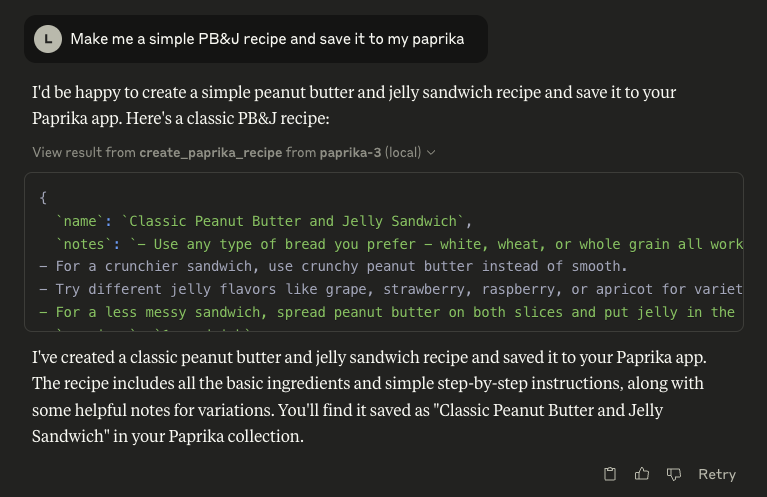
🖼️ Exemplo: Claude usando o servidor MCP do Paprika
🚀 Recursos
Viu algo faltando? Abra uma issue neste repositório para solicitar um recurso!
📄 Recursos
- Receitas ✅
- Fotos de Receitas 🚧
🛠 Ferramentas
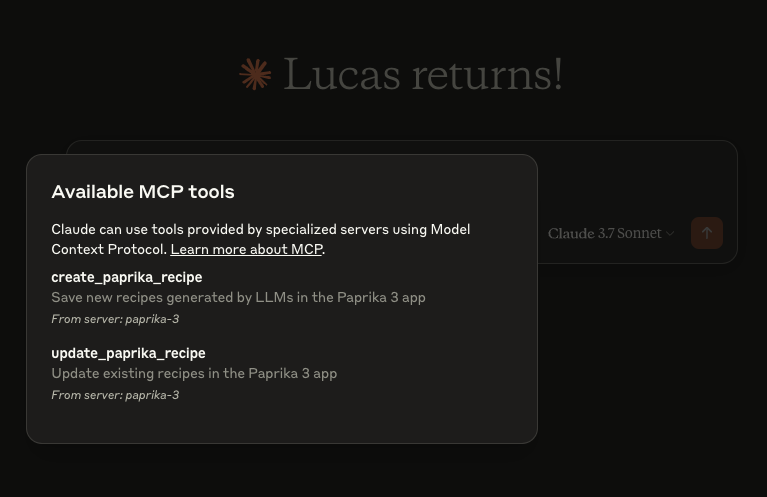
create_paprika_recipe
Permite que o Claude salve uma nova receita no seu aplicativo Paprikaupdate_paprika_recipe
Permite que o Claude modifique uma receita existente
⚙️ Pré-requisitos
- ✅ Um sistema Mac, Linux ou Windows
- ✅ Paprika 3 instalado com sincronização em nuvem ativada
- ✅ Seu nome de usuário e senha do Paprika 3
- ✅ Claude ou qualquer cliente LLM com suporte a ferramentas MCP habilitado
🛠 Instalação
Você pode baixar um binário pré-compilado na página de Releases.
🍎 macOS (via Homebrew)
Se você estiver no macOS, a maneira mais fácil de instalar é com o Homebrew:
brew tap soggycactus/tap
brew install paprika-3-mcp
🐧 Linux / 🪟 Windows
-
Acesse a última versão.
-
Baixe o arquivo apropriado para o seu sistema operacional e arquitetura:
paprika-3-mcp_<version>_linux_amd64.zippara Linuxpaprika-3-mcp_<version>_windows_amd64.zippara Windows
-
Extraia o arquivo zip:
- Linux:
unzip paprika-3-mcp_<version>_<os>_<arch>.zip - Windows:
- Clique com o botão direito no arquivo
.zipe selecione Extrair Tudo, ou use uma ferramenta como o 7-Zip.
- Clique com o botão direito no arquivo
- Linux:
-
Mova o binário para um diretório no
$PATHdo seu sistema:-
Linux:
sudo mv paprika-3-mcp /usr/local/bin/ -
Windows:
- Mova
paprika-3-mcp.exepara qualquer pasta no seuPATH(por exemplo,%USERPROFILE%\bin)
- Mova
-
✅ Teste a instalação
Você pode verificar se o servidor está instalado verificando:
paprika-3-mcp --version
Você deve ver:
paprika-3-mcp version v0.1.0
🤖 Configurando o Claude
Se você ainda não configurou o MCP, primeiro leia mais sobre como instalar o cliente Claude Desktop e configurar um servidor MCP.
Para adicionar paprika-3-mcp ao Claude, tudo o que você precisa fazer é criar outra entrada na seção mcpServers do seu arquivo claude_desktop_config.json:
{
  "mcpServers": {
    "paprika-3": {
      "command": "paprika-3-mcp",
      "args": [
        "--username",
        "<your paprika 3 username (usually email)>",
        "--password",
        "<your paprika 3 password>"
      ]
    }
  }
}
Reinicie o Claude e você verá as ferramentas do servidor MCP após clicar no ícone de cabeça de martelo:
📄 Licença
Este projeto é open source sob a Licença MIT © 2025 Lucas Stephens.
🗂 Diversos
📄 Onde posso ver os logs do servidor?
O servidor MCP escreve logs estruturados usando o slog do Go com rotação via lumberjack. Os arquivos de log são criados automaticamente com base no seu sistema operacional:
| Sistema Operacional | Caminho do Arquivo de Log |
|---|---|
| macOS | ~/Library/Logs/paprika-3-mcp/server.log |
| Linux | /var/log/paprika-3-mcp/server.log |
| Windows | %APPDATA%\paprika-3-mcp\server.log |
| Outro / Desconhecido | /tmp/paprika-3-mcp/server.log |
💡 Os logs são rotacionados automaticamente em 100MB, com apenas 5 arquivos de backup mantidos. Os logs também são apagados após 10 dias.