SideButton
Servidor MCP de código aberto com pacotes de conhecimento, mais de 40 ferramentas de navegador e mecanismo de fluxo de trabalho YAML para agentes de IA.
Documentação
SideButton
Plataforma de agente de IA open-source para codificação agêntica — servidor MCP, pacotes de conhecimento e automação de fluxos de trabalho com IA.


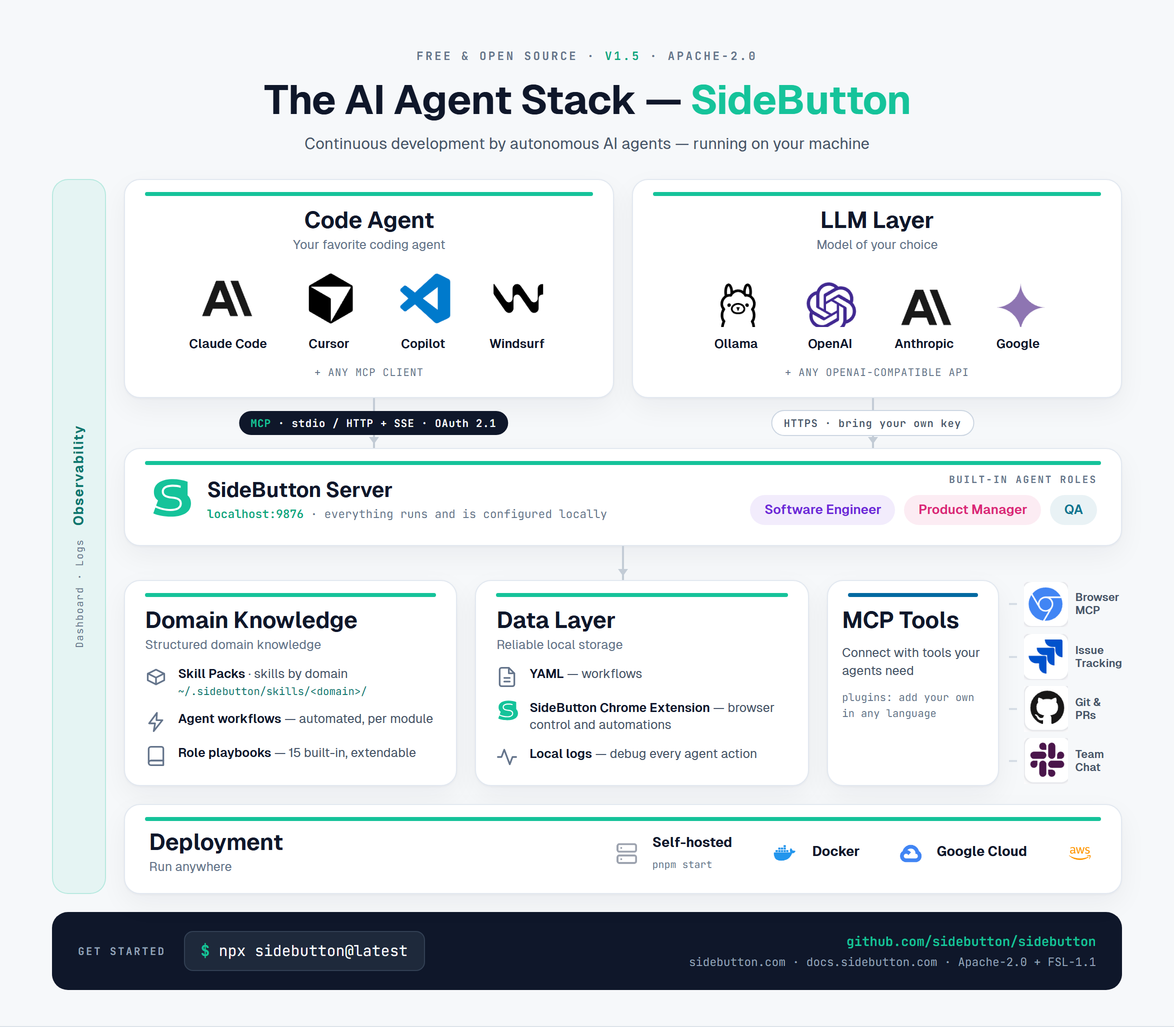
Execute agentes de IA de codificação com fluxos de trabalho agênticos, pacotes de conhecimento e controle real do navegador. Conecte Claude Code, Codex, Cursor, ChatGPT ou qualquer cliente MCP.
npx sidebutton@latest
# Dashboard at http://localhost:9876
O que você obtém
| Servidor MCP | Ferramentas de agente de IA para controle do navegador, execução de fluxos de trabalho e acesso a pacotes de conhecimento. Transportes Stdio e SSE. |
| API REST | Acione fluxos de trabalho remotamente a partir de webhooks, tarefas agendadas, aplicativos móveis ou outros agentes. |
| Mecanismo de Fluxos de Trabalho | Automação de fluxos de trabalho com IA usando etapas de navegador, git, rastreamento de issues, LLM, shell e controle de fluxo. Defina fluxos de trabalho agênticos em YAML. |
| Pacotes de Conhecimento | Conhecimento de domínio instalável — seletores CSS, modelos de dados, máquinas de estado. Playbooks de função transformam agentes de codificação em engenheiro de software de IA, QA ou PM. |
| Extensão do Chrome | Comandos de navegador com acesso real ao DOM via WebSocket, não capturas de tela. Modo de gravação. |
| Painel de Controle | Interface Svelte — navegador de fluxos de trabalho, logs de execução, gerenciador de pacotes de habilidades, status do sistema. |
Início Rápido
# Install and start
npx sidebutton@latest

# Or from source
pnpm install && pnpm build && pnpm start

# Open http://localhost:9876
CLI
pnpm cli serve          # Start server with dashboard
pnpm cli serve --stdio  # Start with stdio transport (for Claude Desktop)
pnpm cli list           # List available workflows
pnpm cli status         # Check server status

# Skill pack management
pnpm cli registry add <path|url>   # Install skill packs from a registry
pnpm cli registry update [name]    # Update installed packs
pnpm cli registry remove <name>    # Uninstall packs and remove registry
pnpm cli search [query]            # Search available skill packs

# Creating skill packs
pnpm cli init [domain]             # Scaffold a new skill pack
pnpm cli validate [path]           # Validate pack structure
pnpm cli publish [source]          # Publish to a registry
Servidor MCP
SideButton é um servidor MCP open-source para agentes de IA de codificação. Os agentes conectam-se diretamente a ele para controle do navegador, automação de fluxos de trabalho e conhecimento de domínio.
Funciona com Claude Code, Codex, Cursor, Claude Desktop, VS Code, Windsurf, ChatGPT — qualquer cliente MCP.
Claude Code
claude mcp add sidebutton --transport http http://localhost:9876/mcp
Persiste em ~/.claude.json; adicione --scope project para gravar em ./.mcp.json em vez disso. Guia completo: Configuração do MCP SideButton para Claude Code.
Codex
Adicione a ~/.codex/config.toml:
[mcp_servers.sidebutton]
command = "sidebutton"
args = ["serve", "--stdio"]
Guia completo: Configuração do MCP SideButton para OpenAI Codex.
Claude Desktop
Adicione a ~/Library/Application Support/Claude/claude_desktop_config.json:
{
  "mcpServers": {
    "sidebutton": {
      "command": "npx",
      "args": ["sidebutton", "--stdio"]
    }
  }
}
Cursor
Adicione a ~/.cursor/mcp.json:
{
  "mcpServers": {
    "sidebutton": {
      "url": "http://localhost:9876/mcp"
    }
  }
}
Ferramentas MCP
| Ferramenta | Descrição |
|---|---|
run_workflow | Executa um fluxo de trabalho por ID |
get_run_log | Obtém o log de execução de uma execução |
list_workflows | Lista todos os fluxos de trabalho disponíveis |
get_workflow | Obtém a definição YAML do fluxo de trabalho |
list_run_logs | Lista execuções recentes de fluxos de trabalho |
publish_artifact | Publica evidências (capturas de tela, relatórios) de uma sessão |
get_browser_status | Verifica a conexão da extensão do navegador |
capture_page | Captura seletores da página atual |
navigate | Navega o navegador para uma URL |
snapshot | Obtém o snapshot de acessibilidade da página |
click | Clica em um elemento |
type | Digita texto em um elemento |
press_key | Envia teclas do teclado |
scroll | Rola a página |
extract | Extrai texto de um elemento |
screenshot | Captura captura de tela da página (passe path para gravar um arquivo PNG em vez de retornar bytes de imagem) |
select_option | Seleciona opção de menu suspenso |
fill | Preenche valor de entrada (compatível com React) |
wait | Aguarda elemento ou atraso |
exists | Verifica se o elemento existe |
extract_all | Extrai todos os elementos correspondentes |
extract_map | Extrai dados estruturados de elementos repetidos |
scroll_into_view | Rola o elemento para o viewport |
hover | Passa o mouse sobre o elemento |
inject_css | Injeta CSS na página (desfoca/oculta elementos antes de uma captura de tela) |
evaluate | Executa JavaScript no navegador |
browser_batch | Executa uma sequência de ações do navegador em uma única chamada |
set_basic_auth | Define credenciais de Autenticação Básica HTTP para a aba conectada |
clear_basic_auth | Limpa credenciais de Autenticação Básica HTTP armazenadas |
API REST
Endpoints JSON para integrações externas. Os mesmos fluxos de trabalho estão disponíveis via MCP localmente e via REST remotamente.
# Run a workflow
curl -X POST http://localhost:9876/api/workflows/check_ticket/run \
  -H "Content-Type: application/json" \
  -d '{"params": {"ticket_id": "PROJ-123"}}'

# List workflows
curl http://localhost:9876/api/workflows

# Get run log
curl http://localhost:9876/api/runs/latest
Acione fluxos de trabalho a partir de webhooks, tarefas agendadas, aplicativos móveis ou outros agentes em máquinas diferentes.
Mecanismo de Fluxos de Trabalho
Orquestração YAML-first para fluxos de trabalho agênticos. Tipos de etapas por família:
Tipos de Etapas
| Família | Etapas |
|---|---|
browser.* | navigate, click, type, fill, extract, extractAll, extractMap, snapshot, screenshot, wait, exists, hover, key, scroll, scrollIntoView, select_option, injectCSS, injectJS |
git.* | createPR, getPR, listPRs, getIssue, listIssues |
issues.* | create, get, search, comment, attach, transition |
llm.* | classify, decide, generate |
control.* | if, foreach, retry, stop |
shell / terminal | shell.run, terminal.open, terminal.run |
data.* | first, get |
workflow.call | Chama outro fluxo de trabalho com parâmetros |
Etapas de LLM funcionam com Ollama (local), OpenAI e Anthropic.
Exemplo
id: check_ticket_status
title: "Check Jira ticket and classify"
steps:
  - type: browser.navigate
    url: "https://your-org.atlassian.net/browse/{{ticket_id}}"
  - type: browser.extract
    selector: "[data-testid='status-field']"
    as: current_status
  - type: control.if
    condition: "{{current_status}} != 'Done'"
    then:
      - type: llm.classify
        prompt: "Should this ticket be closed? Context: {{current_status}}"
        classes: [close, keep_open]
        as: decision
Interpolação de Variáveis
Use a sintaxe {{variable}} para referenciar valores extraídos ou parâmetros:
steps:
  - type: browser.extract
    selector: ".username"
    as: user
  - type: shell.run
    cmd: "echo 'Hello, {{user}}!'"
Pacotes de Conhecimento
Conhecimento de domínio instalável (pacotes de habilidades) por aplicativo web ou domínio. Pacotes de conhecimento potencializam revisão de código com IA, testes automatizados e implantações de agentes de IA empresariais.
Também chamados de pacotes de habilidades no código e nos comandos da CLI.
- Seletores — seletores CSS para elementos de interface
- Modelos de dados — tipos de entidade, campos, relacionamentos, estados válidos
- Máquinas de estado — transições válidas por estado
- Playbooks de função — procedimentos específicos de função (QA, SE, PM, SD)
- Tarefas comuns — procedimentos passo a passo, armadilhas, casos extremos
sidebutton install github.com
sidebutton install atlassian.net
Registro aberto com pacotes publicados para aplicativos web populares. Crie e compartilhe pacotes para qualquer domínio.
Extensão do Chrome
Instale a Extensão do Chrome SideButton na Chrome Web Store.
- Comandos de navegador — navegar, clicar, digitar, extrair, rolar, aguardar, snapshot
- Acesso real ao DOM via seletores CSS — não coordenadas de pixels, não capturas de tela
- Modo de gravação — capture ações manuais como fluxos de trabalho
- Botões incorporados — injete botões de ação em qualquer página web
- Conexão WebSocket — reconexão estável, funciona com servidor local ou remoto
Após instalar:
- Navegue para qualquer site
- Clique no ícone da extensão SideButton
- Clique em "Conectar Esta Aba"
Painel de Controle e Observabilidade
Interface Svelte em http://localhost:9876:
- Navegador de fluxos de trabalho — listar, pesquisar, executar
- Logs de execução — rastreamentos de execução passo a passo com tempo, variáveis, erros
- Gerenciador de pacotes de habilidades — instalar, navegar, inspecionar
- Status do sistema — conexão da extensão, configuração de LLM, saúde do servidor
SideButton lida com orquestração multi-agente — da execução de fluxos de trabalho à injeção de conhecimento.
Arquitetura
┌──────────────────────────────────────────────────────────────────────────┐
│                          @sidebutton/server                               │
│                                                                          │
│  ┌─────────────────────┐   ┌──────────────────────────────────────────┐  │
│  │  stdio Transport    │   │    Fastify HTTP + WebSocket (port 9876)  │  │
│  │  ─────────────────  │   │    ────────────────────────────────────  │  │
│  │  stdin → JSON-RPC   │   │  GET  /        → Dashboard (Svelte)      │  │
│  │  stdout ← JSON-RPC  │   │  GET  /ws      → Chrome Extension WS     │  │
│  │  (Claude Desktop)   │   │  POST /mcp     → MCP JSON-RPC (SSE)      │  │
│  └──────────┬──────────┘   │  GET  /api/*   → REST API                │  │
│             │              └──────────────────────┬───────────────────┘  │
│             │                                     │                      │
│             └──────────────────┬──────────────────┘                      │
│                                ▼                                         │
│  ┌────────────────────────────────────────────────────────────────────┐  │
│  │                       @sidebutton/core                              │  │
│  │                                                                     │  │
│  │  - Workflow types & parser (YAML)                                  │  │
│  │  - Step executors (YAML step types)                                │  │
│  │  - Variable interpolation                                          │  │
│  │  - Execution context & events                                      │  │
│  └────────────────────────────────────────────────────────────────────┘  │
└──────────────────────────────────────────────────────────────────────────┘
      ▲                ▲                      ▲                      ▲
      │ stdio          │ WebSocket            │ HTTP POST            │ REST
      ▼                ▼                      ▼                      ▼
┌──────────────┐ ┌─────────────────┐ ┌─────────────────┐ ┌───────────────────┐
│Claude Desktop│ │ Chrome Extension│ │   Claude Code   │ │   Mobile App      │
│ (MCP stdio)  │ │ (Browser Auto)  │ │   (MCP SSE)     │ │   (REST Client)   │
└──────────────┘ └─────────────────┘ └─────────────────┘ └───────────────────┘
Estrutura do Projeto
sidebutton/
├── packages/
│   ├── core/              # @sidebutton/core — workflow engine
│   │   └── src/
│   │       ├── types.ts       # Workflow types
│   │       ├── parser.ts      # YAML loader
│   │       ├── executor.ts    # Workflow runner
│   │       └── steps/         # Step implementations
│   ├── server/            # @sidebutton/server — MCP + HTTP + CLI
│   │   ├── bin/               # CLI entry point
│   │   └── src/
│   │       ├── server.ts      # Fastify HTTP server
│   │       ├── stdio-mode.ts  # stdio transport entry point
│   │       ├── extension.ts   # WebSocket client
│   │       ├── mcp/           # MCP handlers
│   │       │   ├── handler.ts    # MCP JSON-RPC logic
│   │       │   ├── stdio.ts      # stdio transport adapter
│   │       │   └── tools.ts      # Tool definitions
│   │       └── cli.ts         # Commander CLI
│   └── dashboard/         # Svelte web UI
│       └── src/
│           ├── App.svelte
│           └── lib/
├── extension/             # Chrome extension
├── workflows/             # Public workflow library
├── actions/               # User-created workflows
├── skills/                # Installed skill packs
└── run_logs/              # Execution history
Variáveis de Ambiente
| Variável | Necessária Para | Descrição |
|---|---|---|
OPENAI_API_KEY | etapas llm.* | Chave da API OpenAI para fluxos de trabalho com LLM |
ANTHROPIC_API_KEY | etapas llm.* | Chave da API Anthropic (alternativa) |
Desenvolvimento
pnpm install       # Install dependencies
pnpm build         # Build all packages
pnpm start         # Start server
pnpm cli list      # List workflows
pnpm cli status    # Check status
Modo de Observação
pnpm dev              # Full dev mode (all packages)
pnpm dev:server       # Server with auto-restart on :9876
pnpm dev:dashboard    # Dashboard watch build
pnpm dev:core         # Core library watch build
Aviso de Automação de Plataformas
SideButton é uma estrutura de automação de navegador de propósito geral. Ao automatizar plataformas de terceiros:
- Revise os Termos de Serviço: Muitas plataformas proíbem ou restringem automação. Você é responsável por cumprir os termos de qualquer plataforma que automatizar.
- Risco de Conta: A automação pode resultar em restrições ou suspensão de conta em algumas plataformas.
- Use com Responsabilidade: Automatize apenas ações que você realizaria manualmente. Respeite limites de taxa e diretrizes da plataforma.
Os autores não endossam nem incentivam violações dos termos de serviço de terceiros.
Licença
Este projeto usa licenciamento misto — veja LICENSING.md:
- Mecanismo, servidor, CLI, painel de controle — Apache-2.0
- Extensão do navegador — FSL-1.1-Apache-2.0 (converte para Apache-2.0 em 2029-03-15)