Seekstone
Servidor MCP de sistema de arquivos direto para vaults do Obsidian. Lê arquivos do vault diretamente do disco - sem necessidade do aplicativo ou plugins do Obsidian. Payloads 575x menores que alternativas baseadas em REST.
Documentação

O servidor MCP para Obsidian que não precisa de plugin, não precisa do app Obsidian rodando — e não estoura sua janela de contexto.
Acesso direto ao sistema de arquivos · busca por palavras-chave em milissegundos de um dígito · ~26 ms semântico · ~2 KB de payload · 21 ferramentas · macOS · Linux · Windows










| Seekstone | obsidian-mcp-server (#1 por downloads) | Servidores proxy REST | |
|---|---|---|---|
| Plugin de API REST local | Não é necessário | Necessário | Necessário |
| App Obsidian rodando | Não é necessário — funciona com o Obsidian fechado | Necessário | Necessário |
| Payload de busca @ 10 mil notas | 2,0 KB | 47 KB | até 95 MB |
| Latência de busca aquecida @ 10 mil notas | 5,2 ms | 732 ms (~141× mais lento) | até 1.550 ms |
| Consultas estruturadas de frontmatter | Integrado (query_notes) — predicados de propriedade/data/tamanho, respostas em algumas centenas de bytes | JSONLogic via REST | Varia |
Mesmas consultas, mesmos cofres commitados, 20 execuções cada, uma máquina. Adaptadores in-process foram reexecutados no cofre fixture-v2 em setembro de 2026; as linhas de proxy REST (rest, obsidian-mcp-server, mcp-obsidian) além de obsidian-mcp e obsidian-mcp-pro são capturas de junho de 2026 no fixture v1 — proveniência por linha em benchmarks.json, a fonte de verdade gerada contra a qual cada número aqui é verificado no CI — resultados completos em oito servidores e três tamanhos de cofre abaixo, totalmente reproduzíveis a partir do harness.
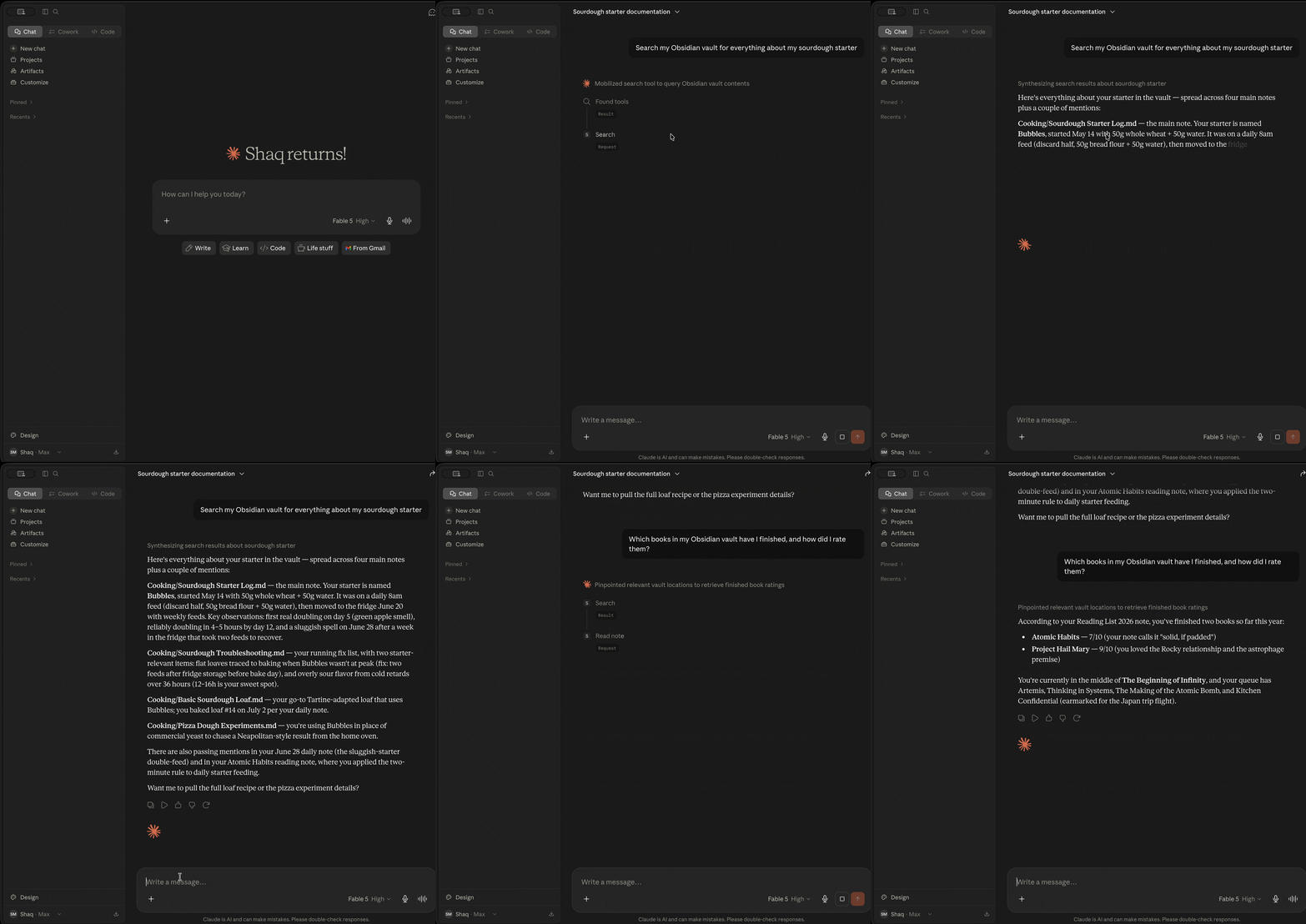
O que é o Seekstone?
Seekstone é um servidor MCP para Obsidian — ele dá ao Claude (e a qualquer cliente Model Context Protocol) acesso direto de leitura e escrita ao seu cofre do Obsidian. Nenhum app Obsidian precisa estar aberto, nenhum plugin é necessário, e nada sai da sua máquina.
Ele lê seu cofre diretamente do disco em vez de rotear pelo plugin Obsidian Local REST API, e mantém um índice de texto completo aquecido in-process. A diferença prática é dupla:
- Velocidade. Buscas por palavras-chave retornam em milissegundos de um dígito aquecidas e buscas semânticas em ~26 ms — até ~514× mais rápido que todos os outros servidores MCP para Obsidian que comparamos, porque não há subprocesso para iniciar nem ida e volta HTTP por consulta.
- Contexto. Uma busca ampla que retorna dezenas de megabytes e milhões de tokens via um servidor proxy REST retorna ~2 KB via Seekstone — uma redução de até ~47.000× que só aumenta conforme seu cofre cresce.
A busca vem em três modos: busca de texto completo ranqueada (correspondência difusa e por prefixo), busca semântica local opcional (baseada em significado, via um pequeno modelo de incorporação no dispositivo — opt-in, offline em tempo de execução após um download único de ~30 MB do modelo), e consultas de metadados estruturados — query_notes filtros por propriedades de frontmatter (status, due, type, …), tags, pasta, hora de modificação e tamanho, respondendo perguntas como "quais notas de rascunho mudaram esta semana?" em algumas centenas de bytes em vez de um loop de busca-e-leitura.
O Claude pode buscar e ler toda a sua biblioteca de notas, em milissegundos, sem queimar a maior parte da janela de contexto em uma única chamada de ferramenta.
Publicado no npm como seekstone — instale com npx -y seekstone. (Anteriormente também publicado como obsidian-mcp-seekstone; esse alias está obsoleto, mas instalações existentes continuam funcionando.)
Por que Seekstone? Os números.
A maioria dos servidores MCP para Obsidian retorna o conteúdo completo da nota para cada resultado de busca. Em uma consulta ampla, isso são megabytes de texto que seu LLM precisa processar — a maior parte irrelevante, tudo queimando janela de contexto.
Seekstone retorna trechos curtos ranqueados em vez disso (~120 caracteres por padrão, ajustável por consulta). Comparamos Seekstone com 7 outros servidores MCP para Obsidian — 8 servidores no total — em três tamanhos de cofre — 1.000 / 5.000 / 10.000 notas (20 execuções cada). Cada número abaixo é totalmente reproduzível: os cofres estão commitados neste repositório (gerados a partir da Encyclopædia Britannica de 1911 em domínio público), então você pode cloná-lo e executar o mesmo benchmark você mesmo.
O objetivo de testar três tamanhos é que é aqui que as arquiteturas divergem — um cofre real só cresce.
Payload de busca — bytes retornados por consulta (imposto de contexto; menor é melhor)
| Servidor | Arquitetura | 1 mil notas | 5 mil notas | 10 mil notas |
|---|---|---|---|---|
| 🥇 Seekstone | índice in-process | 1,6 KB | 1,8 KB | 2,0 KB |
| mcpvault | subprocesso fs-direct | 1,7 KB | 1,9 KB | 2,2 KB |
| obsidian-mcp-rs | fs-direct, varredura por consulta | 5,4 KB | 5,8 KB | 6,2 KB |
| obsidian-tc | plataforma SQLite | 4,6 KB | 6,8 KB | 7,2 KB |
| obsidian-mcp-server | API REST | 55 KB | 47 KB | 47 KB |
| obsidian-mcp-pro | subprocesso fs-direct | 25 KB | 84 KB | 114 KB |
| obsidian-mcp | subprocesso fs-direct | 18 KB | 105 KB | 201 KB |
| mcp-obsidian | API REST | 9,8 MB | 45 MB | 95 MB |
Seekstone permanece estável (~2 KB) não importa o tamanho do seu cofre, porque sempre retorna trechos ranqueados — e agora é o menor payload de todos os servidores testados, superando o mcpvault nos três tamanhos. Os servidores proxy REST retornam o conteúdo completo da nota para cada correspondência, então eles crescem com o cofre — mcp-obsidian atinge 95 MB em 10 mil notas, e uma única consulta ampla (the capital of) teve média de 370,9 MB / 97,8 milhões de tokens por chamada em 20 execuções. Em 10 mil notas, isso é uma diferença de imposto de contexto de ~47.000×.
Latência de busca — média aquecida, ms (menor é melhor)
| Servidor | 1 mil notas | 5 mil notas | 10 mil notas | vs Seekstone @10k |
|---|---|---|---|---|
| 🥇 Seekstone | 1,0 | 2,7 | 5,2 | — |
| obsidian-mcp-rs | 5,8 | 18 | 35 | ~7× mais lento |
| obsidian-mcp-pro | 46 | 213 | 430 | ~83× mais lento |
| obsidian-mcp-server | 82 | 356 | 732 | ~141× mais lento |
| obsidian-mcp | 82 | 405 | 811 | ~156× mais lento |
| mcpvault | 89 | 436 | 897 | ~173× mais lento |
| mcp-obsidian | 164 | 740 | 1.550 | ~299× mais lento |
| obsidian-tc | 263 | 1.253 | 2.667 | ~514× mais lento |
Todo concorrente inicia um subprocesso ou faz idas e voltas HTTP por consulta, e a maioria faz trabalho que escala com o tamanho do cofre. Seekstone mantém um índice in-process aquecido — sem IPC, sem rede — então a busca por palavras-chave permanece em milissegundos de um dígito mesmo em 10.000 notas (o pipeline semântico enviado — incorporar, varrer, reranquear MaxSim — chega a ~26 ms). E a lacuna aumenta com a escala: de 1 mil → 10 mil notas, os concorrentes ficam 5–10× mais lentos, enquanto Seekstone quase não se move. Até a alternativa mais rápida — obsidian-mcp-rs, que reexamina o cofre a cada consulta — é ~7× mais lenta aquecida em 10 mil notas com 3× o payload, e a geração de proxy REST roda ~110–300× mais lenta.
Seekstone é o único servidor em nosso conjunto de benchmarks que entrega tanto payloads de ~2 KB quanto latência de palavras-chave em milissegundos de um dígito em todos os tamanhos de cofre — e, até onde sabemos, o único servidor MCP para Obsidian com benchmarks publicados e reproduzíveis. O harness, os cofres sintéticos e os resultados completos são open source: veja benchmark-scaling.md e o harness. Clone, execute, verifique.
Instalação
Escolha o método que melhor se adequa a você.
Usando um agente de IA? Cole este prompt
Se você usa Claude Code, Cursor ou outro agente de codificação, você não precisa seguir nenhuma instrução você mesmo — cole este prompt e o agente faz a instalação:
Instale o servidor MCP seekstone para este editor. Execute
npx -y seekstone init --client code --write(usedesktop,cursorouvscodepara outros clientes). Ele detecta automaticamente meu cofre do Obsidian; se listar vários, pergunte-me qual e execute novamente com--vault "<path>". Repasse quaisquer erros para mim e depois me diga para reiniciar esta sessão para que as ferramentas do seekstone carreguem.
seekstone init é totalmente não interativo — com --write ele valida o cofre e corrige a configuração do cliente de uma só vez (Claude Code via claude mcp add, outros clientes via um patch JSON aditivo com backup com carimbo de data/hora).
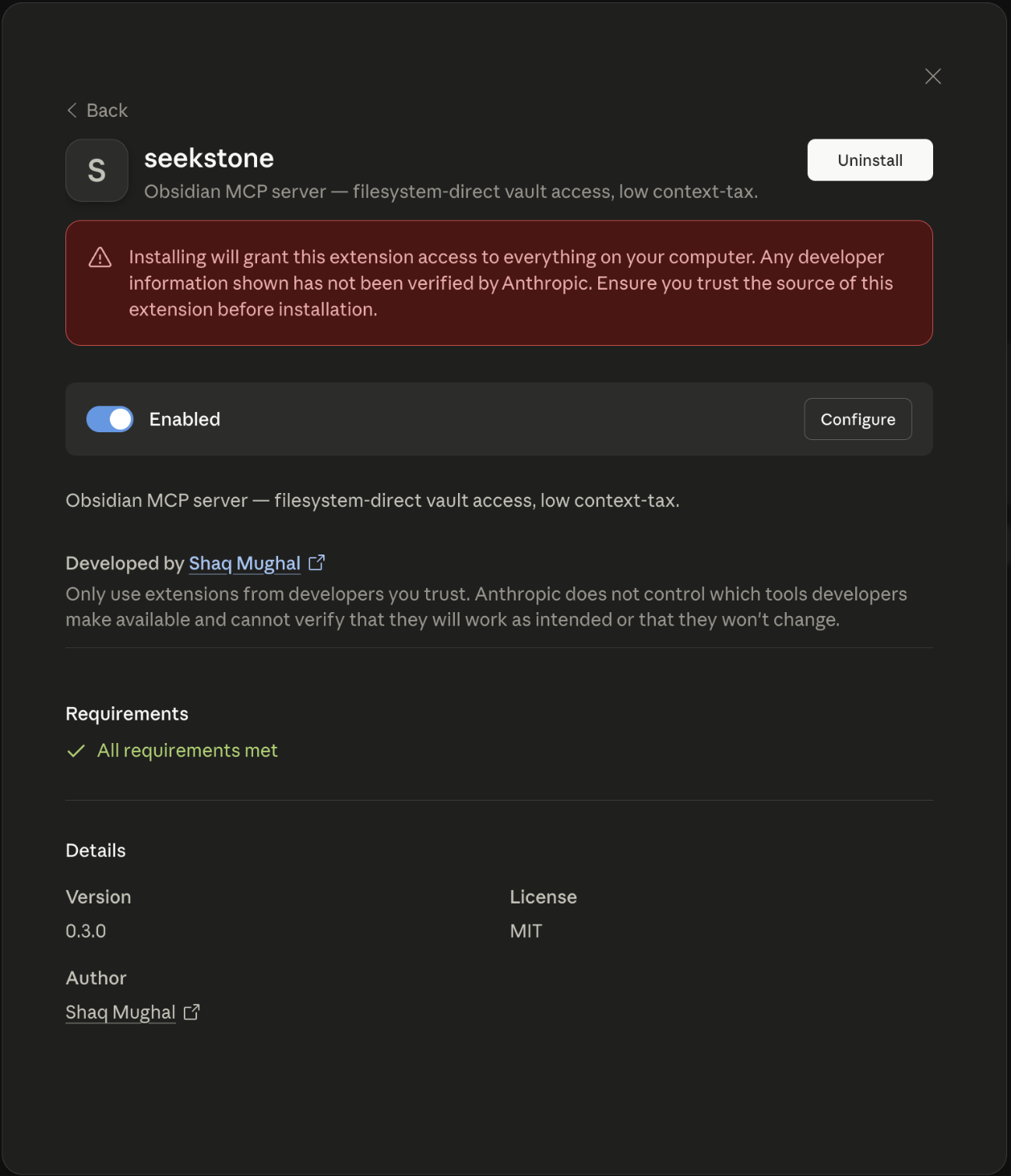
Opção 1 — Um clique (Claude Desktop, sem terminal necessário)
- Baixe
seekstone.mcpb(link direto, sempre a versão mais recente) - Abra com o Claude Desktop — clique duas vezes no Finder, ou clique com o botão direito → Abrir com → Claude Desktop
- Escolha sua pasta de cofre do Obsidian quando solicitado
Você saberá que funcionou quando seekstone aparecer na barra de ferramentas do Claude. Sem edição de JSON, sem terminal, sem Node.js necessário.
Quer busca semântica? Pegue seekstone-semantic.mcpb em vez disso — mesmo servidor com o modelo de incorporação local incluído no pacote (~28 MB maior), então a busca baseada em significado funciona pronta para uso: ainda sem terminal, e nada é baixado em tempo de execução.
Opção 2 — Configuração guiada (recomendado para usuários de CLI)
Abra o Terminal (macOS: Cmd+Space, digite "Terminal", pressione Enter) e execute:
npx -y seekstone init
Você saberá que funcionou quando Seekstone aparecer na barra de ferramentas do Claude sob o ícone de plugue.
Seekstone lê o registro de cofres do próprio Obsidian para detectar seu cofre, valida-o e imprime o bloco de configuração para colar ou corrige o Claude Desktop diretamente:
# Auto-detect vault, print config to paste
npx -y seekstone init

# Auto-detect vault, patch Claude Desktop in place (with backup)
npx -y seekstone init --write

# Specify vault explicitly if you have multiple
npx -y seekstone init --vault "/path/to/vault"

# Auto-configure Claude Code in one step (auto-detects vault, runs claude mcp add)
npx -y seekstone init --client code --write

# Or just print the Claude Code command without running it
npx -y seekstone init --client code
Opção 3 — Configuração manual (Claude Desktop)
Adicione a claude_desktop_config.json (Configurações → Desenvolvedor → Editar Config):
{
  "mcpServers": {
    "seekstone": {
      "command": "npx",
      "args": ["-y", "seekstone"],
      "env": { "SEEKSTONE_VAULT": "/absolute/path/to/your/vault" }
    }
  }
}
Opção 4 — Claude Code
Detecta automaticamente seu cofre e configura o Claude Code em um comando:
npx -y seekstone init --client code --write
Ou manualmente, se preferir especificar o caminho do cofre explicitamente:
claude mcp add seekstone --env SEEKSTONE_VAULT=/absolute/path/to/your/vault -- npx -y seekstone
Opção 5 — Cursor
Um clique: — depois defina SEEKSTONE_VAULT para o caminho absoluto do seu cofre nas configurações de MCP do Cursor (o link instala um espaço reservado).
Ou deixe o CLI detectar automaticamente seu cofre e corrigir ~/.cursor/mcp.json (com backup):
npx -y seekstone init --client cursor --write
Ou adicione o bloco manualmente a ~/.cursor/mcp.json (global) ou <project>/.cursor/mcp.json (por projeto):
{
  "mcpServers": {
    "seekstone": {
      "command": "npx",
      "args": ["-y", "seekstone"],
      "env": { "SEEKSTONE_VAULT": "/absolute/path/to/your/vault" }
    }
  }
}
Opção 6 — VS Code
Um clique: SEEKSTONE_VAULT para o caminho absoluto do seu cofre quando o VS Code abrir a configuração do servidor (o link instala um espaço reservado).
Ou deixe o CLI detectar automaticamente seu cofre e escrever a configuração do workspace (.vscode/mcp.json no diretório atual):
npx -y seekstone init --client vscode --write
Ou adicione pelo terminal:
code --add-mcp '{"name":"seekstone","command":"npx","args":["-y","seekstone"],"env":{"SEEKSTONE_VAULT":"/absolute/path/to/your/vault"}}'
Ou adicione o bloco manualmente em .vscode/mcp.json (workspace) ou via Paleta de Comandos → MCP: Open User Configuration (global do usuário). Observe as duas peculiaridades do VS Code: a chave de nível superior é servers (não mcpServers), e "type": "stdio" é obrigatório:
{
  "servers": {
    "seekstone": {
      "type": "stdio",
      "command": "npx",
      "args": ["-y", "seekstone"],
      "env": { "SEEKSTONE_VAULT": "/absolute/path/to/your/vault" }
    }
  }
}
Requer VS Code 1.102+; seekstone aparece no seletor de ferramentas do Agent mode do Copilot Chat.
Outros clientes MCP (Windsurf, Cline, …)
Seekstone é um servidor MCP stdio padrão — qualquer cliente MCP pode executá-lo. Use o mesmo bloco JSON acima na configuração MCP do seu cliente (command: npx, args: ["-y", "seekstone"], env SEEKSTONE_VAULT).
Após instalar, reinicie o cliente. Na inicialização, o Seekstone percorre o vault, constrói um índice de texto completo em memória (alguns segundos para milhares de notas) e o mantém atualizado enquanto você edita. As 21 ferramentas abaixo ficam então disponíveis para o Claude.
Requer Node.js ≥ 22 para as opções de CLI. O pacote .mcpb de um clique não tem requisitos externos.
Se o Seekstone economizar seu contexto, considere ⭐ dar uma estrela no repositório — isso ajuda outras pessoas a encontrá-lo.
O que o Claude pode fazer com seu vault?
Uma vez conectado ao Seekstone, você pode pedir ao Claude coisas como:
- "Pesquise minhas notas sobre tudo relacionado a [tópico] e me dê um resumo" — usa
search, retorna trechos ranqueados, não arquivos completos - "Encontre todas as notas marcadas com #project e liste seus títulos" — usa
list_notescom um filtro de tag - "Leia apenas a seção 'Decisions' da minha nota [projeto]" — usa
read_notecom um seletor de seção, para que apenas essa parte entre no contexto - "O que linka para minha nota [tópico], e para onde ela linka?" — usa
get_backlinkseget_linkspara percorrer seu grafo - "Adicione as notas do standup de hoje à minha nota diária" — usa
append_periodic_note, resolvendo o caminho da nota diária a partir da configuração do seu vault (o Obsidian não precisa estar aberto) - "Corrija todas as ocorrências do nome antigo do projeto nesta nota" — usa
replace_in_note, com uma prévia de simulação antes de escrever - "Adicione uma seção de resumo ao final de [nota]" — usa
append_note, nunca toca no frontmatter - "Mova todas as notas em /inbox para /archive/[ano]" — usa
move_note - "Atualize o campo de status no frontmatter desta nota para 'done'" — usa
patch_frontmatter, preserva a ordem das chaves e o estilo de aspas - "Crie uma nova nota de reunião para hoje com um modelo padrão" — usa
create_note
O Claude nunca vê seu vault inteiro de uma vez — ele pesquisa e lê seletivamente, então mesmo vaults grandes (10k+ notas) permanecem dentro do orçamento de contexto.
Ferramentas
Leitura
| Ferramenta | Descrição |
|---|---|
search | Pesquisa de texto completo. Retorna trechos ranqueados (padrão ~120 caracteres, ajustável via excerptLength), não notas completas. Correspondência difusa e por prefixo; com SEEKSTONE_SEMANTIC=1, mode: "semantic"/"hybrid" pesquisa por significado via um modelo de embedding local (nada sai da sua máquina). |
query_notes | Consulta estruturada de metadados. Filtre por predicados de chave/valor do frontmatter (eq, ne, contains, exists, missing, gt/gte/lt/lte), tag, pasta, hora de modificação e tamanho; ordene e selecione os campos que você precisa. Retorna linhas compactas (caminho + título por padrão), não o conteúdo da nota. |
context_pack | Contexto pronto para resposta a uma pergunta em linguagem natural em uma única chamada, com limite rígido de orçamento de bytes (padrão 2 KB): trechos ranqueados, notas vizinhas linkadas com resumos de uma linha e caminhos de origem de acompanhamento — substitui um loop de pesquisa → leitura → get_backlinks. |
read_note | Leia o conteúdo completo de uma nota pelo caminho relativo ao vault. Suporta retornar uma única seção, bloco ou intervalo de linhas. |
list_notes | Liste notas, opcionalmente filtradas por prefixo de pasta ou tag. |
list_tags | Liste todas as tags do vault ordenadas por contagem de uso (ou alfabeticamente). |
outline_note | Retorne a estrutura de títulos e blocos de uma nota sem seu conteúdo completo — navegação barata antes de uma leitura direcionada. |
get_backlinks | Encontre todas as notas que linkam para uma determinada nota. |
get_links | Liste todos os wikilinks de saída e links markdown de uma nota. |
get_periodic_note | Leia a nota diária, semanal, mensal, trimestral ou anual de hoje (ou de qualquer data) — caminho resolvido a partir da configuração do seu vault, sem exigir Obsidian. |
list_writes | Escritas recentes do diário — seq, timestamp, ferramenta, caminhos tocados e se cada uma ainda é reversível. Apenas metadados, nunca conteúdo de notas. |
Escrita
| Ferramenta | Descrição |
|---|---|
create_note | Crie uma nota (frontmatter opcional + corpo); diretórios pai são criados automaticamente. |
delete_note | Mova uma nota para a pasta .trash/ do vault (compatível com Obsidian, restaurável). Passe permanent: true para pular a lixeira — o diário de escrita ainda permite que undo_write a restaure. |
move_note | Mova ou renomeie uma nota — wikilinks e links markdown em outras notas que apontam para ela são reescritos para que nada quebre (rewriteLinks: false para optar por não participar); diretórios de destino são criados automaticamente. |
rename_heading | Renomeie um título em uma nota — todo [[note#heading]] wikilink e embed em todo o vault é reescrito para que as referências continuem funcionando (aliases preservados, blocos de código cercados deixados intactos). |
append_note | Adicione texto ao corpo de uma nota sem tocar no frontmatter. |
patch_frontmatter | Defina, atualize ou exclua chaves do frontmatter sem reordenar chaves existentes ou alterar o estilo de aspas. |
patch_note | Adicione, prefixe ou substitua texto em um título ou referência de bloco (createIfMissing para adicionar a seção) — frontmatter intocado. |
replace_in_note | Encontre e substitua texto no corpo da nota — literal ou regex, sensibilidade a maiúsculas, correspondência de palavra inteira, limit opcional (substitui todas as ocorrências por padrão) e uma prévia de simulação. |
append_periodic_note | Adicione à nota periódica de hoje, criando-a a partir de um modelo se ainda não existir. |
undo_write | Reverta uma escrita registrada no diário: cada arquivo tocado volta ao seu estado pré-escrita byte-idêntico (uma movimentação de vários arquivos ou renomeação de título é restaurada por completo; uma exclusão é restaurada mesmo se foi permanent). Padrão para a escrita mais recente; recusa com undo_conflict se um arquivo mudou desde então, a menos que force: true. O desfazer em si é registrado — undo_write({ seq }) na entrada de desfazer refaz. |
Cada ferramenta de escrita (append_note, patch_note, patch_frontmatter, replace_in_note, rename_heading, move_note, delete_note, append_periodic_note e create_note com overwrite: true) suporta compare-and-swap opcional: passe o contentHash que você obteve de read_note como prevHash e a chamada falha limpa se a nota mudou por baixo de você — sem edição concorrente silenciosamente descartada, sem mover ou excluir conteúdo que você não viu. Cada resultado de mutação retorna o novo contentHash, então edições encadeadas não precisam de re-leituras.
Toda escrita é reversível. Antes de qualquer ferramenta de escrita alterar um byte, ela registra a pré-imagem de cada arquivo que está prestes a tocar sob <vault>/.seekstone/history/ — endereçada por conteúdo (estados idênticos são armazenados uma vez) e com fsync antes do commit da escrita no vault. list_writes mostra o diário; undo_write restaura byte-idêntico: um move_note ou rename_heading de vários arquivos é restaurado por completo (a nota e cada reescrita de link), e um delete_note volta mesmo se foi permanent. Um desfazer após uma edição externa é recusado com um undo_conflict estruturado, a menos que você passe force: true — e mesmo assim o estado sobrescrito é registrado primeiro, então nada é perdido. O desfazer em si é registrado: desfazer padrão repetido caminha para trás pelo histórico, e undo_write({ seq }) em uma entrada de desfazer refaz. .seekstone/ é excluído da indexação e pesquisa como .trash/; adicione-o ao .gitignore do seu vault. Isso complementa o git e a Recuperação de Arquivos do Obsidian em vez de substituí-los — é o caminho de recuperação que o agente pode acionar.
Toda escrita deixa um recibo. Defina SEEKSTONE_AUDIT_FILE e cada chamada de ferramenta de escrita — bem-sucedida ou recusada — adiciona uma linha JSON: ferramenta, caminhos relativos ao vault, sha-256 antes/depois, resultado (ok, hash_conflict, undo_conflict, policy_denied, error) e metadados de operação, como contagens de substituição ou o destino .trash/ — nunca conteúdo de notas, valores de frontmatter ou consultas de pesquisa, então o arquivo é seguro para anexar a um relatório de bug.
{"v":1,"ts":"2026-08-29T21:02:11.042Z","tool":"replace_in_note","outcome":"ok","durationMs":1.8,"seq":42,"files":[{"path":"notes/a.md","hashBefore":"3f9c…","hashAfter":"b71e…"}],"path":"notes/a.md","replacements":3}
Os hashes são os mesmos valores contentHash que read_note retorna, então qualquer registro pode ser verificado contra o vault; seq é a entrada do diário que a chamada confirmou, então uma linha indexa diretamente em list_writes / undo_write. Os registros são adicionados e com fsync após o commit da escrita no vault, o arquivo rotaciona para <file>.1 além de SEEKSTONE_AUDIT_MAX_SIZE, um caminho de auditoria não gravável falha na inicialização, e uma adição falha relata a chamada como um erro estruturado audit_failed em vez de um sucesso limpo. Algumas receitas jq:
jq -r '[.tool, .outcome] | @tsv' audit.jsonl | sort | uniq -c            # session summary by tool + outcome
jq -c 'select(.files[]?.path == "notes/a.md")' audit.jsonl              # history of one note
jq -c 'select(.ts > "2026-08-29T21:00:00Z" and .outcome == "ok")' audit.jsonl   # what changed since a timestamp
Rápido e completo. Seekstone é o único servidor MCP do Obsidian em nosso conjunto de benchmark a expor list_tags, outline_note, get_backlinks e get_links como ferramentas de primeira classe. Mais quatro capacidades o diferenciam:
- Pesquisa semântica local, totalmente em processo. Com
SEEKSTONE_SEMANTIC=1,searchganhamode: "semantic"e"hybrid"— recuperação baseada em significado através de um pequeno modelo de embedding no dispositivo (download único denpx -y seekstone fetch-model, ou o pacoteseekstone-semantic.mcpbque inclui o modelo dentro; o servidor em execução nunca toca a rede), com um rerank de interação tardia MaxSim por cima desde 0.17.0. Em nosso vault de benchmark comprometido de 10k notas (conjunto dourado de 150 consultas, fixture v2), o modelo padrão — medido de ponta a ponta através da ferramenta de pesquisa real — pontua 83,3% hit@5 geral, 86,7% na divisão retida (vs 34,7% apenas para pesquisa por palavras-chave) a ~26 ms p50 quente, e o modelopotion-retrieval-32Mopcional (SEEKSTONE_SEMANTIC_MODEL; ~129 MB) atinge 86,7% hit@5 geral, 86,7% retido a ~55 ms. Nenhum outro servidor que comparamos entrega embeddings offline, sem dependências nativas — e medimos as alternativas frente a frente no mesmo conjunto dourado, mesma execução, divisão dev/holdout comprometida (comparação comprometida, leitura em COMPETITORS-SHA-322): a pesquisa semântica simples com suporte Ollama do obsidian-tc nos supera na divisão retida (90,0% vs nossos 86,7%) a 169 ms/consulta e um índice de 30 minutos vs nossos ~28 s, e seu modo GraphRAG pontua o mais alto de tudo que comparamos (95,0% retido), pagando por isso com latência de segundos por consulta (2,9 s p50, 4,2 s p95 — contra nossos 26–55 ms), ~8× o payload (16 KB vs ~2 KB por consulta) e um segundo servidor (Ollama + um modelo de 137M parâmetros) que você deve instalar e executar. Pré-registramos uma porta para reivindicar o #1 (GATE-V2-SHA-316, executado no fixture v1) e perdemos — esse veredito é publicado com a mesma proeminência que uma vitória teria; nenhuma nova porta foi executada no v2, e as mesmas cláusulas recalculam para a mesma perda. obsidian-mcp-pro não conseguiu indexar o vault de 10k notas (seu armazenamento de vetores JSON excede o limite de string do JavaScript após ~17 minutos de embedding). Escolha sua troca — os números estão todos comprometidos. - Notas periódicas, direto no sistema de arquivos.
get_periodic_noteeappend_periodic_noteresolvem caminhos de notas diárias, semanais, mensais, trimestrais e anuais lendo a própria configuração do seu cofre (.obsidian/daily-notes.jsone o plugin Periodic Notes) — com o Obsidian fechado. Todo servidor baseado em REST só consegue fazer isso enquanto o aplicativo está em execução. - Frontmatter byte-idêntico, garantido.
patch_frontmatteredita YAML no lugar — preservando ordem das chaves, estilo de aspas e comentários — e a segurança de escrita é comprovada byte a byte pelo harness de testes. Nenhum outro servidor que pesquisamos faz essa garantia. - Zero acoplamento. Sem aplicativo Obsidian, sem plugin Local REST API, sem descompasso de versões de plugin. Apenas seus arquivos no disco.
Configuração
| Variável | Obrigatória | Descrição |
|---|---|---|
SEEKSTONE_VAULT | Sim | Caminho absoluto para o seu cofre do Obsidian. |
SEEKSTONE_LOG_LEVEL | Não | error | warn | info (padrão) | debug. |
SEEKSTONE_LOG_FILE | Não | Caminho absoluto; quando definido, logs em linhas JSON são anexados aqui (com rotação por tamanho). |
SEEKSTONE_LOG_MAX_SIZE | Não | Limite de rotação de logs para SEEKSTONE_LOG_FILE (ex.: 10mb; padrão 5 MB). |
SEEKSTONE_WATCH_POLL | Não | Defina como 1 para usar polling por estatísticas em vez de eventos nativos do SO — mais lento, mas confiável em unidades de rede, WSL e alguns contêineres. |
SEEKSTONE_WATCH_POLL_INTERVAL | Não | Intervalo do polling por estatísticas em ms (padrão 10000). Usado apenas com SEEKSTONE_WATCH_POLL=1. Menor = detecção mais rápida de edições externas, maior uso de CPU; aumente em montagens de rede/9p lentas. |
SEEKSTONE_READ_ONLY | Não | Defina como 1 para executar somente leitura: as 10 ferramentas de escrita são totalmente removidas da lista de ferramentas (e rejeitadas se chamadas mesmo assim), então a sessão comprovadamente não pode modificar seu cofre. |
SEEKSTONE_WRITE_PATHS | Não | Globs separados por vírgula relativos ao cofre (ex.: journal/**,inbox/*.md). Escritas são permitidas apenas em caminhos correspondentes; o restante do cofre permanece somente leitura. |
SEEKSTONE_HISTORY | Não | Defina como 0 para desativar o diário de escrita (padrão ativado). Com ele ativado, toda ferramenta de escrita armazena a pré-imagem de cada arquivo que toca em <vault>/.seekstone/history/ para que undo_write possa restaurá-la byte a byte. |
SEEKSTONE_HISTORY_MAX_SIZE | Não | Limite para pré-imagens armazenadas (ex.: 100mb; padrão 50 MB). As entradas mais antigas são removidas primeiro e depois exibem undoable: false em list_writes — nunca silenciosamente. |
SEEKSTONE_HISTORY_MAX_ENTRIES | Não | Limite para entradas do diário (padrão 1000); as mais antigas são descartadas além disso. |
SEEKSTONE_AUDIT_FILE | Não | Caminho absoluto; desativado a menos que definido. Anexa um registro de auditoria em linha JSON por chamada de ferramenta de escrita — ok ou recusada — com a ferramenta, caminhos, sha-256 antes/depois, resultado e metadados da operação. Nunca o conteúdo das notas. |
SEEKSTONE_AUDIT_MAX_SIZE | Não | Rota o arquivo de auditoria para <file>.1 além deste tamanho (ex.: 10mb; padrão 10 MB). |
SEEKSTONE_SEMANTIC | Não | Defina como 1 para ativar a busca semântica (search ganha mode: "semantic" e "hybrid"). Requer o modelo de incorporação local — baixe-o uma vez com npx -y seekstone fetch-model; o servidor em execução nunca toca a rede. O pacote seekstone-semantic.mcpb define isso automaticamente e inclui o modelo dentro. |
SEEKSTONE_SEMANTIC_MODEL | Não | Qual modelo local carregar: potion-base-8M (padrão, ~30 MB, 256-dim) ou potion-retrieval-32M (~129 MB, 512-dim — mais preciso em consultas estilo descrição com aproximadamente 2× a latência de consulta). Busque-o primeiro com npx -y seekstone fetch-model --model potion-retrieval-32M. |
SEEKSTONE_MODEL_PATH | Não | Diretório que contém o modelo de incorporação Model2Vec (padrão: onde fetch-model coloca o modelo selecionado, sob o diretório de cache). |
SEEKSTONE_CACHE_DIR | Não | Raiz de cache para o modelo baixado e caches de incorporação por cofre (padrão ~/.cache/seekstone). |
SEEKSTONE_BUNDLED_MODEL_DIR | Não | Definido pelo manifesto do pacote seekstone-semantic.mcpb — aponta para os arquivos de modelo fragmentados enviados dentro da extensão, que o servidor remonta no diretório do modelo na inicialização (somente disco, verificado contra os hashes SHA-256 fixados). Normalmente não definido manualmente. |
Como funciona
Seekstone percorre o cofre com fast-glob, analisa o frontmatter de cada nota (ciente de bytes, para que as escritas possam provar que a região do frontmatter é byte-idêntica antes e depois da escrita) e constrói um índice de texto completo MiniSearch em memória. A busca retorna trechos curtos classificados em vez de notas inteiras — esse design de trecho-em-vez-de-documento é de onde vem a economia de imposto de contexto. Um observador de arquivos multiplataforma (chokidar) mantém o índice atualizado enquanto você edita no Obsidian.
As escritas são conservadoras por design: append_note nunca toca o frontmatter, e patch_frontmatter edita o documento YAML no lugar em vez de re-serializá-lo, preservando ordem das chaves, estilo de aspas e comentários.
É construído para permanecer ativo. Seekstone é testado em macOS, Linux e Windows em CI a cada commit, suas ferramentas de escrita são endurecidas contra entradas patológicas (ReDoS), e uma rejeição não tratada perdida é registrada em vez de causar queda — para que sua sessão MCP de longa duração mantenha seu índice aquecido em vez de cair no meio da conversa.
Para um tour camada por camada do código — pacotes, internals do servidor, fluxo de requisição de ponta a ponta e o harness de medição — veja docs/ARCHITECTURE.md.
Segurança e privacidade
Seekstone lê — e, por meio das ferramentas de escrita, modifica — arquivos sob SEEKSTONE_VAULT no seu disco local. O servidor em execução faz nenhuma chamada de rede e envia nenhuma telemetria (o único caminho de rede no pacote é o subcomando explícito npx -y seekstone fetch-model — um download único verificado por SHA-256 do modelo opcional de busca semântica que sai antes de o servidor começar; o pacote seekstone-semantic.mcpb pula até isso enviando o modelo dentro e remontando-o do disco na inicialização, verificado contra os mesmos hashes fixados). Logs são apenas metadados por padrão (conteúdos de notas só aparecem no nível debug). Nada é escrito fora do cofre, exceto um arquivo de log opcional que você configura e, com SEEKSTONE_SEMANTIC=1, o cache de incorporação por cofre sob ~/.cache/seekstone (vetores derivados das suas notas — nunca enviados a lugar algum).
O Contrato de Segurança de Escrita
Dar a uma IA acesso de escrita às suas notas merece mais do que "confie em nós." Seekstone traz um contrato nomeado e testado — docs/WRITE-SAFETY.md — de dez garantias, cada uma vinculada ao código que a aplica e ao teste que a prova, verificado byte a byte pelo conjunto de segurança do harness em CI a cada commit e release: zero rede, sandbox do cofre, frontmatter byte-idêntico em edições de corpo, escritas atômicas (sem arquivos corrompidos), criações nunca sobrescrevem, exclusões recuperáveis (.trash/), compare-and-swap opcional em toda ferramenta de escrita, escopo de escrita configurável / modo somente leitura, um diário de escrita que torna toda escrita reversível (undo_write) e um log de auditoria verificável por hash — toda chamada de escrita deixa um recibo. O mesmo conjunto roda headless contra outros servidores diretos de FS — a tabela de comparação está no contrato.
Perguntas frequentes
O aplicativo Obsidian precisa estar em execução? Não. Seekstone lê a pasta do cofre diretamente do disco. O Obsidian pode estar aberto ou fechado.
Preciso do plugin Local REST API? Não. Seekstone o ignora completamente — essa é a fonte da redução de payload de até 47.000×. Nenhum plugin é necessário.
Quais clientes de IA ele suporta? Qualquer cliente que suporte o Model Context Protocol (MCP) via stdio — Claude Desktop, Claude Code, Cursor, Windsurf, Continue e outros.
É seguro usar no meu cofre?
Seekstone nunca modifica arquivos, exceto quando você invoca explicitamente uma de suas ferramentas de escrita (as dez na tabela acima — create_note, append_note, patch_note, patch_frontmatter, replace_in_note, move_note, rename_heading, delete_note, append_periodic_note, undo_write). Cada uma delas registra a pré-imagem de cada arquivo que toca primeiro, para que undo_write possa restaurá-la byte a byte — veja a nota do diário de escrita acima — e com SEEKSTONE_AUDIT_FILE definido, toda chamada de escrita deixa um registro de auditoria verificável por hash (tentativas recusadas incluídas). O servidor em execução não faz requisições de rede (o modelo da busca semântica é buscado uma vez, fora de banda, pelo subcomando explícito fetch-model). O caminho do cofre é isolado — nenhuma ferramenta pode ler ou escrever fora dele. E você pode apertar ainda mais: SEEKSTONE_READ_ONLY=1 remove as ferramentas de escrita da sessão inteiramente, e SEEKSTONE_WRITE_PATHS restringe escritas às pastas que você permitir (digamos, apenas journal/**). Ambos são aplicados na camada de despacho, não por ferramenta, então nenhuma ferramenta pode esquecer a verificação.
Funciona no Windows? Sim. Seekstone é testado em macOS, Linux e Windows em CI a cada commit.
Quais tamanhos de cofre do Obsidian ele suporta? Seekstone foi perfilado contra cofres com milhares de notas. No benchmark de 10.000 notas commitado, a construção do índice a frio leva dezenas de segundos e o RSS do processo fica abaixo de ~100 MB; cofres pessoais típicos indexam em alguns segundos. O modo semântico incorpora em segundo plano após a inicialização (~30 s em 10k notas, depois cacheado por cofre para que reinicializações recarreguem em bem menos de um segundo).
Como seekstone init encontra meu cofre automaticamente?
Ele lê o registro de cofres do próprio Obsidian (obsidian.json) — o mesmo arquivo que o Obsidian usa para rastrear seus cofres conhecidos. Se você tem um cofre, ele é selecionado automaticamente. Se você tem vários, ele os lista e pede para você escolher com --vault.
O que é o arquivo .mcpb?
Um MCP Bundle — um zip autocontido com o servidor e seu manifesto. Para instalar: clique duas vezes no Finder (ou clique com o botão direito → Abrir com → Claude Desktop), escolha seu cofre e pronto. Sem terminal ou Node.js necessário. Duas variantes acompanham cada release: seekstone.mcpb (padrão) e seekstone-semantic.mcpb (mesmo servidor com o modelo de incorporação local dentro, busca semântica ativada de fábrica).
Contribuindo e desenvolvimento
Contribuições são bem-vindas. Veja CONTRIBUTING.md para diretrizes, ou vá direto:
npm install                                          # install all workspace deps
npm test                                             # run all tests
npm run lint                                         # biome check
npm run build -w seekstone                           # tsup → dist/
npm run build:mcpb                                   # build seekstone.mcpb bundle

npx vitest run packages/server/src/tools/search.test.ts  # single test file
npx vitest run -t 'parses a typical frontmatter'         # single test by name
npx tsc -p packages/server/tsconfig.json --noEmit        # typecheck
Layout do repositório
| Pacote | Propósito |
|---|---|
packages/server | O servidor MCP seekstone publicado (21 ferramentas, stdio, índice MiniSearch, observador chokidar). |
packages/core | Primitivas compartilhadas do cofre — percurso, parser de frontmatter, extrator de links/tags, esboço, percentis, pmap e o incorporador Model2Vec. Empacotado na build do servidor. |
packages/harness | Perfilador + benchmark + harness de segurança de escrita (REST vs sistema de arquivos) que produziu os números de payload acima. Apenas dev; não publicado. |
O servidor tem uma build real (tsup → dist/) e é publicado no npm. O harness é executado a partir do código-fonte via tsx. Releases são automatizados — veja docs/RELEASING.md.
O harness de medição
O harness existe para reproduzir os números de benchmark que motivaram o design direto no sistema de arquivos. O caminho de reprodução padrão (backends fs/seekstone contra o cofre sintético commitado) não precisa de nada extra; apenas os backends baseados em REST (rest, mcp-obsidian, obsidian-mcp-server) precisam do Obsidian em execução com o plugin Local REST API.
export SEEKSTONE_VAULT="/absolute/path/to/your/vault"

npx tsx packages/harness/src/cli.ts profile --vault "$SEEKSTONE_VAULT"
npx tsx packages/harness/src/cli.ts bench \
  --queries packages/harness/queries/default.json \
  --stats reports/vault-stats.json
npx tsx packages/harness/src/cli.ts safety --vault "$SEEKSTONE_VAULT"
Variáveis de ambiente do harness: SEEKSTONE_REST_API_KEY (do plugin Local REST API) e SEEKSTONE_REST_URL (padrão https://127.0.0.1:27124).
Suporte
Seekstone é gratuito e de código aberto. Se ele economizar contexto (e dinheiro) para você, pode me pagar um café.
Licença
MIT © Shaq Mughal