fff
The fastest and the most accurate file search toolkit for AI agents

A file search toolkit for humans and AI agents. Really fast.
Typo-resistant path and content search, frecency-ranked file access, a background watcher, and a lightweight in-memory content index. Way faster than CLIs like ripgrep and fzf in any long-running process that searches more than once.
Originally started as Neovim plugin people loved, but it turned out that plenty of AI harnesses and code editors need the same thing: accurate, fast file search as a library. That is what fff is.
Pick what you are interested in:
MCP server
Works with Claude Code, Codex, OpenCode, Cursor, Cline, and any MCP-capable client. Fewer grep roundtrips, less wasted context, faster answers.
One-line install
curl -L https://dmtrkovalenko.dev/install-fff-mcp.sh | bash
The script lives at install-mcp.sh if you want to read it first.
It prints the exact wiring instructions for your client. Once the server is connected, ask the agent to "use fff" and it picks up the ffgrep, fffind, and fff-multi-grep tools.
Recommended agent prompt
Drop this into your project's CLAUDE.md or equivalent:
For any file search or grep in the current git-indexed directory, use fff tools.
What changes
- Frecency memory. Files you actually open rank higher next time. Warm-up from git touch history runs automatically.
- Definition-first hinting. Lines that look like code definitions are classified on the Rust side, no regex overhead in your prompt.
- Smart-case with auto-fuzzy fallback.
IsOffTheRecordfinds snake_case variants; zero-match queries retry as fuzzy and surface the best approximate hits. - Git-aware annotations. Modified, untracked, and staged files are tagged so the agent reaches for what you are actively changing.
Source: crates/fff-mcp/.
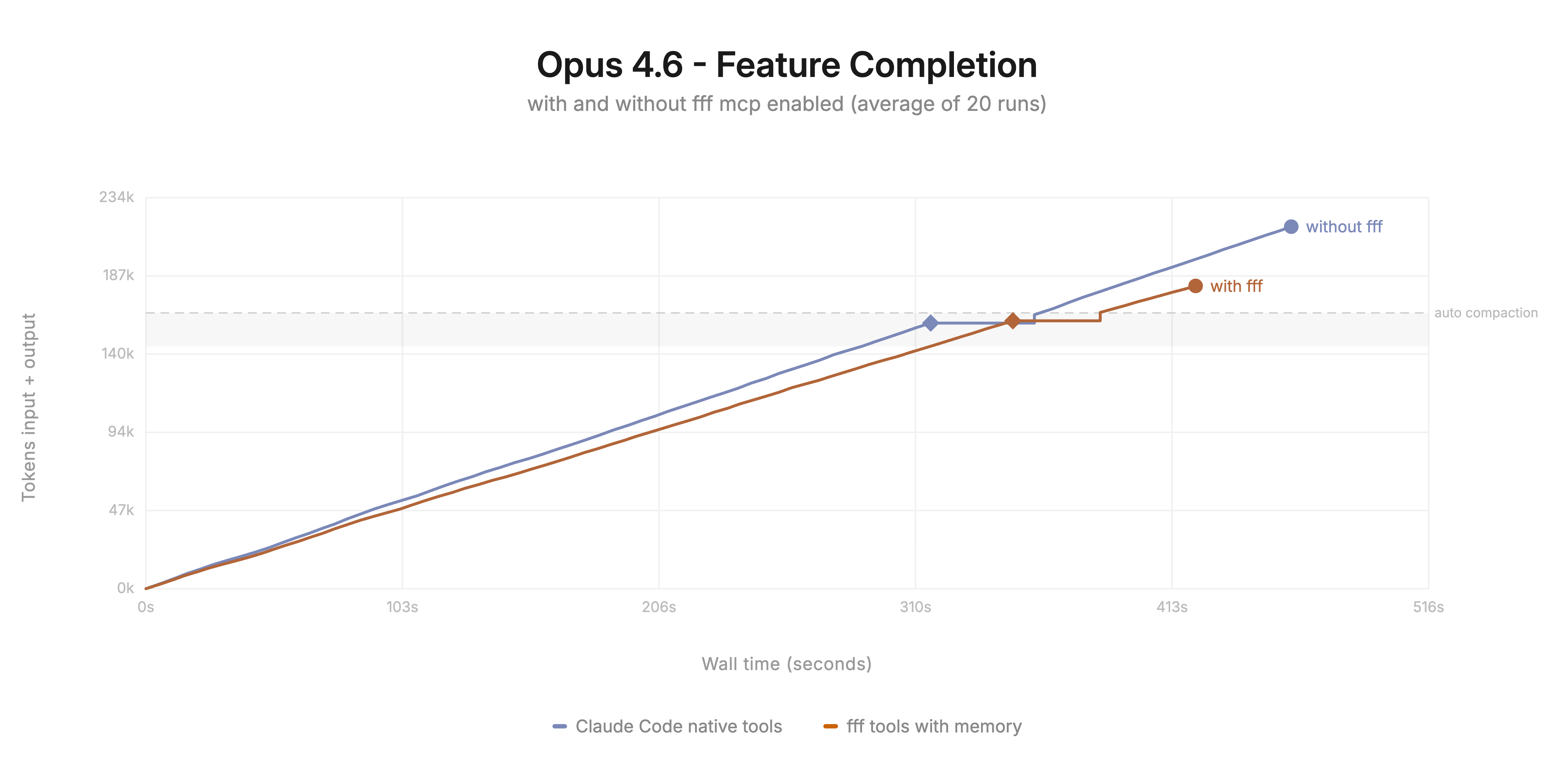
The MCP server gives any agent a file search tool that is faster and more token-efficient than the built-in one.
Pi agent extension
Install
pi install npm:@ff-labs/pi-fff
Modes
Three operating modes, switchable at runtime with /fff-mode:
| Mode | What it does |
|---|---|
tools-and-ui (default) | Adds ffgrep and fffind tools, replaces @-mention autocomplete with FFF. |
tools-only | Only tool injection. Keeps pi's native editor autocomplete. |
override | Replaces pi's built-in grep, find, and multi_grep with FFF implementations. |
Env vars: PI_FFF_MODE, FFF_FRECENCY_DB, FFF_HISTORY_DB. Flags: --fff-mode, --fff-frecency-db, --fff-history-db.
Agent-facing tools
ffgrep. Content search. Acceptspath,exclude(comma, space, or array; leading!optional),caseSensitive,context, and cursor pagination. Auto-detects regex, falls back to fuzzy on zero exact matches, rejects.*-style wildcard-only patterns up front.fffind. Path and filename search. Matches the whole repo-relative path, not just the filename. Frecency-aware. The weak-match detector flags scattered fuzzy noise before it floods the agent's context.
Commands
/fff-mode [tools-and-ui | tools-only | override]. Show or switch the mode./fff-health. Picker, frecency, and git integration status./fff-rescan. Force a rescan.
Source: packages/pi-fff/.
The Pi extension swaps pi's native tools for FFF implementations and feeds the interactive editor's @-mention autocomplete from the frecency-ranked index.
Neovim plugin
Demo on the Linux kernel repo (100k files, 8GB):
https://github.com/user-attachments/assets/5d0e1ce9-642c-4c44-aa88-01b05bb86abb
Installation
lazy.nvim
{
  'dmtrKovalenko/fff.nvim',
  build = function()
    -- downloads a prebuilt binary or falls back to cargo build
    require("fff.download").download_or_build_binary()
  end,
  -- for nixos:
  -- build = "nix run .#release",
  opts = {
    debug = {
      enabled = true,
      show_scores = true,
    },
  },
  lazy = false, -- the plugin lazy-initialises itself
  keys = {
    { "ff", function() require('fff').find_files() end, desc = 'FFFind files' },
    { "fg", function() require('fff').live_grep() end, desc = 'LiFFFe grep' },
    { "fz",
      function() require('fff').live_grep({ grep = { modes = { 'fuzzy', 'plain' } } }) end,
      desc = 'Live fffuzy grep',
    },
    { "fc",
      function() require('fff').live_grep({ query = vim.fn.expand("<cword>") }) end,
      desc = 'Search current word',
    },
  },
}
vim.pack
vim.pack.add({ 'https://github.com/dmtrKovalenko/fff.nvim' })

vim.api.nvim_create_autocmd('PackChanged', {
  callback = function(ev)
    local name, kind = ev.data.spec.name, ev.data.kind
    if name == 'fff.nvim' and (kind == 'install' or kind == 'update') then
      if not ev.data.active then vim.cmd.packadd('fff.nvim') end
      require('fff.download').download_or_build_binary()
    end
  end,
})

vim.g.fff = {
  lazy_sync = true,
  debug = { enabled = true, show_scores = true },
}

vim.keymap.set('n', 'ff', function() require('fff').find_files() end, { desc = 'FFFind files' })
Public API
require('fff').find_files()                        -- find files in current repo
require('fff').live_grep()                         -- live content grep
require('fff').scan_files()                        -- force rescan
require('fff').refresh_git_status()                -- refresh git status
require('fff').find_files_in_dir(path)             -- find in a specific dir
require('fff').change_indexing_directory(new_path) -- change root
Commands
:FFFScan. Rescan files.:FFFRefreshGit. Refresh git status.:FFFClearCache [all|frecency|files]. Clear caches.:FFFHealth. Health check.:FFFDebug [on|off|toggle]. Toggle the scoring display.:FFFOpenLog. Open~/.local/state/nvim/log/fff.log.
Configuration
Defaults are sensible. Override only what you care about.
require('fff').setup({
  base_path = vim.fn.getcwd(),
  prompt = '> ',
  title = 'FFFiles',
  max_results = 100,
  max_threads = 4,
  lazy_sync = true,
  prompt_vim_mode = false,
  layout = {
    height = 0.8,
    width = 0.8,
    prompt_position = 'bottom',   -- or 'top'
    preview_position = 'right',   -- 'left' | 'right' | 'top' | 'bottom'
    preview_size = 0.5,
    flex = { size = 130, wrap = 'top' },
    show_scrollbar = true,
    path_shorten_strategy = 'middle_number', -- 'middle_number' | 'middle' | 'end'
    anchor = 'center',
  },
  preview = {
    enabled = true,
    max_size = 10 * 1024 * 1024,
    chunk_size = 8192,
    binary_file_threshold = 1024,
    imagemagick_info_format_str = '%m: %wx%h, %[colorspace], %q-bit',
    line_numbers = false,
    cursorlineopt = 'both',
    wrap_lines = false,
    filetypes = {
      svg = { wrap_lines = true },
      markdown = { wrap_lines = true },
      text = { wrap_lines = true },
    },
  },
  keymaps = {
    close = '<Esc>',
    select = '<CR>',
    select_split = '<C-s>',
    select_vsplit = '<C-v>',
    select_tab = '<C-t>',
    move_up = { '<Up>', '<C-p>' },
    move_down = { '<Down>', '<C-n>' },
    preview_scroll_up = '<C-u>',
    preview_scroll_down = '<C-d>',
    toggle_debug = '<F2>',
    cycle_grep_modes = '<S-Tab>',
    cycle_previous_query = '<C-Up>',
    toggle_select = '<Tab>',
    send_to_quickfix = '<C-q>',
    focus_list = '<leader>l',
    focus_preview = '<leader>p',
  },
  frecency = {
    enabled = true,
    db_path = vim.fn.stdpath('cache') .. '/fff_nvim',
  },
  history = {
    enabled = true,
    db_path = vim.fn.stdpath('data') .. '/fff_queries',
    min_combo_count = 3,
    combo_boost_score_multiplier = 100,
  },
  git = {
    status_text_color = false, -- true to color filenames by git status
  },
  grep = {
    max_file_size = 10 * 1024 * 1024,
    max_matches_per_file = 100,
    smart_case = true,
    time_budget_ms = 150,
    modes = { 'plain', 'regex', 'fuzzy' },
    trim_whitespace = false,
  },
  debug = { enabled = false, show_scores = false },
  logging = {
    enabled = true,
    log_file = vim.fn.stdpath('log') .. '/fff.log',
    log_level = 'info',
  },
})
Live grep modes
<S-Tab> cycles between plain, regex, and fuzzy. The list is configurable via grep.modes, and single-mode setups hide the indicator entirely.
Per-call override:
require('fff').live_grep({ grep = { modes = { 'fuzzy', 'plain' } } })
require('fff').live_grep({ query = 'search term' }) -- pre-fill
Constraints
Both find and grep accept these tokens to refine a query:
git:modified. One ofmodified,staged,deleted,renamed,untracked,ignored.test/. Any deeply nested children oftest/.!something,!test/,!git:modified. Exclusion../**/*.{rs,lua}. Any valid glob, powered by zlob.
Grep-only:
*.md,*.{c,h}. Extension filter.src/main.rs. Grep inside a single file.
Mix freely: git:modified src/**/*.rs !src/**/mod.rs user controller.
Multi-select and quickfix
<Tab>. Toggle selection (shows a thick▊in the signcolumn).<C-q>. Send selected files to the quickfix list and close the picker.
Git status highlighting
Sign-column indicators are on by default. To color filename text by git status, set git.status_text_color = true and adjust the hl.git_* groups. See :help fff.nvim for the full list.
File filtering
FFF honours .gitignore. For picker-only ignores that do not touch git, add a sibling .ignore file:
*.md
docs/archive/**/*.md
Run :FFFScan to force a rescan.
Troubleshooting
:FFFHealthverifies picker init, optional dependencies, and DB connectivity.:FFFOpenLogopens the log file.
The best file search picker for neovim. Period. Faster and more intuitive queries, frecency ranking, definition classification and much more.
Node & Bun SDK
npm install @ff-labs/fff-node
# or
bun add @ff-labs/fff-node
import { FileFinder } from "@ff-labs/fff-node";

const finder = FileFinder.create({ basePath: process.cwd(), aiMode: true });
if (!finder.ok) throw new Error(finder.error);
await finder.value.waitForScan(10_000);

const files = finder.value.fileSearch("incognito profile", { pageSize: 20 });
const hits = finder.value.grep("GetOffTheRecordProfile", {
  mode: "plain",
  smartCase: true,
  beforeContext: 1,
  afterContext: 1,
  classifyDefinitions: true,
});

finder.value.destroy();
Every method returns a Result<T> ({ ok: true, value } | { ok: false, error }). Full type reference: packages/fff-node/src/types.ts.
TypeScript wrapper over the C library for nodejs and bun. Build custom agent tools, CLIs, or IDE integrations on top of FFF.
Rust crate
Add the dependency
FFF is written in Rust, so this is the lowest-overhead way to use it.
[dependencies]
fff-search = "0.6"
Full API documentation: docs.rs/fff-search.
Native rust crate that is performing all the search. Stable and well documented.
C library
Build
# Builds only the C cdylib (fastest):
make build-c-lib

# or directly with cargo:
cargo build --release -p fff-c --features zlob
The output is a cdylib (libfff_c.so / libfff_c.dylib / fff_c.dll). The header lives at crates/fff-c/include/fff.h.
Prebuilt binaries for every version, including every commit on main, are on the releases page. The same binaries also ship inside the @ff-labs/fff-bin-* npm packages.
Install
# System-wide (needs sudo):
sudo make install

# User-local, no sudo:
make install PREFIX=$HOME/.local

# Staged install for packagers:
make install DESTDIR=/tmp/pkgroot PREFIX=/usr
Drops libfff_c.{so,dylib,dll} into $(PREFIX)/lib and the header into $(PREFIX)/include/fff.h. Remove with make uninstall, which honours the same PREFIX and DESTDIR.
Link against it after install:
cc my_app.c -lfff_c -o my_app
Ensure $(PREFIX)/lib is on your runtime library search path (LD_LIBRARY_PATH on Linux, DYLD_LIBRARY_PATH on macOS, or an entry in /etc/ld.so.conf.d/).
Minimal example
#include <fff.h>
#include <stdio.h>

int main(void) {
    FffResult *res = fff_create_instance(
        ".",        // base_path
        "",         // frecency_db_path (empty = default)
        "",         // history_db_path
        false,      // use_unsafe_no_lock
        true,       // enable_mmap_cache
        true,       // enable_content_indexing
        true,       // watch
        false       // ai_mode
    );
    if (!res->success) {
        fprintf(stderr, "init failed: %s\n", res->error);
        fff_free_result(res);
        return 1;
    }
    void *handle = res->handle;
    fff_free_result(res);

    // Search
    FffResult *search = fff_search(handle, "main.rs", "", 0, 0, 20, 100, 3);
    // ... read FffSearchResult from search->handle, then fff_free_search_result()

    fff_destroy(handle);
    return 0;
}
Notes
- Every function returning
FffResult*allocates with Rust'sBox. Free withfff_free_result, do not use malloc's free - Payloads (search results, grep results, scan progress) have their own dedicated free functions listed in the header.
- C strings returned in the
handlefield (e.g. fromfff_get_base_path) are freed withfff_free_string.
Source: crates/fff-c/.
Stable C ABI. Bind from C/C++, Zig, Go via cgo, Python via ctypes, or anything with C FFI.
What is FFF and why use it over ripgrep or fzf?
FFF is a file search library, not a CLI. Ripgrep and fzf are great tools, but they are command-line programs: every call forks a new process, re-reads .gitignore, re-stats directories, and rebuilds whatever state it needs in memory before it can answer. That is fine when you grep once from a shell. It is bad when an editor or an AI agent wants to run hundreds of searches per session.
FFF keeps the index and the file cache resident in one long-lived process and exposes the same Rust core through four thin layers: a native crate (fff-search), a C library (libfff_c), a Node/Bun SDK (@ff-labs/fff-node), and an MCP server. You call FileFinder.create() once, then every subsequent search hits warm memory. On a 500k-file Chromium checkout, that is the difference between 3-9 SECONDS per ripgrep spawn and sub-10 ms per FFF query.
Algorithm for fuzzy matching is much more comprehensive than fzf's algorithm it is typo-resistant and we provide a query language with additional constraint parsing for prefiltering e.g. "*.rs !test/ shcema" is a perfectly valid query for fff, but fzf wouldn't find anything even for a single typo in "shcema".
Why a programmatic API matters
- No process spawn. Every call stays in-process and avoids the fork, exec, argv parsing, and stdout pipe setup that dominates short
rginvocations. - One FS walk, metadata collection, and parse of
.gitignore. The ignore walker runs once at scan time and the result is reused for every search. - Results come back as typed objects, not text you have to re-parse. The SDK gives you
{ relativePath, lineNumber, lineContent, gitStatus, totalFrecencyScore, isDefinition, ... }directly. - Cursor pagination that survives across calls. Ripgrep has no concept of "page 2 of these matches"; FFF does.
- A long-lived process opens up optimisations that a one-shot CLI cannot apply: warm caches, incremental re-indexing, cross-query frecency, and shared SIMD state.
What the core actually does
- Frecency-ranked fuzzy matching. Every indexed file carries an access score and a modification score. Searches rank files you have opened recently and frequently above cold results. This is the same idea as VS Code's recently-opened list, but applied to every search result, not just a sidebar.
- Typo-resistant matching for both paths and content. Smith-Waterman fuzzy scoring is available on the grep path; path search uses SIMD-accelerated fuzzy matching (via the
frizbee-derived core) that survives dropped characters and reorderings. - Content grep with three modes. Plain literal (SIMD memmem), regex (the Rust
regexcrate), and fuzzy (Smith-Waterman per line). Auto-detects which mode to use from the pattern, falls back to fuzzy when a plain search returns zero hits. - Multi-pattern OR search. SIMD Aho-Corasick for "find any of these 20 identifiers at once", which is faster than regex alternation and a lot faster than 20 separate ripgrep runs.
- Background file watcher. The index updates as files change. You never pay for a rescan on the hot path.
- Git status awareness. Modified, staged, untracked, and ignored states are cached and returned with every result, so callers can sort or filter them without shelling out to git. The watcher talks to libgit2 directly instead of spawning the
gitCLI. - Definition classifier. A byte-level scanner on the Rust side tags lines that start with
struct,fn,class,def,impl, and friends.
Performance choices that matter
- Efficient memory allocator and memory allocation strategy (see next paragraph). By default we use
mimaloc - Parallel multi thread search pipeline that is not contaganted by the orchistration logic
- SIMD first algorithms for everything. Efficinet & non-allocating sorting.
- Platform specific optimizations for FS (getdents64, NTFS api on windows and others)
- Lightweight on the flight content index for realtime even typo resistant grep
- Memory mapped content cache. We store some of the files in virtual memory (the amount is limited)
- Single contiguous arena storage of string chunks. Significantly reduces the amount of memory to work with and dramatically increases CPU cache hits.
Memory allocation
Yes, fff fundamentally requires more memory than calling a single child process. That is the primary source of the speedup. In practice, alongside one of the most popular file search pickers for Neovim, fff ends up using less RAM than a burst of ripgrep invocations.
FFF also keeps a content index, around 360 bytes per indexed file, so roughly 36 MB for a 100k-file repo. Not every file is indexed - binaries, oversized files, and anything not eligible for grep are skipped. If even that footprint is too much, the index can be backed by a memory-mapped file instead of anonymous RAM.
What this means in practice
If you are building an agent, an IDE extension, a pre-commit check, or any long-running tool that searches the same repository many times, calling FFF as a library is dramatically cheaper than shelling out to ripgrep. The tradeoff is real memory: FFF keeps the index in RAM and warms the content cache. On a 14k-file repo that costs about 26 MB resident. On a 500k-file repo like Chromium, expect a few hundred MB. In exchange, every single search is enriched with git status, frecency ranking, file metadata, timestamps of last access and edit and so on.
If you are running one grep from a terminal, rg is still the right tool. If you run dozens of them inside the same process, FFF will pay for itself starting from the second call. If you work on AI agent fff will finish preparation work before your AI will have a chance to call it.
How it compares
- ripgrep: FFF uses the same underlying regex engine and more advanced plain text matching algorithms. Stores content index and file tree. Main wins on repeated-search workloads. Loses on "grep once from bash and exit."
- fzf: FFF's path search is fuzzy like fzf, but it is also frecency-aware and git-aware, and ships a more typo-tolerant algorithm. fzf is a pure match-and-filter tool; FFF ranks results by how often you actually open them.
- Telescope / fzf-lua / snacks.picker: FFF ships its own Neovim picker with the same ranking the MCP server and SDK use. The picker is optional; the core is the same.
- Tantivy or other full-text search engines: different class of tool. Tantivy indexes documents for query-time scoring at scale. FFF is scoped to one repository and optimised for sub-10 ms response. It does not persist an inverted index on disk.
Repository layout
crates/fff-search,crates/fff-grep,crates/fff-query-parser- Rust core.crates/fff-c- C FFI used by every language binding.crates/fff-nvim- Lua/mlua bindings for the Neovim plugin.crates/fff-mcp- MCP server binary.packages/fff-node- Node.js SDK (@ff-labs/fff-node).packages/fff-bun- Bun SDK (@ff-labs/fff-node).packages/pi-fff- pi extension (@ff-labs/pi-fff).lua/- Neovim-side plugin code.
Contributing
Bug reports and pull requests welcome. Agentic coding tools are welcome to be used, but human review is mandatory.
License
MIT & open source forever.
Servidores relacionados
Transmission MCP Server
An MCP server for controlling the Transmission torrent daemon.
MCP PDF Reader
Extract text, images, and perform OCR on PDF documents using Tesseract OCR.
Local Utilities
Provides essential utility tools for text processing, file operations, and system tasks.
MCP File Edit
Perform file system operations such as reading, writing, patching, and managing directories.
SharePoint MCP Server
Browse and interact with Microsoft SharePoint sites and documents.
Everything Search
Fast Windows file search using Everything SDK
CData FTP Server
A read-only MCP server for querying live FTP data using the CData JDBC Driver.
PDF to PNG
A server that converts PDF files to PNG images. Requires the poppler library to be installed.
Basic Memory
Build a persistent, local knowledge base in Markdown files through conversations with LLMs.
MCP File System Server
A server for secure, sandboxed file system operations.