MCP with Claude Server
Um servidor MCP Spring Boot que fornece detalhes da empresa, necessitando do aplicativo Claude Desktop para funcionar.
Documentação
Getting Started
Steps to Make this Project work as MCP
step 1 - install claude desktop in your system
step 2 - upon installation a claude icon will be shown on your desktop
step 3 - run following command in your project mvn clean package -DskipTests this command will create a target folder within your project, if it doesn't show then refresh your project, under this folder you will see a .jar file. copy the absolute location of .jar file
step 3 - open claude_desktop_config file (use notepad, notepad++ or any text/json editor), this file will be found in C drive, under the folder (C:\Users\user_name\AppData\Roaming\Claude)
step 4 - put following script inside claude_desktop_config file { "mcpServers": { "dev-build-mcp": { "command": "java", "args": [ "-jar", "location_of_your_jar_file" ] } } }
step 5 - go to application.properties or application.yaml file and paste following script
    spring.main.web-application-type=none
    spring.ai.mcp.server.name=dev-build-mcp
    spring.ai.mcp.server.version=0.0.1

    # NOTE: You must disable the banner and the console logging
    # to allow the STDIO transport to work !!!
    spring.main.banner-mode=off
    logging.pattern.console=

    For this you can give any name 'spring.ai.mcp.server.name' , in my case i have given dev-build-mcp
step 6 - start your spring boot server by running this command 'mvn spring-boot:run'
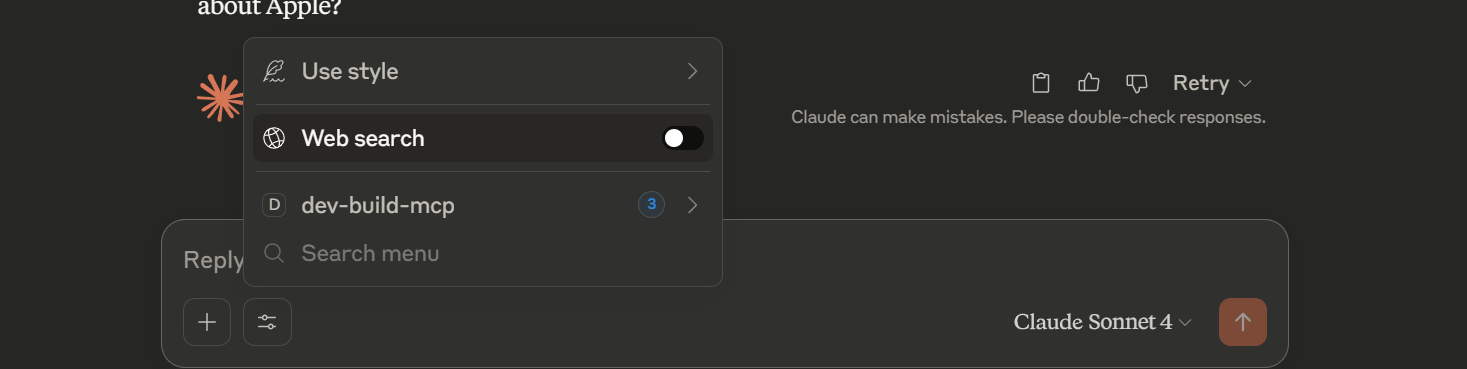
step 6 - now start claude desktop by clicking on claude desktop icon (shows on desktop), In the textbox you will see an icon just beside '+', click on that and you will see your mcp server name, in case of this project it will show dev-build-mcp. turn off the web search and start searching for example - 'get me all product company name' or 'get me the details about Apple company'
Note - since we have configured our project to provide details regarding the company, it will show only those results with a little bit addition of text by Calude intelligence.
For reference -
Technology and version used
Java - 21 spring boot - 3.5.0