roampal-core
Memória persistente para Claude Code com aprendizado baseado em resultados. Rastreia o que ajudou versus falhou, injeta contexto automaticamente via hooks.
Documentação
roampal-core
Servidor MCP de Memória Persistente Baseada em Resultados





Dois comandos. Seu assistente de codificação com IA ganha memória baseada em resultados.
Funciona com Claude Code e OpenCode.
Benchmarks
85,8% no benchmark LoCoMo corrigido (não adversarial, precisão de resposta ponta a ponta) — validado em 1.986 perguntas em 10 conversas com dupla avaliação. Todos os números nesta seção são provenientes do artigo e do roampal-labs (veja as citações no final desta seção).
| Resultado | Pontuação |
|---|---|
| Aprendizado conversacional vs. ingestão bruta | +23 pontos (76,6% vs 53,0%, p<0,0001) |
| Arquitetura vs. efeito do modelo | Arquitetura ~10x maior contribuinte |
| Resiliência a envenenamento (1.135 memórias adversariais) | -2,6 a -4,2 pontos apenas |
| Recuperação TagCascade (tags primeiro + reclassificação CE) | +1,9 Hit@1 vs. CE puro (p<0,0001) |
O pipeline de benchmark roda em uma única GPU sem dependências de nuvem. O Roampal em si roda em CPU — nenhuma GPU é necessária. Metodologia completa, dados e scripts de avaliação: roampal-labs
Artigo: "Beyond Ingestion: What Conversational Memory Learning Reveals on a Corrected LoCoMo Benchmark" (Logan Teague, abril de 2026)
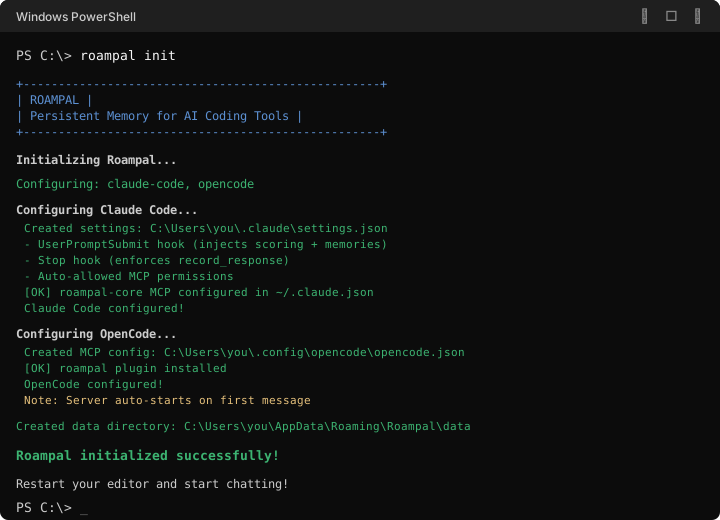
Início Rápido
pip install roampal
roampal init
Detecta automaticamente as ferramentas instaladas. Reinicie seu editor e comece a conversar.
Direcione para uma ferramenta específica:
roampal init --claude-codeouroampal init --opencode
Diferenças entre Plataformas
O ciclo principal é idêntico — ambas as plataformas injetam contexto, capturam trocas e avaliam resultados. O mecanismo de entrega difere:
| Claude Code | OpenCode | |
|---|---|---|
| Injeção de contexto | Hooks (stdout) | Plugin (prompt do sistema) |
| Captura de trocas | Stop hook | Evento session.idle do plugin |
| Avaliação | LLM principal via ferramenta score_memories | Sidecar independente (seu modelo escolhido, desabilitado por padrão até ser configurado) |
| Autocorreção | Hooks reiniciam o servidor automaticamente em caso de falha | Plugin reinicia o servidor automaticamente em caso de falha |
O Claude Code solicita que o LLM principal avalie cada troca por meio da ferramenta score_memories. O OpenCode nunca se autoavalia — um sidecar independente (uma chamada de API separada) revisa cada troca como terceiro, eliminando o viés de autoavaliação. A ferramenta score_memories não é registrada no OpenCode. A avaliação é desabilitada por padrão até que você a configure explicitamente via roampal sidecar setup. Durante a configuração, o Roampal detecta modelos locais (Ollama, LM Studio, etc.) e permite que você escolha um modelo de avaliação. Os modelos gratuitos Zen estão disponíveis como uma opção explícita de adesão para usuários sem modelo local ou chave de API — eles roteiam pelo proxy do OpenCode, que pode registrar dados. Um modelo barato ou local funciona muito bem — a avaliação não precisa de um modelo poderoso.
v0.6.0: Ciclo de vida do servidor + vinculação de perfil por diretório + rede de segurança de deduplicação. O monolito de 4.700 linhas
roampal/cli.pyagora é um pacoteroampal/cli/dividido em módulos por domínio, protegido por snapshots de saída dourada, invariantes de tabela de despacho e uma suíte de equivalência byte-idêntica. Mudanças visíveis ao usuário por cima: roteamento de perfil por solicitação (hooks/MCP/plugin sempre nomeiam seu perfil; um nome não registrado agora falha explicitamente com um 404 "Crie primeiro" em vez de gravar silenciosamente no armazenamento padrão);roampal profile switchnão mata mais o servidor em execução (cada sessão capta o novo perfil na próxima troca); servidores gerados rodam com isolamento-E [-P]e um cwd neutro (um projeto contendo um diretórioroampal/local não pode mais ocultar a instalação — e instalações no site do usuário, por exemplo, Python da Microsoft Store, funcionam novamente — um rascunho anterior desse endurecimento de spawn usava o sinalizador isolado-I, que também oculta o diretório de pacotes do site do usuário);statusrelata uma porta pendurada como parada, não como erro; servidores compartilhados se aposentam após 30 minutos ociosos (umroampal startem primeiro plano é isento); eroampal start --profile Xsobrevive ao respawn ocioso por meio de um pino de lançamento persistido. Novosroampal profile bind <name>/unbindfixam um diretório (e seus subdiretórios) a um perfil — "este projeto sempre usa o perfil X" é um comando em vez de editar manualmente o JSON de env. Um teste de guarda de regressão de deduplicação (3 fatos distintos pelo caminho realstore_memory_bank, mais vetores de modelo real gravados e um controle negativo que recria o regime quebrado v0.5.9 de ambas as maneiras) faz qualquer troca futura de embedder ou mudança de constante de distância falhar na suíte no primeiro toque, em vez de colapsar silenciosamente as gravações. Correção de privacidade (OpenCode): desde v0.3.7, o plugin do OpenCode enviava o texto da troca para Zen (opencode.ai) sempre que nenhum modelo de avaliação era escolhido — inclusive após "Skip" eroampal sidecar disable— quebrando a regra v0.5.3 de "nada sai da sua máquina sem uma escolha explícita", que só havia sido aplicada no lado do servidor. A v0.6.0 a aplica no plugin: Zen apenas após adesão explícita, e nenhuma chamada de avaliação até que um modelo seja escolhido. Se você usa OpenCode e nunca escolheu um modelo de avaliação, a avaliação agora está desligada até você executarroampal sidecar setup(ou--listpara escolher sem o menu). Sem mudança de RAM — a pegada v0.5.9 e o estado do modelo são mantidos inalterados.v0.5.9: Correção de pegada de memória + atualização de embedder/reranker + observabilidade de falhas — acionada por uma falha
MemoryErrorrastreada até o arena de memória da CPU do ONNX Runtime que nunca libera buffers de rascunho por forma, agravada por arquivos de modelo FP16 que são convertidos para FP32 no carregamento. Desabilita o arena e o cache de padrão de memória em ambos os modelos, muda o embedder para sua própria exportação INT8 medida (mesmo modelo mpnet — a atualização planejada para e5-base foi adiada para v0.6.0 depois que um portão de precisão detectou uma regressão de guarda de quase-duplicatas) e o cross-encoder para sua própria exportação INT8, e compartilha uma sessão de cross-encoder entre todos os perfis em vez de uma por perfil. A pegada de processo medida cai de ~2.355MB para ~484MB em isolamento (~5x), e a busca fica mais rápida nos caminhos de embed e rerank, em vez de trocar memória por latência. Uma re-embed em segundo plano, por coleção, migra vetores existentes para o novo embedder automaticamente no primeiro início — nunca bloqueando o cliente MCP, nunca misturando famílias de modelos dentro de uma coleção. Também adiciona registro em arquivo, tratamento de MemoryError/ExceptionGroup, um heartbeat RSS e um endpoint/api/statuspara que o próximo incidente como este deixe um rastro, e estados degradados (embedder inativo, reranker inativo, migração em andamento) sejam exibidos ao usuário em vez de retornar silenciosamente um resultado vazio.v0.5.8: Versão de resiliência a falhas — habilita WAL do SQLite + durabilidade FULL no catálogo ChromaDB para que terminações forçadas (conflitos de porta no Windows, mortes de processos externos, queda de energia) não corrompam ou esvaziem mais o banco de dados. Reescreve
SessionManager.mark_scored()para realizar uma substituição atômica de arquivo temporário, garantindo que a transcrição JSONL sobreviva a uma falha no meio da gravação. Também inclui 16 novos testes automatizados cobrindo ambas as correções, corrige dívida de teste pré-existente que deixava a suíte completa vermelha no Windows e adiciona ferramentas de desenvolvimento (pytest-timeout,pytest-forked,build,twine). Nenhuma migração de dados é necessária; o WAL é aplicado no próximo início do servidor.v0.5.7: Coleta de lixo na inicialização para o
_completion_state.jsondo hook MCP. O arquivo acumulava uma entrada porconversation_idjá visto sem limpeza, gerando amplificação de I/O em cada gravação e deixando sinalizadoresscored_this_turn=Truepresos que podiam envenenar o fallback de avaliação entre sessões. A nova passagem_cleanup_completion_statedescarta entradas com mais de 30 dias ou sem transcrição correspondente, impõe um teto rígido de 500 entradas e grava atomicamente. O TTL da transcrição JSONL foi aumentado de 7 → 30 dias para permanecer em sincronia com o TTL do arquivo de estado. Acompanha o Roampal Desktop v0.3.3.v0.5.6: Versão de endurecimento — fecha lacunas de cobertura restantes da auditoria de verificação v0.5.5.x. Varredura fantasma após limpeza arquivada, limpeza automática sob pressão de capacidade, observabilidade de deduplicação, permissões de exclusão endurecidas, testes de ciclo arquivar-depois-adicionar, alinhamento do prompt do sidecar com o benchmark, fila de avaliação assíncrona (repetição adiada por sessão), reescrita de qualidade da definição de ferramenta MCP (TDQS), autodetecção do OpenCode Go no assistente de configuração do sidecar e correção da extração do nome do usuário.
v0.5.5.2: Hotfix — a instalação do plugin no Windows agora verifica se a cópia foi bem-sucedida (verificação de tamanho pós-cópia + fallback manual de leitura/gravação para interferência do OneDrive/antivírus). Também instala em
%APPDATA%\opencode\pluginscomo fallback, já que alguns aplicativos Electron resolvem caminhos de configuração de forma diferente no Windows. Corrige casos restantes do problema #11, onderoampal init --forcerelatava sucesso, mas o plugin estava vazio ou no diretório errado.v0.5.5.1: Hotfix — o OpenCode Desktop agora alterna corretamente os perfis quando você troca de projeto na interface (problema #10). O plugin lê o
directoryda sessão ativa viaclient.session.get()em vez de armazenar em cache o perfil no carregamento do módulo, para que um plugin singleton em um espaço de trabalho multiprojeto ainda atinja o perfil certo por mensagem. Também:roampal init --forceagora realmente sobrescreve o arquivo do plugin do OpenCode (problema #11), com erros mais claros quando o Desktop segura um bloqueio de arquivo.v0.5.5: Exclusão suave para memory_bank — a exclusão rígida do ChromaDB não remove realmente os vetores do HNSW, causando correspondências fantasma de deduplicação que bloqueiam novas memórias após exclusão pela interface. Substituída por atualização de metadados
status=archivedmais filtro de status em todos os caminhos de consulta/deduplicação. Também: mutex de avaliação → fila assíncrona (elimina solicitações descartadas), correção de contaminação de resumo do sidecar (cercamento de delimitador).v0.5.4: A vinculação de perfil agora é por solicitação, não por processo. Cada cliente (servidor MCP, plugin do OpenCode, hooks Python para Claude Code / Cursor) envia um cabeçalho
X-Roampal-Profilepara que um único servidor FastAPI possa atender vários perfis simultaneamente. Corrige o problema #7, onde oROAMPAL_PROFILEpor projeto do OpenCode Desktop emopencode.jsonera ignorado porque o FastAPI singleton vinculava o perfil uma vez na inicialização.v0.5.3: A avaliação por sidecar agora exige configuração explícita (sem fallback automático para Zen ou localhost). Modelos locais pequenos (qwen2.5:3b, etc.) que retornam arrays JSON simples em vez de respostas no formato OpenAI são tratados de forma transparente via tolerância de forma no lado do servidor.
Como Funciona
Quando você digita uma mensagem, o Roampal injeta automaticamente contexto relevante antes que sua IA o veja:
Você digita:
fix the auth bug
Sua IA vê:
═══ KNOWN CONTEXT ═══
• JWT refresh pattern fixed auth loop [id:patterns_a1b2] (3d, 90% proven, patterns)
• User prefers: never stage git changes [id:mb_c3d4] (memory_bank)
═══ END CONTEXT ═══

fix the auth bug
Sem chamadas manuais. Sem mudanças no fluxo de trabalho. Simplesmente funciona.
O Ciclo
- Você digita uma mensagem
- Roampal injeta contexto relevante automaticamente (hooks no Claude Code, plugin no OpenCode)
- A IA responde com plena consciência do seu histórico, preferências e do que funcionou antes
- Resultado avaliado — bons conselhos são promovidos, maus conselhos são rebaixados
- Repita — o sistema fica mais inteligente a cada troca
Cinco Coleções de Memória
| Coleção | Finalidade | Retenção | |------------|---------|----------| | `working` | Contexto da sessão atual | 24h — promovido se útil, excluído caso contrário | | `history` | Conversas passadas | 30 dias, com pontuação de resultados | | `patterns` | Soluções comprovadas | Persistente enquanto útil, promovido do histórico | | `memory_bank` | Identidade, preferências, objetivos | Permanente | | `books` | Documentos de referência enviados | Permanente |Comandos
roampal init                # Auto-detect and configure installed tools
roampal init --claude-code  # Configure Claude Code explicitly
roampal init --opencode     # Configure OpenCode explicitly
roampal init --no-input     # Non-interactive setup (CI/scripts)
roampal start               # Start the HTTP server manually
roampal stop                # Stop the HTTP server
roampal status              # Check if server is running
roampal status --json       # Machine-readable status (for scripting)
roampal stats               # View memory statistics
roampal stats --json        # Machine-readable statistics (for scripting)
roampal doctor              # Diagnose installation issues
roampal summarize           # Summarize long memories (retroactive cleanup)
roampal context             # Output recent exchange context
roampal ingest <file>       # Add documents to books collection
roampal books               # List all ingested books
roampal remove <title>      # Remove a book by title
roampal sidecar status      # Check scoring model configuration (OpenCode)
roampal sidecar setup       # Configure scoring model (OpenCode)
roampal sidecar test        # Test scoring model response format (OpenCode)
roampal retag               # Re-extract tags on memories using sidecar LLM
roampal sidecar disable     # Disable scoring (removes config, retrieval still works)

# Choose a scoring model without the menu (v0.6.0) — for scripts and AI-driven installs.
# Ask the user first: the choice decides where exchange text is sent.
roampal sidecar setup --list [--json]                  # Every choice, where its data goes, the command that selects it
roampal sidecar setup --model qwen3:1.7b               # A detected local/API model (name from --list)
roampal sidecar setup --auto                           # The recommended detected LOCAL model (never cloud or paid)
roampal sidecar setup --url <base_url> --model <name> --key-env <ENV_VAR>   # Custom endpoint; key read from an env var
roampal sidecar setup --go <model>                     # OpenCode Go
roampal sidecar setup --zen                            # Opt in to free Zen cloud models (data sent to opencode.ai)

# Sidecar scope flags (v0.5.3+) — OpenCode merges project-local over user-global config:
roampal sidecar setup --scope user       # Write only to user-global config (~/.config/opencode/)
roampal sidecar setup --scope project    # Write only to project-local opencode.json in cwd ancestry
roampal sidecar setup                    # Auto-detects: uses project-local if shadow exists, otherwise user-global

# Sidecar scope flags for disable (v0.5.3+):
roampal sidecar disable --scope user       # Clear only from user-global config
roampal sidecar disable --scope project    # Clear only from project-local opencode.json
roampal sidecar disable                    # Auto-detects scope same as setup

# Named memory profiles (v0.5.1) — isolate memory per project, per client, etc.
roampal profile list                         # List registered profiles
roampal profile show                         # Show active profile and its path
roampal profile create <name>                # Create auto-located profile
roampal profile register <name> --path <dir> # Register an existing directory
roampal profile use <name>                   # Persist as user-global default
roampal profile unuse                        # Clear persistence
roampal profile switch <name>                # Persist as active (no server kill — sessions pick it up on the next exchange)
roampal profile delete <name>                # Remove from registry (cascades directory bindings)
roampal profile bind <name>                  # Bind cwd directory to profile (v0.6.0)
roampal profile bind <name> --path <dir>     # Bind a specific directory
roampal profile unbind --path <dir>          # Remove a binding
roampal reembed                              # Re-embed vectors after an embedder model change (v0.5.9+)
roampal help                                 # Show the command help
roampal start --profile <name>               # Launch with a default profile: sessions with nothing configured (hook/MCP resolve the launch pin explicitly) route there; survives idle respawn; cleared by bare start/stop
Perfis de Memória Nomeados (v0.5.1)
Execute armazenamentos de memória separados para diferentes contextos — por projeto, por cliente (Claude Code vs OpenCode), trabalho vs casa. Os perfis são gerenciados inteiramente pela CLI; sem arquivos de configuração para editar manualmente.
roampal profile create work          # auto-located at <appdata>/Roampal/data/work/
roampal profile switch work          # persist as active
# sessions without their own explicit profile config pick 'work' up on the next exchange
Registre um diretório existente como um perfil (sem migração de dados):
roampal profile register project-a --path /existing/custom/path
Precedência (a maior vence; camadas de env/config são por shell e escopo de arquivo de configuração, a vinculação é uma propriedade do diretório):
- Flag
--profile <name> - Variável de ambiente
ROAMPAL_PROFILE=<name>(definida por projeto emopencode.jsonou.claude.jsonenv: {}) - Vinculação de diretório (v0.6.0) —
roampal profile bind workfixa o diretório atual (e todos os subdiretórios) ao perfilwork; a busca sobe a partir do seu diretório de trabalho atual e o diretório vinculado mais próximo vence. Um comando por projeto, mas não toda a configuração: qualquer variável de ambienteROAMPAL_PROFILEdefinida para a configuração daquele projeto ainda vence a vinculação - Padrão persistido
roampal profile use <name> - Fallback
"default"
As sessões sempre nomeiam o perfil ao qual resolvem — um cabeçalho explícito, o diretório de trabalho atual de um projeto ou um padrão persistido — e o servidor compartilhado nunca adivinha um perfil a partir do seu próprio diretório de trabalho ou ambiente.
Ferramentas MCP
Sua IA recebe estas ferramentas de memória:
| Ferramenta | Descrição | Plataformas |
|---|---|---|
search_memory | Busca profunda em todas as coleções | Ambas |
add_to_memory_bank | Armazena fatos permanentes (identidade, preferências, objetivos) | Ambas |
update_memory | Corrige ou atualiza memórias existentes | Ambas |
delete_memory | Remove informações desatualizadas | Ambas |
score_memories | Pontua resultados de trocas anteriores | Claude Code |
record_response | Armazena principais conclusões de trocas significativas | Ambas |
Como funciona a pontuação: Os hooks do Claude Code solicitam ao LLM principal que chame
score_memoriesa cada turno. O OpenCode usa um sidecar independente que pontua silenciosamente em segundo plano — o modelo nunca vê um prompt de pontuação escore_memoriesnão é registrado como ferramenta. Se o sidecar estiver indisponível, um aviso solicita ao usuário que executeroampal sidecar setup. Escolha seu modelo de pontuação duranteroampal initou viaroampal sidecar setup.
Como o Roampal se Compara
| Recurso | Roampal Core | Claude Code integrado (CLAUDE.md / memória automática) | OpenCode integrado |
|---|---|---|---|
| Aprende com resultados | Sim — conselhos ruins rebaixados, bons promovidos | Não | Não |
| Recuperação semântica | Sim — TagCascade + reclassificação com cross-encoder | Não — arquivos carregados por completo, sem busca | Sem sistema de memória |
| Injeção de contexto | Automática — memórias relevantes por consulta | CLAUDE.md completo a cada sessão, memória automática sob demanda | Nenhuma |
| Extração de fatos atômicos | Sim — resumos + fatos, recuperação em duas vias | Não — salva o que o Claude decide ser útil | Não |
| Funciona entre projetos | Sim — memória compartilhada entre todos os projetos | Somente por projeto (por repositório git) | Sem memória |
| Escala com histórico | Sim — 5 coleções, promoção/rebaixamento/decadência | CLAUDE.md ilimitado, memória automática nas primeiras 200 linhas | Sem memória |
| Totalmente local / privado | Sim — ChromaDB na sua máquina | Sim | Sim |
Arquitetura
┌─────────────────────────────────────────────────────────┐
│  pip install roampal && roampal init                    │
│    Claude Code: hooks + MCP → ~/.claude/                │
│    OpenCode:    plugin + MCP → ~/.config/opencode/      │
└─────────────────────────────────────────────────────────┘
                         │
                         ▼
┌─────────────────────────────────────────────────────────┐
│  HTTP Hook Server (port 27182)                          │
│    Auto-started on first use, self-heals on failure     │
│    Manual control: roampal start / roampal stop         │
└─────────────────────────────────────────────────────────┘
                         │
                         ▼
┌─────────────────────────────────────────────────────────┐
│  User types message                                     │
│    → Hook/plugin calls HTTP server for context          │
│    → AI sees relevant memories, responds                │
│    → Exchange stored, scored (hooks or sidecar)         │
└─────────────────────────────────────────────────────────┘
                         │
                         ▼
┌─────────────────────────────────────────────────────────┐
│  Single-Writer Backend                                  │
│    FastAPI → UnifiedMemorySystem → ChromaDB             │
│    All clients share one server, isolated by session    │
└─────────────────────────────────────────────────────────┘
Veja dev/docs/ para detalhes técnicos completos.
Requisitos
- Python 3.10+ (3.13 suportado; 3.11+ recebe a proteção completa de lançamento
-P— no 3.10, a pasta de lançamento neutra sozinha protege contra um projetoroampal/que sombreia a instalação. Nota: Python 3.10 atinge o fim da vida útil em outubro de 2026) - Um de: Claude Code ou OpenCode
- Plataformas: Windows, macOS, Linux (macOS e Python 3.13 são testados em CI a partir da v0.6.0; desenvolvido principalmente no Windows)
- RAM: ~500MB disponíveis (reclassificador cross-encoder + embeddings + ChromaDB); a migração na primeira execução após uma atualização não adiciona pico significativo
- Disco: ~500MB para modelos (embedding multilíngue + reclassificador, baixados automaticamente no primeiro uso)
- CPU: Qualquer processador x86-64 moderno com AVX2 (Intel Haswell 2013+ / AMD Excavator 2015+)
- GPU: Não é necessária — toda inferência roda na CPU via ONNX Runtime
Solução de Problemas
Hooks não funcionando? (Claude Code)
- Reinicie o Claude Code (hooks carregam na inicialização)
- Verifique o servidor HTTP:
curl http://127.0.0.1:27182/api/health
MCP não conectando? (Claude Code)
- Verifique se
~/.claude.jsontem a entrada MCProampal-corecom o caminho correto do Python - Verifique o painel de saída do Claude Code para erros de MCP
Contexto não aparecendo? (OpenCode)
- Certifique-se de ter executado
roampal init --opencode - Verifique se o servidor iniciou automaticamente:
curl http://127.0.0.1:27182/api/health - Se não, inicie manualmente:
roampal start
Servidor trava e se recupera?
Isso é esperado. O Roampal tem autocura — se o servidor HTTP parar de responder, ele é reiniciado e tentado novamente automaticamente.
Ainda travado? Peça ajuda à sua IA — ela pode ler logs e depurar problemas do Roampal diretamente.
Suporte
O Roampal Core é completamente gratuito e de código aberto.
- Apoie o desenvolvimento: roampal.gumroad.com
- Ideias de recursos e feedback: Discord
- Relatórios de bugs: GitHub Issues
- Precisa de ajuda com memória de IA? Entre em contato: roampal@protonmail.com | LinkedIn
