MCP Server
Um framework para execução de comandos com IA e um sistema de ferramentas baseado em plugins. Pode ser executado como um serviço independente ou incorporado em outros projetos para expor uma API consistente para invocar ferramentas e gerenciar tarefas.
Documentação
MCP Server
O MCP Server fornece um framework abrangente para execução de comandos com IA, ferramentas baseadas em plugins e recursos avançados, incluindo execução síncrona de scripts, avaliação segura de Python e gerenciamento de conhecimento. Ele pode ser executado como um serviço autônomo ou incorporado em outros projetos para expor uma API consistente para invocar ferramentas e gerenciar tarefas.
Estrutura do Projeto
- mcp_tools/ – Framework de plugins e ferramentas integradas com gerenciamento aprimorado de concorrência
- server/ – Implementação do servidor Starlette com endpoints HTTP/SSE e interface de DataFrame
- plugins/ – Plugins extensíveis (Azure DevOps, ferramentas Git, indexação de conhecimento, Kusto, CircleCI)
- config/ – Gerenciador de ambiente e auxiliares de configuração
- utils/ – Utilitários principais (tarefas assíncronas, interface de grafo, gerenciamento de memória, armazenamento vetorial, PyEval)
- scripts/ – Instalação, scripts utilitários e fluxos de trabalho automatizados de envio
- assets/ – Imagens e recursos de documentação
Instalação
O projeto usa uv para gerenciamento de dependências. Instale as dependências com:
uv sync
Ou instale em modo de desenvolvimento usando pip:
pip install -e .
Configuração do Ambiente
A configuração é controlada por arquivos .env. Crie um a partir do modelo e edite com suas configurações:
cp config/env.template .env
Variáveis importantes incluem caminhos de repositório (GIT_ROOT), detalhes do Azure Repo (AZREPO_ORG, AZREPO_PROJECT, AZREPO_REPO) e PRIVATE_TOOL_ROOT opcional para configuração de ferramentas externas. O gerenciador de ambiente carrega automaticamente arquivos .env da raiz do repositório, do diretório atual e do diretório inicial do usuário.
Acesse as configurações no código via:
from config import env_manager
env_manager.load()
root = env_manager.get_git_root()
Consulte docs/config_overview.md para mais informações.
Executando o Servidor
Após instalar as dependências e configurar o .env, inicie o servidor com:
uv run server/main.py
Conecte-se ao endpoint SSE em http://0.0.0.0:8000/sse ou use as rotas adicionais em server/api.py.
Os endpoints de tarefas em segundo plano estão documentados em docs/background_jobs_api.md.
Docker
Um Dockerfile está incluído para executar o servidor em um contêiner.
Crie a imagem com:
docker build -t mcp-server .
Em seguida, inicie o contêiner expondo a porta 8000:
docker run -p 8000:8000 mcp-server
Consulte docs/docker.md para mais detalhes.
Arquivos de Configuração
O servidor carrega prompts e definições de ferramentas de arquivos YAML:
server/prompts.yamlserver/tools.yaml
Substituições privadas podem ser colocadas em server/.private/ ou em uma pasta apontada por PRIVATE_TOOL_ROOT. Os arquivos são resolvidos nesta ordem:
PRIVATE_TOOL_ROOTserver/.private/- Padrões em
server/
Sistema de Ferramentas
As ferramentas são plugins modulares registrados por meio de mcp_tools. Os utilitários integrados incluem:
- Executor de Comandos – Execução de comandos síncrona e assíncrona com suporte a execução até a conclusão
- Automação de Navegador – Integração com Playwright para interação web
- PyEval – Avaliação segura de expressões Python usando RestrictedPython
- Serviço de DataFrame – Análise e visualização de dados com interface web
- Auxiliares de Tempo – Utilitários baseados em tempo e agendamento
- Carregador de Ferramentas YAML – Definições dinâmicas de ferramentas a partir de arquivos YAML
Plugins adicionais no diretório plugins/ incluem integração com Azure DevOps, operações Git, indexação de conhecimento, consultas Kusto e fluxos de trabalho CircleCI. Consulte mcp_tools/docs/creating_tools.md para detalhes sobre como criar ferramentas personalizadas.
A interface web oferece painéis abrangentes:
/tools– Navegue por todas as ferramentas registradas e visualize seus detalhes/dataframes– Gerenciamento e visualização interativa de DataFrames/knowledge– Exploração e gerenciamento de grafo de conhecimento/pyeval– Interface segura de avaliação Python
Gerenciamento de Plugins
Plugins externos podem ser instalados declarando-os em plugin_config.yaml. Cada
entrada deve especificar um plugin_repo no formato owner/repository e um sub_dir opcional
se o plugin estiver em uma subpasta. Exemplo:
plugins:
   - plugin_repo: "github_owner/repo"
     sub_dir: "path/to/plugin"
     type: "python"
Execute a ferramenta mcp_admin com a operação refresh_plugins para clonar ou atualizar
plugins com base nesta configuração. Passe force=true para remover todos os plugins
instalados antes de reinstalar.
Executando Testes
Execute todas as suítes de teste com:
scripts/run_tests.sh
Ou execute pytest diretamente em mcp_tools/tests, plugins/*/tests ou server/tests.
Principais Recursos (v0.2.0)
- Execução até a Conclusão – Execução síncrona de scripts com captura abrangente de saída
- Segurança PyEval – Avaliação segura de expressões Python usando RestrictedPython
- Interface de DataFrame Aprimorada – Interface web responsiva para análise e visualização de dados
Onde Ir em Seguida
- Navegue pela documentação em
mcp_tools/docs/edocs/para aprender sobre criação de ferramentas, injeção de dependências e recursos avançados. - Revise os arquivos de configuração de exemplo em
server/e tente adicionar suas próprias ferramentas. - Explore os plugins no diretório
plugins/para implementações concretas. - Verifique o diretório
utils/para utilitários avançados como armazenamentos vetoriais, interfaces de grafo e gerenciamento de memória. - Consulte o
CHANGELOG.mdpara notas de versão detalhadas e atualizações recentes.
Integração com Editores
Editores como Cursor/VSCode podem usar o endpoint SSE adicionando o seguinte às suas configurações:
{
  "mcpServers": {
    "mymcp-sse": { "url": "http://0.0.0.0:8000/sse" }
  }
}
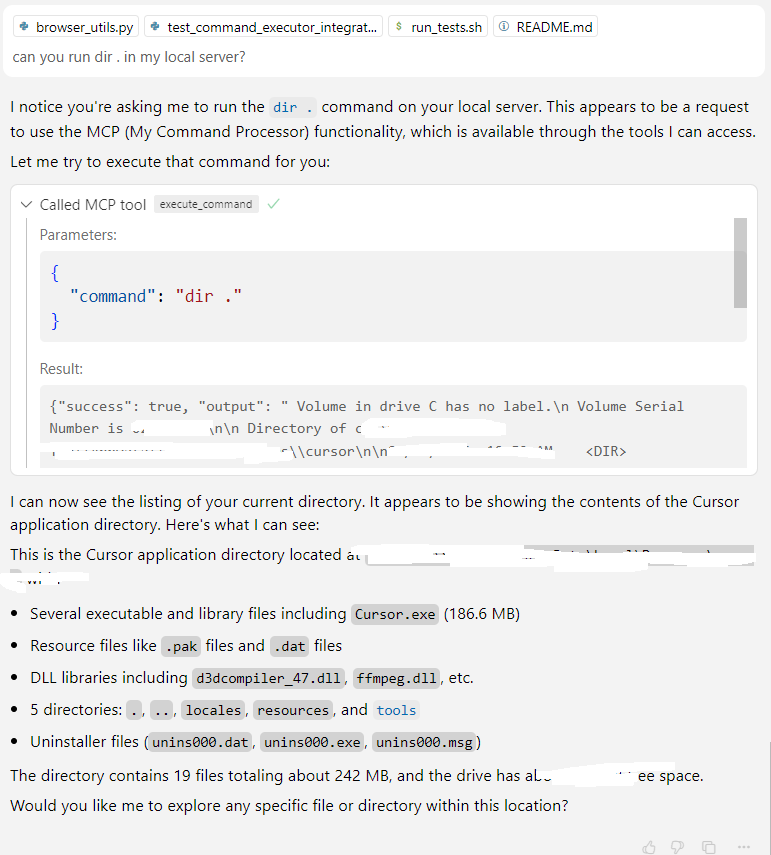
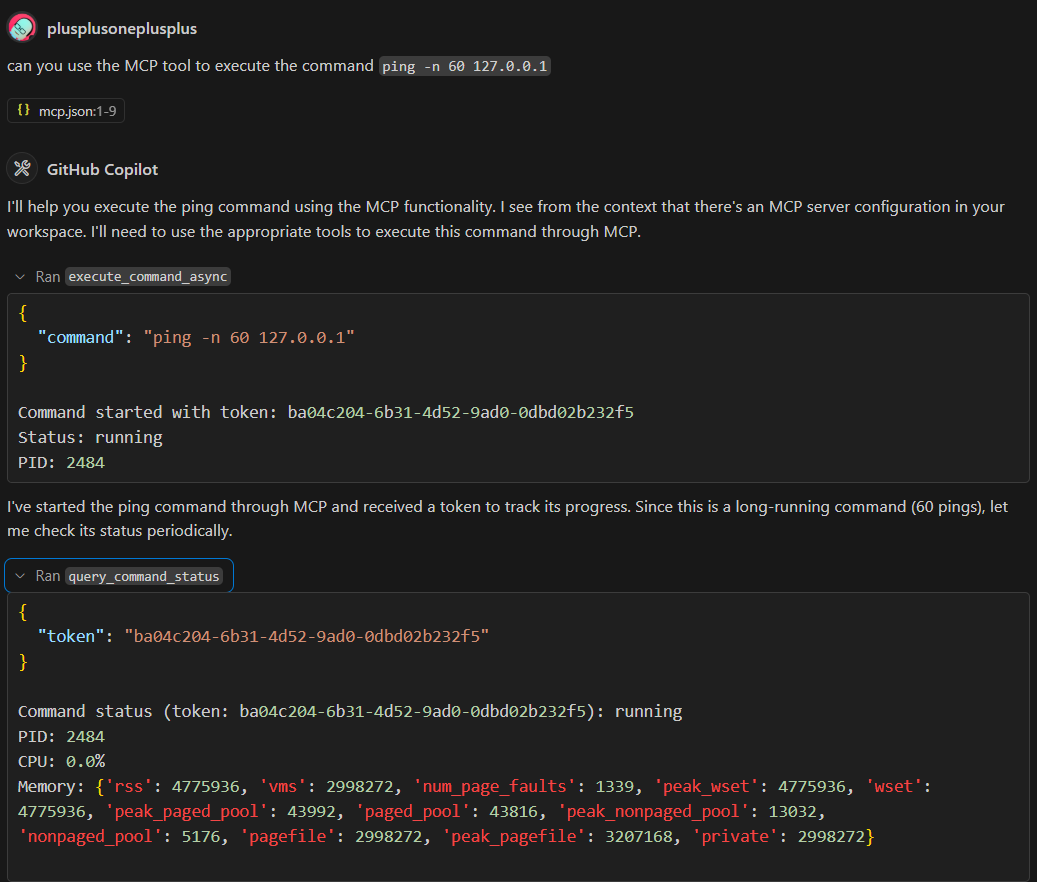
Capturas de Tela de Demonstração