openEuler MCP Servers
Uma coleção de servidores MCP projetados para melhorar a experiência de interação com o sistema operacional openEuler.
Documentação
Repositório openEuler MCP Servers, contribuições são bem-vindas
简体中文 | English
Repositório openEuler MCP Servers




Introdução
MCP é a sigla para Model Context Protocol, que visa fornecer um protocolo universal de contexto para modelos de grande porte, usado para chamar diversas aplicações e expandir as capacidades dos modelos. O repositório mcp-servers da openEuler é usado para armazenar vários MCP Servers, com foco no domínio de sistemas operacionais, combinando Devstation e EulerCopilot para melhorar a experiência de interação com openEuler.
Arquitetura de Software
O diretório do repositório contém uma pasta doc, usada para armazenar a documentação geral de diversos tipos. Em seguida, cada pasta em servers é um MCP Server independente.
mcp-servers/
├── servers
│   ├── oeDeploys/
│   │   ├── mcp_config.json
│   │   ├── mcp-rpm.yaml
│   │   └── src/
│   │       ├── icon.png
│   │       ├── mcp-oedp.py
│   │       ├── readme.md
│   │       └── requirements.txt
│   ├── oeGitExt/
│   └── xxxxx/
├── scripts/
└── doc/
Tomando oeDeploy como exemplo, o nível superior de cada server deve conter os seguintes itens:
-
Arquivo de configuração do MCP - contém as informações de configuração do MCP Server
-
Arquivo de configuração de implantação - contém outros arquivos de configuração relacionados
-
Diretório de código-fonte - contém o código de implementação específico do MCP Server e arquivos de recursos relacionados
O Documento de descrição do MCP em doc fornece sugestões de descrição para os MCP Servers, visando melhorar a usabilidade dos MCP Servers.
Instruções de Uso
-
Use clientes MCP comuns para concluir a configuração, como EulerCopilot, Roo Code, Cline, etc.
-
Escreva o arquivo de configuração do MCP Server no cliente MCP.
Instalação automática com yum (recomendado):
A comunidade openEuler irá empacotar cada MCP Server como um pacote RPM. Os usuários podem simplesmente instalar com yum install e usar, disponível em breve.
Início Rápido: Como usar o MCP Python-SDK para criar seu próprio servidor MCP
Configuração do ambiente MCP
1. Instale a ferramenta de gerenciamento Python uv
yum install -y uv
2. Instale o MCP
yum install -y python3-mcp
Codificação prática
1. Escolha uma pequena ferramenta oegitext
oegitext é uma pequena ferramenta para interagir com o gitee, usada para consultar repositórios e issues no gitee, além de consultar informações de PRs:
Esta ferramenta é pré-instalada no DevStation. Se não estiver instalada, você pode usar yum install oegitext安装 após configurar o repositório openEuler-25.03 EPOL.
Após a instalação, use o seguinte comando para configurar o token do gitee:
oegitext config -token ${access_token}
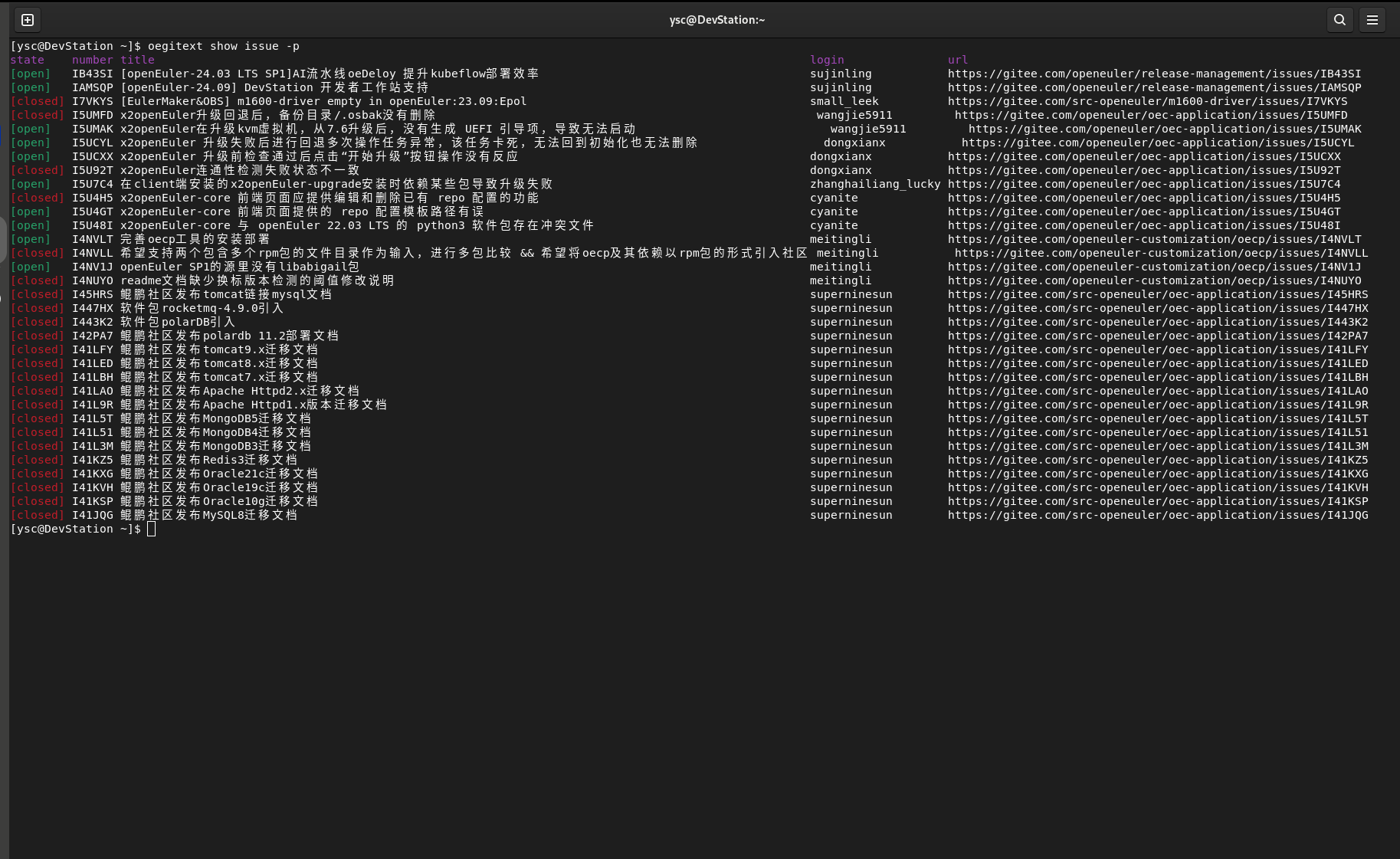
Depois, use oegitext show issue -p para consultar a issue atual:
2. Use o python-sdk para fazer uma modificação
No ambiente virtual criado com uv acima, crie um novo arquivo oegitext_mcp.py Abaixo está um exemplo simples do código:
import subprocess
from mcp.server.fastmcp import FastMCP

mcp = FastMCP("查找openEuler社区的issue")

@mcp.tool()
def get_my_openeuler_issue() -> str:
    """统计我在openEuler社区所负责的issue"""
    try:
        # 执行oegitext命令并解析结果
        result = subprocess.check_output(['oegitext', 'show', 'issue', '-p'],
                                        text=True,
                                        stderr=subprocess.STDOUT)

        return result
    except subprocess.CalledProcessError as e:
        return e
    except Exception as e:
        return e

if __name__ == "__main__":
    # Initialize
    mcp.run()
3. Configuração do ambiente openEuler MCP
Abra o software vscodium pré-instalado no DevStation, instale o Roo Code no mercado de plugins (posteriormente também pode ser implementado com EulerCopilot) Configure o modelo de grande porte nas configurações; usamos a API do DeepSeek V3:
API提供商:OpenAI Compatible
OpenAI基础URL:https://api.siliconflow.cn
密钥:对应的密钥
模型:Pro/deepseek-ai/DeepSeek-V3   #可以自己选择合适的模型
Selecione a aba MCP Server nas opções superiores do plugin Roo Code Clique em editar MCP global
{
  "mcpServers": {
    "oegitext_mcp": {
      "command": "/usr/bin/uv",
      "args": [
        "--directory",
        "/home/xxx/oegitext_mcp",
        "run",
        "--python",
        "/usr/bin/python3",
        "oegitext_mcp.py"
      ],
      "disabled": false,
      "autoApprove": [],
      "alwaysAllow": []
    },
  }
}
Altere o caminho acima para o caminho real correto, depois salve e clique em concluir
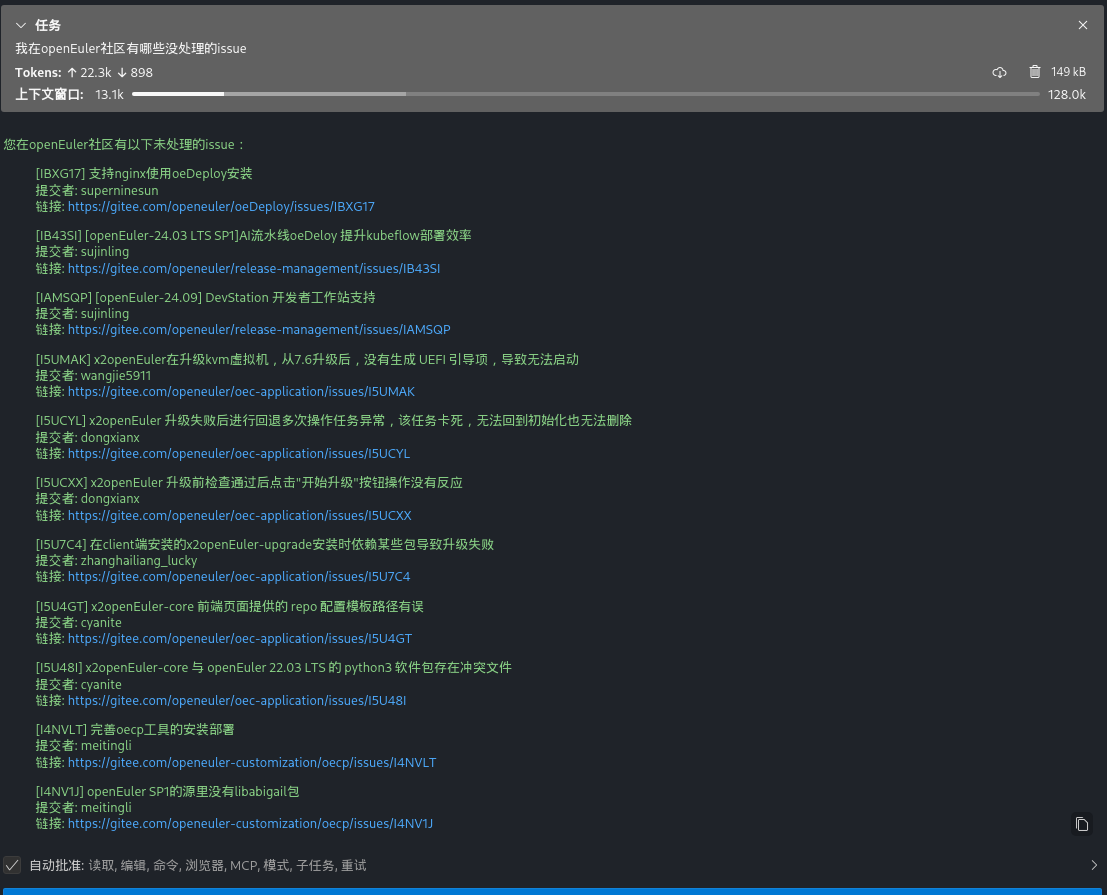
4. Efeito da chamada do cliente MCP