Skills-ContextManager
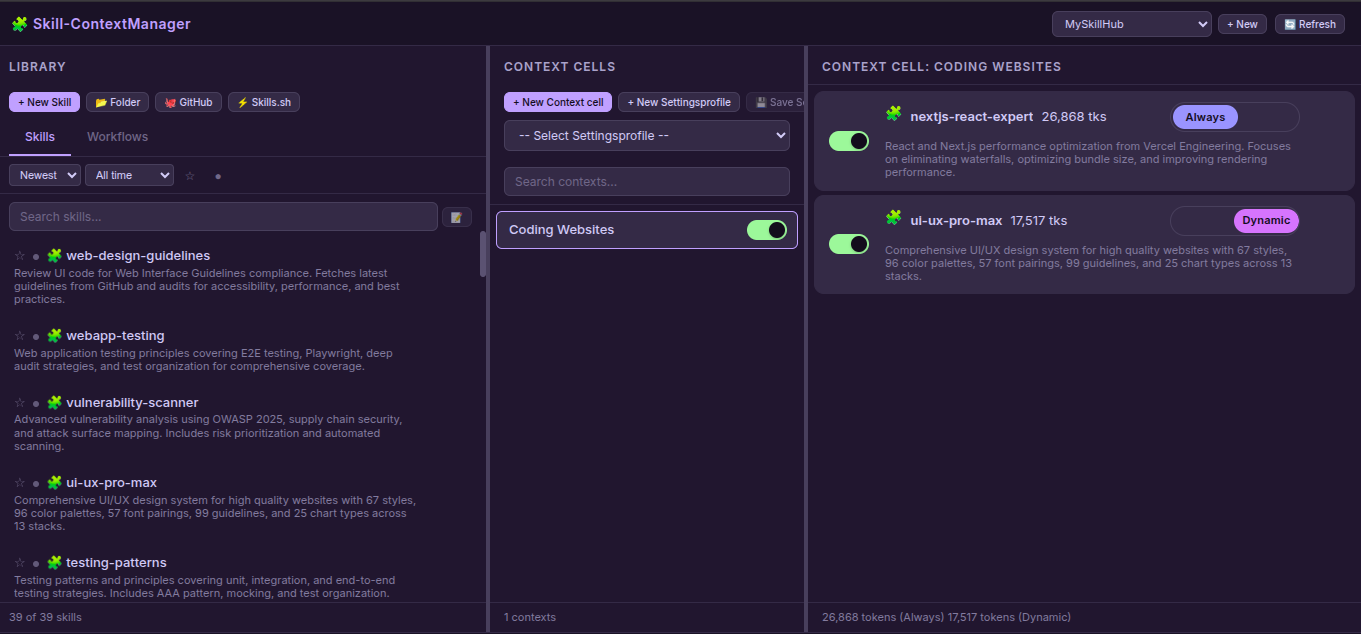
Não polua o contexto do seu agente de IA com 1.000 skills. Use o Skills-ContextManager, uma interface web auto-hospedada para gerenciar skills e fluxos de trabalho de IA, fornecendo skills a um agente de IA via MCP apenas quando necessário. Basta adicionar skills à sua biblioteca e ativá-las ou desativá-las com um botão. Escolha se uma skill é sempre carregada no contexto ou ativada dinamicamente quando o agente de IA determinar que é necessária.
Documentação
Skill-ContextManager & MCP Server

Um aplicativo web auto-hospedado para gerenciar habilidades de IA, fluxos de trabalho e contextos com integração completa com MCP (Model Context Protocol). Organize, gerencie e carregue dinamicamente bases de conhecimento especializadas em qualquer Agente de IA apenas alternando suas Habilidades Ligado/Desligado em uma interface web local simples.
Recursos
Aplicação Web
- Gerenciamento de Habilidades e Fluxos de Trabalho: Crie, edite, exclua e organize habilidades e fluxos de trabalho
- Suporte a Multi-Hub: Crie espaços de trabalho isolados com habilidades/contextos separados
- Células de Contexto: Organize habilidades/fluxos de trabalho em grupos lógicos com alternâncias de ativar/desativar
- Modo Duplo: Escolha habilidades Sempre-carregadas (auto-carregadas) ou Dinâmicas (sob demanda) por alternância liga/desliga
- Editor de Arquivos: Editor integrado com árvore de arquivos, criar/excluir arquivos e pastas
- Fontes de Importação:
- 📂 Pasta: Enviar do sistema de arquivos local
- 🐙 GitHub: Clonar de repositórios do GitHub
- ⚡ Skills.sh: Importar do registro Skills.sh
- Geração de Descrição por IA: Gere automaticamente descrições de habilidades usando APIs de IA
- Armazenamento Seguro de Chaves de API: Chaves de API armazenadas com modo de arquivo 0600 (somente proprietário)
- Perfis de Configuração: Salve e carregue predefinições de configuração
- Pesquisa e Filtro: Pesquisa inteligente, ordenação, favoritos, filtros ativo/inativo
- Contagem de Tokens: Acompanhe o tamanho do contexto em tokens
- Arrastar e Soltar: Mova habilidades/fluxos de trabalho para contextos
Servidor MCP
- 3 Ferramentas Essenciais para Agentes de IA:
get_default_skills()- Carregar habilidades com modo"always_loaded"list_available_skills()- Listar todas as habilidades habilitadas com modosload_full_skill_context(name)- Carregar habilidade dinâmica sob demanda
- Ciente do Hub: Funciona com o hub ativo de vários espaços de trabalho
- Suporte a Modo: Carregamento de habilidades
"always_loaded"vs"dynamic" - Suporte a Tipos: Tanto Habilidades quanto Fluxos de Trabalho
Início Rápido
# Clone the repository
git clone https://github.com/One-Man-Company/Skills-ContextManager.git
cd Skills-ContextManager

# Make setup script executable and run it
chmod +x setup.sh
./setup.sh

# Start web application
cd Skill-ContextManager && npm start
Acesso: http://localhost:3000
Configuração MCP salva em mcp_settings.json - adicione isso às configurações MCP do seu Agente de IA.
⚠️ Importante: Copie o conteúdo de
MCP_instructions.mdpara o prompt do sistema ou configuração de regras do seu Agente de IA.
Configuração MCP
O script setup.sh gera mcp_settings.json com caminhos corretos. Adicione-o ao arquivo de configurações MCP do seu Agente de IA:
{
  "Skills-ContextManager": {
    "command": "/absolute/path/Skills-MCP/.venv/bin/python3",
    "args": ["-u", "/absolute/path/Skills-MCP/mcp_server.py"],
    "env": {}
  }
}
Ferramentas MCP
Agentes de IA precisam apenas dessas 3 ferramentas. Detalhes de uso estão em MCP_instructions.md (prompt do sistema):
| Ferramenta | Descrição |
|---|---|
get_default_skills() | Carregar todas as habilidades com modo "always_loaded" no contexto |
list_available_skills() | Listar todas as habilidades habilitadas com descrições e modos |
load_full_skill_context(name) | Carregar uma habilidade específica sob demanda (para modo "dynamic") |
Submissão ao mcpservers.org
| Campo | Valor |
|---|---|
| Nome | Skills-ContextManager |
| Descrição | Interface web para gerenciar habilidades de IA com integração MCP |
| Repositório | https://github.com/One-Man-Company/Skills-ContextManager |
| Comando | [path]/Skills-MCP/.venv/bin/python3 |
| Argumentos | -u [path]/Skills-MCP/mcp_server.py |
Habilidades e Fluxos de Trabalho Incluídos
O repositório inclui conteúdo inicial em MySkillsHUB/:
Habilidades (39): architecture, behavioral-modes, clean-code, code-review-checklist, documentation-templates, frontend-design, game-development, i18n-localization, mobile-design, nextjs-react-expert, nodejs-best-practices, parallel-agents, performance-profiling, python-patterns, seo-fundamentals, server-management, skill-creator, systematic-debugging, ui-ux-pro-max, vulnerability-scanner, webapp-testing, api-patterns, e mais.
Fluxos de Trabalho (3):
- best-standard-autonomous-coding
- elite-cognitive-operator-system
- plan-mode
Todo o conteúdo é copiado automaticamente para sua biblioteca na primeira configuração.
Licença
Licença MIT
Criado: Fevereiro de 2026