Novada-MCP
Pesquise, extraia, rastreie, mapeie e explore a web — a partir de qualquer agente de IA ou terminal.
Documentação
Novada MCP
Um servidor MCP para toda a web ao vivo. Pesquise, extraia, raspe, rastreie, use proxy, automatize navegadores e faça pesquisa com IA — tudo por trás de uma única conexão hospedada, ou uma instalação local se você preferir executar por conta própria.




Início rápido · Obtenha sua chave · Como escolher uma ferramenta · Por que Novada · Estrutura do repositório · Links
✅ Funciona com qualquer cliente MCP — Claude, Cursor, Windsurf, VS Code ou npx localmente | 🎯 15 raspadores tipados por plataforma — Amazon, Google, LinkedIn, TikTok, … cada um com um enum fechado de operation, para que um agente não possa chamar uma operação inválida |
| 🎁 $10 em créditos grátis — sem cartão de crédito — até 1.000 chamadas/mês | ⚡ Hospedado primeiro, zero instalação — aponte para uma URL, ou hospede você mesmo com um comando |
Início rápido
Novada é hospedado primeiro — não há nada para instalar. Aponte seu cliente para a URL hospedada e pronto.
Nota de segurança: a URL hospedada contém sua chave de API no parâmetro
?apikey=— trate-a como uma senha. Nunca a compartilhe, nunca a publique publicamente e nunca a configure como um conector compartilhado ou de nível organizacional. Clientes com suporte a cabeçalhos: prefiraAuthorization: Bearer <key>— isso mantém a chave fora de URLs e logs de acesso.
claude.ai (web)
- Vá para Configurações → Conectores → Adicionar conector personalizado.
- Nomeie-o como
Novada. - Cole a URL (contém sua chave — veja a nota de segurança acima):
https://mcp.novada.com/mcp?apikey=YOUR_KEY - Clique em Adicionar.
Claude Code
claude mcp add --transport http novada "https://mcp.novada.com/mcp?apikey=YOUR_KEY"
Instalação completa por cliente (Cursor/Windsurf/VS Code + auto-hospedagem local) → npm-package/README.md.
Experimente
novada_setup()                                          — validates your key, shows balance
novada_search({query: "Claude MCP tutorials"})          — web search
novada_extract({url: "https://example.com"})            — read any URL
novada_research({question: "how do MCP servers work?"}) — parallel multi-source research
Obtenha sua chave
- Cadastre-se em novada.com — sem cartão de crédito.
- Copie sua chave de API de novada.com.
- Você começa com $10 em créditos grátis, limitados a 1.000 chamadas/mês. Verifique o saldo a qualquer momento com
novada_account({section: "balance"})ounovada_setup().
Como escolher uma ferramenta
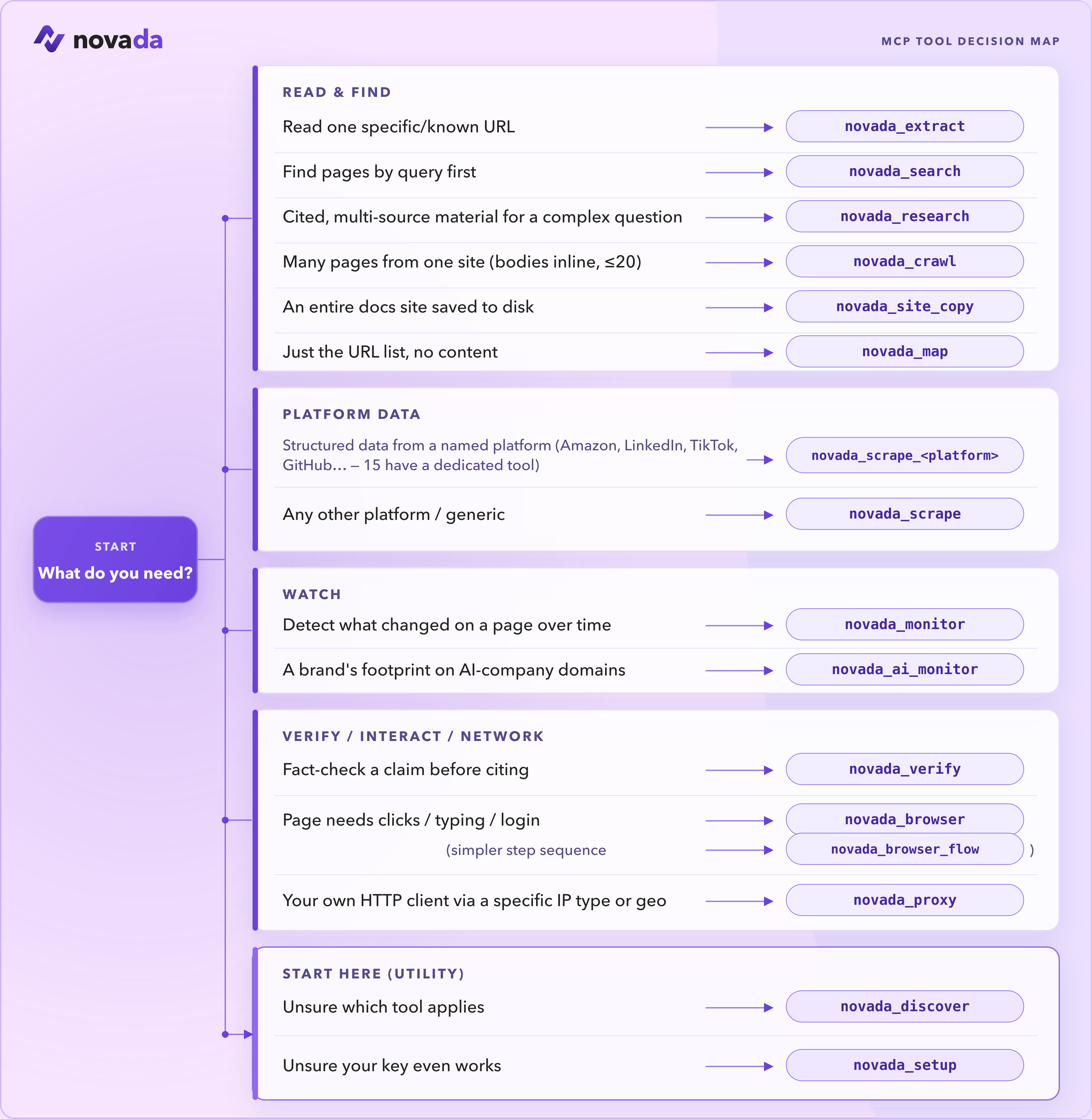
Estas são as ferramentas que você usará com mais frequência:
| Ferramenta | Use quando |
|---|---|
novada_setup | Primeira execução — valide sua chave e veja seu saldo. Comece aqui. |
novada_search | Encontre páginas por consulta (google / duckduckgo / yandex; filtros de tempo, domínio, geo). |
novada_extract | Leia uma URL conhecida — ou até 10 em paralelo — através de páginas anti-bot. |
novada_research | Responda a uma pergunta complexa — pesquisa multi-fonte paralela + extração em uma única chamada. |
novada_scrape | Registros estruturados de 16 plataformas (Amazon, LinkedIn, TikTok, …). Além de 15 ferramentas tipadas por plataforma — novada_scrape_amazon, _google, _linkedin, … — cada uma com um enum fechado de operation. |
novada_crawl | Extraia conteúdo de um conjunto limitado de páginas relacionadas (≤20) em um site. |
novada_map | Descubra quais URLs existem em um site antes de buscar. |
novada_browser | Interaja com uma página — clique, digite, capture tela, execute JS. |
novada_proxy | Roteie seu próprio cliente HTTP através de um tipo de IP / país / sessão específico. |
Não tem certeza? Chame novada_discover e ele retornará o catálogo completo com o status de cada ferramenta.
📚 Referência completa — todas as 38 ferramentas →
38 ferramentas em 6 categorias. Auto-hospedagem (npx novada-mcp) expõe todas as 38. A superfície padrão hospedada (mcp.novada.com) expõe 30 — o mesmo registro menos 8 ferramentas que não se aplicam a um endpoint serverless sem estado: novada_browser_flow (precisa de uma sessão de navegador persistente), novada_site_copy (grava arquivos em disco), novada_ip_whitelist / novada_static_ip_mgmt / novada_capture_apikey (operações de conta com gate de escrita), novada_session_stats / novada_search_feedback (estado em memória por processo) e novada_verify — é derivado do núcleo, não um subconjunto curado manualmente. Chame novada_discover na sua conexão para ver exatamente o que está disponível nela.
Onde ele roda?
Divisão completa local/hospedado, todas as 38 ferramentas
| Ferramenta | Local (npx novada-mcp) | Hospedado (mcp.novada.com) |
|---|---|---|
novada_search | ✅ | ✅ |
novada_extract | ✅ | ✅ |
novada_crawl | ✅ | ✅ |
novada_research | ✅ | ✅ |
novada_map | ✅ | ✅ |
novada_site_copy | ✅ | ❌ grava em disco local |
novada_search_feedback | ✅ | ❌ estado em memória por processo |
novada_scrape | ✅ | ✅ |
novada_scrape_amazon … _perplexity (15 ferramentas de plataforma) | ✅ | ✅ |
novada_ai_monitor | ✅ | ✅ |
novada_monitor | ✅ | ✅ |
novada_verify | ✅ | ❌ não está na listagem hospedada de novada_discover |
novada_proxy | ✅ | ✅ |
novada_browser | ✅ | ✅ |
novada_browser_flow | ✅ | ❌ precisa de uma sessão de navegador persistente |
novada_account | ✅ | ✅ |
novada_proxy_account_create | ✅ | ❌ operação de conta com gate de escrita |
novada_proxy_account_list | ✅ | ✅ |
novada_ip_whitelist | ✅ | ❌ operação de conta com gate de escrita |
novada_capture_apikey | ✅ | ❌ operação de conta com gate de escrita |
novada_static_ip_mgmt | ✅ | ❌ operação de conta com gate de escrita |
novada_discover | ✅ | ✅ |
novada_setup | ✅ | ✅ |
novada_session_stats | ✅ | ❌ estado em memória por processo |
Referência completa por ferramenta (mesma coluna) → docs/TOOLS.md.
Por que Novada
- 15 raspadores dedicados por plataforma.
novada_scrape_amazon,_google,_bing,_duckduckgo,_yandex,_youtube,_instagram,_facebook,_tiktok,_x,_walmart,_shein,_linkedin,_github,_perplexity— cada um expõe um enum fechado e tipado deoperationlimitado àquela plataforma, em vez do par genérico de stringsnovada_scrape+platformdooperation, para que um agente não possa adivinhar uma operação inválida para a plataforma errada. - Superfície de ferramentas honesta. Cada
operationlistado é verificado como funcional — operações que não podemos entregar atualmente são marcadas e excluídas, não deixadas para falhar no meio da sua tarefa. - Autodescrição testada por contrato. As descrições das ferramentas são testadas contra o comportamento real, não apenas escritas e esquecidas — o que uma ferramenta afirma retornar é verificado contra o que ela realmente retorna.
- Registro de ferramentas protegido contra divergência.
npm-package/src/tools/registry.tsé a fonte única de verdade para o catálogo de ferramentas; um teste garante que as ferramentas registradas, as ferramentas conectadas e a saída denovada_discovernunca possam divergir. - Gate de escrita
confirm:true. Toda ferramenta mutável (criação de subconta de proxy, alterações na lista de permissões de IP, compras de IP estático, redefinições de chave de captura) exige uma confirmação explícita em duas etapas — sem gravações silenciosas. - Onboarding chamável.
novada_discoverenovada_setupsão ferramentas que seu agente pode chamar por conta própria para encontrar a ferramenta certa ou validar uma chave, sem nunca ler este README.
vs Firecrawl / Tavily (medido, não marketing):
- 4,9× mais compacto. Uma consulta de busca idêntica com 5 resultados retornou 2.761 bytes da Novada vs 13.421 bytes do Firecrawl — menos custo de token do agente por resposta.
- Sem chave para começar.
npx -y novada-mcpinicia a frio sem chave;novada_setupte guia até uma somente quando uma ferramenta precisar. - Falhas anti-bot nomeadas. Em um alvo irresolvível, a resposta da Novada nomeia o bloqueador exato (ex.:
anti_bot:kasada) em vez de um erro genérico, para que um agente possa ramificar com base nisso.
Estrutura do repositório
Este é um monorepo com dois artefatos:
npm-package/— o pacote npmnovada-mcp. Servidor MCP stdio local (npx novada-mcp); fonte da verdade para toda a lógica de ferramentas.hosted-server/— o que roda emhttps://mcp.novada.com. Um wrapper HTTP (auth, cota, limite de taxa) na Vercel em torno da saída compilada do pacote npm.
Mapa completo da arquitetura (entradas, núcleo de despacho, onde-cada-coisa-vive) → ARCHITECTURE.md; roteamento de contribuidores → CONTRIBUTING.
Links
- Site: novada.com
- Obtenha uma chave de API: novada.com
- Cadastre-se (grátis): novada.com
- npm: npmjs.com/package/novada-mcp
- GitHub: github.com/NovadaLabs/novada-mcp
- Issues: github.com/NovadaLabs/novada-mcp/issues
Licença
MIT