Code Reasoning
Melhora a capacidade do Claude de resolver tarefas complexas de programação por meio de um raciocínio estruturado, passo a passo.
GitHub
259
Experimente este MCPPatrocinadoDocumentação
Code Reasoning MCP Server
Um servidor Model Context Protocol (MCP) que aprimora a capacidade do Claude de resolver tarefas complexas de programação por meio de raciocínio estruturado, passo a passo.


Instalação Rápida
-
Configure o Claude Desktop editando:
- macOS:
~/Library/Application Support/Claude/claude_desktop_config.json - Windows:
%APPDATA%\Claude\claude_desktop_config.json - Linux:
~/.config/Claude/claude_desktop_config.json
{ "mcpServers": { "code-reasoning": { "command": "npx", "args": ["-y", "@mettamatt/code-reasoning"] } } } - macOS:
-
Configure o VS Code:
{
  "mcp": {
    "servers": {
      "code-reasoning": {
        "command": "npx",
        "args": ["-y", "@mettamatt/code-reasoning"]
      }
    }
  }
}
Uso
-
Para acionar este MCP, acrescente isto às suas mensagens de chat:
Use sequential thinking to reason about this. -
Use prompts prontos que acionam o Code-Reasoning:
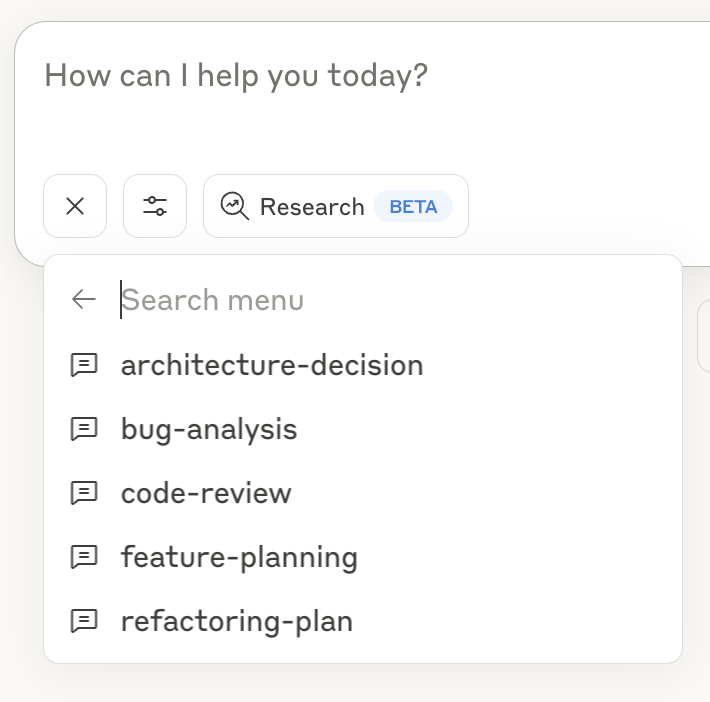
- Clique no ícone "+" na janela de chat do Claude Desktop, ou no Claude Code digite
/helppara ver os comandos específicos. - Selecione "Add from Code Reasoning" nas ferramentas disponíveis
- Escolha um modelo de prompt e preencha as informações necessárias
- Envie o formulário para adicionar o prompt à sua mensagem de chat e pressione Enter
Consulte o Guia de Prompts para obter detalhes sobre o uso dos modelos de prompt.
Opções de Linha de Comando
--debug: Ativar registro detalhado--helpou-h: Exibir informações de ajuda
Principais Recursos
- Foco em Programação: Otimizado para tarefas de codificação e resolução de problemas
- Pensamento Estruturado: Divida problemas complexos em etapas gerenciáveis
- Ramificação de Pensamento: Explore múltiplos caminhos de solução em paralelo
- Revisão de Pensamento: Refine raciocínios anteriores à medida que a compreensão melhora
- Limites de Segurança: Para automaticamente após 20 etapas de pensamento para evitar loops
- Prompts Prontos para Uso: Modelos pré-definidos para tarefas comuns de desenvolvimento
Documentação
Documentação detalhada disponível no diretório docs:
- Exemplos de Uso: Exemplos de pensamento sequencial com o servidor MCP
- Guia de Configuração: Todas as opções de configuração do servidor MCP
- Guia de Prompts: Como usar e personalizar prompts com o servidor MCP
- Framework de Testes: Informações sobre testes
Estrutura do Projeto
├── index.ts                  # Entry point
├── src/                      # Implementation source files
└── test/                     # Placeholder for future test utilities
Licença
Este projeto é licenciado sob a Licença MIT. Consulte o arquivo LICENSE para obter detalhes.