Lokalise MCP Tool
Adiciona chaves de tradução a projetos Lokalise. Requer uma chave de API Lokalise.
Documentação
Lokalise MCP Tool
Um servidor de Programa de Linha de Comando Mínimo (MCP) para adicionar chaves de tradução aos seus projetos Lokalise, projetado para integração com Cursor ou uso autônomo.
📦 Instalação
# For MCP usage (global installation)
npm install -g lokalise-mcp-server

# For library usage (project dependency)
npm install lokalise-mcp-server
Pacote NPM: https://www.npmjs.com/package/lokalise-mcp-server
🖼️ Diagrama de Fluxo do MCP
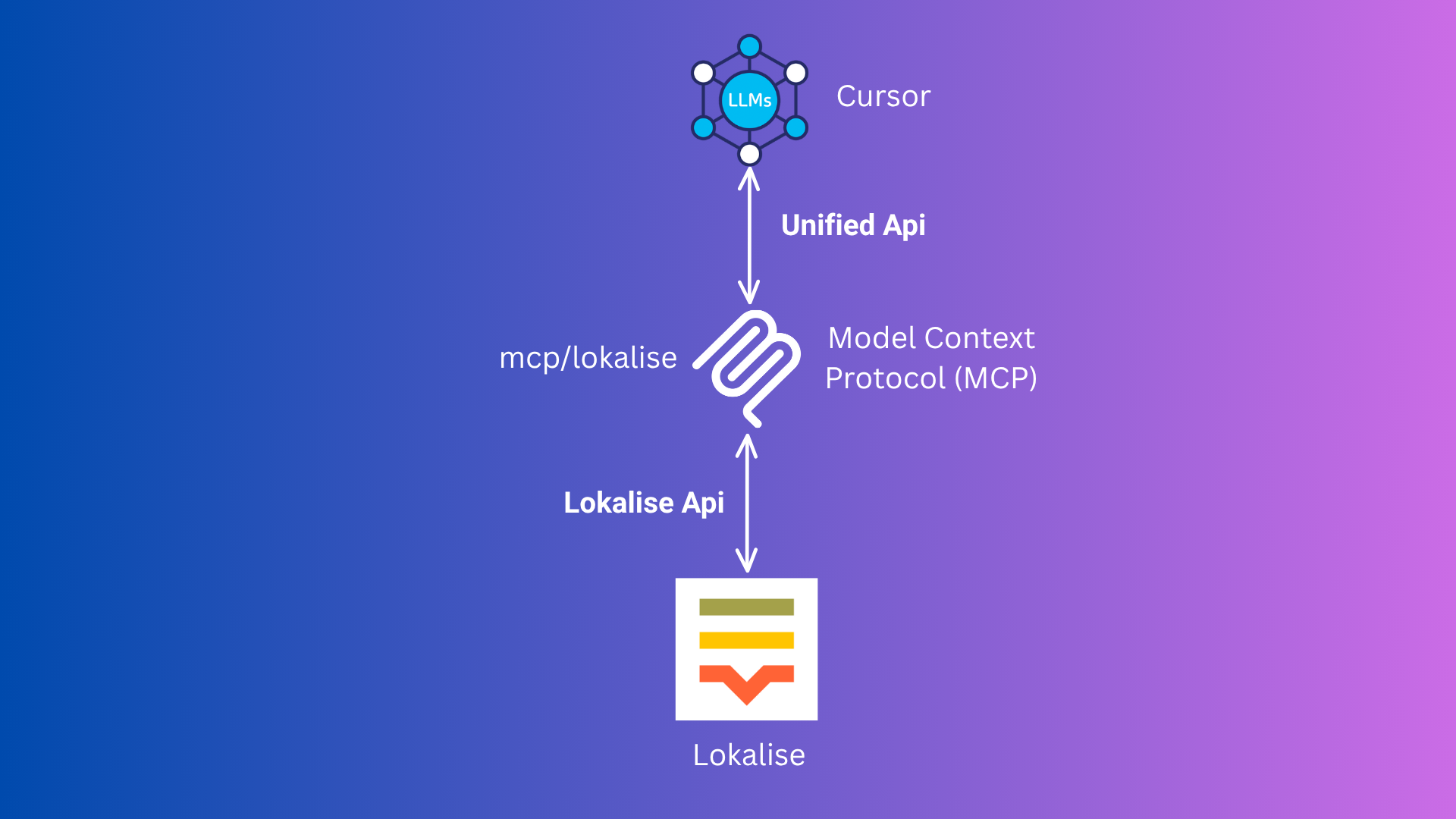
Este diagrama ilustra o fluxo do Model Context Protocol (MCP) entre o Cursor, seu servidor MCP e o Lokalise.
⚡️ Uso (Início Rápido com Cursor MCP)
Opção 1: Pacote NPM (Recomendado)
🛠️ Adicione isto ao seu mcp.json (ou configure via interface do Cursor):
{
  "mcpServers": {
    "lokalise": {
      "command": "npx",
      "args": ["-y", "lokalise-mcp-server"],
      "env": {
        "LOKALISE_API_KEY": "your_actual_api_key"
      }
    }
  }
}
- 🔄 Recarregue a Janela. Ele usará automaticamente o pacote npm.
Opção 2: Docker (Alternativa)
Não é necessário executar Docker ou Podman manualmente!
-
🐳 Certifique-se de que o Docker ou Podman esteja instalado e em execução.
-
🛠️ Adicione isto ao seu
mcp.json(ou configure via interface do Cursor):{ "mcpServers": { "lokalise": { "command": "docker", // podman "args": [ "run", "--rm", "-i", "-e", "LOKALISE_API_KEY", "rafee03/mcp-lokalise:latest" ], "env": { "LOKALISE_API_KEY": "your_actual_api_key" } } } }- Você pode usar
podmanem vez dedockerse preferir. - O Cursor puxará e executará a imagem automaticamente conforme necessário.
- Você pode usar
-
🔄 Reinicie o Cursor. Ele cuidará de tudo para você.
📝 Como Usar no Cursor
Esta ferramenta recebe estas entradas:
- projectName (obrigatório): O nome do seu projeto Lokalise (ex.:
SpaceX). - keys (obrigatório): Um array de objetos, cada um com:
- keyName (obrigatório): A chave de tradução (ex.:
hello) - defaultValue (opcional): O valor de tradução padrão (ex.:
Hello) - platforms (opcional): As plataformas às quais esta chave se aplica (ex.:
web,ios)
- keyName (obrigatório): A chave de tradução (ex.:
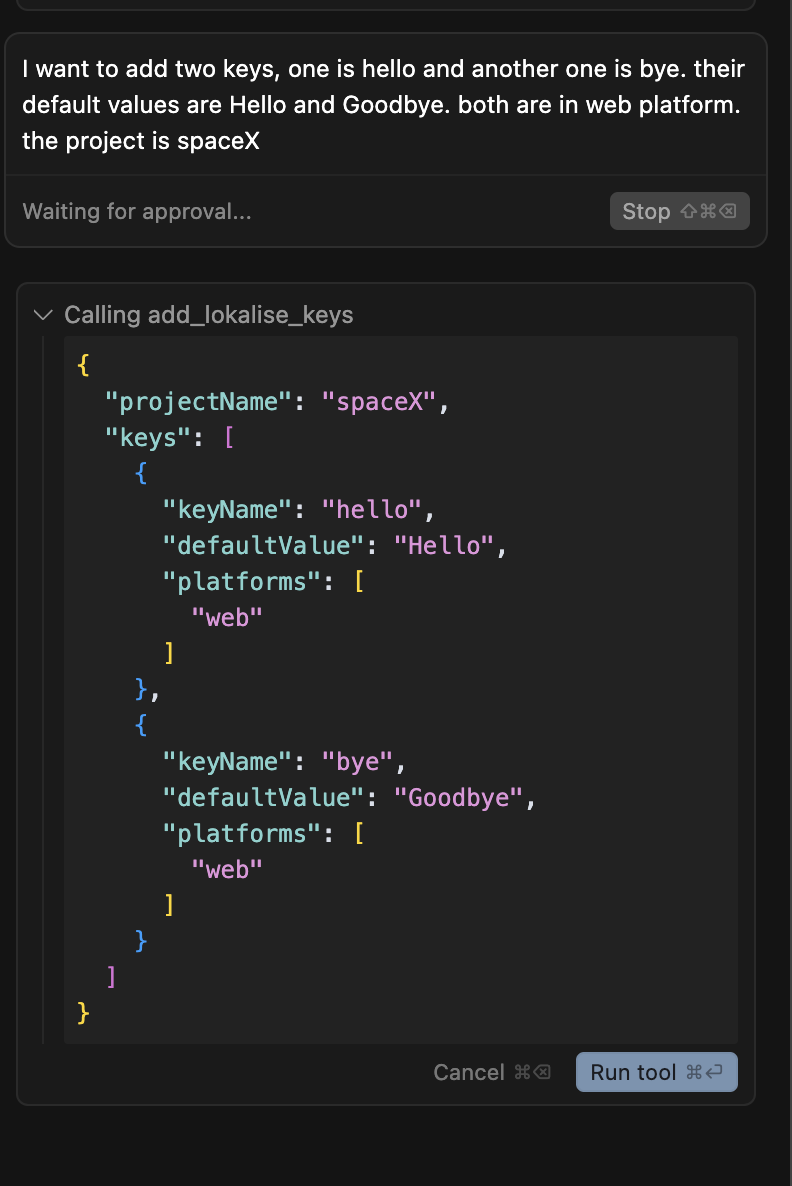
Exemplo:
Quero adicionar duas chaves, uma é hello e a outra é bye. Seus valores padrão são Hello e Goodbye. Ambas estão na plataforma web. O projeto é spaceX
O Cursor converterá automaticamente isso na entrada correta para a ferramenta MCP.
📁 Arquivos do Projeto
Arquivos-fonte TypeScript (src/):
- src/mcp-server.ts: O principal ponto de entrada do servidor MCP para integração com o Cursor.
- src/mcp.ts: Lógica compartilhada para interagir com a API do Lokalise (usada pelo servidor).
- src/server.ts: (Opcional) Versão do servidor HTTP (não necessária para o Cursor).
- src/add-key.ts: (Opcional) Ferramenta CLI para adicionar uma chave interativamente (não necessária para o Cursor).
Arquivos JavaScript Compilados (dist/):
- dist/mcp-server.js: Servidor MCP compilado.
- dist/mcp.js: Lógica de API compilada.
- dist/server.js: Servidor HTTP compilado.
- dist/add-key.js: Ferramenta CLI compilada.
Outros Arquivos:
- tsconfig.json: Configuração do TypeScript.
- Dockerfile: Para construir a imagem Docker do servidor MCP.
- package.json: Dependências e scripts do projeto.
- README.md: Este arquivo de documentação.
🛠️ Configuração (Para Desenvolvimento Local ou Personalização)
1. 📥 Clone o Repositório
git clone https://github.com/mdrafee03/mcp-lokalise.git
cd mcp-lokalise
2. 📦 Instale as Dependências
npm install
3. 🔨 Compile o Projeto
npm run build
4. 🔑 Defina Sua Chave de API do Lokalise
Na sua configuração do MCP (recomendado para o Cursor)
{
  "mcpServers": {
    "lokalise": {
      "command": "node",
      "args": ["{directory-of-the-project}/dist/mcp-server.js"],
      "env": {
        "LOKALISE_API_KEY": "your_actual_api_key"
      }
    }
  }
}
Scripts Disponíveis
npm run build- Compilar TypeScript para JavaScriptnpm run dev- Executar o servidor MCP em modo de desenvolvimento com tsxnpm run server- Executar o servidor HTTP em modo de desenvolvimento com tsxnpm run add-key- Executar a ferramenta CLI em modo de desenvolvimento com tsxnpm start- Executar o servidor MCP compilado a partir de dist/
Requisitos
- Node.js 22+ recomendado
- TypeScript 5.8+
- Protocolo MCP via @modelcontextprotocol/sdk
Licença
MIT