Excalidraw MCP
Gere mais de 25 tipos de diagramas (fluxograma, sequência, ER, mapa mental, arquitetura, etc.) como arquivos Excalidraw com linguagem natural. Suporte a CJK, mais de 30 cores de marcas de tecnologia, layout automático Sugiyama.
Documentação
excalidraw-mcp



Gere 25+ tipos de diagramas bonitos desenhados à mão com IA — fluxogramas, sequência, arquitetura, mapas mentais, ER, classes, estados, linha do tempo, gráficos de pizza/barras/linhas/radar, kanban, wireframes, árvores de decisão e muito mais — com layout hierárquico Sugiyama, suporte a CJK e curva de aprendizado zero.
Por Maaker.AI
Showcase
Cada imagem abaixo foi gerada por uma única chamada de ferramenta — sem coordenadas, sem layout manual. Os arquivos-fonte .excalidraw estão em docs/showcase/; arraste qualquer um deles para excalidraw.com para continuar editando.
| Fluxograma (ramificações + ciclo + CJK) | Arquitetura em camadas |
|---|---|
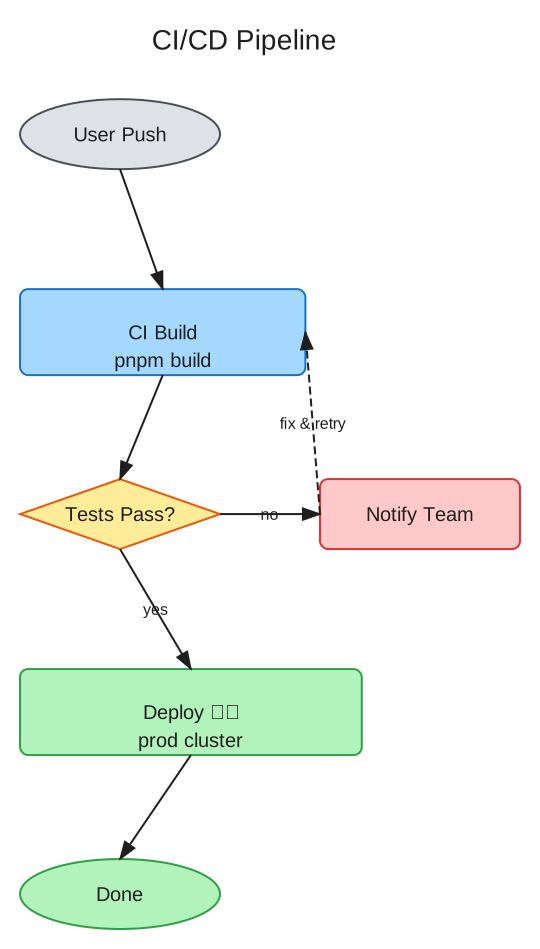 | 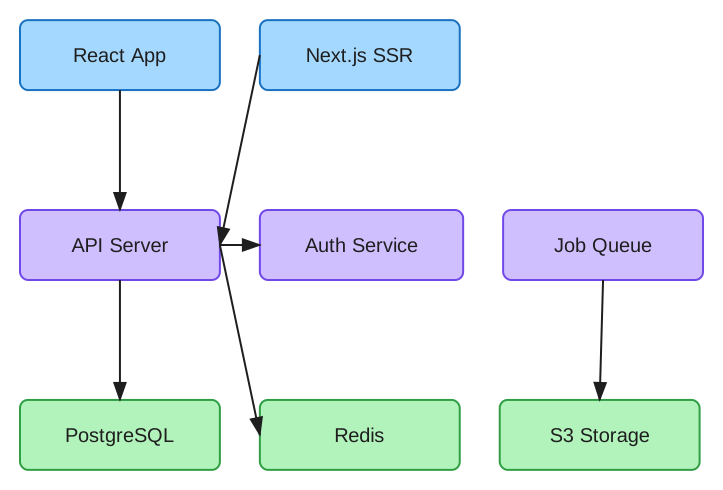 |
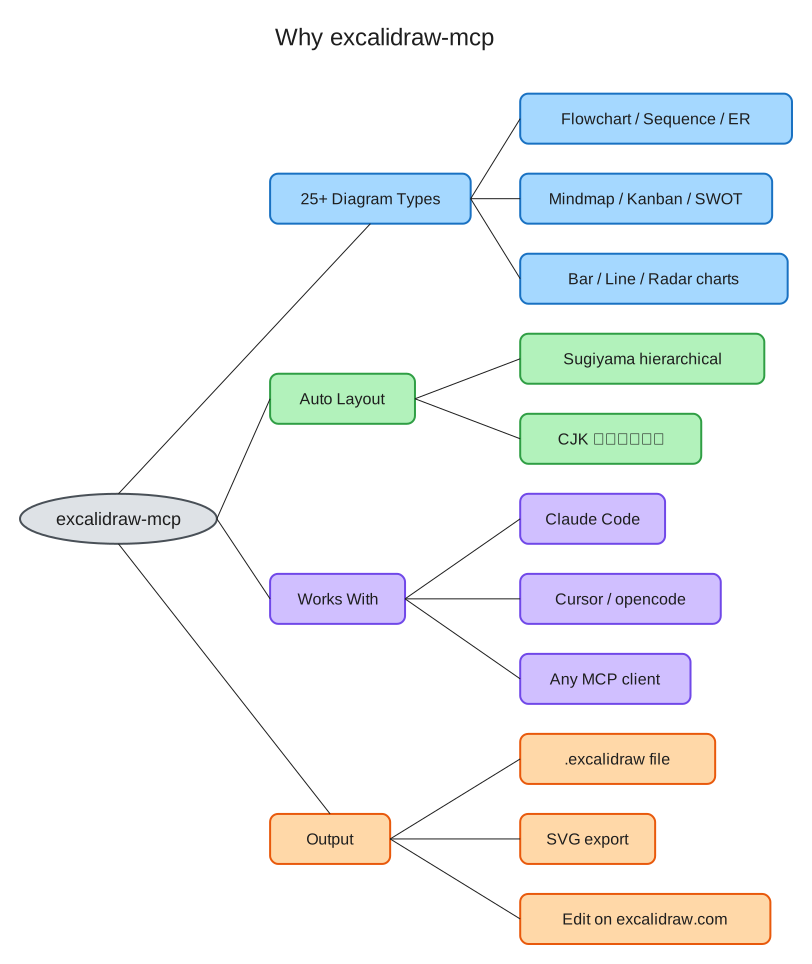
Instalação
Claude Code (recomendado)
claude mcp add excalidraw -- uvx maaker-excalidraw-mcp
Claude Desktop
Adicione à sua configuração MCP (~/Library/Application Support/Claude/claude_desktop_config.json):
{
  "mcpServers": {
    "excalidraw": {
      "command": "uvx",
      "args": ["maaker-excalidraw-mcp"]
    }
  }
}
opencode / Cursor / qualquer cliente MCP
{
  "mcp": {
    "excalidraw": {
      "type": "local",
      "command": ["uvx", "maaker-excalidraw-mcp"],
      "enabled": true
    }
  }
}
(opencode mostrado; Cursor e outros clientes usam o mesmo comando uvx maaker-excalidraw-mcp no formato de configuração MCP deles.)
pip
pip install maaker-excalidraw-mcp
Ferramentas
| Ferramenta | Descrição |
|---|---|
create_flowchart | Fluxogramas com layout Sugiyama — ramificações, junções, ciclos, grupos |
create_architecture_diagram | Diagramas de arquitetura em camadas com conexões |
create_sequence_diagram | Diagramas de sequência UML com linhas de vida e mensagens |
create_class_diagram | Diagramas de classes UML com atributos, métodos, relacionamentos |
create_state_diagram | Máquinas de estado UML com estados inicial/final |
create_er_diagram | Diagramas Entidade-Relacionamento com cardinalidade |
create_mindmap | Mapas mentais em estilo de árvore com ramificações coloridas automaticamente |
create_timeline | Gráficos de linha do tempo/Gantt com tratamento de eventos sobrepostos |
create_pie_chart | Gráficos de pizza com fatias rotuladas e porcentagens |
create_kanban_board | Quadros Kanban com colunas e cartões |
create_network_diagram | Topologia de rede com nós tipados (servidor, banco de dados, etc.) |
create_quadrant_chart | Matrizes 2x2 de prioridade/posicionamento |
create_user_journey | Mapas de jornada do usuário com indicadores de emoção |
create_wireframe | Mockups de wireframe de UI com molduras de dispositivos |
create_org_chart | Organogramas (hierarquia de cima para baixo) |
create_swot_analysis | Análise SWOT em matrizes 2x2 codificadas por cores |
create_table | Tabelas de grade com colunas de tamanho automático e cores alternadas de linhas |
create_bar_chart | Gráficos de barras verticais com barras e rótulos de escala automática |
create_line_chart | Gráficos de linhas com suporte a múltiplas séries |
create_radar_chart | Gráficos de radar/teia com sobreposição de múltiplas séries |
create_decision_tree | Árvores de decisão com decisões em losango e resultados retangulares |
import_mermaid | Importar sintaxe Mermaid (fluxograma, sequência, classe, estado) |
list_diagram_types | Listar todos os tipos de diagrama disponíveis |
modify_diagram | Adicionar/remover nós e conexões em diagramas existentes |
read_diagram | Analisar arquivos .excalidraw existentes |
export_diagram | Exportar diagramas para o formato SVG |
Exemplos Rápidos
Fluxograma
Basta dizer ao seu assistente de IA:
"Crie um fluxograma: Solicitação do Usuário → Balanceador de Carga → Servidor de API → Banco de Dados"
A IA chamará create_flowchart com dados estruturados, e você receberá um arquivo .excalidraw com:
- Layout hierárquico Sugiyama — tratamento adequado de ramificações, junções, ciclos e subgrafos desconectados
- Tamanhos de caixa calculados automaticamente com base no conteúdo do texto
- Texto perfeitamente centralizado (incluindo caracteres chineses/CJK)
- Roteamento inteligente de setas com vinculação adequada de bordas
- Estilo desenhado à mão que fica ótimo em documentos e apresentações
- 4 direções: LR (esquerda-para-direita), RL, TB (cima-para-baixo), BT
Diagrama de Arquitetura
"Crie um diagrama de arquitetura com camadas Frontend (React, Next.js), Backend (API Server, Auth Service) e Database (PostgreSQL, Redis)"
Gera um diagrama em camadas com componentes organizados por nível, dimensionamento automático e conexões entre camadas.
Ler e Modificar
"Leia o diagrama em ./my-system.excalidraw e adicione um nó 'Cache' conectado ao API Server"
Funciona com arquivos .excalidraw existentes — leia a estrutura deles, adicione/remova nós, adicione conexões.
Por que excalidraw-mcp?
vs MCP Oficial do Excalidraw (excalidraw/excalidraw-mcp)
| Recurso | MCP Oficial | excalidraw-mcp |
|---|---|---|
| Abordagem | JSON bruto — a IA posiciona manualmente cada elemento | Entrada estruturada — diga o que você quer, receba um diagrama |
| Layout | A IA calcula coordenadas | Layout automático hierárquico Sugiyama |
| Ramificações/Junções | A IA precisa descobrir o posicionamento | Automático — tratado pelo mecanismo de layout |
| Texto CJK | Sem estimativa de largura | Cálculo preciso de largura para CJK/script misto |
| Centralização de texto | A IA precisa calcular deslocamentos x/y | Centralização automática em contêineres |
| Vinculação de setas | A IA precisa gerenciar vinculações | Vinculação automática fixedPoint + orbit |
| Arquivos locais | Não consegue ler/gravar arquivos locais | Suporte completo para ler, modificar e salvar |
| Distribuição | URL remota / .mcpb | uvx / pip (Python padrão) |
| Uso de tokens | Precisa de chamada read_me para aprender o formato | Conhecimento do formato integrado |
vs ferramentas baseadas em Mermaid
- Layout livre: Não limitado pelas restrições de sintaxe do Mermaid
- Estilo desenhado à mão: Visual nativo do Excalidraw, não blocos de código renderizados
- Saída editável: Arraste o arquivo
.excalidrawpara excalidraw.com para continuar editando
Referência de Ferramentas
create_flowchart
Input:
  nodes: [{label: "Step 1", color?: "blue", shape?: "rectangle"}]
  edges: [{from: "Step 1", to: "Step 2", label?: "next"}]
  direction?: "LR" | "RL" | "TB" | "BT"  (default: "LR")
  title?: "My Flowchart"
  output_path?: "/path/to/output.excalidraw"

Output: Path to generated .excalidraw file
Cores: azul, verde, roxo, amarelo, vermelho, cinza, laranja, rosa
Formas: retângulo (padrão), losango (decisões), elipse (início/fim)
create_architecture_diagram
Input:
  layers: [{
    name: "Frontend",
    color?: "blue",
    components: [{label: "React"}, {label: "Next.js"}]
  }]
  connections?: [{from: "React", to: "API Server"}]
  output_path?: "/path/to/output.excalidraw"

Output: Path to generated .excalidraw file
modify_diagram
Input:
  file_path: "/path/to/existing.excalidraw"
  add_nodes?: [{label: "New Node", color?: "green", x?: 100, y?: 100}]
  remove_labels?: ["Old Node"]
  add_connections?: [{from: "A", to: "B"}]
  output_path?: "/path/to/output.excalidraw"

Output: Path to modified file
read_diagram
Input:
  file_path: "/path/to/diagram.excalidraw"

Output: Structured description (shapes, connections, colors)
export_diagram
Input:
  file_path: "/path/to/diagram.excalidraw"
  format: "svg"

Output: Path to exported SVG file
Detalhes Técnicos
Layout Hierárquico Sugiyama
Usa a biblioteca grandalf para layout adequado de grafos direcionados:
- Atribuição de camadas: Nós posicionados em camadas com base na topologia do grafo
- Minimização de cruzamentos: Otimização de múltiplas passagens para reduzir cruzamentos de arestas
- Atribuição de coordenadas: Posicionamento equilibrado dentro das camadas
- Tratamento de ciclos: Detecção de arestas de feedback para grafos cíclicos
- Subgrafos desconectados: Posicionamento automático lado a lado
Estimativa de Largura CJK
Cálculo preciso de largura de texto para texto misto chinês/inglês:
| Tipo de Caractere | Largura (em fontSize=20) |
|---|---|
| Caracteres CJK | ~22px por caractere |
| Letras/dígitos ASCII | ~11px por caractere |
| Espaços | ~5px |
Vinculação de Setas
Usa a vinculação moderna fixedPoint + orbit do Excalidraw (não o formato obsoleto focus/gap):
{
  "startBinding": {
    "elementId": "box1",
    "fixedPoint": [1.0, 0.5001],
    "mode": "orbit"
  }
}
As setas se conectam automaticamente na borda correta com base nas posições relativas.
Desenvolvimento
git clone https://github.com/maaker-ai/excalidraw-mcp.git
cd excalidraw-mcp
uv sync --dev
uv run pytest
Licença
MIT