MCP YouTube Transcript Server
Recupera transcrições de vídeos do YouTube para análise e processamento de conteúdo.
Documentação
MCP YouTube Transcript Server
Um servidor Model Context Protocol que permite a recuperação de transcrições de vídeos do YouTube. Este servidor fornece acesso direto às transcrições de vídeos por meio de uma interface simples, sendo ideal para análise e processamento de conteúdo.
Sumário
Recursos
✨ Principais capacidades:
- Extrair transcrições de vídeos do YouTube
- Suporte a vários idiomas
- Formatar texto com modo contínuo ou por parágrafos
- Recuperar títulos e metadados de vídeos
- Segmentação automática de parágrafos
- Normalização de texto e decodificação de entidades HTML
- Tratamento robusto de erros
- Detecção de carimbos de data/hora e sobreposição
Começando
Pré-requisitos
- Node.js 18 ou superior
Instalação
Fornecemos dois métodos de instalação:
Opção 1: Configuração Manual (Recomendada para Produção)
-
Crie ou edite o arquivo de configuração do Claude Desktop:
- macOS:
~/Library/Application Support/Claude/claude_desktop_config.json - Windows:
%APPDATA%\Claude\claude_desktop_config.json
- macOS:
-
Adicione a seguinte configuração:
{
  "mcpServers": {
    "youtube-transcript": {
      "command": "npx",
      "args": [
        "-y",
        "@sinco-lab/mcp-youtube-transcript"
      ]
    }
  }
}
Script de configuração rápida para macOS:
# Create directory if it doesn't exist
mkdir -p ~/Library/Application\ Support/Claude

# Create or update config file
cat > ~/Library/Application\ Support/Claude/claude_desktop_config.json << 'EOL'
{
  "mcpServers": {
    "youtube-transcript": {
      "command": "npx",
      "args": [
        "-y",
        "@sinco-lab/mcp-youtube-transcript"
      ]
    }
  }
}
EOL
Opção 2: Via Smithery (Somente Desenvolvimento)
npx -y @smithery/cli install @sinco-lab/mcp-youtube-transcript --client claude
⚠️ Nota: Este método não é recomendado para uso em produção, pois depende dos serviços de proxy da Smithery.
Uso
Configuração Básica
Para usar com Claude Desktop / Cursor / cline, certifique-se de que sua configuração corresponda:
{
  "mcpServers": {
    "youtube-transcript": {
      "command": "npx",
      "args": ["-y", "@sinco-lab/mcp-youtube-transcript"]
    }
  }
}
Testes
Com o Claude App
- Reinicie o aplicativo Claude após a instalação
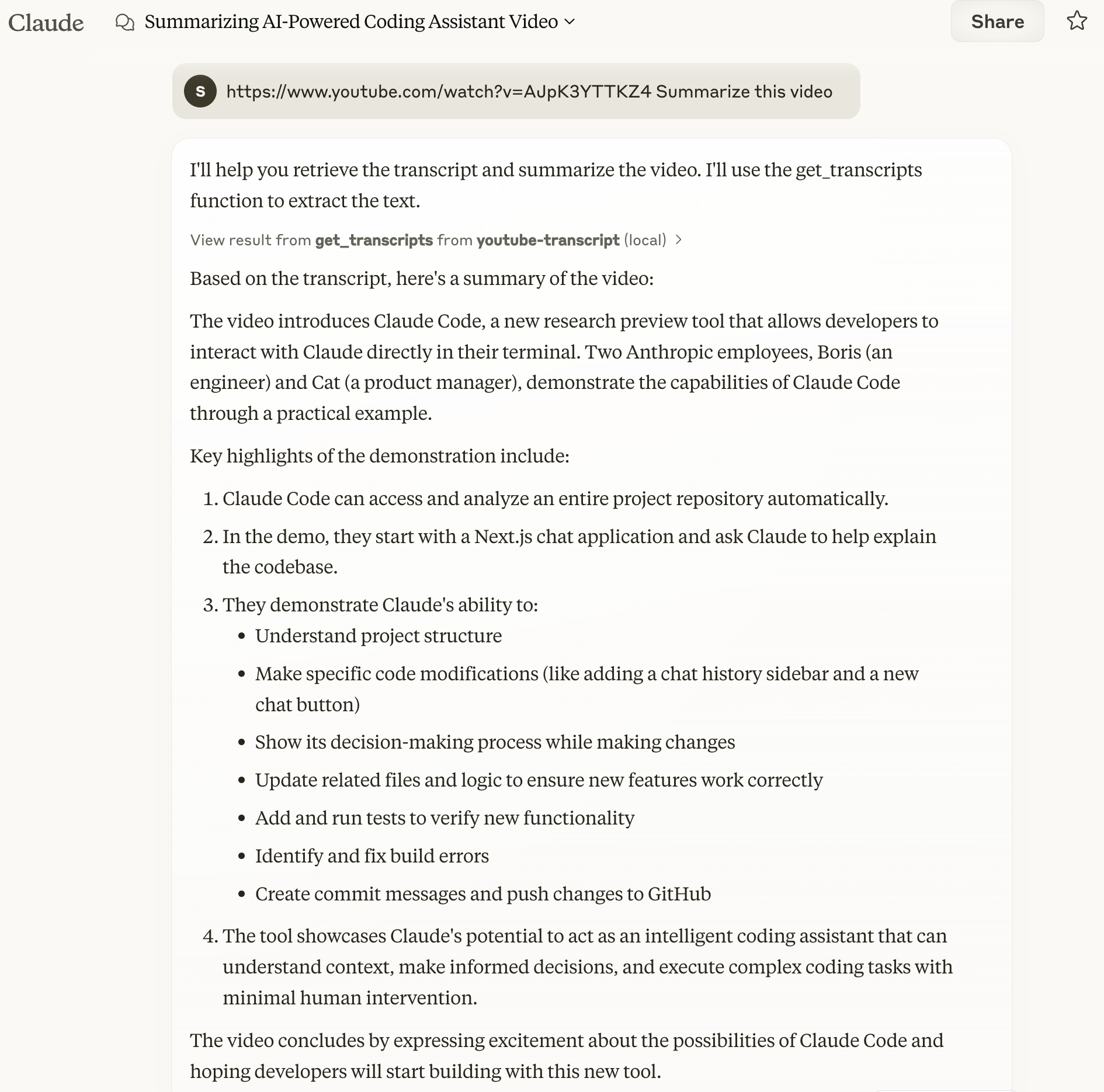
- Teste com um comando simples:
https://www.youtube.com/watch?v=AJpK3YTTKZ4 Summarize this video
Exemplo de saída:
Com o MCP Inspector
# Clone and setup
git clone https://github.com/sinco-lab/mcp-youtube-transcript.git
cd mcp-youtube-transcript
npm install
npm run build

# Launch inspector
npx @modelcontextprotocol/inspector node "dist/index.js"

# Access http://localhost:6274 and try these commands:
# 1. List Tools: clink `List Tools`
# 2. Test get_transcripts with:
#    url: "https://www.youtube.com/watch?v=AJpK3YTTKZ4"
#    lang: "en" (optional)
#    enableParagraphs: false (optional)
Solução de Problemas e Manutenção
Verificando os Logs do Claude
Para monitorar os logs do Claude, você pode usar o seguinte comando:
tail -n 20 -f ~/Library/Logs/Claude/mcp*.log
Isso exibirá as últimas 20 linhas do arquivo de log e continuará mostrando novas entradas conforme forem adicionadas.
Nota: O aplicativo Claude prefixa automaticamente os arquivos de log do servidor MCP com
mcp-server-. Por exemplo, os logs do nosso servidor serão gravados emmcp-server-youtube-transcript.log.
Limpando o Cache do npx
Se você encontrar problemas relacionados ao cache do npx, pode limpá-lo manualmente usando:
rm -rf ~/.npm/_npx
Isso removerá os pacotes em cache e permitirá que você comece do zero.
Referência da API
get_transcripts
Busca transcrições de vídeos do YouTube.
Parâmetros:
url(string, obrigatório): URL ou ID do vídeo do YouTubelang(string, opcional): Código do idioma (padrão: "en")enableParagraphs(boolean, opcional): Ativar modo de parágrafo (padrão: false)
Formato de Resposta:
{
  "content": [{
    "type": "text",
    "text": "Video title and transcript content",
    "metadata": {
      "videoId": "video_id",
      "title": "video_title",
      "language": "transcript_language",
      "timestamp": "processing_time",
      "charCount": "character_count",
      "transcriptCount": "number_of_transcripts",
      "totalDuration": "total_duration",
      "paragraphsEnabled": "paragraph_mode_status"
    }
  }]
}
Desenvolvimento
Estrutura do Projeto
├── src/
│ ├── index.ts            # Server entry point
│ ├── youtube.ts          # YouTube transcript fetching logic
├── dist/                 # Compiled output
└── package.json
Componentes Principais
YouTubeTranscriptFetcher: Funcionalidade principal de busca de transcriçõesYouTubeUtils: Processamento de texto e utilitários
Recursos e Capacidades
-
Tratamento de Erros:
- URLs/IDs inválidos
- Transcrições indisponíveis
- Disponibilidade de idioma
- Erros de rede
- Limitação de taxa
-
Processamento de Texto:
- Decodificação de entidades HTML
- Normalização de pontuação
- Normalização de espaços
- Detecção inteligente de parágrafos
Contribuindo
Recebemos contribuições com prazer! Sinta-se à vontade para enviar issues e pull requests.
Licença
Este projeto é licenciado sob a Licença MIT - consulte o arquivo LICENSE para obter detalhes.