esp-mcp
Um servidor MCP para fluxos de trabalho ESP-IDF, permitindo compilações de projetos, gravação de firmware e resolução automatizada de problemas a partir de logs de compilação.
Documentação
Objetivo
O objetivo deste MCP é:
- Consolidar comandos do ESP-IDF e projetos relacionados em um só lugar.
- Simplificar a introdução usando apenas comunicação via LLM.
Como contribuir com o projeto
Basta encontrar um comando que esteja faltando neste MCP e criar um PR para ele!
Se você quiser que alguém ajude com esta implementação, basta abrir uma issue.
Aviso
Este projeto é atualmente um Prova de Conceito (PoC) para um servidor MCP adaptado para fluxos de trabalho do ESP-IDF.
Capacidades Atuais:
Recursos Principais:
run_esp_idf_install: Instalar dependências e toolchain do ESP-IDF viainstall.sh.create_esp_project: Criar um novo projeto ESP-IDF.setup_project_esp_target: Definir o chip alvo para projetos ESP-IDF (esp32, esp32c3, esp32s3, etc.).build_esp_project: Compilar projetos ESP-IDF com suporte a build incremental.list_esp_serial_ports: Listar portas seriais disponíveis para dispositivos ESP.flash_esp_project: Gravar firmware compilado em dispositivos ESP conectados.run_pytest: Executar testes pytest com suporte a pytest-embedded para projetos ESP-IDF.
Recursos Adicionais:
- Gerenciamento flexível de caminho do ESP-IDF: suporta versões do ESP-IDF por projeto via parâmetro
idf_path. - Gerenciamento de configuração do SDK: suporta arquivos
sdkconfig_defaultspersonalizados para configuração de build (vários arquivos podem ser especificados separados por ponto e vírgula). - Rastreamento de tempo de build para monitoramento de desempenho.
- Especificação opcional de porta para operações de gravação.
- Inclui suporte experimental para correção automática de problemas com base em logs de build.
Visão e Trabalho Futuro: A visão de longo prazo é expandir este MCP para um kit de ferramentas abrangente para interagir com dispositivos embarcados, potencialmente integrando-se a plataformas de automação residencial e simplificando o acesso à documentação do ESP-IDF e tecnologias relacionadas.
Imaginamos recursos como:
- Suporte mais amplo a comandos do ESP-IDF (por exemplo, interação com
monitor,menuconfigse viável). - Gerenciamento de dispositivos e recuperação de informações.
- Integração com outras ferramentas e plataformas de desenvolvimento embarcado.
Suas ideias e contribuições são bem-vindas! Sinta-se à vontade para discuti-las abrindo uma issue.
Instalação
Primeiro, clone este repositório do MCP:
git clone git@github.com:horw/esp-mcp.git
Em seguida, configure-o no seu chatbot.
O trecho JSON abaixo é um exemplo de como você pode configurar este servidor esp-mcp dentro de um chatbot ou sistema de agente que suporte o Model Context Protocol (MCP). As etapas exatas de configuração e o formato podem variar dependendo do sistema de chatbot específico que você está usando. Consulte a documentação do seu chatbot para obter detalhes sobre como integrar servidores MCP.
{
    "mcpServers": {
        "esp-run": { // "esp-run" is an arbitrary name you can assign to this server configuration.
            "command": "<path_to_uv_or_python_executable>",
            "args": [
                "--directory",
                "<path_to_cloned_esp-mcp_repository>", // e.g., /path/to/your/cloned/esp-mcp
                "run",
                "main.py" // If using python directly, this might be just "main.py" and `command` would be your python interpreter
            ],
            "env": {
                "IDF_PATH": "<path_to_your_esp-idf_directory>" // e.g., ~/esp/esp-idf or C:\\Espressif\\frameworks\\esp-idf
            }
        }
    }
}
Algumas notas sobre a configuração:
command: Este deve ser o caminho completo para o seu executáveluvse você estiver usando-o, ou o seu interpretador Python (por exemplo,/usr/bin/python3ouC:\\Python39\\python.exe) se você planeja executarmain.pydiretamente.args:- O primeiro argumento para
--directorydeve ser o caminho absoluto para onde você clonou o repositórioesp-mcp. - Se você estiver usando
uv, os argumentosrun main.pysão apropriados. Se você estiver usando Python diretamente, pode precisar apenas demain.pyna listaargs, e garantir que seucommandaponte para o executável Python.
- O primeiro argumento para
IDF_PATH: (Opcional) Esta variável de ambiente pode apontar para o diretório raiz da sua instalação do ESP-IDF. O ESP-IDF é o framework oficial de desenvolvimento IoT da Espressif. Se você não o instalou, consulte a documentação oficial do ESP-IDF para instruções de instalação. Nota: Todas as ferramentas suportam um parâmetroidf_pathque pode ser especificado manualmente ao chamar a ferramenta, permitindo que você use diferentes versões do ESP-IDF para diferentes projetos sem definir a variável de ambiente. Seidf_pathnão for fornecido, a ferramenta usará a variável de ambienteIDF_PATHse disponível.
Uso
Uma vez que o servidor esp-mcp esteja configurado e em execução, seu LLM ou chatbot pode interagir com ele usando as ferramentas definidas neste MCP. Por exemplo, você pode pedir ao seu chatbot para:
- "Instalar dependências do ESP-IDF para a instalação do ESP-IDF em
/path/to/esp-idf." - "Definir o chip alvo para esp32s3 para o projeto em
/path/to/my/esp-project." - "Compilar o projeto localizado em
/path/to/my/esp-projectusando oesp-mcp." - "Compilar o projeto com padrões de sdkconfig personalizados:
sdkconfig.defaults;sdkconfig.ci.release." - "Executar testes pytest para o projeto em
/path/to/my/esp-projectvisando esp32c3." - "Gravar o firmware no meu dispositivo ESP32 conectado para o projeto em
my_app."
O servidor MCP então executará os comandos ESP-IDF correspondentes (como idf.py build, idf.py set-target, idf.py flash, pytest) com base nas ferramentas implementadas em main.py.
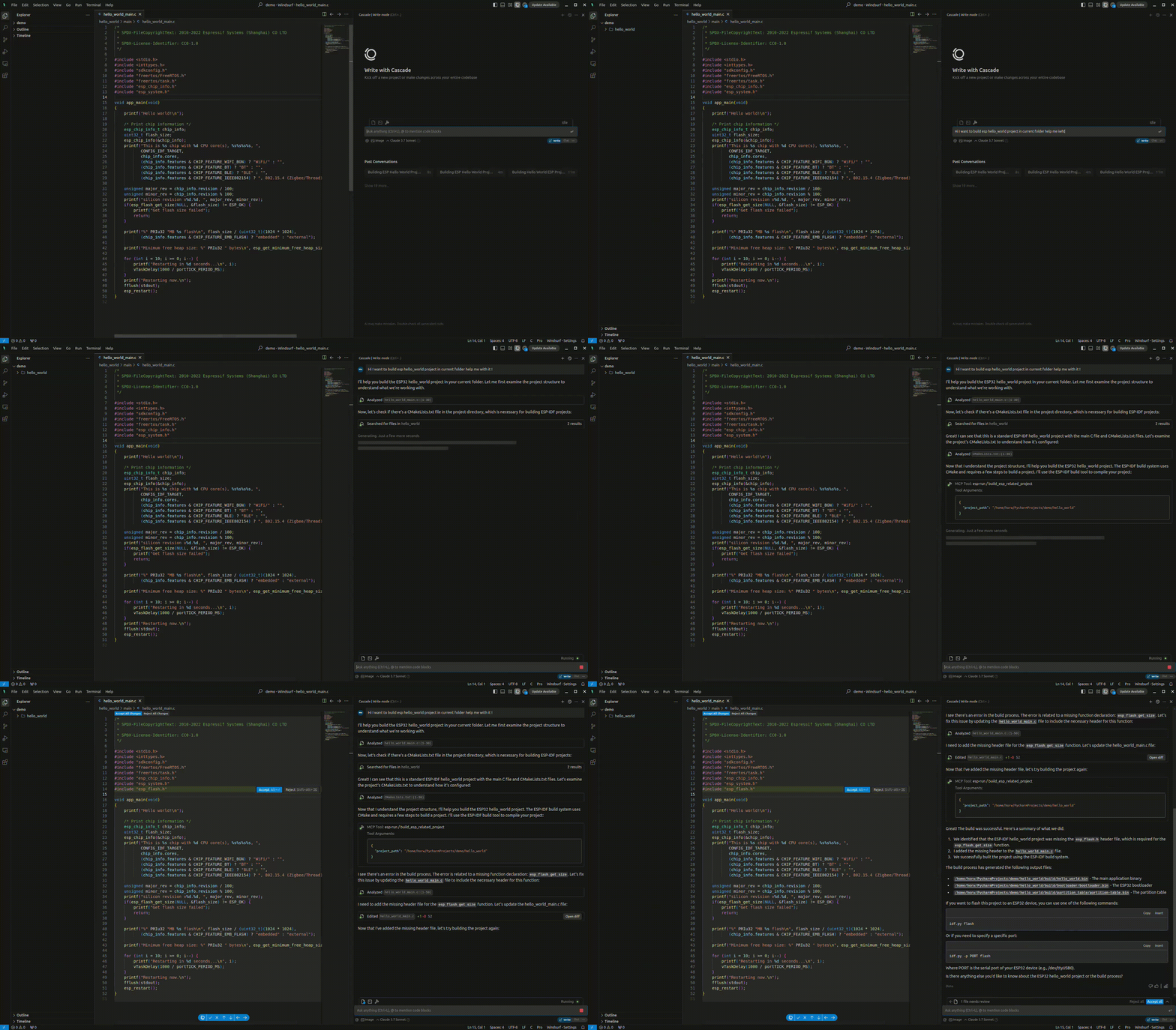
O result.gif abaixo mostra um exemplo de interação:
Exemplos
- Compilar e Gravar