Perfetto
Transforme linguagem natural em análise poderosa de traces do Perfetto. Explique rapidamente jank, diagnostique ANRs, identifique threads quentes de CPU, descubra contenção de locks e encontre vazamentos de memória.
Documentação

Perfetto MCP
Transforme linguagem natural em análise poderosa de traces do Perfetto
Um servidor Model Context Protocol (MCP) que transforma prompts em linguagem natural em análises focadas do Perfetto. Explique rapidamente jank, diagnostique ANRs, identifique threads quentes de CPU, descubra contenção de locks e encontre vazamentos de memória – tudo sem escrever SQL.
✨ Recursos
- Linguagem Natural → SQL: Faça perguntas em inglês simples, obtenha consultas precisas do Perfetto
- Detecção de ANR: Identifique e analise automaticamente eventos de Application Not Responding
- Análise de Performance: Perfil de CPU, detecção de jank de frames, detecção de vazamento de memória
- Contenção de Threads: Encontre gargalos de sincronização e contenção de locks
- Perfil de Binder: Analise performance de IPC e interações lentas do sistema
📋 Pré-requisitos
- Python 3.13+ (macOS/Homebrew):
brew install python@3.13 - uv (recomendado):
brew install uv
🚀 Começando
Cursor

Ou adicione a ~/.cursor/mcp.json (global) ou .cursor/mcp.json (projeto):
{
  "mcpServers": {
    "perfetto-mcp": {
      "command": "uvx",
      "args": ["perfetto-mcp"]
    }
  }
}
Claude Code
Execute este comando. Consulte a documentação do MCP do Claude Code para mais informações.
# Add to user scope
claude mcp add perfetto-mcp --scope user -- uvx perfetto-mcp
Ou edite ~/claude.json (macOS) ou %APPDATA%\Claude\claude.json (Windows):
{
  "mcpServers": {
    "perfetto-mcp": {
      "command": "uvx",
      "args": ["perfetto-mcp"]
    }
  }
}
VS Code

ou adicione a .vscode/mcp.json (projeto) ou execute o comando "MCP: Add Server":
{
  "mcpServers": {
    "perfetto-mcp": {
      "command": "uvx",
      "args": ["perfetto-mcp"]
    }
  }
}
Ative no modo Agent do GitHub Copilot Chat.
Codex
Edite ~/.codex/config.toml:
[mcp_servers.perfetto-mcp]
command = "uvx"
args = ["perfetto-mcp"]
Opcional: Use um Binário Local trace_processor_shell
Se o seu ambiente de rede bloquear downloads, defina
PERFETTO_MCP_TRACE_PROCESSOR_BIN_PATH para um caminho absoluto de um binário
local trace_processor_shell.
Quando esta variável de ambiente estiver definida, perfetto-mcp usa esse binário diretamente.
Quando não estiver definida, o comportamento padrão do Python perfetto permanece inalterado.
Exemplo (mcp.json):
{
  "mcpServers": {
    "perfetto-mcp": {
      "command": "uvx",
      "args": ["perfetto-mcp"],
      "env": {
        "PERFETTO_MCP_TRACE_PROCESSOR_BIN_PATH": "D:/tools/perfetto/trace_processor_shell.exe"
      }
    }
  }
}
Exemplo (~/.codex/config.toml):
[mcp_servers.perfetto-mcp]
command = "uvx"
args = ["perfetto-mcp"]
[mcp_servers.perfetto-mcp.env]
PERFETTO_MCP_TRACE_PROCESSOR_BIN_PATH = "D:/tools/perfetto/trace_processor_shell.exe"
Instalação Local (servidor de desenvolvimento)
cd perfetto-mcp-server
uv sync
uv run mcp dev src/perfetto_mcp/dev.py
Local MCP
{
  "mcpServers": {
    "perfetto-mcp-local": {
      "command": "uv",
      "args": [
        "--directory",
        "/path/to/git/repo/perfetto-mcp",
        "run",
        "-m",
        "perfetto_mcp"
      ],
      "env": { "PYTHONPATH": "src" }
    }
  }
}
Usando pip
pip3 install perfetto-mcp
python3 -m perfetto_mcp
📖 Como Usar
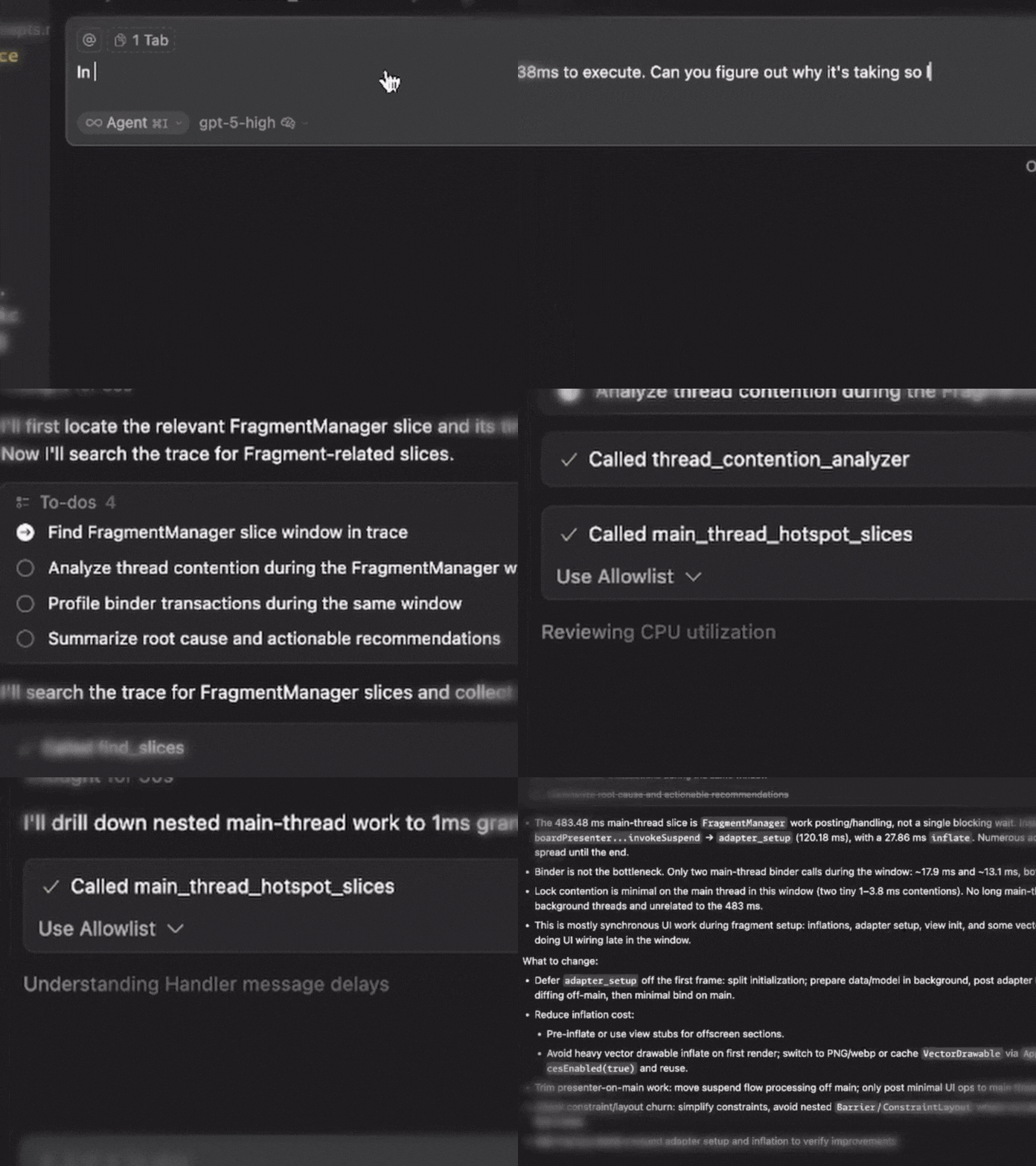
Exemplo de prompt inicial:
No trace do perfetto, vejo que o FragmentManager está levando 438ms para executar. Você consegue descobrir por que está demorando tanto?
Parâmetros Obrigatórios
Cada ferramenta precisa destas duas entradas:
| Parâmetro | Descrição | Exemplo |
|---|---|---|
| trace_path | Caminho absoluto para o seu trace do Perfetto | /path/to/trace.perfetto-trace |
| process_name | Nome do processo/aplicativo alvo | com.example.app |
Nos Seus Prompts
Seja explícito sobre o trace e o processo, prefixe seu prompt com:
"Use o trace do perfetto /absolute/path/to/trace.perfetto-trace para o processo com.example.app"
Filtros Opcionais
Muitas ferramentas suportam filtragem adicional (mas deixe seu LLM cuidar disso):
- time_range:
{start_ms: 10000, end_ms: 25000} - Limiares específicos da ferramenta:
min_block_ms,jank_threshold_ms,limit
🛠️ Ferramentas Disponíveis
🔎 Exploração e Descoberta
| Ferramenta | Finalidade | Exemplo de Prompt |
|---|---|---|
find_slices | Examine nomes de slices e localize caminhos quentes | "Encontre nomes de slices contendo 'Choreographer' e mostre os principais exemplos" |
execute_sql_query | Execute PerfettoSQL personalizado para análise avançada | "Execute SQL personalizado para correlacionar threads e frames nos primeiros 30s" |
🚨 Análise de ANR
Nota: Útil se o trace gravado contiver ANR
| Ferramenta | Finalidade | Exemplo de Prompt |
|---|---|---|
detect_anrs | Encontre eventos de ANR com classificação de severidade | "Detecte ANRs nos primeiros 10s e resuma a severidade" |
anr_root_cause_analyzer | Análise aprofundada das causas de ANR com probabilidade classificada | "Analise a causa raiz do ANR em torno de 20.000 ms e classifique as causas prováveis" |
🎯 Perfil de Performance
| Ferramenta | Finalidade | Exemplo de Prompt |
|---|---|---|
cpu_utilization_profiler | Uso de CPU e agendamento em nível de thread | "Perfile o uso de CPU por thread e sinalize as threads mais quentes" |
main_thread_hotspot_slices | Encontre as operações de thread principal de maior duração | "Liste hotspots da thread principal >50 ms durante 10s–25s" |
📱 Performance de UI
| Ferramenta | Finalidade | Exemplo de Prompt |
|---|---|---|
detect_jank_frames | Identifique frames que perdem prazos | "Encontre frames com jank acima de 16,67 ms e liste os 20 piores" |
frame_performance_summary | Métricas gerais de saúde dos frames | "Resuma a performance dos frames e relate a taxa de jank e o tempo de CPU P99" |
🔒 Concorrência e IPC
| Ferramenta | Finalidade | Exemplo de Prompt |
|---|---|---|
thread_contention_analyzer | Encontre gargalos de sincronização | "Encontre contenção de locks entre 15s–30s e mostre as piores esperas" |
binder_transaction_profiler | Analise a performance do IPC do Binder | "Perfile transações Binder lentas e agrupe por processo servidor" |
💾 Análise de Memória
| Ferramenta | Finalidade | Exemplo de Prompt |
|---|---|---|
memory_leak_detector | Encontre padrões de crescimento sustentado de memória | "Detecte sinais de vazamento de memória nos últimos 60s" |
heap_dominator_tree_analyzer | Identifique classes que consomem muita memória | "Analise classes dominadoras do heap e liste as principais" |
Formato de Saída
Todas as ferramentas retornam JSON estruturado com:
- Resumo: Descobertas de alto nível
- Detalhes: Resultados específicos da ferramenta
- Metadados: Contexto de execução e quaisquer fallbacks usados
📚 Recursos
- Trace Processor Python API - Interface Python do Perfetto
- Perfetto SQL Syntax - Referência SQL para consultas personalizadas
📄 Licença
Licença Apache 2.0. Consulte LICENSE para detalhes.