Fused MCP
Um servidor MCP baseado em Python para cientistas de dados executarem código Python com um cliente Claude.
Documentação
Fused MCP Agents: Configurando Servidores MCP para Dados



Documentação 🌪️ Leia o anúncio 🔥 Entre no Discord
Os servidores MCP permitem que LLMs como o Claude façam requisições HTTP, conectando-os a APIs e código executável. Construímos este repositório para nós e para qualquer pessoa que trabalhe com dados, para que seja fácil passar qualquer código Python diretamente para o seu aplicativo Claude desktop.
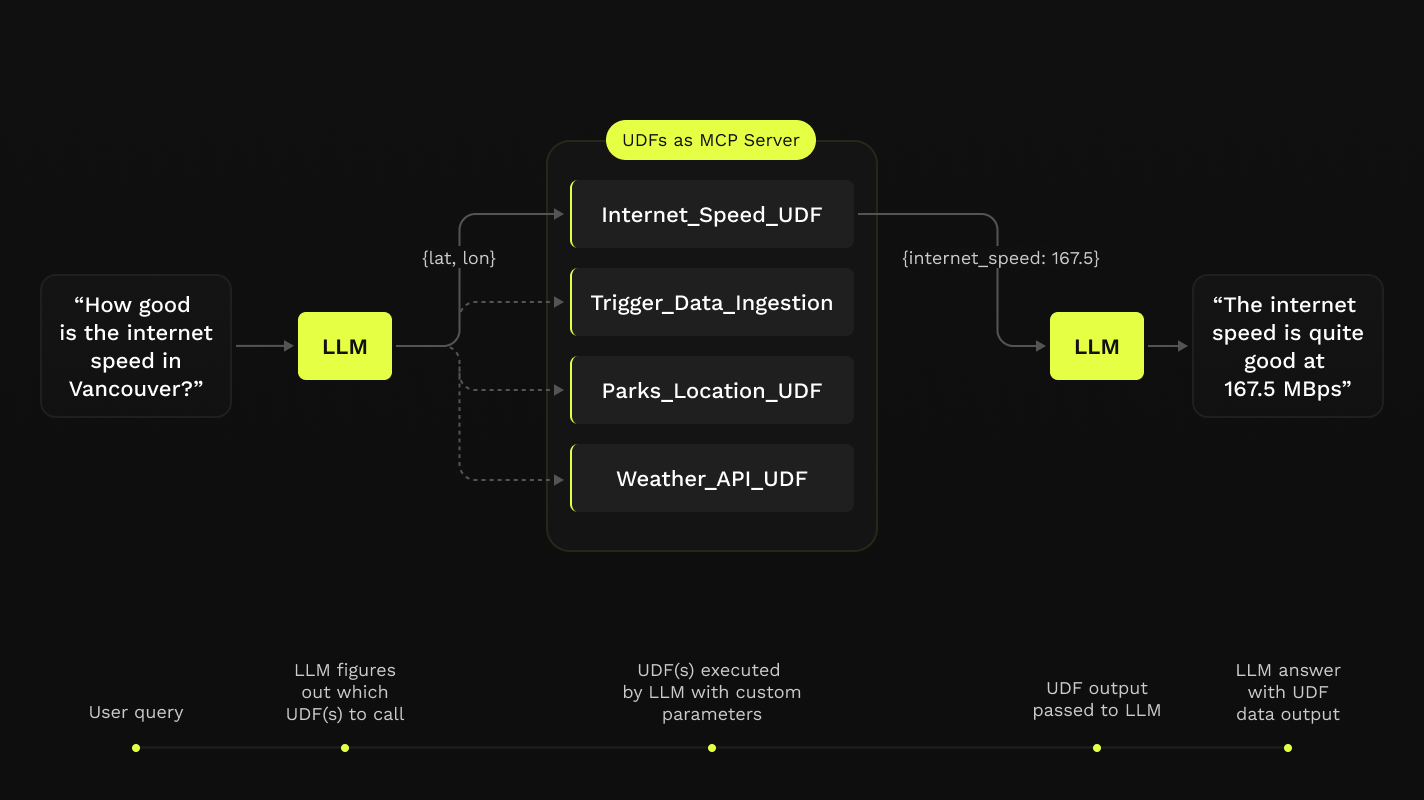
Este repositório oferece um fluxo de trabalho simples em notebook, passo a passo, para configurar Servidores MCP com o aplicativo Claude Desktop, tudo em Python, construído sobre as Funções Definidas pelo Usuário (UDFs) do Fused.

Requisitos
- Python 3.11
- Última versão do aplicativo Claude Desktop instalada (macOS e Windows)
Se você estiver no Linux, o aplicativo desktop não está disponível, então criamos um cliente simples que você pode usar para executá-lo localmente também!
Você não precisa de uma conta Fused para fazer nada disso! Tudo isso será executado na sua máquina local.
Instalação
-
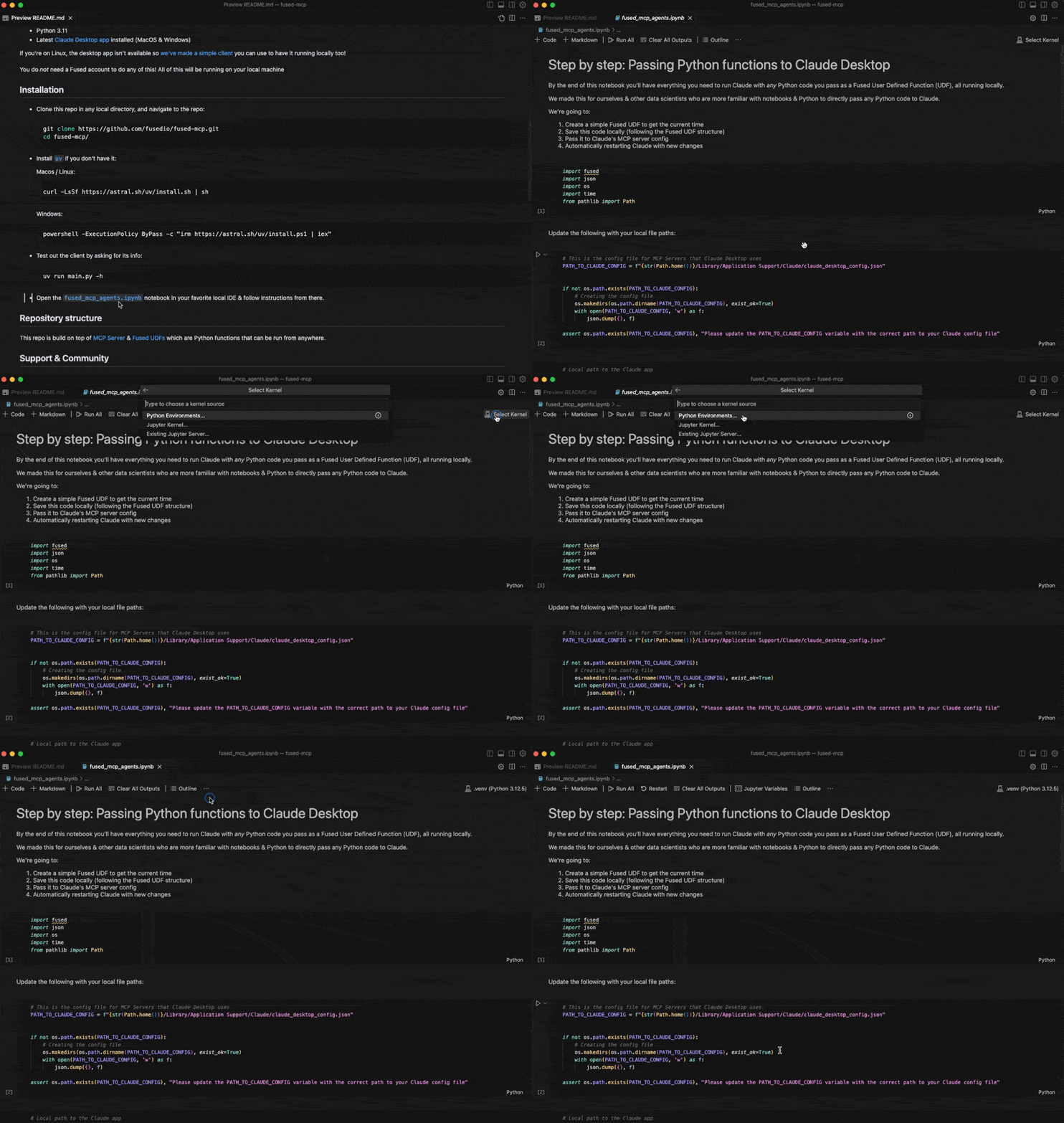
Clone este repositório em qualquer diretório local e navegue até o repositório:
git clone https://github.com/fusedio/fused-mcp.git cd fused-mcp/ -
Instale o
uvse você não o tiver:macOS / Linux:
curl -LsSf https://astral.sh/uv/install.sh | shWindows:
powershell -ExecutionPolicy ByPass -c "irm https://astral.sh/uv/install.ps1 | iex" -
Teste o cliente perguntando por suas informações:
uv run main.py -h -
Comece seguindo nosso notebook de introdução
fused_mcp_agents.ipynbno seu IDE local favorito para configurar tudo e depois avance para o notebook mais avançado para criar seus próprios Agentes e funções
Estrutura do repositório
Este repositório é construído sobre o Servidor MCP e as UDFs do Fused, que são funções Python que podem ser executadas de qualquer lugar.
Suporte e Comunidade
Sinta-se à vontade para entrar no nosso servidor Discord se precisar de ajuda para desbloquear algo!
Aqui estão alguns passos comuns para depurar a configuração:
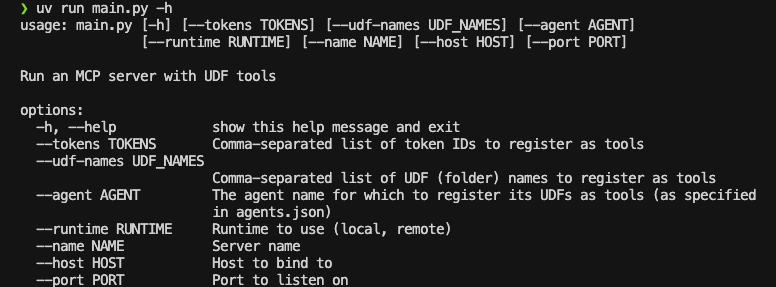
- Executar
uv run main.py -hdeve retornar algo como isto:
- Você pode precisar passar caminhos globais para algumas funções ao
Claude_Desktop_Config.json. Por exemplo, por padrão passamos apenasuv:
{
    "mcpServers": {
        "qgis": {
            "command": "uv",
            "args": ["..."]
        }

    }
}
Mas você pode precisar passar o caminho completo para uv, que você pode simplesmente passar para common.generate_local_mcp_config no notebook:
# in fused_mcp_agents.ipynb
import shutil

common.generate_local_mcp_config(
    config_path=PATH_TO_CLAUDE_CONFIG,
    agents_list = ["get_current_time"],
    repo_path= WORKING_DIR,
    uv_path=shutil.which('uv'),
)
O que criaria uma configuração como esta:
{
    "mcpServers": {
        "qgis": {
            "command": "/Users/<YOUR_USERNAME>/.local/bin/uv",
            "args": ["..."]
        }

    }
}
- Se o Claude rodar sem mostrar ferramentas conectadas, dê uma olhada na Documentação MCP para solucionar problemas da configuração do Claude Desktop
Contribua
Sinta-se à vontade para abrir PRs para adicionar suas próprias UDFs ao udfs/ para que outras pessoas também possam experimentá-las localmente!
Usando um cliente Claude local (sem o aplicativo Claude Desktop)
Se você não conseguir instalar o aplicativo Claude Desktop (por exemplo, no Linux), fornecemos um pequeno exemplo de interface de cliente local para usar o Claude com o servidor MCP configurado neste repositório:
NOTA: Você precisará de uma chave de API para o Claude aqui, pois não usará o aplicativo Desktop
-
Crie uma Conta no Console da Anthropic
-
Crie uma Chave de API da Anthropic
-
Crie um
.env:touch .env -
Adicione sua chave como
ANTHROPIC_API_KEYdentro do.env:# .env ANTHROPIC_API_KEY = "your-key-here" -
Inicie o servidor MCP:
uv run main.py --agent get_current_time -
Em outra sessão de terminal, inicie o cliente local, apontando para o endereço do servidor:
uv run client.py http://localhost:8080/sse