secretctl
Gerenciador de segredos seguro para IA - injeta credenciais como variáveis de ambiente, a IA nunca vê texto simples
Documentação
secretctl


Pare de colar chaves de API no chat de IA.
Quando você cola sk-proj-xxx no Claude Code, esse segredo agora está no seu histórico de conversa, nos logs da Anthropic e potencialmente exposto a ataques de injeção de prompt.
O secretctl resolve isso. Sua IA recebe resultados de comandos, nunca valores secretos.





O Problema
Todos os dias, desenvolvedores colam segredos em assistentes de codificação com IA:
You: "Help me debug this AWS error"
You: "Here's my config: AWS_ACCESS_KEY_ID=AKIA..."
Isso é um incidente de segurança prestes a acontecer.
- Segredos no histórico de conversa
- Segredos em logs na nuvem
- Segredos expostos a injeção de prompt
- Sem possibilidade de rotacionar ou revogar
A Solução
O secretctl injeta segredos como variáveis de ambiente. Sua IA executa comandos e vê resultados, mas nunca vê as credenciais reais.
- Binário único — Sem servidores, sem configuração, sem assinatura
- Local-first — Segredos nunca saem da sua máquina
- Integração MCP — Funciona com Claude Code de forma nativa
- Defesa em profundidade — AES-256-GCM + Argon2id + sanitização de saída
# That's it. You're done.
secretctl init
secretctl set API_KEY
secretctl get API_KEY
Por que Local-First e Seguro para IA?
-
Seus segredos, sua máquina — Sem sincronização em nuvem, sem servidores de terceiros, sem taxas de assinatura. Suas credenciais permanecem no seu dispositivo, ponto final.
-
Agentes de IA não precisam de texto puro — Quando o Claude executa
aws s3 ls, ele precisa do resultado, não das suas chaves AWS. O secretctl injeta credenciais diretamente nos comandos — a IA nunca as vê. -
Defesa em profundidade — Criptografia AES-256-GCM em repouso, derivação de chave Argon2id, controles de política MCP e sanitização automática de saída. Múltiplas camadas, não um único ponto de falha.
flowchart LR
    subgraph Flow["How It Works"]
        AI["🤖 AI Agent<br/>(Claude)"]
        MCP["🔐 secretctl<br/>MCP Server"]
        CMD["⚡ Command<br/>(aws, etc)"]

        AI -->|"1. Run aws s3 ls<br/>with aws/*"| MCP
        MCP -->|"2. Inject secrets<br/>as env vars"| CMD
        CMD -->|"3. Execute"| MCP
        MCP -->|"4. Sanitized output<br/>[REDACTED]"| AI
    end

    AI ~~~ NOTE["✓ Gets command results<br/>✗ Never sees secret values"]
Instalação
A partir do código-fonte
# Requires Go 1.24+
git clone https://github.com/forest6511/secretctl.git
cd secretctl
go build -o secretctl ./cmd/secretctl
Lançamentos binários
Baixe o lançamento mais recente em GitHub Releases.
CLI:
secretctl-linux-amd64— Linux (x86_64)secretctl-linux-arm64— Linux (ARM64)secretctl-darwin-amd64— macOS (Intel)secretctl-darwin-arm64— macOS (Apple Silicon)secretctl-windows-amd64.exe— Windows (x86_64)
Aplicativo Desktop:
secretctl-desktop-macos— macOS (Universal)secretctl-desktop-linux— Linux (AppImage)secretctl-desktop-windows.exe— Windows (Instalador)
Verificar downloads
# Download checksums.txt and verify
sha256sum -c checksums.txt
macOS: Aviso do Gatekeeper
O macOS pode exibir um aviso de segurança para aplicativos não assinados. Para permitir:
# Option 1: Remove quarantine attribute
xattr -d com.apple.quarantine secretctl-darwin-arm64

# Option 2: Right-click the app and select "Open"
Windows: Aviso do SmartScreen
O SmartScreen do Windows pode exibir um aviso. Para permitir:
- Clique em "Mais informações"
- Clique em "Executar mesmo assim"
Início Rápido
1. Inicialize seu cofre
secretctl init
# Enter your master password (min 8 characters)
2. Armazene um segredo
echo "sk-your-api-key" | secretctl set OPENAI_API_KEY
3. Recupere um segredo
secretctl get OPENAI_API_KEY
4. Liste todos os segredos
secretctl list
5. Exclua um segredo
secretctl delete OPENAI_API_KEY
Recursos
Núcleo
- Criptografia AES-256-GCM — Criptografia autenticada padrão da indústria
- Derivação de chave Argon2id — Proteção com uso intensivo de memória contra força bruta
- Armazenamento SQLite — Confiável, portátil, sem dependências externas
- Registro de auditoria — Logs encadeados com HMAC para detecção de adulteração
- Seguro para IA por design — A integração MCP nunca expõe segredos em texto puro a agentes de IA
Suporte a metadados
# Add notes and tags to secrets
secretctl set DB_PASSWORD --notes="Production database" --tags="prod,db"

# Add URL reference
secretctl set API_KEY --url="https://console.example.com/api-keys"

# Set expiration
secretctl set TEMP_TOKEN --expires="30d"

# Filter by tag
secretctl list --tag=prod

# Show expiring secrets
secretctl list --expiring=7d

# View full metadata
secretctl get API_KEY --show-metadata
Executar comandos com segredos
Injete segredos como variáveis de ambiente sem expô-los no histórico do seu shell:
# Run a command with a single secret
secretctl run -k API_KEY -- curl -H "Authorization: Bearer $API_KEY" https://api.example.com

# Use wildcards to inject multiple secrets
# Pattern aws/* matches aws/access_key, aws/secret_key (single level)
secretctl run -k "aws/*" -- aws s3 ls

# Output is automatically sanitized to prevent secret leakage
secretctl run -k DB_PASSWORD -- ./deploy.sh
# If deploy.sh prints DB_PASSWORD, it appears as [REDACTED:DB_PASSWORD]

# With timeout and prefix
secretctl run -k API_KEY --timeout=30s --env-prefix=APP_ -- ./app
Nota: A sanitização de saída usa correspondência exata de strings. Segredos codificados (Base64, hex) ou correspondências parciais não são detectados.
Exportar segredos
Exporte segredos para uso com Docker, CI/CD ou outras ferramentas:
# Export as .env file (default)
secretctl export -o .env

# Export specific keys as JSON
secretctl export --format=json -k "db/*" -o config.json

# Export to stdout for piping
secretctl export --format=json | jq '.DB_HOST'
Importar segredos
Importe segredos de arquivos .env ou JSON existentes:
# Import from .env file
secretctl import .env

# Import from JSON file
secretctl import config.json

# Preview what would be imported (dry run)
secretctl import .env --dry-run

# Handle conflicts: skip, overwrite, or error
secretctl import .env --on-conflict=skip
secretctl import .env --on-conflict=overwrite
Gerar senhas
Crie senhas aleatórias seguras:
# Generate a 24-character password (default)
secretctl generate

# Generate a 32-character password without symbols
secretctl generate -l 32 --no-symbols

# Generate multiple passwords
secretctl generate -n 5
Backup e restauração
Crie backups criptografados e restaure seu cofre:
# Create encrypted backup
secretctl backup -o vault-backup.enc

# Create backup with audit logs
secretctl backup -o full-backup.enc --with-audit

# Verify backup integrity
secretctl restore vault-backup.enc --verify-only

# Restore to a new vault (dry run first)
secretctl restore vault-backup.enc --dry-run

# Restore with conflict handling
secretctl restore vault-backup.enc --on-conflict=skip    # Skip existing keys
secretctl restore vault-backup.enc --on-conflict=overwrite  # Overwrite existing

# Use key file instead of password (for automation)
secretctl backup -o backup.enc --key-file=backup.key
secretctl restore backup.enc --key-file=backup.key
Segurança: Os backups são criptografados com AES-256-GCM usando um salt novo. A verificação de integridade HMAC-SHA256 detecta qualquer adulteração.
Registro de auditoria
# View recent audit events
secretctl audit list --limit=50

# Verify log integrity
secretctl audit verify

# Export audit logs
secretctl audit export --format=csv -o audit.csv

# Prune old logs (preview first)
secretctl audit prune --older-than=12m --dry-run
Acesso seguro para IA
O secretctl implementa Acesso Seguro para IA — um princípio de segurança em que agentes de IA nunca recebem segredos em texto puro.
Diferente de gerenciadores de segredos tradicionais que podem expor credenciais diretamente à IA, o secretctl usa uma abordagem fundamentalmente diferente:
flowchart LR
    subgraph "Traditional Approach ❌"
        AI1[AI Agent] -->|"get secret"| SM1[Secret Manager]
        SM1 -->|"plaintext: sk-xxx..."| AI1
    end

    subgraph "AI-Safe Access ✅"
        AI2[AI Agent] -->|"run command"| SM2[secretctl]
        SM2 -->|"inject env vars"| CMD[Command]
        CMD -->|"sanitized output"| SM2
        SM2 -->|"[REDACTED]"| AI2
    end
Isso segue a filosofia "Acesso sem Exposição" usada por líderes da indústria como 1Password e HashiCorp Vault.
Integração com IA (Servidor MCP)
O secretctl inclui um servidor MCP para integração segura com assistentes de codificação com IA, como o Claude Code:
# Start MCP server (requires SECRETCTL_PASSWORD)
SECRETCTL_PASSWORD=your-password secretctl mcp-server
Ferramentas MCP disponíveis:
secret_list— Lista chaves de segredos com metadados (sem expor valores)secret_exists— Verifica se um segredo existe com metadadossecret_get_masked— Obtém valor mascarado (ex.:****WXYZ)secret_run— Executa comandos com segredos como variáveis de ambientesecret_list_fields— Lista nomes de campos para segredos com múltiplos campos (sem valores)secret_get_field— Obtém apenas valores de campos não sensíveissecret_run_with_bindings— Executa com vínculos de ambiente predefinidos
Configurar no Claude Code (~/.claude.json):
{
  "mcpServers": {
    "secretctl": {
      "command": "/path/to/secretctl",
      "args": ["mcp-server"],
      "env": {
        "SECRETCTL_PASSWORD": "your-master-password"
      }
    }
  }
}
Configuração de política (~/.secretctl/mcp-policy.yaml):
version: 1
default_action: deny
allowed_commands:
  - aws
  - gcloud
  - kubectl
Segurança: Agentes de IA nunca recebem segredos em texto puro. A ferramenta
secret_runinjeta segredos como variáveis de ambiente, e a saída é sanitizada automaticamente.
Aplicativo Desktop
O secretctl inclui um aplicativo desktop nativo construído com Wails v2:
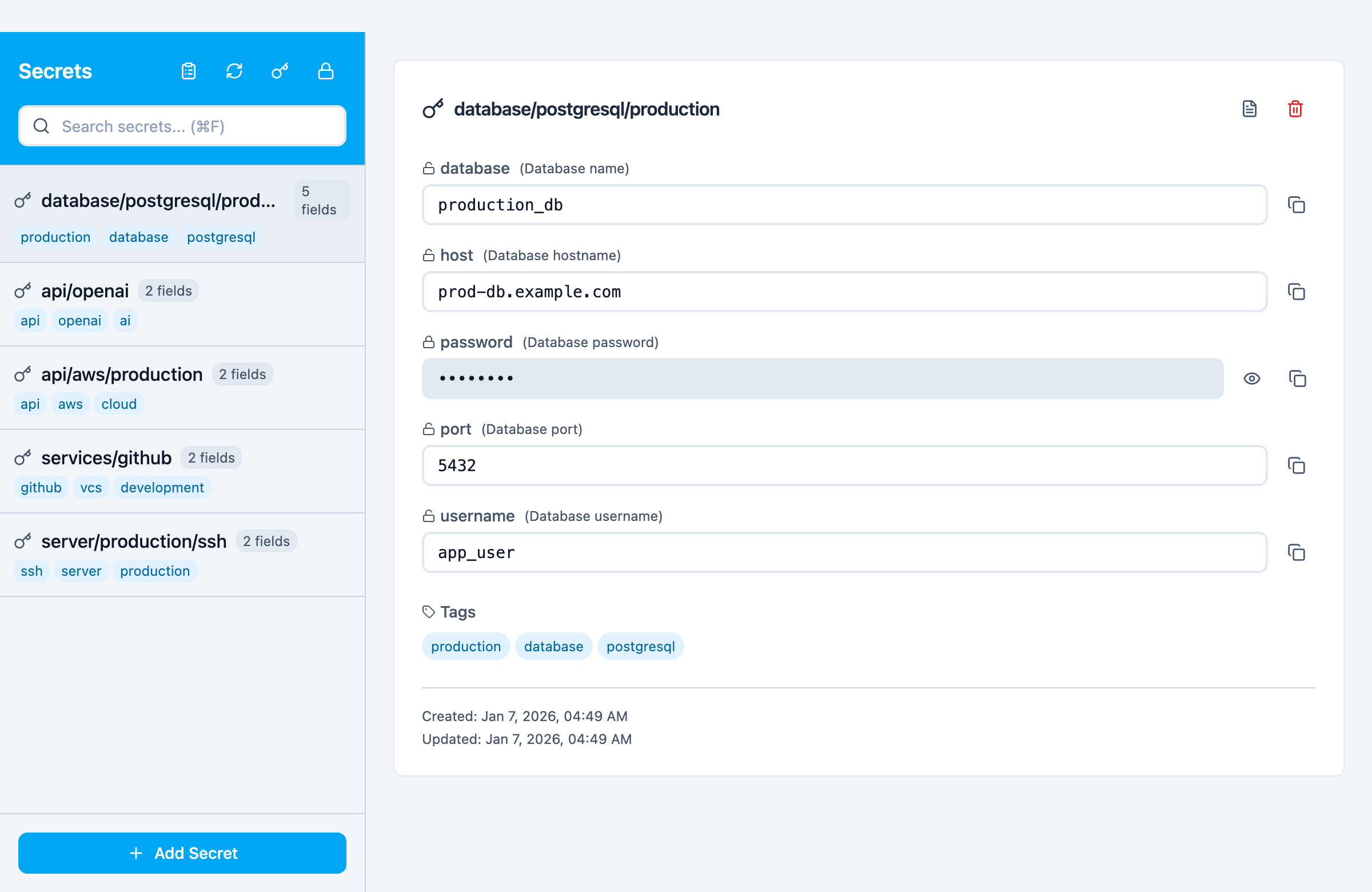
Aplicativo desktop mostrando segredos com múltiplos campos e modelos (Banco de Dados, Chave de API, Login, Chave SSH)
# Build the desktop app
cd desktop && wails build

# Or run in development mode
cd desktop && wails dev
Recursos:
- Aplicativo nativo para macOS/Windows/Linux
- Crie e desbloqueie cofres com senha mestra
- Operações CRUD completas de segredos (Criar, Ler, Atualizar, Excluir)
- Pesquise e filtre segredos por chave
- Copie valores de segredos para a área de transferência (com limpeza automática)
- Suporte a metadados (URL, tags, notas)
- Alternância de visibilidade de senha
- Bloqueio automático por tempo ocioso
- Visualizador de registro de auditoria — Veja e analise toda a atividade do cofre
- Filtre por ação, origem, chave e intervalo de datas
- Paginação para grandes volumes de logs
- Verificação de integridade da cadeia
- Exportação para formatos CSV/JSON
- Modal de detalhes da entrada de log
- Frontend moderno com React + TypeScript + Tailwind CSS
Desenvolvimento:
# Run E2E tests (Playwright)
cd desktop/frontend
npm run test:e2e

# Run with visible browser
npm run test:e2e:headed

# Run with Playwright UI
npm run test:e2e:ui
Segurança
O secretctl leva a segurança a sério:
- Design de conhecimento zero — Sua senha mestra nunca é armazenada ou transmitida
- Criptografia AES-256-GCM — Criptografia autenticada padrão da indústria
- Derivação de chave Argon2id — Proteção com uso intensivo de memória contra força bruta
- Permissões de arquivo seguras — Arquivos de cofre são criados com permissões 0600
- Sem acesso à rede — Operação completamente offline
- Logs à prova de adulteração — Cadeia HMAC detecta qualquer manipulação de logs
- Sanitização de saída — Redação automática de segredos na saída de comandos
Para relatar vulnerabilidades de segurança, consulte SECURITY.md.
Documentação
📚 Documentação completa — Introdução, guias e referência
- Introdução - Instalação e início rápido
- Guia da CLI - Uso da linha de comando
- Integração MCP - Integração com agentes de IA
- Aplicativo Desktop - Guia do aplicativo nativo
- Guia de contribuição
- Política de segurança
Licença
Apache License 2.0 — Consulte LICENSE para detalhes.
Feito com cuidado para desenvolvedores que valorizam simplicidade e segurança.