DreamFactory MCP
Um servidor MCP para integração com a API DreamFactory, permitindo gerenciar e acessar fontes de dados.
Documentação
DreamFactory MCP
Um servidor Model Context Protocol (MCP) para integração do DreamFactory com o Claude.
Visão Geral
O DreamFactory é uma plataforma segura e auto-hospedada de acesso a dados empresariais que fornece acesso governado a qualquer fonte de dados via API, conectando aplicações empresariais e LLMs locais com controle de acesso baseado em papéis e passagem de identidade.
Instalação da Desktop Extension (Somente Claude Desktop)
A maneira mais fácil de começar a usar o MCP Server do DreamFactory é acessando os lançamentos deste repositório e baixando o arquivo mais recente da Desktop Extension. As Desktop Extensions são um novo formato de arquivo criado pela Anthropic (a empresa por trás do Claude.ai). Após o download, clique duas vezes no arquivo DXT para iniciar a instalação. Observe que você precisará instalar o Claude Desktop antes de fazer isso. Após iniciar a instalação, você verá este aviso:
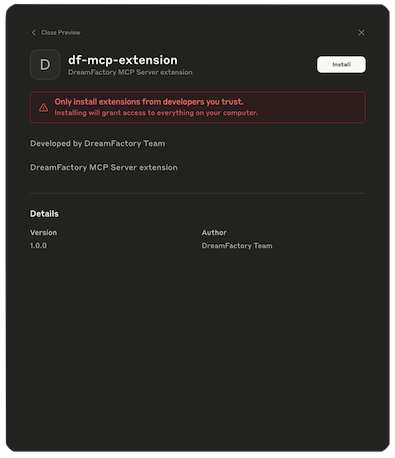
Clique no botão Install e você verá:
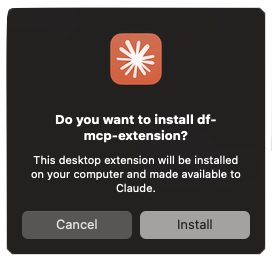
Clique em Install e, se tudo correr bem, você será solicitado a inserir uma chave de API do DreamFactory e a URL do serviço:
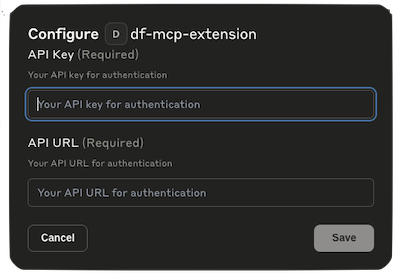
Se você não tiver essas informações disponíveis, basta clicar em Cancel. Você pode adicioná-las mais tarde clicando na aba Extensions dentro das Configurações e depois clicando em Configure:

Em qualquer caso, antes de usar o MCP Server do DreamFactory, você precisará habilitá-lo manualmente alternando o interruptor Disabled para Enabled:

Instalação Manual
-
Clone este repositório e instale as dependências:
cd df-mcp npm install -
Compile o projeto:
npm run build
Configurando o Claude Desktop
-
Instale o Claude Desktop a partir de https://claude.ai/download.
-
Abra o Claude Desktop e navegue até Configurações.
-
No menu Configurações, vá para a seção "Developer".
-
Clique em "Edit Config" para modificar a configuração do Claude.
-
Adicione a seguinte configuração para habilitar o servidor MCP do DreamFactory:
{ "mcpServers": { "add": { "command": "node", "args": [ "/Users/dreamfactory/Documents/df-mcp/build/index.js" ], "env": { "DREAMFACTORY_URL": "https://example.dreamfactory.com/api/v2/<service-name>", "DREAMFACTORY_API_KEY": "" } } } } -
Importante: Modifique o caminho no array
argspara corresponder ao seu caminho de instalação local, se diferente de/Users/dreamfactory/Documents/df-mcp/. -
Adicione a URL do DreamFactory e a chave de API às variáveis de ambiente
DREAMFACTORY_URLDREAMFACTORY_API_KEYconforme necessário. -
Salve a configuração e reinicie o Claude Desktop.
Nota Sobre Claude Desktop, NodeJS e NVM
O DreamFactory MCP requer Node 22.10.0 ou mais recente. Mesmo se você estiver executando Node 22.10 ou mais recente, pode encontrar um problema confuso se estiver usando NVM (Node Version Manager), o que dificulta a instalação. Às vezes, esses problemas são ainda mais complicados se você também estiver usando outras ferramentas de desenvolvimento, como o Laravel Herd, que fazem alterações adicionais nos caminhos do Node.
Se o log do servidor MCP indicar que a versão errada do Node está sendo usada pelo Claude Desktop, você pode facilmente forçá-lo a usar a versão desejada criando um script de shell que se pareça com isto:
#!/bin/zsh
source ~/.zshrc
exec /Applications/Herd/config/nvm/versions/node/v22.17.1/bin/node
Chame o script de node-for-claude.sh ou similar e coloque-o em /usr/local/bin. Em seguida, torne-o executável:
$ chmod +x node-for-claude.sh
Por fim, atualize o arquivo claude_desktop_config.json para apontar para este script:
{
  "mcpServers": {
        "df-mcp": {
            "command": "/usr/local/bin/node-for-claude.sh",
            "args": [
                "/Users/wjgilmore/Software/df-mcp/build/index.js"
            ],
            "env": {
               "DREAMFACTORY_URL": "<URL>",
                "DREAMFACTORY_API_KEY": "<API_KEY>"
            }
        }
  }
}
Uso
Uma vez configurado, o servidor MCP do DreamFactory estará disponível para o Claude Desktop. Você pode usar os recursos do DreamFactory através da interface do Claude.
Configuração Docker MCP para Claude Desktop
Construindo a Imagem Docker
docker build -t df-mcp .
Configurar Claude Desktop
Adicione esta configuração ao arquivo de configuração do Claude Desktop:
Localização:
- macOS: ~/Library/Application Support/Claude/claude_desktop_config.json
- Windows: %APPDATA%\Claude\claude_desktop_config.json
- Linux: ~/.config/Claude/claude_desktop_config.json
Configuração
{
  "mcpServers": {
    "dreamfactory-mcp": {
      "command": "docker",
      "args": [
        "run",
        "--rm",
        "-i",
        "--env", "DREAMFACTORY_URL=https://your-dreamfactory-instance.com/api/v2/<service-name>",
        "--env", "DREAMFACTORY_API_KEY=your-api-key-here",
        "dreamfactory-mcp:latest"
      ]
    }
  }
}
Reiniciar Claude Desktop
Após atualizar a configuração, reinicie o Claude Desktop para carregar o servidor MCP.
Testando o Contêiner Docker
Execute o script de teste incluído para validar a configuração do Docker:
./test-docker.sh
Isso verificará se o contêiner é construído corretamente, responde aos comandos MCP e se todas as ferramentas estão registradas adequadamente.
Desenvolvimento
- O código-fonte está localizado no diretório
src - Os arquivos compilados estão no diretório
build - Use
npm startpara executar o servidor compilado diretamente
Segurança
Encontrou um problema de segurança? Envie um e-mail para security@dreamfactory.com.