Gamedev All-in-One MCP
um servidor MCP de código aberto que unifica Roblox Studio, Unity, Unreal Engine e Blender em um único plano de controle de IA para fluxos de trabalho de desenvolvimento de jogos.
Documentação
🎮 Gamedev All-in-One MCP
Um Servidor. Quatro Engines. 67 Ferramentas. Zero Atrito.
O primeiro servidor MCP open-source que unifica Roblox Studio, Unity, Unreal Engine e Blender em um único painel de controle com IA.







Início Rápido · Recursos · Arquitetura · Inventário de Ferramentas · Painel · Contribuindo
"Hey Claude, create a red spinning cube in Unity, then replicate it in Roblox and Blender."
✨ Recursos
🔧 67 Ferramentas MCPEm 12 módulos — gerenciamento de cena, script, CRUD de instâncias, simulação de física por engine. 🌉 4 Conectores de EnginePontes com reconexão automática para Roblox (HTTP), Unity (TCP), Unreal (TCP) e Blender (TCP). 🤖 Console de IA IntegradoConverse com Claude, GPT-4o ou Gemini diretamente do painel — as ferramentas são executadas automaticamente. |
🖥️ Painel WebMonitoramento SSE em tempo real em ⚡ Motor de FísicaGravidade por engine, corpos rígidos, restrições, raycasting, simulação de força/impulso. 🔌 Compatibilidade UniversalFunciona com Claude Desktop, Cursor, Claude Code, OpenCode, VS Code Copilot e qualquer cliente MCP. |
🎯 Engines Suportadas

20 ferramentas Ponte HTTP Long-Poll Porta 3002Plugin Luau Incluído |

15 ferramentas Ponte TCP Socket Porta 7890C# EditorWindow |

15 ferramentas Ponte TCP Socket Porta 55557Plugin C++ |

13 ferramentas Ponte TCP Socket Porta 9876Addon Python |
🚀 Início Rápido
# Clone the repo
git clone https://github.com/nicepkg/gamedev-all-in-one.git
cd gamedev-all-in-one

# Install & build
npm install
npm run build

# Start the server
npm run dev
Em seguida, abra http://127.0.0.1:3100 para o painel web.
Configuração do Cliente MCP
Adicione à configuração do seu cliente MCP (Claude Desktop, Cursor, etc.):
{
  "mcpServers": {
    "gamedev-all-in-one": {
      "command": "node",
      "args": ["/absolute/path/to/gamedev-all-in-one/dist/index.js"]
    }
  }
}
🏗 Arquitetura
graph TB
    subgraph Client["🤖 MCP Clients"]
        CD[Claude Desktop]
        CR[Cursor]
        CC[Claude Code]
        OC[OpenCode]
        VS[VS Code Copilot]
    end

    subgraph Server["⚡ MCP Server — Node.js"]
        FND["🔧 Foundation (4 tools)"]
        RBX["🟦 Roblox (20 tools)"]
        UNI["⬛ Unity (15 tools)"]
        UNR["⬜ Unreal (15 tools)"]
        BLN["🟧 Blender (13 tools)"]
        WEB["🖥️ Dashboard :3100"]
    end

    subgraph Engines["🎮 Game Engines"]
        RS["Roblox Studio<br/>Luau Plugin"]
        UE["Unity Editor<br/>C# EditorWindow"]
        UEE["Unreal Editor<br/>C++ Plugin"]
        BE["Blender<br/>Python Addon"]
    end

    Client -->|stdio| Server
    RBX -->|"HTTP :3002"| RS
    UNI -->|"TCP :7890"| UE
    UNR -->|"TCP :55557"| UEE
    BLN -->|"TCP :9876"| BE

    style Client fill:#1e1b4b,stroke:#6366f1,color:#e0e7ff
    style Server fill:#0c4a6e,stroke:#0ea5e9,color:#e0f2fe
    style Engines fill:#431407,stroke:#f97316,color:#fff7ed
📦 Inventário de Ferramentas (67 ferramentas)
🔧 Fundação — 4 ferramentas
| Ferramenta | Descrição |
|---|---|
project_init | Inicializa o manifesto do projeto |
inspect_project | Lê o estado do manifesto |
doctor | Valida o ambiente e os conectores |
list_capabilities | Lista todas as ferramentas e o status dos conectores |
🟦 Roblox — 20 ferramentas
| Categoria | Ferramentas |
|---|---|
| Núcleo (2) | roblox_run_code · roblox_create_workspace_part |
| Script (4) | roblox_get_script_source · roblox_set_script_source · roblox_edit_script_lines · roblox_grep_scripts |
| Instância (5) | roblox_create_instance · roblox_delete_instance · roblox_set_property · roblox_clone_instance · roblox_reparent_instance |
| Consulta (4) | roblox_get_instance_properties · roblox_get_instance_children · roblox_search_instances · roblox_get_file_tree |
| Física (5) | roblox_set_gravity · roblox_set_physics · roblox_add_constraint · roblox_raycast · roblox_simulate_physics |
⬛ Unity — 15 ferramentas
| Categoria | Ferramentas |
|---|---|
| Núcleo (10) | unity_get_hierarchy · unity_get_gameobject · unity_create_gameobject · unity_delete_gameobject · unity_set_component_property · unity_add_component · unity_set_transform · unity_get_script_source · unity_play_mode · unity_execute_menu_item |
| Física (5) | unity_set_gravity · unity_add_rigidbody · unity_add_joint · unity_raycast · unity_apply_force |
⬜ Unreal Engine — 15 ferramentas
| Categoria | Ferramentas |
|---|---|
| Núcleo (10) | unreal_get_world_outliner · unreal_get_actor · unreal_spawn_actor · unreal_destroy_actor · unreal_set_actor_transform · unreal_set_actor_property · unreal_get_blueprint · unreal_run_python · unreal_play_mode · unreal_get_viewport_screenshot |
| Física (5) | unreal_set_gravity · unreal_set_simulate_physics · unreal_add_physics_constraint · unreal_raycast · unreal_apply_force |
🟧 Blender — 13 ferramentas
| Categoria | Ferramentas |
|---|---|
| Núcleo (8) | blender_get_scene · blender_get_object · blender_create_object · blender_delete_object · blender_set_transform · blender_set_material · blender_run_python · blender_export |
| Física (5) | blender_set_gravity · blender_setup_rigid_body · blender_add_constraint · blender_bake_physics · blender_apply_force |
🖥️ Painel Web
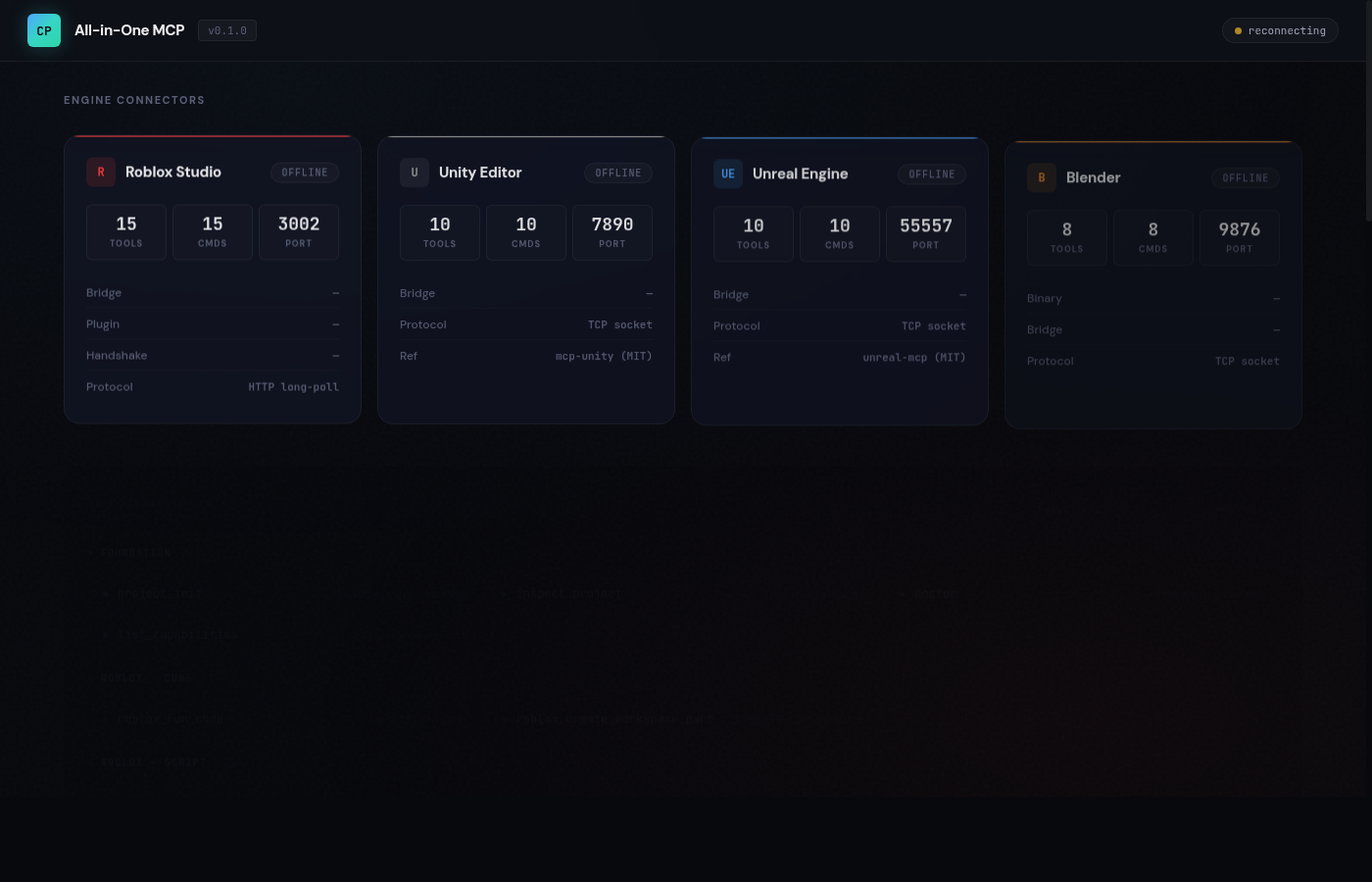
O painel integrado em http://127.0.0.1:3100 apresenta uma interface dark glassmorphism:
| Painel | Descrição |
|---|---|
| Status das Engines | Status de conexão em tempo real para todas as 4 engines com efeitos de brilho animados |
| Console de IA | Converse com Claude / GPT-4o / Gemini — executa automaticamente as ferramentas das engines |
| Registro de Ferramentas | Todas as 67 ferramentas com pontos coloridos por engine e busca ao vivo |
| Log de Eventos | Fluxo em tempo real via SSE de conexões, chamadas de ferramentas e erros |
Provedores do Console de IA
| Provedor | Modelos |
|---|---|
| Anthropic | Claude Opus 4.6, Claude Sonnet 4.6, Claude Haiku 4.5 |
| OpenAI | GPT-5.4, GPT-5.4 Mini, GPT-5.4 Nano, o3, o4-mini |
| Gemini 2.5 Pro, Gemini 2.5 Flash, Gemini 2.5 Flash-Lite |
As chaves de API são armazenadas apenas no localStorage — nunca são enviadas ou armazenadas no servidor.
🔌 Plugin do Roblox Studio
Um plugin de arquivo único pronto para produção está incluído.
Instalação
- Copie
runtime/roblox-studio-plugin/GamedevAllInOne.server.luapara a sua pasta de Plugins:- Windows:
%LOCALAPPDATA%\Roblox\Plugins\ - Mac:
~/Documents/Roblox/Plugins/
- Windows:
- Reinicie o Roblox Studio
- Ative: Game Settings > Security > Allow HTTP Requests = ON
- Inicie o servidor com
npm run dev - O plugin conecta automaticamente ao carregar
Recursos do Plugin
- 20 manipuladores de comandos (CRUD de script, CRUD de instância, física, raycast)
- Handshake automático com a ponte na inicialização
- Loop de comandos HTTP long-poll com requisições encapsuladas em
pcall - Botão na barra de ferramentas para iniciar/parar o runtime
🌉 Arquitetura das Pontes
| Engine | Protocolo | Porta | Reconexão | Plugin |
|---|---|---|---|---|
| Roblox | HTTP long-poll | 3002 | N/A | Plugin Luau (incluído) |
| Unity | TCP socket | 7890 | Automática | C# EditorWindow |
| Unreal | TCP socket | 55557 | Automática | Plugin C++ |
| Blender | TCP socket | 9876 | Automática | Addon Python |
Todas as pontes vinculam-se apenas a
127.0.0.1. As pontes TCP reconectam automaticamente com intervalos configuráveis.
⚙️ Configuração
Variáveis de Ambiente
| Variável | Padrão | Descrição |
|---|---|---|
WEB_DASHBOARD_PORT | 3100 | Porta HTTP do painel |
WEB_DASHBOARD_ENABLED | true | Defina false para desativar o painel |
ROBLOX_LUAU_BRIDGE_PORT | 3002 | Porta da ponte Luau do Roblox |
UNITY_BRIDGE_PORT | 7890 | Porta da ponte TCP do Unity |
UNREAL_BRIDGE_PORT | 55557 | Porta da ponte TCP do Unreal |
BLENDER_BRIDGE_PORT | 9876 | Porta da ponte TCP do Blender |
🔒 Segurança
- Apenas loopback — todas as pontes vinculam-se a
127.0.0.1 - Validação de host — requisições com cabeçalhos Host inválidos são rejeitadas
- CORS restrito por origem — apenas origens localhost são permitidas
- Limites de tamanho do corpo — máximo de 1 MiB na ponte Luau, 64 KiB na API do painel
- Validação de entrada — esquemas Zod em todos os endpoints das pontes
- Sem segredos no servidor — chaves de API ficam apenas no localStorage do navegador
- Degradação graciosa — conflitos de porta desativam serviços individuais sem travar
🛠 Desenvolvimento
npm run dev          # Start with tsx (hot reload)
npm run build        # TypeScript compile + copy dashboard
npm start            # Production mode
npm test             # Run tests
Estrutura do Projeto
src/
├── index.ts                        # Entry point + graceful shutdown
├── version.ts                      # NAME, VERSION constants
├── server/
│   └── create-server.ts            # McpServer + 12 tool module registration
├── connectors/
│   ├── shared/tcp-bridge.ts        # Shared TCP bridge (Unity/Unreal/Blender)
│   ├── roblox/index.ts             # Roblox detection + command dispatch
│   ├── luau/bridge.ts              # HTTP long-poll bridge (hardened)
│   ├── unity/index.ts              # Unity detection + TCP bridge
│   ├── unreal/index.ts             # Unreal detection + TCP bridge
│   └── blender/index.ts            # Blender detection + TCP bridge
├── tools/
│   ├── foundation.ts               # 4 foundation tools
│   ├── roblox*.ts                  # 20 Roblox tools (5 files)
│   ├── unity*.ts                   # 15 Unity tools (2 files)
│   ├── unreal*.ts                  # 15 Unreal tools (2 files)
│   └── blender*.ts                 # 13 Blender tools (2 files)
└── web/
    ├── server.ts                   # Dashboard HTTP + SSE + Chat API
    ├── llm-proxy.ts                # Multi-provider LLM with tool execution
    └── dashboard.html              # Single-file frontend (dark theme)

runtime/
└── roblox-studio-plugin/
    └── GamedevAllInOne.server.lua  # Production-ready Studio plugin
🤝 Contribuindo
Contribuições são bem-vindas! Veja como começar:
- Faça um fork do repositório
- Crie um branch de recurso:
git checkout -b feat/amazing-feature - Faça commit das suas alterações:
git commit -m 'feat: add amazing feature' - Envie para o branch:
git push origin feat/amazing-feature - Abra um Pull Request
Áreas em que Gostaríamos de Ajuda
- 🎮 Plugins de engine — C# EditorWindow para Unity, plugin C++ para Unreal, addon Python para Blender
- 🧪 Testes — testes unitários, testes de integração, testes E2E das pontes
- 📚 Documentação — tutoriais, vídeos passo a passo, exemplos de prompts
- 🌐 i18n — traduções para a interface do painel
- 🔧 Novas ferramentas — ferramentas de animação, áudio, terreno e iluminação por engine
📚 Referências Upstream
Projetos que inspiraram este trabalho
| Engine | Projeto | Licença |
|---|---|---|
| Roblox | boshyxd/robloxstudio-mcp | MIT |
| Roblox | yannyhl/linkedsword-mcp | MIT |
| Roblox | Roblox/studio-rust-mcp-server | Oficial |
| Unity | CoderGamester/mcp-unity | MIT |
| Unity | CoplayDev/unity-mcp | MIT |
| Unreal | chongdashu/unreal-mcp | MIT |
| Unreal | kevinpbuckley/VibeUE | MIT |
| Blender | ahujasid/blender-mcp | MIT |
| Blender | poly-mcp/Blender-MCP-Server | MIT |
| Física | KAIST-M4/MCP-SIM | — |
📄 Licença
AGPL-3.0-only — consulte LICENSE para detalhes.
- Melhorias no servidor devem permanecer open-source
- Variantes em rede ou hospedadas não podem se tornar forks fechados
- Código upstream MIT e Apache-2.0 adaptado com atribuição preservada
Se este projeto ajudar no seu fluxo de trabalho de desenvolvimento de jogos, dê uma ⭐
Feito com ❤️ pela comunidade open-source