Substack Publisher API
Consulte postagens, análises e dados de assinantes da API oficial do Publisher do Substack.
Documentação
substack-publisher-mcp
Servidor MCP para a API oficial do Publisher da Substack



Nota: Esta é uma ferramenta não oficial, desenvolvida pela comunidade, e não é afiliada, endossada ou suportada pela Substack, Inc.
Um servidor MCP para a API do Publisher oficial da Substack. Pesquise e leia posts, obtenha análises de posts e contagens de assinantes, e consulte assinantes a partir do Claude, Cursor ou qualquer cliente MCP. Todas as ferramentas são somente leitura.
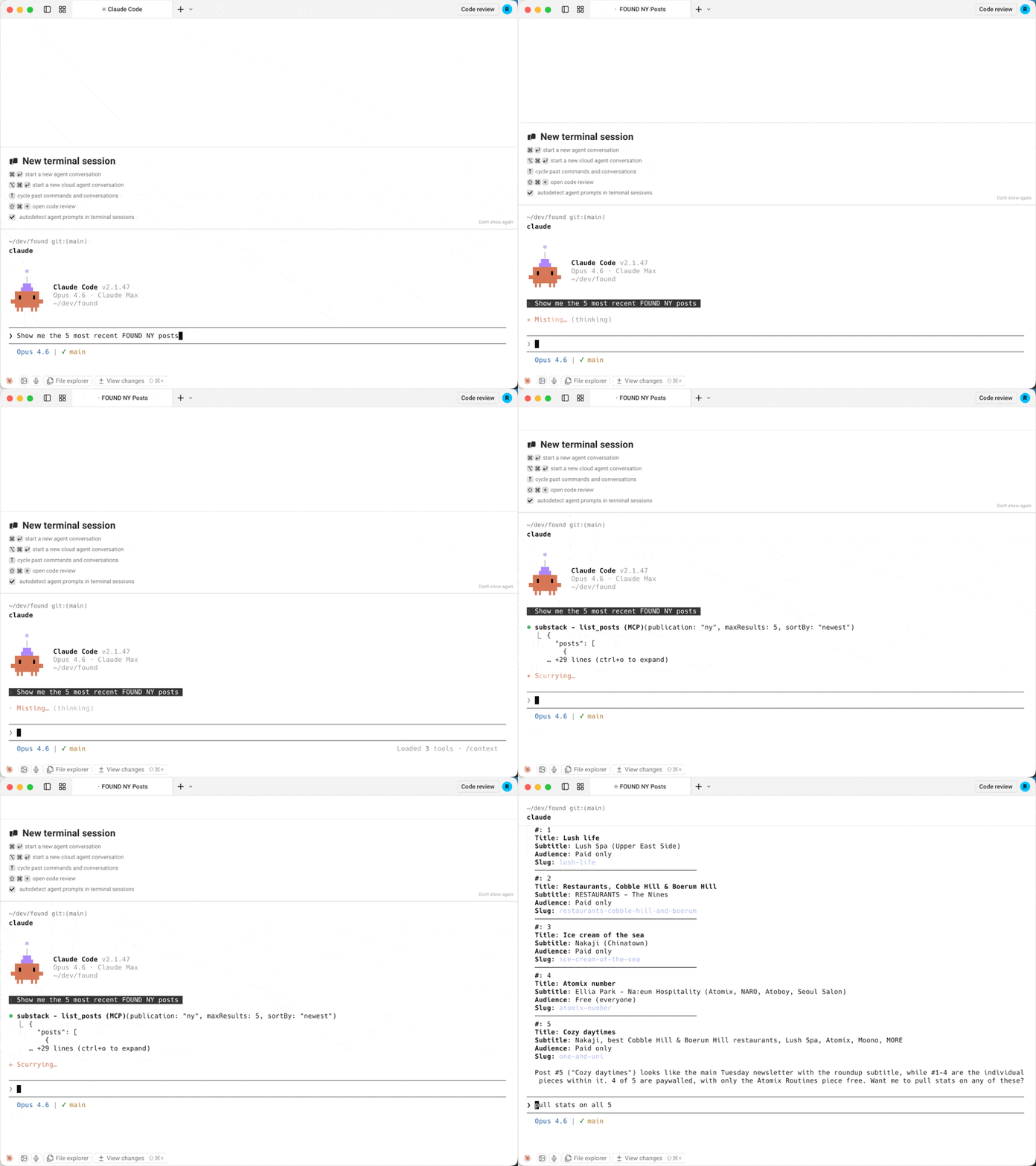
Por que este servidor?
| substack-publisher-mcp | Outros servidores MCP da Substack | |
|---|---|---|
| API | API oficial do Publisher | API interna não oficial |
| Autenticação | Chave de API (estável) | Cookies de navegador (frágil) |
| Estabilidade | API oficial e documentada | Quebra quando a Substack altera internos |
| Multi-publicação | Suporte integrado | Não disponível |
Pré-requisitos
- Node.js 22+. Verifique com
node --version; instale a partir de nodejs.org se estiver ausente. - Chave da API do Publisher da Substack. Gere uma no painel da Substack da sua publicação. Se você não vir uma opção de API do Publisher lá, ela pode não estar habilitada para sua publicação ainda; consulte a documentação da API do Publisher para disponibilidade.
Início Rápido
1. Instalação
git clone https://github.com/dkships/substack-publisher-mcp.git
cd substack-publisher-mcp
npm install && npm run build
2. Configure seu cliente MCP
Adicione ao arquivo de configuração MCP do seu cliente (crie o arquivo se ele não existir):
| Cliente | Arquivo de configuração |
|---|---|
| Claude Desktop (macOS) | ~/Library/Application Support/Claude/claude_desktop_config.json |
| Claude Desktop (Windows) | %APPDATA%\Claude\claude_desktop_config.json |
| Claude Code | .mcp.json no diretório do seu projeto |
| Cursor | .cursor/mcp.json |
{
  "mcpServers": {
    "substack": {
      "command": "node",
      "args": ["/path/to/substack-publisher-mcp/dist/index.js"],
      "env": {
        "SUBSTACK_API_KEY": "your-api-key-here"
      }
    }
  }
}
Usuários do Claude Code: Adicione
"type": "stdio"à configuração do servidor.
Reinicie seu cliente MCP após editar a configuração — os servidores são carregados na inicialização.
3. Comece a usar
Pergunte ao Claude (ou ao seu cliente MCP):
- "Quais publicações da Substack eu tenho configuradas?"
- "Mostre-me meus posts do último mês"
- "Encontre meus posts sobre preços"
- "Abra meu post com o slug my-latest-post"
- "Quantas aberturas e cliques meu último post recebeu?"
- "Quais são minhas contagens de assinantes nos últimos 30 dias?"
- "Consulte o assinante jane@example.com"
Instalando por meio de um agente de IA ou registro? Consulte llms-install.md para um guia de configuração condensado e legível por máquina.
Ferramentas
| Ferramenta | Descrição | Parâmetros principais |
|---|---|---|
list_publications | Lista publicações configuradas | Nenhum |
list_posts | Lista posts publicados | startDate, endDate, sortBy, type, maxResults, next |
search_posts | Pesquisa de texto completo em posts publicados | query (obrigatório), maxResults (1-100) |
get_post | Obtém um post e seu corpo pelo slug da URL | urlSlug (obrigatório), bodyFormat |
get_post_stats | Obtém estatísticas de engajamento de um post | urlSlug (obrigatório) |
get_subscriber_counts | Obtém contagens diárias de assinantes por tipo | startDate, endDate |
get_subscriber | Consulta um assinante por e-mail | email (obrigatório) |
Todas as ferramentas, exceto list_publications, aceitam um parâmetro opcional publication quando várias publicações estão configuradas.
get_post retorna o corpo do post como Markdown por padrão. A Substack o envia como um documento ProseMirror codificado em JSON, tipicamente cerca de duas vezes o tamanho. Passe bodyFormat: "prosemirror" para o documento bruto ou "none" para apenas metadados.
Filtros de data aceitam YYYY-MM-DD. Em list_posts, endDate é exclusivo; em get_subscriber_counts, é inclusivo.
Exemplos de respostas
get_subscriber_counts
[
  {
    "date": "2025-01-15",
    "total_email_subscribers": 25000,
    "paid_subscribers": 500,
    "free_trial_subscribers": 10,
    "comp_subscribers": 50,
    "gift_subscribers": 15,
    "lifetime_subscribers": 0,
    "founding_subscribers": 25
  }
]
get_post_stats
{
  "clicks": 320,
  "opens": 5400,
  "post_id": 12345678,
  "recipients": 10000,
  "views": 6100,
  "new_free_subscriptions": 80,
  "new_paid_subscriptions": 5,
  "estimated_revenue_increase": 400
}
list_posts
{
  "posts": [
    {
      "post_id": 12345678,
      "title": "My Latest Post",
      "audience": "only_paid",
      "subtitle": "A deep dive into the topic",
      "postDate": "2025-01-15T12:00:00.000Z",
      "urlSlug": "my-latest-post",
      "coverImage": "https://substackcdn.com/image/..."
    }
  ],
  "next": "abc123cursor"
}
next é null na última página.
Múltiplas publicações
Se você gerencia várias publicações da Substack, configure uma chave de API separada para cada uma usando o padrão SUBSTACK_API_KEY_<NAME>:
{
  "mcpServers": {
    "substack": {
      "command": "node",
      "args": ["/path/to/substack-publisher-mcp/dist/index.js"],
      "env": {
        "SUBSTACK_API_KEY_MAIN": "your-main-blog-key",
        "SUBSTACK_API_KEY_TECH": "your-tech-newsletter-key",
        "SUBSTACK_API_KEY_COMPANY": "your-company-updates-key"
      }
    }
  }
}
Em seguida, especifique qual publicação consultar:
"Mostre-me contagens de assinantes para main" "Liste posts recentes da publicação de tecnologia"
Use list_publications para ver todos os nomes de publicações configuradas.
Solução de problemas
| Problema | Solução |
|---|---|
Erro Unauthorized | Verifique se sua chave de API está correta. A chave vai diretamente no cabeçalho authorization sem prefixo Bearer. |
... duplicates publication ... ou ... ignoring it na inicialização | Duas variáveis de ambiente mapeiam para o mesmo nome de publicação (nomes são insensíveis a maiúsculas/minúsculas, e SUBSTACK_API_KEY é default), ou uma chave está malformada. Renomeie ou remova a variável extra. |
| O servidor não inicia | Certifique-se de executar npm run build após clonar. O servidor roda a partir de dist/, não src/. |
No API keys configured | Defina SUBSTACK_API_KEY ou SUBSTACK_API_KEY_<NAME> na configuração do seu cliente MCP. |
| O servidor não aparece no seu cliente | Verifique se o arquivo de configuração é JSON válido (sem vírgulas finais) e reinicie o cliente. |
command not found / spawn node ENOENT | O Node.js não está instalado ou não está no seu PATH. Verifique node --version. |
| Ainda travado | Verifique os logs MCP do seu cliente. Claude Desktop no macOS: ~/Library/Logs/Claude/mcp*.log. |
Referência da API
Este servidor encapsula a API do Publisher da Substack. Consulte a documentação da Substack para detalhes sobre dados disponíveis e limites de taxa.
Contribuindo
Consulte CONTRIBUTING.md para diretrizes.
Licença
Licença MIT. Consulte LICENSE para detalhes.
Substack é uma marca registrada da Substack, Inc. Este projeto não é afiliado à Substack, Inc. O uso do nome Substack é apenas para fins descritivos.