ynab-mcp
Servidor MCP para YNAB. Concilie extratos bancários, detalhe recibos, gerencie transações — tudo por meio de linguagem natural.
Documentação
YNAB MCP Server
Talk to your YNAB budget from Claude, Codex, Cline or any MCP client.




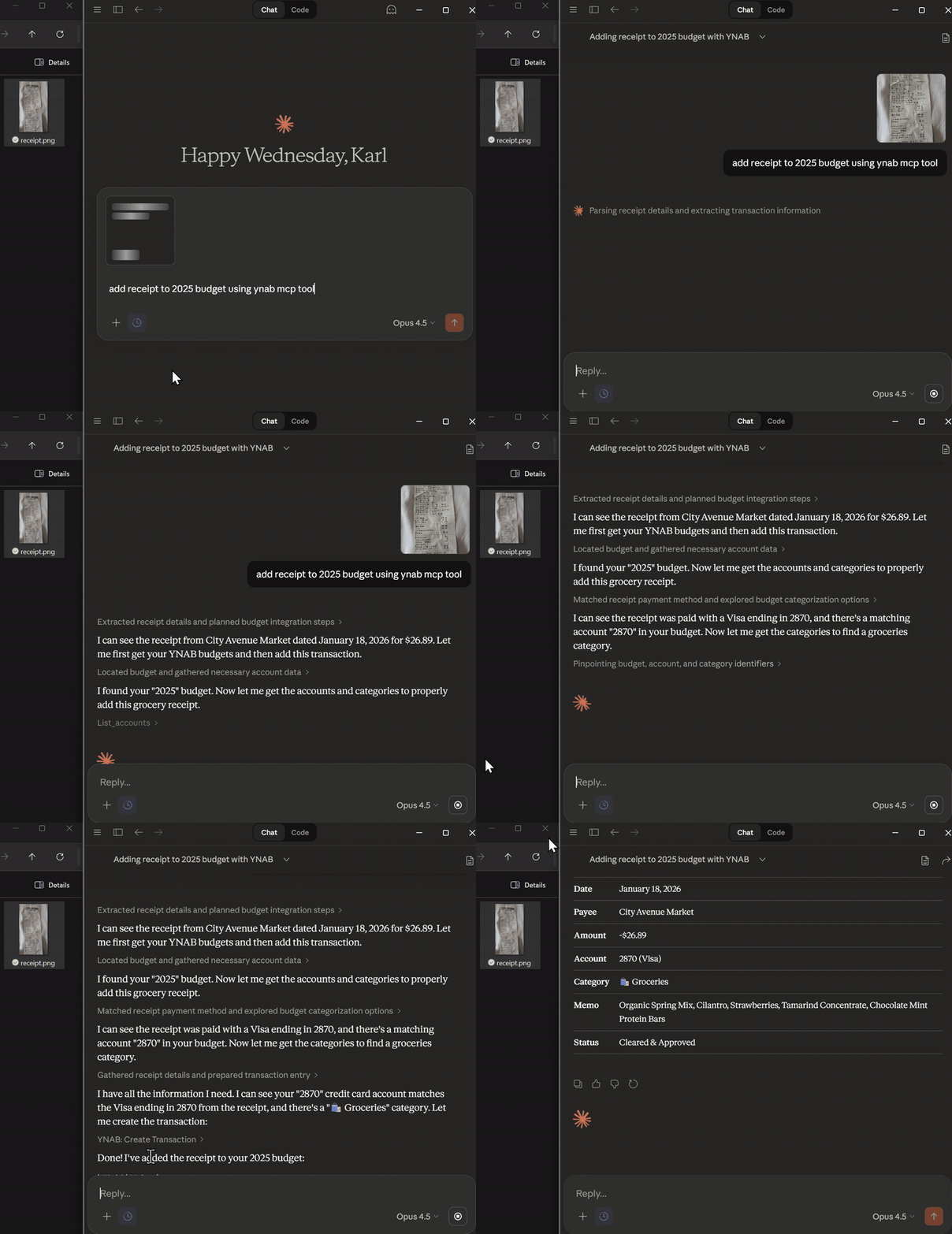
Paste a receipt → itemized split transaction with tax allocated
What it does
A local server that gives an AI assistant safe, structured access to your YNAB budget. 35 YNAB tools cover budgets, accounts, transactions, categories, payees, months and scheduled transactions, plus a few workflows YNAB itself doesn't have:
- Receipt splitting. Paste or photograph a receipt; get one split transaction with each item in its category and the tax distributed exactly to the cent.
- Bank reconciliation. Give it a bank CSV; it matches against YNAB (fuzzy payee, date tolerance, exact amounts), shows what's missing or mismatched, and applies the fixes you approve.
- Spending analysis. Deterministic totals by category or payee for any period, and period-over-period comparisons.
- Bulk cleanup. Create or update up to 100 transactions at once, including turning a transaction into a split.
Every write is previewed first by default: the assistant sees exactly what will change and must repeat the identical request with a short-lived, single-use token to apply it.
"Split this receipt across groceries and household, with tax."
"Reconcile my checking account against this CSV."
"What did I spend on takeout this month compared to last month?"
"What scheduled bills are due before the 30th?"
"Categorize my uncategorized transactions from last week."
Setup
1. Get a YNAB token. In YNAB go to Account Settings → Developer Settings → New Token, and copy it (it is shown once).
2. Install.
Claude Desktop (MCPB bundle)
- Download the latest
.mcpbfrom Releases. - Open it with Claude Desktop (or drag it into Settings → Extensions).
- Paste your token when prompted.
Any MCP client via npx (Claude Desktop, Cline, Cursor, ...)
{
  "mcpServers": {
    "ynab": {
      "command": "npx",
      "args": ["-y", "@dizzlkheinz/ynab-mcpb@latest"],
      "env": { "YNAB_ACCESS_TOKEN": "your-token" }
    }
  }
}
Codex
[mcp_servers.ynab]
command = "npx"
args = ["-y", "@dizzlkheinz/ynab-mcpb@latest"]
env = { "YNAB_ACCESS_TOKEN" = "your-token" }
startup_timeout_sec = 120
Claude Code
claude mcp add ynab --env YNAB_ACCESS_TOKEN=your-token -- npx -y @dizzlkheinz/ynab-mcpb@latest
3. Try it: "List my budgets and make my main one the default."
Configuration
Everything except the token is optional.
| Variable | Default | |
|---|---|---|
YNAB_ACCESS_TOKEN | — | Required. Your personal access token. |
YNAB_DEFAULT_BUDGET_ID | — | Budget used when a tool call omits budget_id (the UUID in your YNAB URL). Can also be set in chat with ynab_set_default_budget. |
YNAB_MCP_WRITE_MODE | preview | preview: every write needs a confirmation token from a preview. enabled: writes apply directly. read-only: no write tools at all. |
YNAB_MCP_TOOL_PROFILE | full | core exposes a smaller set of common tools to save context. |
YNAB_EXPORT_PATH | Downloads (Linux: Documents) | Where ynab_export_transactions writes files. |
LOG_LEVEL | info | trace, debug, info, warn, error. Logs go to stderr. |
Privacy
- The server runs on your machine and talks only to the YNAB API.
- Whatever a tool returns becomes part of your conversation, so it is processed by the AI provider your client uses.
- Exports stay on local disk.
- Keep your token in your client's config. Never paste it into a chat, issue or log.
- This is an independent project, not affiliated with or endorsed by YNAB.
Troubleshooting
| Problem | Fix |
|---|---|
npx fails or the server won't start | Install Node.js 24+, then restart your client. |
| 401 / unauthorized | Generate a new token and update YNAB_ACCESS_TOKEN. |
| Tools don't appear | Restart the client after changing its config. |
| 429 / rate limited | YNAB allows 200 requests per hour per token; wait and retry. |
| A reconciliation looks wrong | Open an issue with an anonymized CSV sample. |
Documentation
- Tool reference: every tool, prompt and resource
- Reconciliation design
- Receipt splitting spec
- Contributing and architecture
- Changelog
Development
git clone https://github.com/dizzlkheinz/ynab-mcpb.git && cd ynab-mcpb
npm ci --ignore-scripts
npm run build
npm test && npm run test:integration   # offline; no token needed
To run it against your budget, copy .env.example to .env, add your token and run
npm start. See AGENTS.md for architecture, conventions and the full command list.
Bug reports and PRs are welcome.