mu-mcp
Consulte seu índice
GitHub
3
Experimente este MCPPatrocinadoDocumentação
mu-mcp: MCP Server for the mu Mail Indexer


A Model Context Protocol (MCP) server for querying your local mu mail index. This server enables fast, structured mail search from Claude Desktop and other MCP clients.
Features
- Stdio MCP server for easy integration
- Tools:
search_emails,view_emails(HTML-only emails converted to text),list_attachments,open_attachment(saves to a temp dir and optionally opens with the default OS viewer), andmu_helpfor the fullmureference on demand. - Small context footprint: a short query guide lives in the tool description; the full man pages are only loaded when the model asks for them.
- Fast, flexible mail search using the
muindex - Claude Desktop ready: simple installation and config
- Python, uv, and MCP SDK based
Installation
Requires mu installed and your mail indexed (mu init + mu index).
Clone this repository and install dependencies:
git clone https://github.com/danielfleischer/mu-mcp.git
cd mu-mcp
uv sync
Usage
Run the MCP Server
With uv:
uv run --directory . mcp run mu_mcp/mu_mcp.py
Claude Desktop Integration
Add to your claude_desktop_config.json:
"mcpServers": {
  "email": {
    "command": "uv",
    "args": [
      "run",
      "--directory",
      "PROJECT_PATH",
      "mcp",
      "run",
      "mu_mcp/mu_mcp.py"
    ]
  }
}
Replace PROJECT_PATH with the path to your cloned repo.
Claude Code Integration
claude mcp add email -s user -- uv run --directory PROJECT_PATH mcp run mu_mcp/mu_mcp.py
Use -s local instead to enable it only in the current project. Check it with /mcp in a new session.
Query
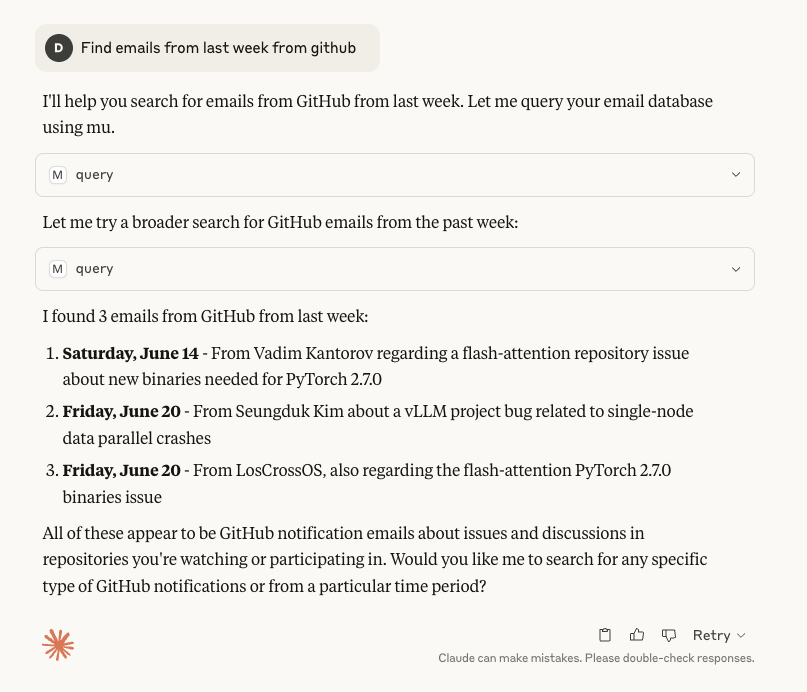
Ask Claude to find emails, e.g. "Find emails with a PDF attachment that were sent last April and open the PDF", "Show me the email I received from Alice last week", or "Find emails with the subject 'Meeting Notes'".
Development
- Adding a tool to view an email.
- Adding a tool to find and download attachments.
- Progressive disclosure of the
muman pages viamu_help.