diagrams-mcp-server
Servidor MCP para gerar diagramas de arquitetura em nuvem, fluxogramas, diagramas de sequência e muito mais — alimentado por mingrammer/diagrams, Mermaid e PlantUML.
Documentação
diagrams-mcp-server


Servidor MCP para gerar diagramas de arquitetura de nuvem, fluxogramas, diagramas de sequência e muito mais — alimentado por três mecanismos de renderização: mingrammer/diagrams, Mermaid e PlantUML.
Começando
Instalação Local
Pré-requisitos
Graphviz é necessário para o modo de renderização local/em processo padrão. Mermaid CLI e PlantUML são opcionais — instale-os apenas se precisar desses mecanismos de renderização específicos localmente.
| Dependência | Necessária para | Instalação |
|---|---|---|
| Graphviz | render_diagram (arquitetura de nuvem) | brew install graphviz |
| Mermaid CLI | render_mermaid (fluxogramas, sequência, etc.) | npm install -g @mermaid-js/mermaid-cli |
| Java + PlantUML | render_plantuml (diagramas UML) | brew install openjdk + baixar plantuml.jar |
Instalar o servidor
Via uvx (recomendado):
uvx diagrams-mcp-server
Via pip:
pip install diagrams-mcp-server
A partir do código-fonte:
pip install git+https://github.com/ByteOverDev/diagrams-mcp.git
Configurar seu cliente MCP
Claude Desktop
Adicione ao seu claude_desktop_config.json (Settings → Developer → Edit Config):
uvx (recomendado):
{
  "mcpServers": {
    "diagrams-mcp": {
      "command": "uvx",
      "args": ["diagrams-mcp-server"]
    }
  }
}
pip:
{
  "mcpServers": {
    "diagrams-mcp": {
      "command": "diagrams-mcp-server"
    }
  }
}
Claude Code (CLI)
Execute:
claude mcp add diagrams-mcp -- uvx diagrams-mcp-server
Ou adicione ao seu .mcp.json:
uvx (recomendado):
{
  "mcpServers": {
    "diagrams-mcp": {
      "command": "uvx",
      "args": ["diagrams-mcp-server"]
    }
  }
}
pip:
{
  "mcpServers": {
    "diagrams-mcp": {
      "command": "diagrams-mcp-server"
    }
  }
}
Cursor
Adicione ao seu .cursor/mcp.json:
uvx (recomendado):
{
  "mcpServers": {
    "diagrams-mcp": {
      "command": "uvx",
      "args": ["diagrams-mcp-server"]
    }
  }
}
pip:
{
  "mcpServers": {
    "diagrams-mcp": {
      "command": "diagrams-mcp-server"
    }
  }
}
Windsurf
Adicione ao seu ~/.codeium/windsurf/mcp_config.json:
uvx (recomendado):
{
  "mcpServers": {
    "diagrams-mcp": {
      "command": "uvx",
      "args": ["diagrams-mcp-server"]
    }
  }
}
pip:
{
  "mcpServers": {
    "diagrams-mcp": {
      "command": "diagrams-mcp-server"
    }
  }
}
VS Code
Adicione ao seu .vscode/mcp.json:
uvx (recomendado):
{
  "servers": {
    "diagrams-mcp": {
      "type": "stdio",
      "command": "uvx",
      "args": ["diagrams-mcp-server"]
    }
  }
}
pip:
{
  "servers": {
    "diagrams-mcp": {
      "type": "stdio",
      "command": "diagrams-mcp-server"
    }
  }
}
Ferramentas Disponíveis
Descoberta
list_providers()→list[str]— Lista todos os provedores de diagramas (aws,gcp,k8s,azure,onprem, etc.)list_services(provider)→list[str]— Lista categorias de serviços dentro de um provedor (ex.:aws→compute,database,network)list_nodes(provider, service)→list[dict]— Lista classes de nós para um par provedor.serviço com caminhos de importaçãosearch_nodes(query)→list[dict]— Busca nós por palavra-chave em todos os provedores (ex.: "postgres", "lambda")
Renderização
render_diagram(code)→Image(PNG) — Executa um script Python usando mingrammer/diagrams em um subprocesso isolado. Retorna um diagrama de arquitetura de nuvem renderizado.render_mermaid(definition)→Image(PNG/SVG) — Renderiza uma definição de diagrama Mermaid (fluxogramas, sequência, classe, ER, estado, Gantt e mais).render_plantuml(definition)→Image(PNG) — Renderiza uma definição de diagrama PlantUML (sequência, classe, componente, atividade, estado, implantação).
Equivalência Entre Provedores
find_equivalent(node, target_provider?)→dict— Encontra serviços equivalentes entre provedores de nuvem (ex.:EC2→ComputeEngineno GCP).list_categories()→list[dict]— Lista todas as 30 categorias de papéis de infraestrutura com nós mapeados entre provedores.
Recursos
O servidor fornece documentação de referência acessível via URIs de recursos MCP:
| URI | Descrição |
|---|---|
diagrams://reference/diagram | Parâmetros do construtor de diagramas, padrões e uso |
diagrams://reference/edge | Operadores de aresta, rótulos, estilos e encadeamento |
diagrams://reference/cluster | Aninhamento de clusters, estilos e atributos de grafo |
diagrams://reference/mermaid | Exemplos de sintaxe Mermaid para 6 tipos de diagramas |
diagrams://reference/plantuml | Exemplos de sintaxe PlantUML para 6 tipos de diagramas |
Exemplos
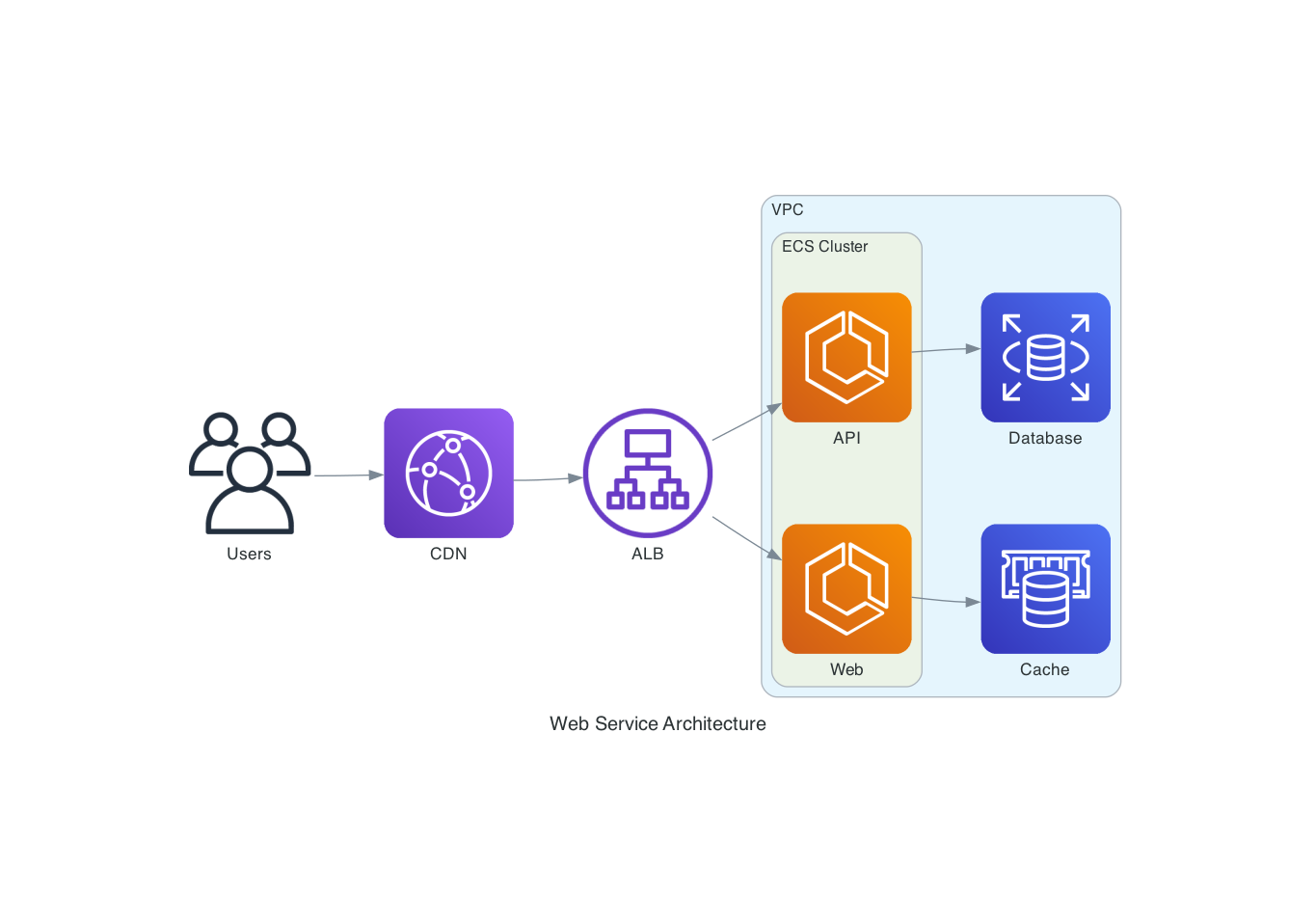
Arquitetura de Nuvem (mingrammer/diagrams)
"Desenhe uma arquitetura AWS com um ALB roteando para dois serviços ECS, apoiados por RDS e ElastiCache"
from diagrams import Diagram, Cluster
from diagrams.aws.network import ALB
from diagrams.aws.compute import ECS
from diagrams.aws.database import RDS, ElastiCache

with Diagram("ECS Service", direction="LR"):
    lb = ALB("ALB")

    with Cluster("ECS Cluster"):
        services = [ECS("Web"), ECS("API")]

    lb >> services
    services[0] >> ElastiCache("Cache")
    services[1] >> RDS("Database")
Fluxograma (Mermaid)
"Crie um fluxograma mostrando um pipeline de CI/CD"

Diagrama de Sequência (PlantUML)
"Mostre o fluxo de autenticação entre um cliente, um gateway de API e um serviço de autenticação"
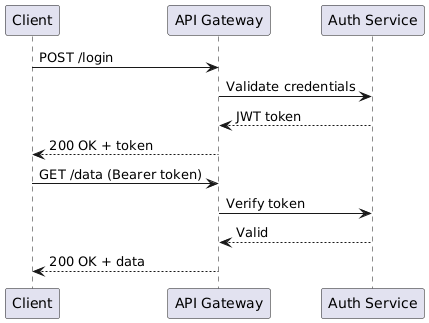
@startuml
Client -> "API Gateway": POST /login
"API Gateway" -> "Auth Service": Validate credentials
"Auth Service" --> "API Gateway": JWT token
"API Gateway" --> Client: 200 OK + token
Client -> "API Gateway": GET /data (Bearer token)
"API Gateway" -> "Auth Service": Verify token
"Auth Service" --> "API Gateway": Valid
"API Gateway" --> Client: 200 OK + data
@enduml
Desenvolvimento
# Clone and install
git clone https://github.com/ByteOverDev/diagrams-mcp.git
cd diagrams-mcp
pip install -e ".[dev]"

# Run tests
pytest

# Lint and format
ruff check .
ruff format .

# Run the MCP server locally (stdio mode)
diagrams-mcp-server
Modo Facade/Renderer Dividido
Para implantações hospedadas, o servidor MCP pode ser executado como um facade leve que delega o trabalho de renderização a um serviço de renderização separado. Isso mantém o processo MCP sempre ativo pequeno, enquanto Graphviz, Chromium, Mermaid CLI, Java e PlantUML ficam apenas na imagem do renderer.
# Terminal 1: renderer service
RENDERER_HOST=0.0.0.0 RENDERER_PORT=8001 diagrams-renderer-server

# Terminal 2: HTTP MCP facade delegating to the renderer
FASTMCP_TRANSPORT=http \
FASTMCP_HOST=0.0.0.0 \
FASTMCP_PORT=8000 \
DIAGRAMS_RENDERER_MODE=remote \
DIAGRAMS_RENDERER_URL=http://127.0.0.1:8001 \
diagrams-mcp-server
Exemplos Docker/Railway estão incluídos:
| Arquivo | Propósito |
|---|---|
Dockerfile.facade | Imagem facade MCP enxuta sem binários exclusivos do renderer |
Dockerfile.renderer | Imagem do renderer com Graphviz, Chromium, Mermaid CLI, Java e PlantUML |
railway.facade.toml | Exemplo de configuração do serviço facade Railway |
railway.renderer.toml | Exemplo de configuração do serviço renderer Railway |
Variáveis de ambiente principais:
| Variável | Propósito |
|---|---|
DIAGRAMS_RENDERER_MODE=remote | Faz o facade usar o serviço de renderização HTTP |
DIAGRAMS_RENDERER_URL | URL base do renderer, por exemplo http://diagrams-renderer.railway.internal:8080 |
DIAGRAMS_IMAGE_STORE_DIR | Diretório opcional de armazenamento temporário de imagens baseado em arquivo |
BASE_URL | URL base pública opcional usada ao retornar links de download absolutos |
Provedores Suportados
A ferramenta render_diagram suporta todos os provedores da biblioteca mingrammer/diagrams, incluindo:
AWS, GCP, Azure, Kubernetes, On-Premise, AlibabaCloud, OCI, OpenStack, DigitalOcean, Elastic, Outscale, Generic e nós Custom.
Use list_providers() e search_nodes(query) para descobrir os nós disponíveis.
Licença
MIT