grasp-mcp-server a
36 ferramentas para gráficos de dependência, análise de arquitetura, varredura de segurança, refatoração e rastreamento de CI para agentes LLM
Documentação
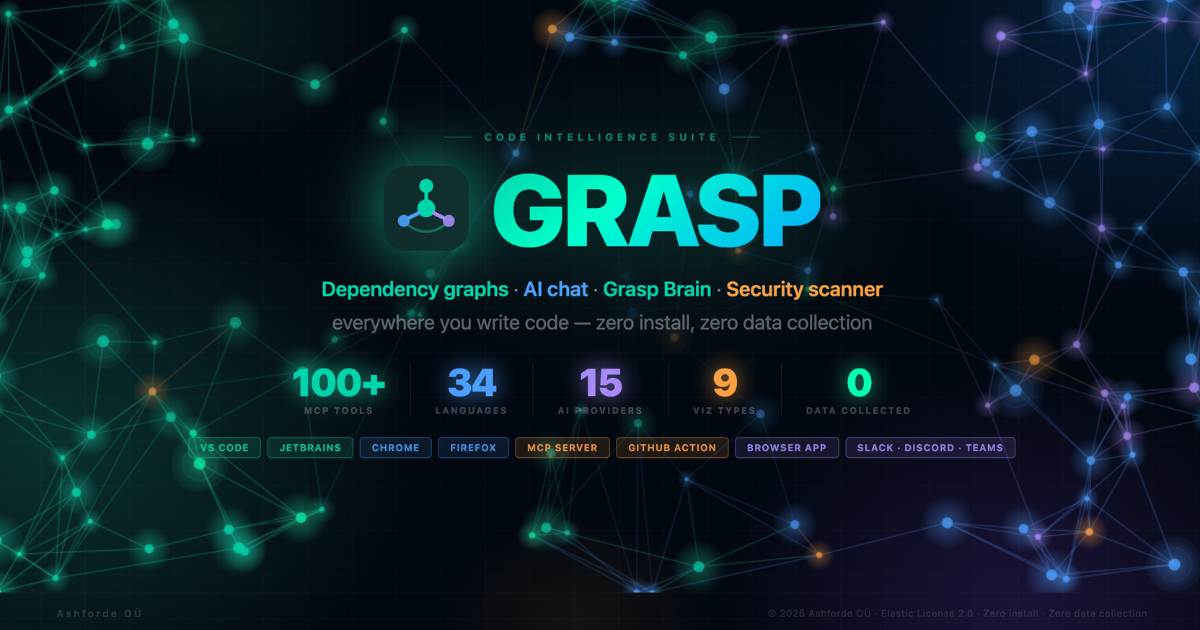



150 MCP tools + 8 Resources + 2 Prompts · 35 languages · 11 AI providers + 200+ models via OpenRouter · 10 graph views · multimodal knowledge graph · zero data collection

-007ACC?style=for-the-badge&logo=visual-studio-code)




-0D96F6?style=for-the-badge&logo=safari&logoColor=white)


🌐 Browser App · 📦 MCP Server · 🐛 Report Bug · ✨ Request Feature · 🔒 Privacy
What's New in v3.21.0
New — Multimodal Knowledge Graph (MCP server). Seven new MCP tools ingest your documents — PDF, DOCX, XLSX, HTML, images (OCR), audio/video (local Whisper via @xenova/transformers + ffmpeg), YouTube, and URLs — alongside your code into a queryable knowledge graph, then answer natural-language questions with citations: grasp_ingest, grasp_kg_ask, grasp_kg_trace, grasp_kg_explain, grasp_kg_stats, grasp_kg_export, grasp_llm_status. A local-first multi-LLM layer auto-detects Ollama before any cloud key and falls back to a zero-credential deterministic engine. Server-side only (Node MCP server, not the browser app) — see Multimodal Knowledge Graph under Code Intelligence.
+3 native AST languages — Bash, Elixir, and Julia take tree-sitter-backed function extraction, call counting, and complexity scoring to 19 languages.
Optional MCP-over-HTTP bridge — set GRASP_HTTP_MCP=1 to expose the MCP server over Streamable HTTP (bearer-token auth) so a whole team can share one Grasp instance instead of each running their own stdio server.
Previously in v3.20.0: Full security scanning suite — grasp_vulnerabilities covers 5 threat vectors (OSV.dev dependency CVEs, NIST NVD container/runtime CVEs, local supply-chain integrity checks, Socket.dev behavioral analysis, and scheduled grasp_vuln_watch monitoring) with skip_container / skip_socket / skip_integrity fast-scan flags.
Previously in v3.19.0: Full visual + UX parity between team-dashboard.html and index.html — teal brand sweep, SVG icons, 7-provider auth, mobile More menu, keyboard shortcut popover.
Previously in v3.18.0: 9 new MCP tools (graph analytics + LLM-context), 11 graph export formats, TypeScript path-alias + Python import resolvers, Claude Code slash commands, token-reduction eval harness (3,241× on got@v14).
Total as of v3.21.0: 150 MCP tools · 8 Resources · 2 Prompts · 35 languages · 11 graph export formats · 10 graph views · multimodal knowledge graph · 19 themes.
What is Grasp?
Grasp turns any GitHub or GitLab repository — cloud or self-hosted — or local codebase into an interactive architecture map in seconds. 150 MCP tools (plus 8 Resources and 2 guided Prompts) expose the full analysis engine to Claude Code, Cursor, and any MCP-compatible agent.
Paste URL / Open Folder → AST Analysis Engine → Architecture Map + 150 MCP Tools
| No installation | Runs 100% in your browser — two HTML files, no build step |
| No data collection | Your code never leaves your machine |
| No accounts | Paste a URL and go |
| Works offline | Analyse local folders without internet |
| 35 languages | JS/TS, Python, Go, Java, Rust, C/C++, C#, Ruby, Swift, Kotlin, Scala, Dart, Elixir, Erlang, Haskell, OCaml, F#, Clojure, Julia, Lua, R, Perl, Shell, PowerShell, Groovy, Zig, V, Nim, Crystal, VBA, Ada/SPARK, Vue, Svelte, PHP |
| 150 MCP tools | Dependency graphs, security, OSV.dev SCA vulnerability scanning, DORA, brain store, Kuzu graph schema v3, communities, ORM tracker, git change impact, architecture drift detection, test coverage gap map, org dashboard, PR impact action, MCP Resources/Prompts, grasp setup editor auto-config |
| 11 AI providers (+ unlimited via routers) | Direct: Anthropic Claude (3 models), OpenAI (GPT-4o + o-series), Google Gemini (3), Mistral (2), Groq (3), DeepSeek (chat + reasoner), Ollama (local), LM Studio (local), Custom OpenAI-compatible endpoint. Routers: OpenRouter (200+ models via slug) and Together AI (50+ open-source models). Switchable mid-conversation, fully off by default (chat panel closed = zero network calls), API keys stored in localStorage only — Grasp has no proxy or telemetry. |
| 10 graph views | Force graph, 3D, arch, treemap, matrix, tree (dendrogram), flow (sankey), bundle, cluster (disjoint), heatmap |
| Grasp Brain | SQLite + Kuzu persistent store — index once, query instantly. FTS5 + 384D vector embeddings + Cypher graph queries |
| Supply chain signed | SLSA Level 2 npm provenance + Cosign keyless Docker signing on every release |
Who is Grasp for?
| You are… | Grasp helps you… | Start with |
|---|---|---|
| Tech lead joining a new team | Map the codebase in 60s, find the riskiest hotspots, identify good first issues | Try expressjs/express chip → ISS tab + ACT tab |
| Engineering manager | Track health across all team repos, see DORA metrics, identify bus-factor risks | team-dashboard.html |
| Open-source maintainer | Generate a wiki, label good first issues, post PR impact comments | grasp_wiki + GitHub Action grasp-pr-impact |
| Security reviewer | Spot hardcoded secrets, scan dependencies for CVEs, generate SBOM/SARIF | VULN tab + grasp_sbom + grasp_sarif |
| AI agent (Claude Code, Cursor, Copilot) | Get sub-100-token repo orientation + token-budget-aware traversal | MCP server: grasp_minimal_context → grasp_traverse |
| Developer onboarding | Get an ordered reading path, plain-English explanations of any file | grasp_onboard + grasp_explain |
| Refactoring contractor | Plan migrations with topological ordering, preview renames, find duplicate code | grasp_migration_plan + grasp_apply_refactor |
| CTO evaluating tech debt | Quantify debt in dev-days, flag legacy hotspots, justify rewrite budget | Health Score + Technical Debt + Org Dashboard |
What makes Grasp different
Grasp is intentionally additive to whatever static-analysis or graph tool you already use. The axes that matter:
| Capability | Grasp |
|---|---|
| Run on a stranger's repo without cloning | ✅ Paste URL → instant analysis in browser |
| Zero install, zero account | ✅ Single HTML file, runs entirely in browser |
| MCP-native — works with Claude Code, Cursor, Copilot, Continue, etc. | ✅ 150 tools, 8 Resources, 2 Prompts |
| Supply-chain CVE scanning | ✅ OSV.dev across npm/PyPI/Go/Cargo/Maven |
| 35 languages with native AST | ✅ Tree-sitter |
| Local — your code never leaves your machine | ✅ Browser fetches direct; MCP runs as subprocess |
| Persistent architecture intelligence | ✅ Brain store + Kuzu graph DB |
| Multi-channel — Chrome/Firefox/Safari/VS Code/JetBrains/Docker/Raycast/Zed | ✅ 13 distribution channels |
Screenshots
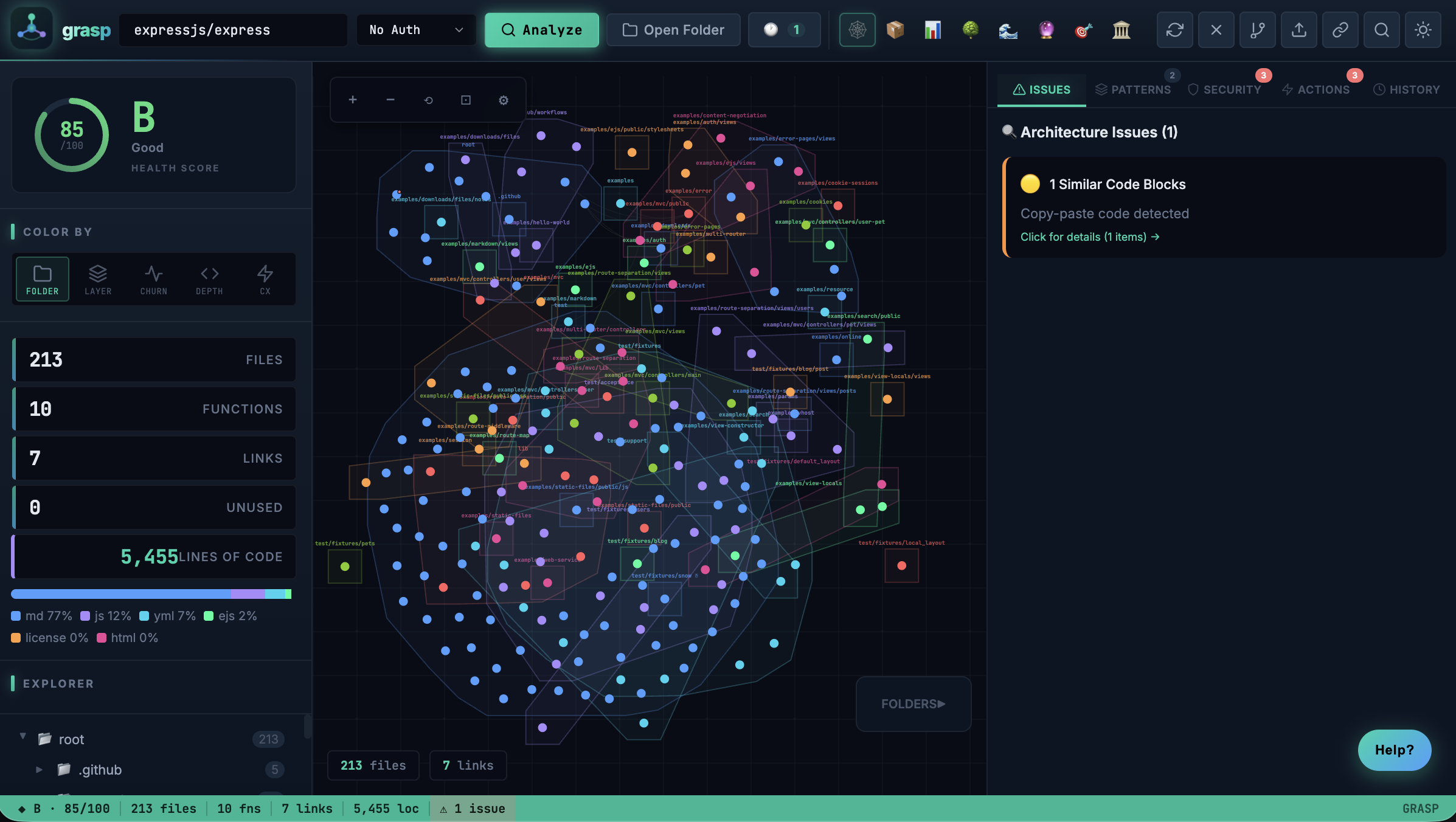
🕸️ Dependency Graph — see exactly how files connect
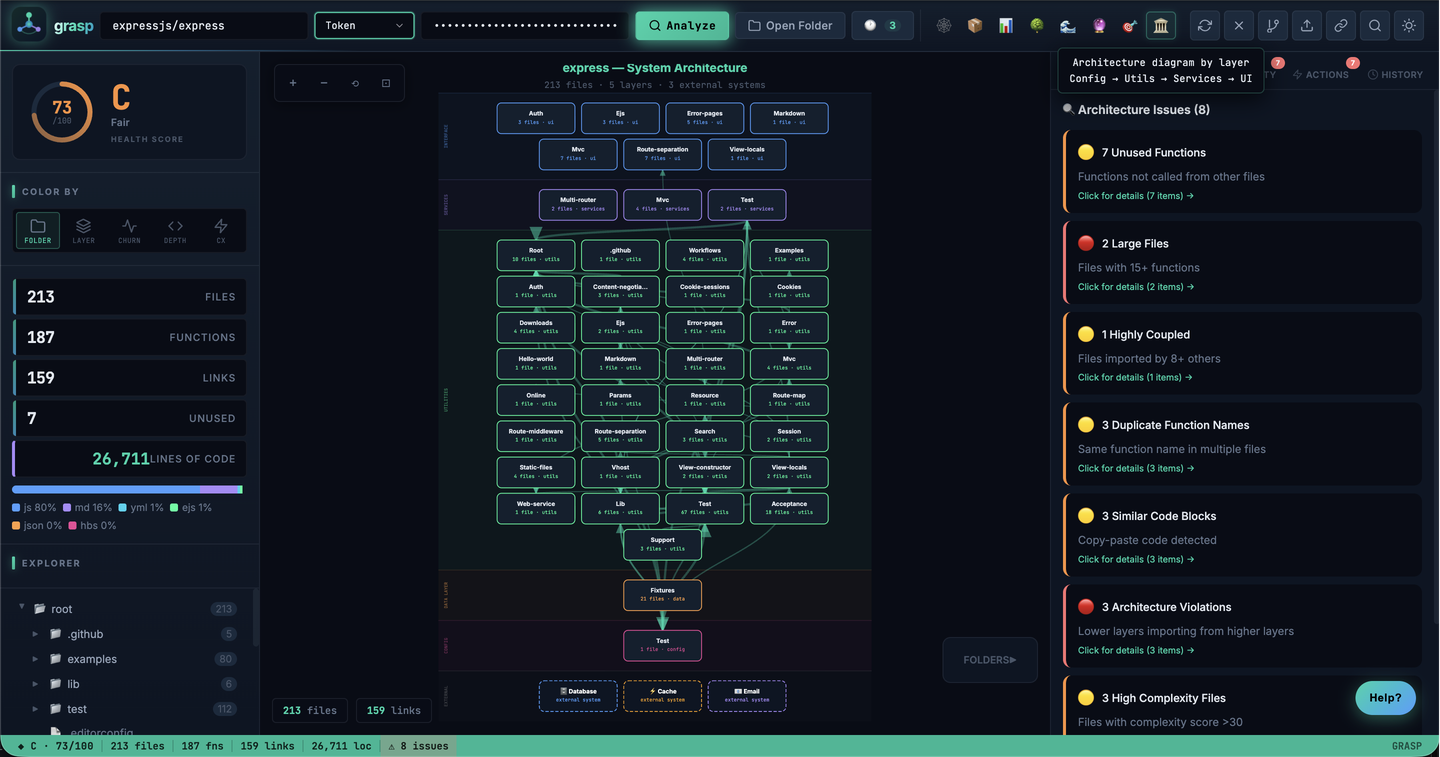
🏛️ Architecture Diagram — your codebase by layer
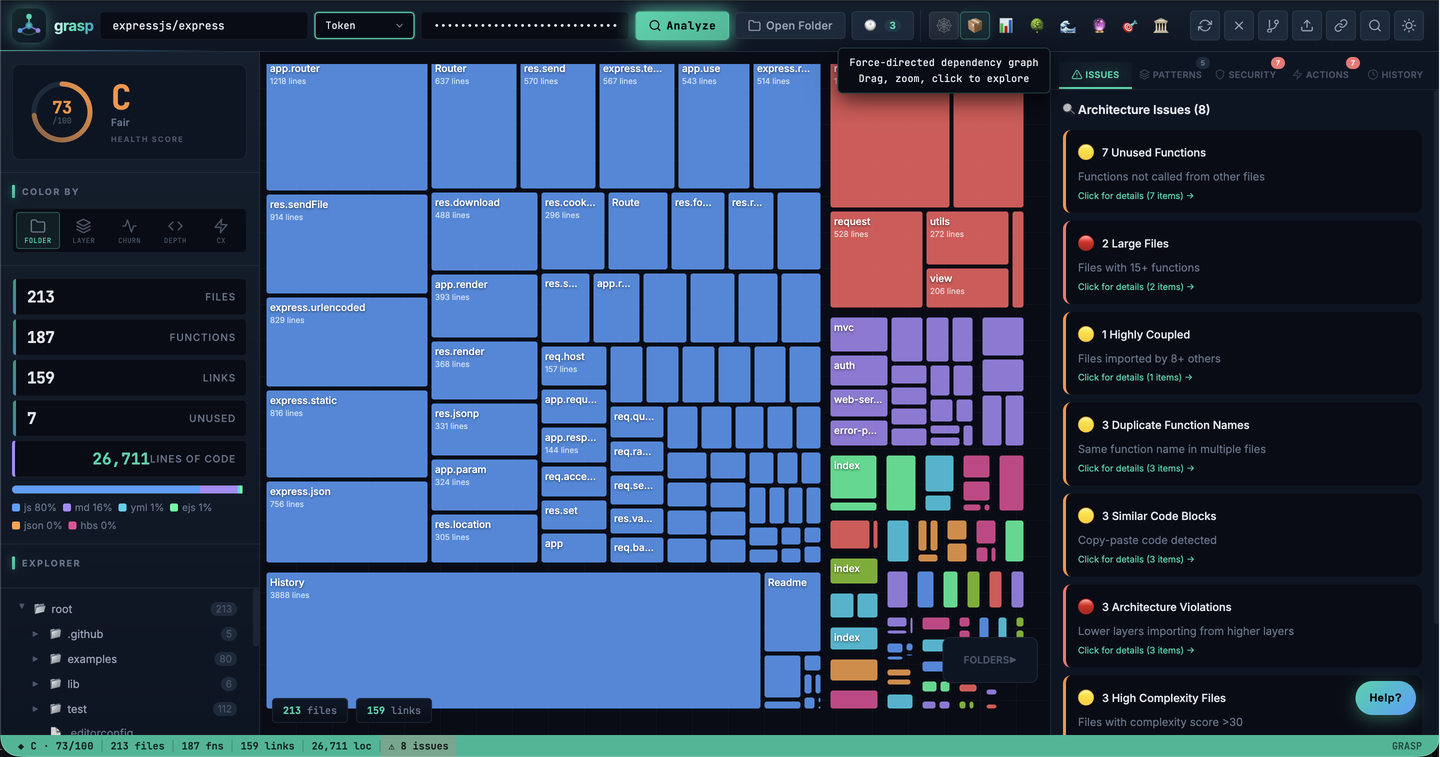
📦 Treemap — files sized by line count
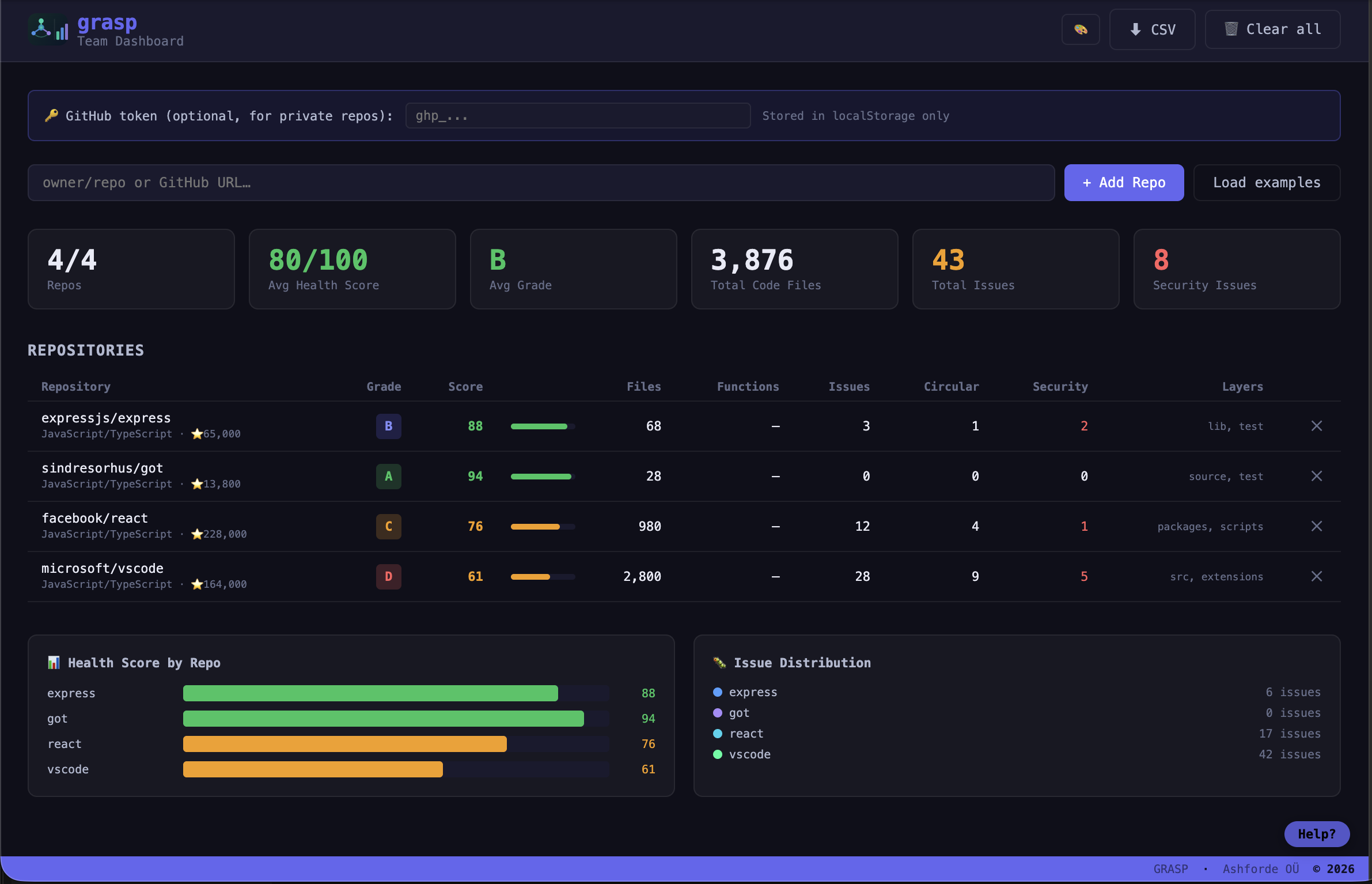
🏢 Team Dashboard — health across all your repos at a glance
Quick Start
Option 1 — Browser (zero setup)
git clone https://github.com/ashfordeOU/grasp.git
open index.html           # Main app
open team-dashboard.html  # Team Dashboard
No build step. No npm install. Two HTML files.
Option 2 — CLI
npm install -g grasp-mcp-server

grasp ./my-project        # Analyse a local folder
grasp facebook/react      # Analyse a GitHub repo
grasp .                   # Analyse current directory
grasp . --watch           # Live mode — browser reloads on every file save
grasp . --timeline        # Time-travel — last 30 commits as a scrubber
grasp . --report          # Terminal-only report + JSON output
grasp . --format=sarif    # Export SARIF for GitHub Code Scanning
grasp . --pr-comment      # Print GitHub PR comment markdown to stdout
grasp . --check           # Enforce grasp.yml architecture rules (CI gate)
Option 3 — IDE Extensions
| IDE | Install |
|---|---|
| VS Code | Install (.vsix) — download grasp-vscode-3.21.0.vsix and run Extensions: Install from VSIX… (Cmd+Shift+P) |
| JetBrains | JetBrains Marketplace — search Grasp in Settings → Plugins |
| Raycast | Raycast Store — or search Grasp in the Raycast extension store |
| Zed | Zed Extensions — or search grasp in Zed → Extensions |
Option 4 — Browser Extension
| Browser | Install |
|---|---|
| Chrome | Chrome Web Store |
| Firefox | Firefox Add-ons — ID: grasp@ashforde.org |
| Safari | GitHub Releases — see sideload instructions |
A floating Grasp button appears on every GitHub and GitLab page. Supports self-hosted GitLab, GitHub Enterprise, and any custom host via on-demand permission grants.
Distribution at a Glance
Every tagged release auto-publishes to all channels:
| Channel | Status | Link |
|---|---|---|
npm (grasp-mcp-server) |  | npm install -g grasp-mcp-server |
| MCP Registry | Listed | modelcontextprotocol.io |
Docker (ghcr.io/ashfordeou/grasp) |  | docker pull ghcr.io/ashfordeou/grasp:latest |
| VS Code | .vsix on Releases | GitHub Releases |
| JetBrains | Marketplace | Plugin ID 31362 |
| Raycast | Store (PR per release) | raycast.com/ashfordeOU/grasp |
| Zed | Extension (PR per release) | zed.dev/extensions |
| Chrome | Web Store | CWS listing |
| Firefox | AMO (listed) | addons.mozilla.org |
| Safari | Sideload (macOS 13+) | GitHub Releases |
| GitLab bot image | ghcr.io/ashfordeou/grasp-gitlab-bot | Auto-pushed per release |
| GitLab tunnel agent | Binary on Releases | GitHub Releases |
| GitHub Release | Signed + checksums | Releases page |
AI-tool integrations (Grasp called by your assistant via MCP or extension)
| AI tool | How to install | Notes |
|---|---|---|
| Claude Code | claude mcp add grasp -- npx -y grasp-mcp-server | Native MCP — all 150 tools + 8 Resources + 2 Prompts |
| Cursor | Add grasp-mcp-server to ~/.cursor/mcp.json | Native MCP |
| Cline / Roo Code / Kilo Code | MCP config in VS Code settings | Native MCP |
| Windsurf | MCP config | Native MCP |
| Codex / OpenCode / Trae / Droid | MCP config | Native MCP — grasp setup auto-configures all of them |
| Gemini CLI / Grok CLI | MCP config | Native MCP |
| GitHub Copilot Chat | Install grasp-copilot-extension | Copilot calls Grasp via the Copilot Extension API — @grasp mention in chat |
| Continue | continue-provider package | Grasp as a Continue context provider |
| Amazon Q Developer | amazon-q-plugin | Grasp surfaces in Q's chat |
| GPT Actions / Custom GPTs | gpt-actions package | Grasp exposed as REST for OpenAI Actions schema |
| Aider / Sweep / any tool | Use the grasp-mcp-server npm package | Tool-agnostic stdio JSON-RPC |
🧭 Safari Sideload Instructions
curl -sL https://github.com/ashfordeOU/grasp/releases/latest/download/grasp-safari-extension.zip \
  -o /tmp/grasp-safari.zip \
  && unzip -q /tmp/grasp-safari.zip -d /tmp/grasp-safari \
  && mv /tmp/grasp-safari/Grasp.app /Applications/ \
  && open /Applications/Grasp.app
Then in Safari: Settings → Extensions → enable Grasp. If it doesn't appear, enable Safari → Develop → Allow Unsigned Extensions first.
How It Works
┌──────────────────────────────────────────────────────────────────┐
│  Input                                                            │
│  github.com/owner/repo  ·  gitlab.com/ns/proj  ·  ./local/path   │
└────────────────────────────────┬─────────────────────────────────┘
                                 ▼
┌──────────────────────────────────────────────────────────────────┐
│  Analysis Pipeline  (mcp/src/)                                    │
│                                                                   │
│  1. scan        file enumeration + gitignore                      │
│  2. parse       tree-sitter AST · 35 languages · 19 native        │
│  3. resolvers   tsconfig path-alias · Jedi-style Python imports   │
│  4. routes      HTTP route detection (Express/FastAPI/Gin)        │
│  5. tools       MCP/gRPC tool definition detection                │
│  6. orm         ORM query tracking (Prisma/TypeORM/Sequelize/SA)  │
│  7. scope       3-tier call resolver  (0.95 → 0.90 → 0.50)       │
│  8. types       cross-file type propagation  (Kahn topo-sort)     │
│  9. coverage    test-file detection → TESTS/COVERS edges (v3)     │
│ 10. communities Louvain community detection on import graph       │
│ 11. processes   BFS execution-flow tracing from entry points      │
│ 12. analytics   degree centrality · Brandes betweenness ·         │
│                 surprising-edge rarity · knowledge-gap detection  │
│ 13. vulns       OSV.dev SCA scan (npm/PyPI/Go/Cargo/Maven)        │
└───────────┬──────────────────────────┬────────────────────────────┘
            │                          │
    ┌───────▼─────────┐    ┌───────────▼─────────────────┐
    │  Browser App    │    │   MCP Server (CLI)           │
    │  index.html     │    │   grasp-mcp-server           │
    │                 │    │                              │
    │ 10 graph views  │    │ 150 tools · 8 Resources      │
    │ 16 color modes  │    │ 2 guided Prompts             │
    │ AI Chat (11p)   │    │ Brain + Kuzu Schema v3       │
    │ Ask Grasp       │    │ Hybrid search (BM25+vector)  │
    │ Coverage overlay│    │ Graph analytics (5 tools)    │
    │ VULN tab        │    │ LLM-context (4 tools)        │
    │ Try-it chips    │    │ Graph exports (GraphML /     │
    │ Token indicator │    │   Cypher / Obsidian)         │
    │ Snapshot URLs   │    │ Slash commands (3 in         │
    │ Compare modal   │    │   .claude/commands/)         │
    │ Mid-fetch retry │    │ grasp setup (5 editors)      │
    │ Mobile touch    │    │ grasp vulns / drift / org    │
    └─────────────────┘    └──────────────────────────────┘
Analysis flow (v3.18.0): the pipeline is additive — phase 12 (graph analytics) runs after the dependency graph is built and produces the data backing grasp_hub_nodes, grasp_bridge_nodes, grasp_surprising_connections, grasp_knowledge_gaps, and grasp_suggested_questions. Phase 13 only runs when a manifest (package.json, requirements.txt, go.mod, Cargo.toml, pom.xml) is present. Both browser and MCP server share the exact same pipeline output via the ~/.grasp/brain.db + ~/.grasp/graph/ pair so a CLI grasp index and a browser analyze of the same repo are interchangeable.
Visualizations
Graph Types
| View | Description |
|---|---|
| 🕸️ Graph | Force-directed dependency graph — drag, zoom, multi-select |
| 🔮 3D Graph | Three-dimensional force graph — rotate, pan, zoom |
| 🏛️ Arch | Layer-by-layer architecture diagram |
| 📦 Treemap | Files sized by line count, grouped by folder |
| 📊 Matrix | Adjacency matrix showing all dependencies |
| 🌳 Tree | Hierarchical cluster dendrogram |
| 🌊 Flow | Folder-level Sankey dependency flow |
| 🎯 Bundle | Circular layout with arc-based connections |
| 🔮 Cluster | Separated force graphs per folder |
Color Modes
| Mode | What it shows |
|---|---|
| 📁 Folder | Directory structure |
| 🏗️ Layer | Architectural layer (UI, Services, Utils, etc.) |
| 🔥 Churn | Commit frequency — red = most-changed hot spots |
| ⚡ Complexity | Cyclomatic complexity (green → yellow → red) |
| 💥 Blast | Blast radius impact for a selected file |
| 🌊 Depth | Max brace-nesting depth |
| 🔎 Dup | Duplicate code density — red = many clones |
| 👤 Owner | Top contributor — spot bus-factor risks |
| 🐛 Issues | Linked GitHub Issues per file |
| 🧪 Coverage | Test coverage — highlight untested files |
| 📦 Bundle | Bundle size contribution |
| 🌐 API Surface | Public-facing file exposure |
| ⚡ Runtime | Actual call frequency from a live trace |
| 🔒 Safety | Safety gate coverage (green = gated, red = ungated) |
| 🧪 Boundary | Research/production boundary drift |
| 🧪 Eval Coverage | Coverage from eval/test scripts |
Code Intelligence
📊 Health Score
Instant A–F grade based on dead code, circular dependencies, coupling metrics, and security issues. Displayed as a score (0–100) with a visual bar.
🔐 Security Scanner
Automatic detection of hardcoded secrets & API keys, SQL injection risks, dangerous eval() usage, and debug statements left in production.
🛡️ Dependency & Container Security Scanner (v3.17.0, expanded v3.20.0)
Five-layer security scan via grasp_vulnerabilities:
- Dependency CVEs — declared deps (npm/PyPI/Go/Cargo/Maven) vs OSV.dev public CVE database. Resolves pinned versions from lockfiles. Severity-classified with CVSS scores and fix-version suggestions. Health score deducts –5 per critical and –3 per high.
- Container/Runtime CVEs — parses
Dockerfile(FROM image:tag),docker-compose*.yml, and CI workflow YAML for pinned image versions, then queries NIST NVD. SetGRASP_NVD_API_KEYfor higher rate limits. - Supply-chain integrity — local checks (no network): npm lockfile sha512
integrityfield coverage,go.sumalongsidego.mod,Cargo.lockalongsideCargo.toml,--hash=pinning inrequirements.txt. - Behavioral analysis — Socket.dev free API scans npm packages for malware, supply-chain risk, and install-script signals (up to 50 packages per scan).
- Scheduled monitoring —
grasp_vuln_watchMCP tool:start/stop/status/historyactions; periodic re-scans viasetInterval; persists scan history + CVE diffs inbrain.db.
New grasp vulns <path> CLI exits 1 on critical/high findings (CI-friendly). 100% client-side — all API requests go directly from your machine to the respective services, never through a Grasp server.
🧩 Pattern Detection
Identifies Singleton, Factory, Observer/Event patterns, React hooks, and anti-patterns (God Objects, high coupling) — automatically.
💥 Blast Radius Analysis
"If I change this file, what breaks?" — select any file and see every downstream file that would be affected, highlighted on the graph.
🔥 Activity Heatmap
Colors files by commit frequency. Works for GitHub repos (via API) and local repos (via git log — no internet required).
🔎 Duplicate & Similarity Detection
The Dup color mode highlights files with exact or near-duplicate code. The grasp_similarity MCP tool returns ranked duplicate clusters for targeted refactoring.
🧠 Multimodal Knowledge Graph (MCP server)
Build a queryable knowledge graph from your codebase and external documents, then ask natural-language questions with cited answers. Runs entirely inside the Node MCP server — not the browser app.
grasp_ingest parses PDF, DOCX, XLSX, HTML, images (OCR), audio/video (local Whisper via @xenova/transformers + ffmpeg), YouTube, and URLs; heavy parsers are optional, lazy-loaded dependencies. Entities and relations are tagged EXTRACTED vs INFERRED with source locators and persisted to SQLite kg.db; retrieval is hybrid BM25 + vector. A local-first multi-LLM layer auto-detects Ollama before any cloud key and falls back to a deterministic engine that needs zero credentials (Anthropic / OpenAI / Gemini / DeepSeek / Kimi / Azure / Bedrock / Ollama). The whole server can optionally be shared across a team over HTTP (GRASP_HTTP_MCP=1, optional GRASP_HTTP_API_KEY, port 7333, /health).
| MCP Tool | Description |
|---|---|
grasp_ingest | Ingest a file, URL, or media source (PDF/DOCX/XLSX/HTML/image OCR/audio/video/YouTube) into the knowledge graph |
grasp_kg_ask | Natural-language Q&A over the graph with inline source citations (hybrid BM25 + vector) |
grasp_kg_trace | BFS path-tracing between two entities |
grasp_kg_explain | Explain an entity, its relations, and whether each fact was EXTRACTED or INFERRED |
grasp_kg_stats | Graph statistics — entity/relation counts, hubs, and god-nodes |
grasp_kg_export | Export the graph as Cypher, GraphML, JSON, or Mermaid |
grasp_llm_status | Report the active LLM provider and any detected local models (Ollama), including deterministic-fallback state |
👥 Code Ownership
Top contributors per file from git history, with line-percentage breakdowns. One-click jump to GitHub Blame.
📋 PR Impact Analysis
Paste a PR URL to see which files it touches and calculate the blast radius of proposed changes before merging.
💰 Technical Debt Quantification
Converts every architectural issue into developer-hours using configurable estimates — circular dep = 4h, god file = 16h, critical security = 8h — with a coupling multiplier. Shown in the health panel and Team Dashboard.
🔗 Shareable Embeds
Click ⋯ → 🔗 Embed for a ready-to-paste <iframe>, README badge, React snippet, and direct link — share live health reports in docs, wikis, or dashboards.
🎯 Connection Confidence Scoring (v3.16.0)
Every cross-file connection is scored 0–1: explicit static imports = 1.0, same-folder = 0.8, cross-folder inferred = 0.6, low-frequency = 0.4. The force graph overlays confidence as edge opacity — use the slider in ⚙ settings to filter out low-confidence edges.
🔍 Graph Query Modal (v3.16.0)
Click the 🔍 toolbar button to search files, functions, and edges in-browser without leaving the graph. Matches update live — click any file result to jump to it on the graph.
ƒ() Function-Level Canvas (v3.16.0)
Toggle the ƒ() button to switch the force graph from file-level to function-level nodes — see individual function call relationships, capped at 300 nodes for performance.
🗄️ DB Coupling Tab (v3.16.0)
The right panel 🗄️ DB tab scans file content for ORM patterns (Django, TypeORM, raw SQL), mapping which files reference which tables. Instantly spot god-tables and high-coupling files.
🎯 Good First Issues Tab (v3.16.0)
The 🎯 GFI tab surfaces isolated, low-complexity, untested files — ideal contribution targets for new engineers or AI coding agents.
🔐 PII Detection & Security Subcategories (v3.16.0)
The Security tab now has subcategory pills — ALL / SECRETS / INJECTION / PII / EVAL — to filter findings. The PII pill scans file content for email, phone, SSN, credit card, and API key patterns in source files.
📸 Architecture Drift Detection (v3.17.0)
Snapshot your codebase architecture and detect drift over time — automatically.
grasp snapshot ./my-project --name before-refactor
# ... make changes ...
grasp drift ./my-project          # exits 1 if drift is CRITICAL (CI-friendly)
| MCP Tool | Description |
|---|---|
grasp_snapshot | Save current health score, coupling metrics, circular deps, and top-10 hotspots as a named snapshot |
grasp_diff_snapshots | Compare any two snapshots — returns health delta, new circular deps, files whose coupling increased >20%, drift level (STABLE / DEGRADED / CRITICAL) |
Snapshots are stored in ~/.grasp/brain.db and persist across analysis sessions.
🧪 Test Coverage Gap Map (v3.17.0)
Find the functions most likely to cause production incidents — highest call count, zero test coverage.
grasp_coverage_gaps # via MCP — returns uncovered_functions sorted by call_count DESC
The dependency graph gains a 🧪 Coverage overlay toggle — uncovered functions render in red, partially-covered in amber, covered in green. Coverage is estimated by static analysis: Grasp detects test files (*.test.*, *.spec.*, test_*, *_test.*) and traces which source functions they reference.
| MCP Tool | Description |
|---|---|
grasp_coverage_gaps | Returns uncovered_functions (sorted by call count), risky_uncovered (high churn + no tests), coverage_by_module per directory, and overall_coverage_estimate |
🏢 Org-Level Dashboard (v3.17.0)
Analyse an entire GitHub organisation in one command:
grasp org my-github-org --token ghp_xxx --format html   # Self-contained HTML dashboard
grasp org my-github-org --format json                   # CI-consumable JSON
grasp org my-github-org --format md                     # Markdown for wikis
Aggregates health grades, security findings, most-churned files, and language distribution across all repos (up to 500, 5 concurrent). The HTML output embeds Chart.js inline — no external dependencies.
| MCP Tool | Description |
|---|---|
grasp_org_summary | Analyse up to 20 top repos in an org — returns aggregate health grade, grade distribution, total security findings by severity, top churned files, language breakdown |
🤖 PR Impact GitHub Action (v3.17.0)
Add automated architectural impact analysis to every pull request:
# .github/workflows/grasp-pr-impact.yml
- uses: ashfordeOU/grasp/.github/actions/grasp-pr-impact@main
  with:
    github-token: ${{ secrets.GITHUB_TOKEN }}
    min-risk-to-comment: LOW      # LOW / MEDIUM / HIGH / CRITICAL
    fail-on-risk: CRITICAL        # fail the CI check at this risk level
The action posts a structured PR comment showing:
- Risk badge (LOW / MEDIUM / HIGH / CRITICAL) with colour coding
- Changed files with function-level blast radius
- Affected execution processes (with step counts)
- Suggested reviewers from
git blame(top 2 contributors per affected file) - Test coverage gaps: which changed functions have no test file touching them
AI Chat — 11 Providers + Routers
Built-in AI assistant that knows your entire codebase. Ask "why is auth.ts a hotspot?", "which files are safest to refactor?", or "explain the security issues in this call chain" — answers reference your live dependency graph, security findings, and architectural layers.
| Provider | Models |
|---|---|
| Anthropic | Claude Opus 4.7, Sonnet 4.6, Haiku 4.5 |
| OpenAI | GPT-4o, GPT-4o mini, o3-mini, o1 |
| Google Gemini | Gemini 2.0 Flash, 1.5 Pro, 1.5 Flash |
| Mistral | Mistral Small, Mistral Large |
| Groq | Llama 3.3 70B, 3.1 8B, Gemma 2 9B |
| DeepSeek | DeepSeek Chat, DeepSeek Reasoner |
| OpenRouter | Any model slug (100+ models via one key) |
| Together AI | Any model slug |
| Ollama | Local models (no key needed) |
| LM Studio | Local models on any port |
| Custom | Any OpenAI-compatible base URL |
Features:
- Multi-turn conversation memory — persisted in
localStorageacross page refreshes - Selected-file context — layer, functions, complexity, and issues injected automatically when a file is selected
- Rich codebase context — top 80 files with metadata, all issues, security findings, circular deps, layer breakdown
- Markdown rendering with syntax-highlighted code blocks
- API key stays in your browser only, never sent anywhere except the chosen provider
Grasp Brain — Persistent Architecture Intelligence (v3.16.0)
Grasp Brain combines two persistent stores that work together:
- SQLite Brain (
~/.grasp/brain.db) — file metadata, coupling, security, and issue index. Includes a FTS5 full-text index over functions and an in-process 384D vector embedding store (Xenova/all-MiniLM-L6-v2 — no cloud dependency). Index once, query instantly. - Kuzu Graph DB (
~/.grasp/graph/) — native graph database with Cypher query support. Stores the full function call graph, file imports, and type relationships as a traversable property graph.
Index once, then query instantly — no re-analysis needed. Every function is tagged with the execution processes it participates in (BFS from entry points), so search results include a processes[] field grouping matches by flow.
How it works
grasp index ./my-project    →  analysis stored in ~/.grasp/brain.db
grasp context src/api.ts    →  instant file context from the stored index
grasp diff ./my-project     →  compare current state vs stored baseline
grasp daemon ./my-project   →  watch for changes, re-index automatically
CLI Subcommands
grasp index <path>           # Analyse and persist a repo to the brain
grasp context <src> <file>   # Get rich context for any file
grasp setup [path]           # Install hooks in Claude Code / Cursor / Windsurf
grasp diff <path>            # Compare current analysis vs brain baseline
grasp daemon <path>          # Watch directory and auto-reindex on changes
grasp drift [path]           # Snapshot + diff vs last snapshot; exits 1 on CRITICAL (CI-friendly)
grasp org <github-org>       # Org-level dashboard (--format json|html|md --token ghp_xxx)
grasp vulns [path]           # OSV.dev dependency vulnerability scan
Ask Grasp — Natural Language Architecture Queries
Both the browser app (Ask Grasp panel) and grasp_ask MCP tool support plain-English questions about your codebase. grasp_ask recognises structural intents directly; for open-ended queries it falls back to hybrid semantic search — BM25 full-text + 384D vector embeddings merged with Reciprocal Rank Fusion.
For pure semantic search without the question-answering layer, use grasp_search directly — results include a processes[] field showing which execution flows each match belongs to.
| Question | What you get |
|---|---|
| "What are the most complex files?" | Files ranked by cyclomatic complexity |
| "Show me coupling hotspots" | Files with highest combined fan-in + fan-out |
| "Any security issues?" | All security findings across the codebase |
| "What's the blast radius of auth.ts?" | Full transitive impact list |
| "What layer handles data access?" | Layer breakdown with file examples |
| "What's the overall grade?" | Health score, grade, issue summary |
| "Which files have the most churn?" | Commit frequency ranking |
| "Are there circular dependencies?" | Cycle list with severity |
Registry — All Indexed Repos
grasp_registry_list and grasp_registry_status expose the full Brain index:
# Via MCP
grasp_registry_list          # all repos: health grade, files, functions, active sessions
grasp_registry_status        # aggregate: indexed count, session count, grade distribution

# Via HTTP (when MCP server runs with --http)
curl http://localhost:7332/api/v1/registry
The Team Dashboard 🗂️ Registry panel auto-fetches this on load — no session_id needed.
Arch Diff
grasp diff (and grasp_arch_diff MCP tool) compares your current codebase against the stored brain baseline and surfaces:
- Grade degradations (files that got worse: A→B, B→C, etc.)
- Health score delta
- New security issues introduced since baseline
Editor Hooks (grasp setup)
Detects .claude/, .cursor/, .windsurf/ in your repo and installs a pre-tool-use hook that automatically gives your AI coding assistant codebase context before every action. Also writes CLAUDE.md and AGENTS.md with architecture summaries.
Team & Collaboration
🏢 Team Dashboard
Track health across multiple repos in one view. Add any public (or private, with a token) GitHub repo and see:
- Health score, grade, files, issues, circular deps, security findings, architectural layers
- Pattern count, Env var issues, Feature flag count — new v3.13.0 columns
- DORA metrics mini-card — Deploy Frequency, Lead Time, Change Fail Rate, MTTR per repo (expandable row)
- 🗂️ Registry panel — all Brain-indexed repos with live health grades and session status
- Commit activity (7d / 30d) and CI status (✅/❌/⏳)
- Commit velocity sparkline, Technical debt in developer-days
- Export the full table as CSV or JSON. Open local folders with 📁 Open Folder (File System Access API).
🔄 Live Team Collaboration
Grasp's CLI hosts a real-time collaboration server for your whole team:
npx grasp --host=0.0.0.0 --room-secrets=backend:pass1,frontend:pass2
#   → main app:       http://server-ip:7331/
#   → team dashboard: http://server-ip:7331/dashboard
#   → health check:   http://server-ip:7331/api/health
- WebSocket sync — workspace changes propagate to all connected team members instantly
- Named rooms —
?sync_room=backend-teamisolates each team's workspace - Presence indicators — see who's online in the Sync panel
- Share links — ⎘ Copy team link or 👁 Copy read-only link
- Read-only mode —
?readonly=1for observers - Password protection —
--room-secrets=room:password - REST API —
GET /api/health·GET /api/rooms·GET/PUT /api/workspace/:room
LAN hosting: anyone on the same network accesses
http://server-ip:7331/dashboard— no cloud needed.
🏢 Monorepo & Workspace Support
Grasp automatically detects sub-packages in monorepos (package.json, pyproject.toml, Cargo.toml, go.mod, pom.xml). A Workspace sidebar lets you filter to a single package — all graphs, treemaps, and metrics update instantly.
⏮️ Time-Travel Architecture Scrubber
Run grasp . --timeline to load your last 30 git commits as a scrubber panel. Drag the slider to any commit — changed nodes glow yellow on the graph so you can watch your architecture evolve over time.
📡 Live Watch Mode
Run grasp . --watch for a local dev server with real-time SSE sync. Every file save reloads the browser graph automatically — a LIVE badge appears while connected.
Industry Verticals
✈️ Aerospace / Safety-Critical
| Feature | Description |
|---|---|
| Requirement Traceability | Upload a requirements CSV — Grasp scans for @REQ-NNN tags and shows coverage %, missing, and unspecified files. One-click compliance matrix export. |
| MISRA / Safety Mode | ⋯ → 🔧 Safety Mode — detect MISRA C/C++ and Ada violations: dynamic allocation after init, recursive calls, goto, abort()/exit(). |
| DO-178C / ECSS Certification Export | One-click certification evidence package: inventory, traceability matrix, complexity, MISRA violations, security findings — JSON and printable HTML. |
| Anomaly Investigation | Select file → 🔍 Anomaly Investigation — callers, callees, transitive blast radius, recent commits, security in call path, plain-English summary. |
| Software Reuse Assessor | Traffic-light matrix across Interface Compatibility, Dependencies, Safety Level, Architecture Fitness, Security, Complexity. |
| Cross-language Call Graph | Ada→C pragma Import, Python ctypes/cffi, JS→WASM boundaries. |
| Heritage Software Genealogy | Overlay an origin-mission manifest, identify zero-delta certification shortcuts. |
| ICD Mapper | Match Interface Control Document entries to exported functions, flag unimplemented interfaces. |
| ECSS-E-ST-40C Compliance | Check DI-01, DI-04, DI-07, DI-10, DI-15 compliance requirements. |
🧠 AI Research
| Feature | Description |
|---|---|
| Safety Constraint Tracer | Mark safety gates (filters, sanitizers) — trace every entry→output path and flag any that bypass all gates. New Safety color mode. |
| Research/Production Boundary | Define research vs production folders — flags production files that import from research code. |
| Jupyter Notebook Support | .ipynb in the dependency graph — extracts code cells, parses imports, flags reproducibility issues. |
| Training Run Diff | Upload two YAML/JSON configs — diff hyperparameters and find which files read each changed key. |
| Eval Coverage Map | Auto-detects eval scripts and traces which model/training code they exercise. Safety gates with no eval coverage flagged as critical. |
| ML Pipeline DAG | Detects PyTorch, TensorFlow, JAX, HuggingFace patterns — renders Data→Model→Training→Eval→Checkpoint DAG. |
🏢 Enterprise
| Feature | Description |
|---|---|
| SBOM Generation | CycloneDX 1.4 or SPDX 2.3 JSON for npm, pip, Cargo, Go modules. Optional CVE enrichment via OSV API. |
| DORA Metrics | Deployment Frequency, Lead Time, Change Failure Rate, MTTR from GitHub Actions. Elite/High/Medium/Low classification. |
| AI-Powered ADR Generation | One-click MADR-format Architecture Decision Records using codebase context + optional PR diff. |
| PII Data Flow Tracer | BFS from user-marked PII source files — shows all downstream consumers. |
| Separation of Duties | Detects files that both initiate and approve transactions (SOX/FDA compliance). |
| Regulatory Change Impact | Keywords-to-blast-radius for GDPR/HIPAA/SOX/PCI-DSS article changes. |
| Finance / Trading | Latency hotspot detection — blocking I/O, GC pressure, lock contention, allocation in loops. |
| Financial Model Risk | Hardcoded parameters, missing NaN checks, division without zero-guard. |
Token-Reduction Benchmark (v3.18.0)
scripts/eval-token-reduction.mjs is a benchmark harness that measures how many tokens an LLM saves by querying grasp_minimal_context instead of reading every source file. It clones 6 OSS repos (express, flask, gin, got, lodash, axios), computes naive total-token cost, calls Grasp, and reports the reduction factor.
# Build the MCP server first
cd mcp && node build.mjs && cd ..

# Run the full benchmark (clones 6 repos to /tmp/grasp-eval, ~5 minutes)
node scripts/eval-token-reduction.mjs

# Or just one repo
node scripts/eval-token-reduction.mjs --only got
Outputs to docs/benchmarks/token-reduction.{md,json}. Verified end-to-end on got@v14.0.0: 113,438 → 35 tokens.
For AI Agents — MCP Server
Grasp ships a Model Context Protocol (MCP) server that exposes the full analysis engine as callable tools for Claude Code, Cursor, and any MCP-compatible agent.
Setup
# Install
npm install -g grasp-mcp-server

# Or run without installing
npx grasp-mcp-server
Add to ~/.claude/claude_mcp_settings.json:
{
  "mcpServers": {
    "grasp": {
      "command": "npx",
      "args": ["-y", "grasp-mcp-server"]
    }
  }
}
Works with GitHub repos and local directories. See mcp/README.md for GitLab, Docker, and self-hosted options.
Claude Code Slash Commands (v3.18.0)
Three pre-built slash commands ship in .claude/commands/ so any Claude Code workspace can invoke Grasp's most common flows in one step:
| Command | What it does |
|---|---|
/grasp:build-graph | Runs grasp_analyze on the current dir + grasp_minimal_context for a sub-100-token orientation |
/grasp:review-delta | Detects changes since base branch and produces a risk-scored impact report |
/grasp:review-pr | Full PR review composing detect_changes + suggested_questions + surprising_connections + knowledge_gaps |
Each command is a markdown file with allowed-tools and template body. Edit them in-repo to customize.
Tools Reference
Tier legend: Most tools work after a single
grasp_analyze. Some require an indexed Brain (rungrasp_brain_indexfirst) — flagged in their description with phrases like "from the brain index". A few make outbound network calls: GitHub Issues / DORA / CI status / deps.dev (grasp_issues,grasp_jira_issues,grasp_dora,grasp_ci_status,grasp_deps_dev) need a token;grasp_vulnerabilitiesqueries OSV.dev, NIST NVD, and Socket.dev;grasp_vuln_watchruns scheduled re-scans;grasp_adrcalls the AI provider you configure.grasp_apply_refactorandgrasp_renameare the only tools that write to disk (off by default —dry_run/apply: falseis the default).
Core Analysis
| Tool | What it does |
|---|---|
grasp_analyze | Full analysis of any repo or local path — returns session_id for follow-up queries |
grasp_sessions | List active sessions (persist 7 days, survive restarts) |
grasp_diff | Compare two snapshots — what changed between analyses? |
grasp_watch | Re-analyse a directory and diff against a prior run |
grasp_rules_check | Run grasp.yml architecture rules and report violations |
grasp_config_check | Validate a session against architecture rules — returns violations |
File & Code Intelligence
| Tool | What it does |
|---|---|
grasp_file_deps | What does this file depend on? |
grasp_dependents | What breaks if I change this file? |
grasp_cycles | Are there circular dependencies? |
grasp_architecture | What layers does this codebase have? |
grasp_hotspots | Which files are riskiest to touch? |
grasp_metrics | Lines, complexity, fan-in/fan-out per file |
grasp_find_path | How does file A connect to file B? |
grasp_patterns | What design patterns are in use? |
grasp_unused | Dead code — defined but never called |
grasp_explain | Plain-English explanation of any file or function |
grasp_refactor | Step-by-step refactor plan for a file or session |
grasp_suggest | Ranked refactoring suggestions by effort-to-impact ratio |
grasp_onboard | Ordered reading path for new engineers entering a codebase area |
grasp_types | Type annotation coverage — prioritises high fan-in files lacking types |
grasp_similarity | Ranked duplicate clusters and code-clone groups |
grasp_stale | Active but abandoned files — low churn, high fan-in, no test counterpart |
grasp_change_risk | Risk score 0–100 for a set of changed files |
Security & Compliance
| Tool | What it does |
|---|---|
grasp_security | Hardcoded secrets, injection risks, dangerous patterns |
grasp_sbom | SBOM in CycloneDX 1.4 or SPDX 2.3 JSON |
grasp_sarif | SARIF 2.1.0 export for GitHub Code Scanning |
grasp_license | Dependency licenses — flags copyleft and unknown |
grasp_pii_trace | BFS trace from PII source files to all consumers |
grasp_duties | Separation of duties — files that both initiate and approve |
grasp_reg_impact | Regulatory change blast radius (GDPR/HIPAA/SOX/PCI-DSS) |
grasp_env_vars | All env var reads — flags undocumented and test-only vars |
grasp_feature_flags | All feature flag reads (LaunchDarkly, GrowthBook, env-var flags) |
Team & DevOps
| Tool | What it does |
|---|---|
grasp_pr_comment | Generate PR health comment with blast radius for changed files |
grasp_pr_review | Post inline review comments on a GitHub PR at high-severity lines |
grasp_commits | Commit counts for last 7d and 30d |
grasp_ci_status | Latest GitHub Actions run — passing/failing/in-progress |
grasp_dora | DORA metrics — Deployment Frequency, Lead Time, CFR, MTTR |
grasp_adr | AI-powered MADR-format Architecture Decision Record |
grasp_embed | Generate iframe, README badge, React snippet for sharing |
grasp_timeline | Last N commits with per-commit changed files + co-change matrix |
grasp_contributors | Per-file ownership, bus-factor, top contributors |
grasp_coverage | Test coverage overlay — which files lack tests? |
grasp_issues | Map GitHub Issues to the files they mention |
grasp_jira_issues | Map Jira issues to source files via project key |
grasp_service_graph | Service-level dependency graph from OTEL / custom trace JSON |
grasp_deps_dev | Ecosystem dependents via deps.dev — how many packages depend on this repo |
Brain / Intelligence (v3.16.0)
| Tool | What it does |
|---|---|
grasp_brain_index | Analyse and persist a repo to the local SQLite brain |
grasp_brain_status | What's indexed in the brain and when? |
grasp_context | Rich file context — layer, complexity, coupling, security, dependents, dependencies |
grasp_arch_diff | Compare current state vs brain baseline — detect degradations |
grasp_ask | Ask a natural language question about your architecture |
Graph Core (Kuzu — v3.16.0)
| Tool | What it does |
|---|---|
graph_query | Run read-only Cypher queries against the persistent function/file call graph |
call_chain | Trace caller and callee chains for any function, up to configurable depth |
type_propagation | Find all functions sharing a return type and their call neighbors |
function_graph | Render a Mermaid / DOT / JSON subgraph centred on any named function |
Advanced Analysis
| Tool | What it does |
|---|---|
grasp_dead_packages | npm deps in package.json but never imported |
grasp_runtime_calls | Merge a live runtime trace with static edges — actual hot paths |
grasp_db_coupling | ORM/SQL-to-table coupling map — god tables, high-coupling files |
grasp_migration_plan | Phased topologically-ordered plan for replacing a package/module |
grasp_api_surface | Unified API surface from OpenAPI, GraphQL, Express/FastAPI routes |
grasp_events | Event emitters and subscribers — orphaned emits, ghost subscriptions |
grasp_perf | N+1 queries, synchronous I/O, JSON serialization in loops |
grasp_bundle | Bundle size treemap — largest files by size category |
grasp_dep_impact | Impact of upgrading a dependency across all files |
grasp_cross_repo | Compare two sessions — shared files, diverged functions |
grasp_diagram | Generate Mermaid flowchart or C4 diagrams from the dependency graph |
Aerospace / Safety-Critical Vertical
| Tool | What it does |
|---|---|
grasp_req_trace | Requirement traceability — scan @REQ-NNN tags against a CSV |
grasp_anomaly | Anomaly investigation — BFS blast radius, security in call chain, plain-English summary |
grasp_reuse | Software reuse assessor — Red/Amber/Green compatibility matrix |
grasp_safety_trace | Safety constraint tracer — finds paths that bypass all safety gates |
grasp_multilang | Cross-language call graph (Ada→C, Python→C, JS→WASM) |
grasp_heritage | Heritage software genealogy — zero-delta certification shortcuts |
grasp_icd | ICD mapper — match Interface Control Document entries to code |
grasp_ecss | ECSS-E-ST-40C compliance checker (DI-01, DI-04, DI-07, DI-10, DI-15) |
AI Research Vertical
| Tool | What it does |
|---|---|
grasp_run_diff | Training run diff — changed hyperparameters and affected code |
grasp_eval_coverage | Eval coverage map — safety gates with no eval coverage flagged critical |
Multi-Repo / Platform
| Tool | What it does |
|---|---|
grasp_org_graph | Org-level multi-repo dependency graph with inter-repo edges |
grasp_api_diff | Breaking API change detector — removed/changed exported symbols |
grasp_plugins | Extension-point map — plugin interfaces, hook points, strategy patterns |
grasp_semver | Semantic versioning enforcer — validate semver bump for the change set |
grasp_abi_diff | ABI/API stability checker — stability score 0–100 |
grasp_subsystems | Kernel/OS subsystem boundary map |
grasp_kconfig | Kconfig/build-time conditional analysis — CONFIG_* usage map |
grasp_irq | IRQ/interrupt dependency graph — blocking calls, allocation in handlers |
grasp_patch_impact | Patch series impact analyzer — rank patches by blast radius + complexity |
grasp_good_first_issues | Good first issue generator — isolated, low-complexity, untested files |
grasp_api_stability | API stability score (0–100) between two sessions |
grasp_fork_diff | Fork divergence analysis — diverged/identical/fork-only files |
grasp_latency | Finance/trading latency hotspot detection |
grasp_model_risk | Financial model risk auditor |
Code Intelligence (v3.16.0)
| Tool | What it does |
|---|---|
grasp_diff_symbols | Map git diff hunks to functions — blast radius of a PR before merge |
grasp_exec_flow | BFS execution flow from any entry point with STEP_IN_PROCESS edges + Mermaid chart |
grasp_skillmd | Auto-generate SKILL.md / CLAUDE.md snippet from the analysis session |
grasp_hooks | Generate .claude/settings.json PostToolUse hook + .cursor/rules/grasp.mdc |
grasp_mro | Method Resolution Order — C3 linearization (Python), MRO for Ruby/Java hierarchies |
grasp_communities | Leiden/Louvain community detection — identify bounded contexts and microservice candidates |
grasp_contracts | Multi-repo contract analysis — provider exports vs consumer usage, violations + coverage % |
Analysis Intelligence (v3.16.0)
| Tool | What it does |
|---|---|
grasp_confidence | Score every cross-file connection 0–1 (explicit import=1.0, same-folder=0.8, cross-folder=0.6, low-freq=0.4) |
grasp_wiki | Auto-generate a markdown wiki: index.md + per-folder pages + api.md sorted by caller count |
grasp_registry_list | List all Brain-indexed repos with health grade, file/function counts, and active session IDs |
grasp_registry_status | Registry health: indexed count, session count, grade distribution |
grasp_resolve_receiver | Resolve the concrete class for every class method — what self/this refers to across Python, JS, Java, Ruby |
Semantic Search, Rename & Routes (v3.16.0)
| Tool | What it does |
|---|---|
grasp_search | Hybrid semantic search — BM25 FTS5 + 384D vector embeddings (Xenova/all-MiniLM-L6-v2) merged with Reciprocal Rank Fusion. Results include processes[] grouping by execution flow. Supports @groupName fan-out across multiple repos |
grasp_rename | Graph-aware whole-codebase symbol rename using brain store edges to find every reference. apply: false (default) returns a dry-run diff; apply: true writes changes to disk |
grasp_route_map | Scan for HTTP route definitions (Express/Fastify/Hono, FastAPI/Flask, Gin) — maps each route to its handler function with file location |
grasp_api_impact | Given a route or handler name, returns all callers, downstream services, and blast radius using brain graph edges |
grasp_tool_map | Scan for MCP tool definitions (server.tool / server.registerTool) and gRPC service definitions — returns a service contract map |
grasp_shape_check | For any function, traces parameter types and return types across all call sites from the brain index; flags call-site mismatches |
grasp_group_add | Add a repo source to a named group in ~/.grasp/groups.json for multi-repo @groupName fan-out |
grasp_group_list | List all named groups and their member repos from ~/.grasp/groups.json |
Graph Intelligence (v3.16.0)
| Tool | Description |
|---|---|
grasp_graph_schema | Kuzu schema v3 introspection — node/edge table definitions (File, Function, Class, Interface, Method, Constructor, TestFile + 12 edge types including TESTS and COVERS) with live row counts |
grasp_type_propagation | Cross-file type inference via Kahn topological sort over import graph; returns top inferred types with confidence 0–1 |
grasp_orm_map | ORM query tracker — Prisma, TypeORM, Sequelize, SQLAlchemy; results grouped by model with call sites, operations, frequency |
grasp_detect_changes | Git diff → symbol impact: changed files, affected functions, impacted process flows, risk level LOW/MEDIUM/HIGH/CRITICAL |
grasp_generate_agents_md | Generate rich AGENTS.md from brain session — functional communities, execution processes, health grade, top issues |
grasp_generate_skills | Per-community .claude/skills/generated/<community>.md files — key files, entry points, cross-area deps |
Graph Analytics & LLM Context (v3.18.0)
| Tool | What it does |
|---|---|
grasp_hub_nodes | Top-N most connected files by fan-in + fan-out (degree centrality) |
grasp_bridge_nodes | Brandes betweenness centrality. Auto-samples 100 sources for repos > 500 nodes |
grasp_surprising_connections | Rare cross-layer edges flagged by frequency-weighted rarity |
grasp_knowledge_gaps | Isolated files, untested hotspots, weak communities |
grasp_suggested_questions | Auto-generated 5–10 review questions composing all of the above |
grasp_minimal_context | Sub-100-token repo orientation — the LLM's first call |
grasp_traverse | Token-budget-aware BFS from any starting node |
grasp_semantic_search | Cosine similarity over function signatures via @xenova/transformers |
grasp_apply_refactor | Executes rename ops with dry_run preview default |
grasp_architecture_overview | Combined community + hub + review-question report |
grasp_export_graphml | yEd / Gephi-compatible GraphML XML export |
grasp_export_cypher | Neo4j CREATE statements that reproduce the graph |
grasp_export_obsidian | .canvas JSON for Obsidian Canvas with per-layer column layout |
grasp_export_dot | Graphviz DOT (digraph) — clusters per layer, edge counts, renders on GitHub |
grasp_export_mermaid | Mermaid graph LR — inline-renders on GitHub, GitLab, Notion, Obsidian |
grasp_export_d2 | Terrastruct D2 — direction: right with layer containers, render via d2 CLI |
grasp_export_plantuml | PlantUML class diagram — works in Confluence, Jira, IntelliJ, VS Code |
grasp_export_dgml | Visual Studio Directed Graph XML — opens natively in VS Architecture window |
grasp_export_gexf | Gephi-native GEXF 1.3 with layer/lines/complexity/churn node attributes |
grasp_export_drawio | draw.io / diagrams.net XML — grid layout, editable in app.diagrams.net |
grasp_export_csv | Three-sheet CSV bundle: files, connections, issues — opens in any spreadsheet |
MCP Resources (v3.16.0) — 8 live grasp:// URIs for direct resource access: grasp://repos · grasp://setup · grasp://repo/{id}/context · grasp://repo/{id}/clusters · grasp://repo/{id}/processes · grasp://repo/{id}/schema · grasp://repo/{id}/cluster/{name} · grasp://repo/{id}/process/{name}
MCP Prompts (v3.16.0) — detect_impact (changes → symbols → processes → risk → test scope) · generate_map (repos → analyze → diagram → communities → wiki)
CI/CD Integration
GitHub Actions — Automatic PR Comments
# .github/workflows/grasp.yml
name: Grasp Health Check
on:
  pull_request:
    types: [opened, synchronize, reopened]
jobs:
  health:
    uses: ashfordeOU/grasp/.github/workflows/grasp-health.yml@main
The workflow posts and updates a comment on every PR:
| Metric | Value |
|---|---|
| Health Score | ████████░░ 82/100 |
| Grade | 🟢 A |
| Files | 142 (891 functions) |
| Architecture Issues | 3 |
| Circular Deps | 0 ✓ |
| Security | 0 ✓ |
| Changed Files | 5 code files in this PR |
Architecture Rules (grasp.yml)
rules:
  - min_health_score: 70       # fail CI if score drops below 70
  - max_blast_radius: 20       # flag any file affecting 20+ others
Run locally with grasp . --check, or use the GitHub Actions template.
CLI-based CI Gate
grasp . --report # Writes grasp-report.json, exit 0 = pass, exit 1 = fail
- name: Grasp health gate
  run: |
    PASSED=$(cat grasp-report.json | jq '.ci.passed')
    SCORE=$(cat grasp-report.json | jq '.ci.score')
    echo "Health score: $SCORE"
    if [ "$PASSED" != "true" ]; then
      cat grasp-report.json | jq '.ci.failures'
      exit 1
    fi
See docs/api-schema.md for the full export schema.
SARIF Upload (GitHub Code Scanning)
grasp . --format=sarif # Writes grasp-results.sarif
- uses: github/codeql-action/upload-sarif@v3
  with:
    sarif_file: grasp-results.sarif
Advanced Features
⚡ Command Palette
Cmd+K (Mac) / Ctrl+K (Windows) — search files, jump to functions, navigate to issues. Selecting a result pans the graph to that node.
🔍 Path Finder
Select two files in the details panel to find the shortest dependency chain between them.
🏛️ Architecture Rule Engine
Define custom FORBIDDEN dependency rules (e.g., utils → services is FORBIDDEN). Violations are flagged as issues and persist across sessions.
📅 History & Snapshots
Every analysis is saved automatically. Click HISTORY in the right panel to compare health scores over time with a D3 sparkline and range slider.
🚫 Custom Ignore Patterns
⋯ → 🚫 Ignore Patterns — add directory exclusions (e.g., generated/, __mocks__/). Persists across sessions. Built-in defaults (node_modules, dist, .git) cannot be removed.
📤 Export Reports
JSON, Markdown, Plain Text, SVG, SARIF 2.1.0, plus 11 portable graph formats: GraphML (yEd/Gephi), Cypher (Neo4j), Obsidian Canvas, DOT (Graphviz), Mermaid, D2 (Terrastruct), PlantUML, DGML (Visual Studio), GEXF (Gephi), draw.io, and a three-sheet CSV bundle (files / connections / issues). Every graph format is one click in the in-app Export menu and one MCP tool away (grasp_export_*). Full schema in docs/api-schema.md.
✨ v3.19.0 Team Dashboard Parity
Full visual and UX parity between the Team Dashboard and the main Grasp app:
- Teal brand sweep — all indigo accent tokens replaced with teal
#00d4aa, matching Grasp's design system exactly. - Lucide SVG icons — emoji buttons in the topbar and help modal replaced with proper inline SVG icons throughout.
- Multi-provider auth — GitLab Token, GitHub Enterprise, Bitbucket, Azure DevOps, and Gitea added to the auth selector, sharing the same localStorage keys as the main app (
grasp_gitlab_token,grasp_bb_username,grasp_ghe_token, etc.). - Mobile More menu — at ≤860px, secondary topbar buttons collapse into a
···dropdown. Auth bar flex-wraps on narrow screens. - Keyboard shortcut popover —
?floating button (kbd-fab) shows a hover/click popover with dashboard shortcuts (/to focus input,Tfor theme,Escto close,?to toggle).
✨ v3.18.0 UX Improvements
- Try-it chips — empty state offers
expressjs/express,lodash/lodash,sindresorhus/gotquick-start chips for instant demos. - Token-loaded indicator — green dot + "Token loaded — 5,000 req/hr" caption when a saved token is detected; otherwise "60 req/hr · Add token →".
- Snapshot URLs —
📸 Copy snapshot linkbundles the entire analysis into a#snapshot=<gz-base64>fragment. Recipient loads instantly, offline, no API calls. - Compare two repos — More menu → Compare opens a modal with two URL inputs and renders side-by-side health/files/issues/hubs.
- Mid-analysis rate-limit recovery — when GitHub returns 403/429 mid-fetch, a recovery card replaces the spinner with a countdown to reset, password input for token, and Resume / Retry / Cancel buttons.
- Mobile touch gestures — pinch-to-zoom + drag pan on the SVG graph. Right panel auto-collapses below 768px so the graph gets full width.
- Better error messages — 401 explains how to refresh the token + scope link; 404 includes correction examples; network errors mention Open Folder; every error has a ↻ Retry button.
- Per-repo persistence — ignore patterns + color mode now save per-repo via
grasp_ignore_patterns_<owner/repo>andgrasp_color_mode_<owner/repo>. Restored automatically on next analysis of the same repo. - Floating ? popover — bottom-right keyboard-shortcuts hint popover with frosted glass.
- Export menu enhanced — JSON, Markdown, SBOM (CycloneDX 1.4 / SPDX 2.3), SARIF 2.1.0, GraphML, Copy Snapshot URL.
🤖 AI Coding Tool Support
Grasp works via MCP with all major AI coding tools: Claude Code, Cursor, Cline, Roo Code, Kilo Code, OpenCode, Trae, Grok CLI, Codex CLI, Droid
See ai-tools/ for per-tool setup guides.
🔖 Health Badge

@grasp-bot in PRs
Comment @grasp-bot analyze on any PR — Grasp posts a full health report inline.
VS Code Extension
Install: Download
grasp-vscode-3.21.0.vsixfrom GitHub Releases, then in VS Code run Extensions: Install from VSIX… (Cmd+Shift+P).
- Auto-analyses workspace on startup, re-analyses on file save (2s debounce)
- Status bar shows
↑ N deps ↓ M dependentsfor the active file - Pans to the active file on every editor switch
- Surfaces security issues and arch violations in the Problems panel (squiggly lines)
- 4 color mode buttons in the panel header: Layer / Folder / Churn / Complexity
- Health score badge in the panel header
- Double-click any node to open the file in the editor
- Right-click any file → Grasp: Analyze File for instant details
- Directed links: blue = outgoing imports, green = incoming dependents
- Rich tooltips: complexity, churn count, top contributor per file
Keyboard Shortcuts
| Key | Action |
|---|---|
Enter | Analyze repository |
Cmd+K / Ctrl+K | Open command palette |
+ / - | Zoom in/out |
Shift+click | Multi-select nodes |
Escape | Close modal / command palette |
T | Cycle through 19 themes |
? | Toggle the keyboard-shortcut popover (bottom-right) |
In-app help: every screen in the browser app has a floating
?button bottom-right that opens a popover listing every shortcut and tab. The Team Dashboard (team-dashboard.html) ships its own help modal. If you ever feel lost, press?.
Troubleshooting
| Problem | Cause | Fix |
|---|---|---|
| Analysis hangs at "Found N files" | GitHub unauthenticated rate limit (60 req/hr) | Click 🔑 → paste a Personal Access Token (5,000 req/hr). Token stays in localStorage only |
grasp-mcp-server command not found | Package not in PATH | Use npx grasp-mcp-server instead, or npm install -g grasp-mcp-server |
| Port 7332 already in use | Another Grasp instance running | lsof -ti:7332 | xargs kill -9 then re-run |
grasp_semantic_search slow on first call | Embedding model is downloading (~30 MB) | First call takes 30-60s; subsequent calls instant. Or set GRASP_DISABLE_EMBEDDINGS=1 for fallback |
| WASM grammar download failed | CDN blocked / offline | Set GRASP_GRAMMAR_DIR=/path/to/local/grammars to use local copies |
Permission denied: ~/.grasp/brain.db | Multiple users, restrictive umask | chmod 644 ~/.grasp/brain.db or set GRASP_BRAIN_DIR=/tmp/grasp |
| GitHub Actions: "Repository not found" | Token lacks repo scope | For private repos, token needs repo (not just public_repo) |
| Browser extension popup blank | MV3 service worker not registered | Reload from chrome://extensions → Developer mode → ↺ |
| Safari extension hidden | Sideloaded extensions disabled | Safari → Develop → Allow Unsigned Extensions |
| Chrome Web Store: "Item not updatable" | Extension is in CWS review | Wait ~24-48h; not an error |
grasp setup writes nothing | No editor config detected | Check for .claude/, .cursor/, .windsurf/ etc. — at least one must exist |
| Mid-analysis 403 spinner | Rate limit hit during file fetch | New: a recovery card now appears with countdown + token input. Paste token → Resume |
Glossary
| Term | Plain English |
|---|---|
| MCP (Model Context Protocol) | An open protocol for AI assistants to call tools. Grasp's MCP server exposes 150 tools to Claude Code, Cursor, etc. |
| AST (Abstract Syntax Tree) | A tree representation of source code. Grasp uses tree-sitter to build them in 35 languages. |
| tree-sitter | A parser library that builds ASTs incrementally and accurately. Grasp ships native bindings for 19 languages |
| fan-in / fan-out | How many other files import this file (in) vs how many it imports (out). High fan-in = critical hub |
| Brandes betweenness centrality | Algorithm that finds files sitting on the most "shortest paths" between others — chokepoints |
| Leiden / Louvain | Algorithms that group densely-connected nodes into communities (microservice-candidate detection) |
| Cypher | The graph-query language used by Kuzu. Grasp lets you run read-only Cypher queries via graph_query |
| Kuzu | An embedded graph database optimised for analytical queries. Stores Grasp's call graph at ~/.grasp/graph/ |
| BM25 | A keyword-search ranking function (the standard in search engines). Used by grasp_search for text matches |
| RRF (Reciprocal Rank Fusion) | Algorithm to merge keyword and vector search results into a single ranked list |
| Brain store | Grasp's local SQLite cache at ~/.grasp/brain.db — files, edges, security, coupling, churn |
| Blast radius | The set of files affected when one file changes — followed transitively through the import graph |
| Cyclomatic complexity | A score for how many branches/paths a function has. Higher = harder to test |
| Hybrid search | BM25 (keywords) + vector (semantic) combined via RRF for the best of both worlds |
| Snapshot | A frozen architecture state saved to brain.db; used to detect drift over time |
| MCP Resources | URIs like grasp://repos that expose live data to MCP clients without a tool call |
| MCP Prompts | Pre-built guided workflows that compose multiple tools (e.g., detect_impact chains 5 tools) |
| Slash commands | Pre-built .claude/commands/*.md files that give Claude Code shortcut buttons |
19 Themes
Full theme system with hover picker and click-to-cycle:
Dark · Light · Matrix · Amber Terminal · Dracula · Nord · Tokyo Night · Catppuccin · Gruvbox · Obsidian Gold · Midnight Diamond · Carbon · Noir · Synthwave · Ocean Depth · Forest · Sunset · High Contrast · Solarized Light
Theme choice persists across sessions and is shared between Grasp and Team Dashboard.
Supported Languages
JavaScript · TypeScript · Python · Go · Java · Rust · C · C++ · C# · Ruby · PHP · Swift · Kotlin · Scala · Vue · Svelte · Dart · Elixir · Erlang · Haskell · Lua · R · Julia · Perl · Shell · PowerShell · F# · OCaml · Clojure · Elm · VBA · Groovy · Ada · Zig
GitHub API Rate Limits
| Auth | Requests/hour |
|---|---|
| No token | 60 |
| Personal Access Token | 5,000 |
| GitHub App | 5,000 per installation |
Architecture
┌─────────────────────────────────────────────────────────────────────────┐
│                          Analysis Engine  (mcp/src/)                    │
│                                                                         │
│  ┌──────────────────────┐   ┌──────────────────────────────────────┐   │
│  │  AST Parser          │   │  Analyzer + Pipeline                 │   │
│  │  tree-sitter WASM    │   │  · Dependency extraction             │   │
│  │  35 languages        │   │  · Cyclomatic complexity             │   │
│  │  native bindings     │   │  · Layer classification              │   │
│  └──────────────────────┘   │  · Security pattern detection        │   │
│                              │  · Dead code & duplicate analysis    │   │
│  ┌──────────────────────┐   │  · Scope resolver (3-tier, 0.95→0.50)│   │
│  │  Source Adapters     │   │  · Type propagator (Kahn topo-sort)  │   │
│  │  GitHub  · GitLab    │   │  · ORM tracker (Prisma/TypeORM/SA)   │   │
│  │  Azure   · Bitbucket │   └──────────────────────────────────────┘   │
│  │  Gitea   · Local FS  │                                               │
│  └──────────────────────┘   ┌──────────────────────────────────────┐   │
│                              │  Brain Store  (~/.grasp/brain.db)    │   │
│                              │  SQLite · repos / files / edges      │   │
│                              │  FTS5 full-text · 384D vectors       │   │
│                              │  Execution process tags (BFS)        │   │
│                              └──────────────────────────────────────┘   │
│                              ┌──────────────────────────────────────┐   │
│                              │  Graph Store  (~/.grasp/graph/)      │   │
│                              │  Kuzu  —  Schema v3                  │   │
│                              │  Nodes: File · Function · Class      │   │
│                              │         Interface · Method           │   │
│                              │         Constructor · TestFile       │   │
│                              │  Edges: CALLS(conf) · IMPORTS        │   │
│                              │         EXTENDS · IMPLEMENTS         │   │
│                              │         HAS_METHOD · OVERRIDES       │   │
│                              │         QUERIES · STEP_IN_PROCESS    │   │
│                              │         TESTS · COVERS               │   │
│                              │  Read-only Cypher via graph_query    │   │
│                              └──────────────────────────────────────┘   │
└────────────────────────────────────┬────────────────────────────────────┘
                                     │
           ┌─────────────────────────┼─────────────────────────┐
           ▼                         ▼                         ▼
┌──────────────────────────┐  ┌──────────────────────────┐  ┌──────────────────────┐
│      Browser Apps        │  │     MCP Server + CLI     │  │   IDE Extensions     │
│                          │  │    (grasp-mcp-server)    │  │                      │
│  index.html              │  │                          │  │  VS Code             │
│  · React + D3            │  │  150 tools               │  │  JetBrains           │
│  · 10 graph views        │  │  8 MCP Resources         │  │  Zed                 │
│  · AI Chat (11 prov)     │  │  2 guided Prompts        │  │  Neovim · Vim        │
│  · Confidence overlay    │  │  Brain (SQLite+Kuzu)     │  │  Emacs               │
│  · Graph query modal     │  │  Hybrid search           │  │  Eclipse · Continue  │
│  · Fn-level canvas       │  │  Graph analytics(v3.18)  │  │                      │
│  · DB coupling tab       │  │  ORM map · Change risk   │  │  Browser Extensions  │
│  · Compare mode (v3.18)  │  │  Route/API map           │  │  Chrome · Firefox    │
│  · Snapshot URLs (v3.18) │  │  @group fan-out          │  │  Safari              │
│  · PII detection         │  │  Arch diff · Hooks       │  │                      │
│  · 19 themes             │  │  grasp setup             │  │  Setup auto-config   │
│  · Try-it chips          │  │  (Claude/Cursor/         │  │  grasp setup [path]  │
│  · Token indicator       │  │   Windsurf/Codex/        │  │  writes mcp.json +   │
│                          │  │   OpenCode)              │  │  hooks for all       │
│  team-dashboard.html     │  │  --watch --timeline      │  │  detected editors    │
│  · Multi-repo health     │  │  --format=sarif          │  │                      │
│  · DORA + sparklines     │  │  --pr-comment            │  │                      │
│  · Patterns/Env/Flags    │  │  --http (HTTP server)    │  │                      │
│  · Registry panel        │  │                          │  │                      │
│  · WebSocket rooms       │  │                          │  │                      │
└──────────────────────────┘  └──────────────────────────┘  └──────────────────────┘
           │                         │                         │
           └─────────────────────────┴─────────────────────────┘
                                     │
┌────────────────────────────────────▼────────────────────────────────────┐
│                           Integrations                                  │
│                                                                         │
│  CI/CD             Bots & Alerts       AI Coding Tools   Project Mgmt  │
│  GitHub Action     Slack Bot           Claude Code       Jira          │
│  GitLab CI         Discord Bot         Cursor            Linear        │
│  Bitbucket Pipe    Teams Bot           Windsurf · Codex  Raycast       │
│  CircleCI Orb      @grasp-bot          Copilot Extension               │
│  Jenkins Plugin                        Amazon Q · Cline                │
│                                        GPT Actions · Roo               │
│                                                                         │
│  Self-hostable SaaS API (saas/) · badge service · GitHub OAuth        │
└─────────────────────────────────────────────────────────────────────────┘
Browser app: zero dependencies to install. React 18, D3.js 7, Babel from CDNs. Tree-sitter WASM grammars load lazily and cache in IndexedDB.
MCP server: Node.js 18+. Native tree-sitter bindings for AST-backed function extraction and cyclomatic complexity across 19 languages: Python, Go, Java, Kotlin, Rust, C, C++, C#, Ruby, JavaScript, TypeScript, TSX, Swift, PHP, Scala, Zig, Bash, Elixir, Julia.
Brain store: two persistent stores — SQLite at ~/.grasp/brain.db (file metadata, coupling, security) and Kuzu graph DB at ~/.grasp/graph/ (function call graph, imports, return-type edges — queryable via Cypher).
Knowledge graph (MCP server): three new module groups under mcp/src/ — ingest/ (PDF, DOCX, XLSX, HTML, image OCR, audio/video via local Whisper, YouTube, URL; heavy parsers are optional lazy-loaded deps), llm/ (provider.ts — a local-first multi-provider layer that auto-detects Ollama before any cloud key, with a zero-credential deterministic fallback; supports Anthropic/OpenAI/Gemini/DeepSeek/Kimi/Azure/Bedrock/Ollama), and semantic/ (SQLite kg.db of EXTRACTED/INFERRED entities and relations with source locators, hybrid BM25 + vector retrieval, BFS path-tracing, hub/god-node detection). Exposed via grasp_ingest / grasp_kg_* / grasp_llm_status; optionally shared across a team over HTTP (GRASP_HTTP_MCP=1, optional GRASP_HTTP_API_KEY, port 7333, /health).
IDE extensions: VS Code (vscode-extension/), JetBrains (jetbrains-plugin/), Zed, Neovim, Vim, Emacs, Eclipse, Continue — all backed by the same MCP server.
Browser extensions: Chrome, Firefox, and Safari (browser-extension/, safari-extension/) — MV3, inject a floating Grasp button on GitHub and GitLab pages.
Version & Auto-Update
Both index.html and team-dashboard.html display the current version (v3.21.0) in the footer. On load, they silently check the npm registry for a newer release. If found, a dismissible toast appears:
- Update Now — fetches the new HTML from GitHub, downloads it, and applies it immediately
- Later — snoozes for 24 hours
No server, no background process.
Privacy & Security
Your code stays on your machine.
Browser app:
- Runs 100% in the browser — no server, no proxy
- GitHub/GitLab API calls go directly from your browser to the provider
- Your token lives in
localStorageonly — never sent anywhere except the chosen Git provider - No analytics, no tracking, no accounts
- The entire app is one open-source HTML file — audit it yourself
MCP server:
- Runs locally as a subprocess — no outbound connections except the GitHub/GitLab API
- No telemetry, no data collection
- Local directory analysis is read and discarded in memory; Brain store stays on your machine at
~/.grasp/brain.db
Supply chain:
- Every npm release is signed with SLSA provenance (Level 2) via GitHub Actions OIDC
- Every Docker image (
ghcr.io/ashfordeou/grasp) is signed with Cosign keyless signatures, recorded in the Sigstore Rekor public ledger
Full privacy policy: PRIVACY.md — zero data collection, plain-language statement of what each surface (browser app, MCP server, CI bot, hosted SaaS) does and does not transmit.
Verify before installing:
# npm package
npm install -g @sigstore/verify  # one-time
sigstore verify npm grasp-mcp-server@3.21.0

# Docker image
cosign verify \
  --certificate-identity-regexp="https://github.com/ashfordeOU/grasp/.github/workflows/publish.yml" \
  --certificate-oidc-issuer="https://token.actions.githubusercontent.com" \
  ghcr.io/ashfordeou/grasp:v3.21.0
Contributing
See CONTRIBUTING.md for setup, code structure, and PR checklist.
Found a bug? Open an issue
Adding a language? Tree-sitter grammar sources are in mcp/src/extractors/ — follow the existing pattern for a new language file.
Adding an MCP tool? Register in mcp/src/index.ts following the existing server.registerTool pattern. Add tests in mcp/tests/.
License
Elastic License 2.0 — Copyright (c) 2026 Ashforde OÜ.
Free to use, modify, and self-host. You may not offer Grasp as a hosted or managed service, strip copyright notices, or redistribute it under a different brand. See LICENSE for full terms.
150 MCP tools · 35 languages · 11 AI providers + 200+ models · zero install · zero data collection
Dependency graphs, security scanner, DORA metrics, and Grasp Brain — everywhere you write code.